 Skip to content
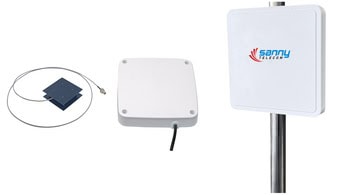
Hey there! Let’s talk about something you probably use daily without even realizing it: RFID. Specifically, I want to dive deep into the unsung hero of any RFID system—the antenna. I’ve spent years working with this tech, and I’m here to give you the ultimate guide to RFID antennas, demystifying the jargon and helping you understand what makes them tick.
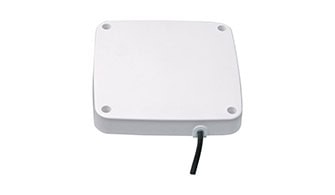
An RFID antenna is a critical device that converts a reader’s electrical signal into radio waves to activate and communicate with RFID tags. It’s responsible for both transmitting the energy that powers passive tags and receiving the data they send back, defining the system’s read range and coverage area.
If you’re ready to go from novice to pro and understand how to choose the perfect antenna for any project, you’ve come to the right place. Let’s get into it.
Let’s Start with the Basics: What Exactly Is an RFID Antenna?
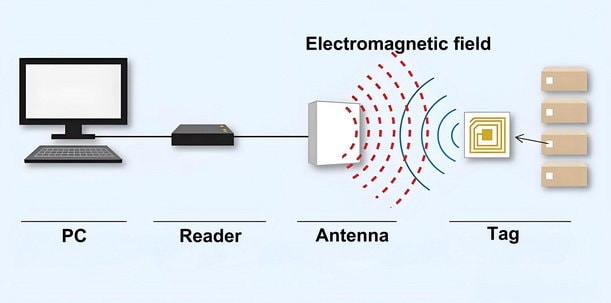
I like to think of an RFID system as a conversation. You have an RFID reader (the brain), an RFID tag (the speaker with a unique story), and the RFID antenna, which acts as both the mouth and ears of the system. Without the antenna, the reader can’t send out its signal, and it certainly can’t “hear” the tag’s response. It’s the crucial bridge for all communication.
The Unsung Hero of Your RFID System
At its core, an RFID antenna is a transducer. It takes the electrical energy from the reader and radiates it out as electromagnetic waves. When these waves hit a nearby RFID tag, they energize it enough for the tag’s tiny chip to power on and send back its information—again, in the form of radio waves. The antenna then captures these faint return signals and sends them back to the reader to be decoded. It’s a beautifully simple, yet powerful, two-way street.
This whole process happens in the blink of an eye and is what allows a retailer to scan a whole basket of items at once or a marathon to time thousands of runners with pinpoint accuracy. The antenna might look like a simple panel, but it’s where all the magic happens. It’s not a “dumb device” in the sense of being unimportant; rather, it can’t function or compute on its own but is essential for the system to work.
How It “Talks” to Your RFID Tags (A Simple Analogy)
Imagine you’re standing on one side of a valley, and your friend is on the other. You’re the RFID reader, your friend is the RFID tag, and your voice is the antenna.
To get your friend’s attention, you cup your hands around your mouth and shout. That’s the antenna focusing and sending out RF energy. Your voice (the RF waves) travels across the valley and reaches your friend (the tag).
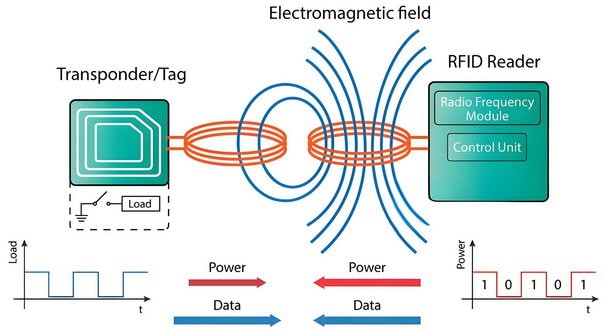
Your friend, now energized by hearing your call, shouts a reply back. You then cup your hands around your ears to better catch their faint response. That’s the antenna in its “receiving” mode. The antenna is what makes this long-distance, wireless conversation possible.
The Core Components: How an RFID System “Actually” Works
To really appreciate the antenna, it helps to see the bigger picture. An RFID system is essentially a team of three working in perfect harmony.
The Three Musketeers: Tag, Reader, and Antenna
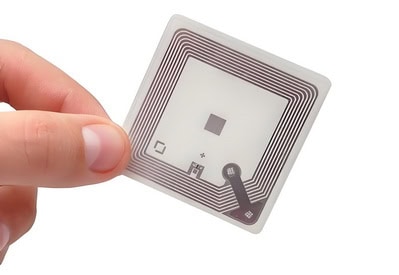
1. The RFID Tag: This is the small device attached to the item you want to track. In its simplest form, a passive tag has two parts: a microchip that stores data (like a unique ID number) and an antenna for communication. It doesn’t have a battery; it gets all its power from the reader’s signal.
2. The RFID Reader (or Interrogator): This is the brains of the operation. It generates the radio waves, sends them out via the antenna, and then processes the data received back from the tags. The reader is connected to a host computer system that uses the data for whatever application it’s designed for, like inventory management.

3. The RFID Antenna: As we’ve covered, this is the crucial link. It connects to the reader and is responsible for the actual transmission and reception of the radio signals that make everything work.
The Flow of Information: From Antenna to Insight
The process is a quick and elegant cycle:
1. The reader sends an electrical current to the antenna.
2. The antenna converts this current into RF waves, creating an electromagnetic field. This is the “read zone.”
3. When a tag enters this zone, its own antenna picks up the energy.
4. This energy activates the tag’s chip, which then modulates the signal with its stored data.
5. The tag sends this new, data-rich signal back. This is often done through a clever technique called “backscatter,” where it reflects the reader’s own energy back in a modified way.
6. The reader’s antenna picks up this backscattered signal and passes it to the reader.
7. The reader decodes the signal, and voilà, you have your data.
This entire loop can happen up to 1,000 times per second, allowing for the rapid identification of a huge number of items.
Decoding the Lingo: Key Antenna Specs You NEED to Understand
Okay, now we’re getting into the nitty-gritty. When you start shopping for RFID antennas, you’ll be hit with a wall of technical terms. Don’t worry, they’re not as scary as they look. Here are the must-know keypoints and specs and what they actually mean for you.
Standard: Playing by the Rules (FCC, ETSI, Global )
cURL Too many subrequests by single Worker invocation. To configure this limit, refer to https://developers.cloudflare.com/workers/wrangler/configuration/#limits
cURL Too many subrequests by single Worker invocation. To configure this limit, refer to https://developers.cloudflare.com/workers/wrangler/configuration/#limits cURL Too many subrequests by single Worker invocation. To configure this limit, refer to https://developers.cloudflare.com/workers/wrangler/configuration/#limits

cURL Too many subrequests by single Worker invocation. To configure this limit, refer to https://developers.cloudflare.com/workers/wrangler/configuration/#limits cURL Too many subrequests by single Worker invocation. To configure this limit, refer to https://developers.cloudflare.com/workers/wrangler/configuration/#limits.

cURL Too many subrequests by single Worker invocation. To configure this limit, refer to https://developers.cloudflare.com/workers/wrangler/configuration/#limits.
cURL Too many subrequests by single Worker invocation. To configure this limit, refer to https://developers.cloudflare.com/workers/wrangler/configuration/#limits
cURL Too many subrequests by single Worker invocation. To configure this limit, refer to https://developers.cloudflare.com/workers/wrangler/configuration/#limits
cURL Too many subrequests by single Worker invocation. To configure this limit, refer to https://developers.cloudflare.com/workers/wrangler/configuration/#limits
cURL Too many subrequests by single Worker invocation. To configure this limit, refer to https://developers.cloudflare.com/workers/wrangler/configuration/#limits“cURL Too many subrequests by single Worker invocation. To configure this limit, refer to https://developers.cloudflare.com/workers/wrangler/configuration/#limits”cURL Too many subrequests by single Worker invocation. To configure this limit, refer to https://developers.cloudflare.com/workers/wrangler/configuration/#limits.
cURL Too many subrequests by single Worker invocation. To configure this limit, refer to https://developers.cloudflare.com/workers/wrangler/configuration/#limits cURL Too many subrequests by single Worker invocation. To configure this limit, refer to https://developers.cloudflare.com/workers/wrangler/configuration/#limits cURL Too many subrequests by single Worker invocation. To configure this limit, refer to https://developers.cloudflare.com/workers/wrangler/configuration/#limits.
cURL Too many subrequests by single Worker invocation. To configure this limit, refer to https://developers.cloudflare.com/workers/wrangler/configuration/#limits cURL Too many subrequests by single Worker invocation. To configure this limit, refer to https://developers.cloudflare.com/workers/wrangler/configuration/#limits cURL Too many subrequests by single Worker invocation. To configure this limit, refer to https://developers.cloudflare.com/workers/wrangler/configuration/#limits.
cURL Too many subrequests by single Worker invocation. To configure this limit, refer to https://developers.cloudflare.com/workers/wrangler/configuration/#limits cURL Too many subrequests by single Worker invocation. To configure this limit, refer to https://developers.cloudflare.com/workers/wrangler/configuration/#limits cURL Too many subrequests by single Worker invocation. To configure this limit, refer to https://developers.cloudflare.com/workers/wrangler/configuration/#limits”cURL Too many subrequests by single Worker invocation. To configure this limit, refer to https://developers.cloudflare.com/workers/wrangler/configuration/#limits” refers to a global alliance promoting a specific standard within the UHF band (ISO/IEC 18000-63), which has made this technology more interconnected and universal.
Polarization: The “Handshake” of RFID (Linear vs. Circular)
This is one of the most important concepts to grasp. Polarization refers to the orientation of the radio waves as they leave the antenna. Getting this right is crucial for a successful “handshake” with the tag. There are two main flavors:

Linear Polarization: Imagine the radio wave as a flat, vertical or horizontal plane of energy. Linearly polarized antennas push out a powerful, focused signal in one direction. This gives them a longer read range than their circular counterparts, but with a catch: the tag’s antenna must be aligned on the same plane to be read reliably.
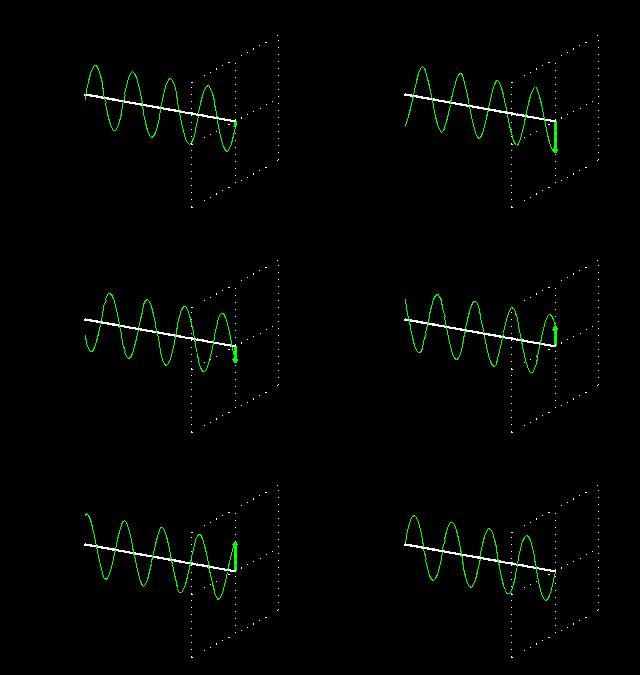
When to use it: Use linear polarization when you have control over the tag’s orientation. Think of items on an assembly line or files in a cabinet where all the tags are facing the same way.
Circular Polarization: Now, imagine that plane of energy is rotating in a corkscrew pattern as it travels. This can be either right-hand (RHCP) or left-hand (LHCP). Because the wave is constantly spinning, it’s much more likely to hit a tag’s antenna regardless of its orientation. The trade-off is a shorter read range, as the energy is split across multiple planes.
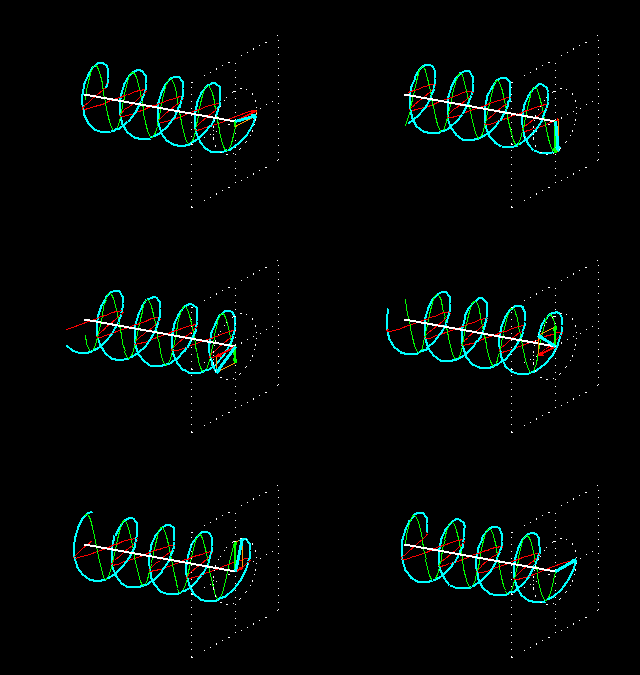
When to use it: Circular polarization is your go-to when you can’t predict how the tags will be oriented. This is perfect for tracking pallets of mixed goods, retail inventory, or timing runners in a race.
Gain & Beamwidth: Shouting vs. Whispering in the Right Direction
These two specs are two sides of the same coin.
Gain: Measured in isotropic decibels (dBi), gain tells you how well the antenna converts electrical power into focused radio waves in a specific direction. A high-gain antenna (e.g., 12dBi) acts like a megaphone, shouting the signal in a tight, long-distance beam. A low-gain antenna (e.g., 1 dBi) is more like a conversational voice, spreading the signal out more broadly over a shorter distance.
cURL Too many subrequests by single Worker invocation. To configure this limit, refer to https://developers.cloudflare.com/workers/wrangler/configuration/#limits: This is the angle, in degrees, of the area where the antenna’s power is most effective. A high-gain antenna will have a “narrow“ beamwidth (like a spotlight), while a low-gain antenna has a “wide” beamwidth (like a floodlight).
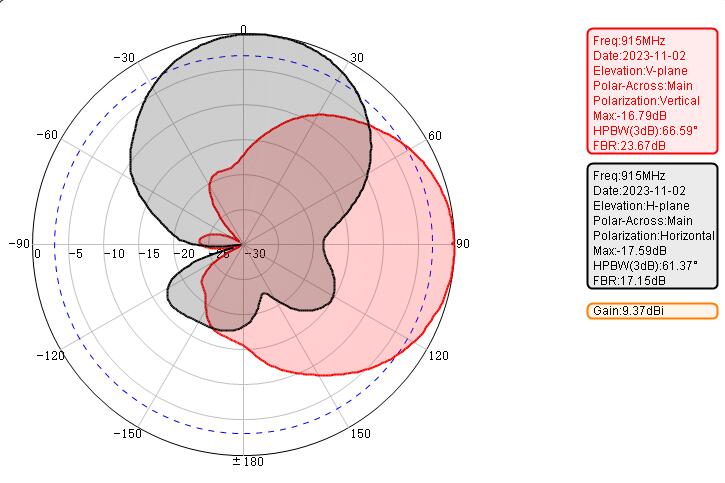
The key takeaway? There’s a direct trade-off: “Higher gain = longer range but narrower coverage. Lower gain = shorter range but wider coverage.” You need to choose based on the shape and size of the area you need to cover.
VSWR and Impedance: Keeping the Signal Clean
These are a bit more technical, but they’re important for system efficiency.
Impedance: This is a measure of opposition to the flow of electrical current. For RFID systems, the industry standard is 50 Ohms. It’s crucial that your reader, antenna, and cables all have the same impedance for maximum power transfer.
Voltage Standing Wave Ratio (VSWR): This ratio tells you how well the antenna is matched to the reader’s impedance. An impedance mismatch causes some of the signal to be reflected back to the reader, which is wasted energy. An ideal VSWR is 1:1 (no reflection). In the real world, you should look for a VSWR as close to 1:1.3 as possible, generally under 1.5:1. A lower VSWR means a more efficient antenna.

Axial Ratio: How “Perfect” is Your Corkscrew?
If you’re working with circularly polarized antennas, there’s one more spec you’ll want to keep an eye on: the axial ratio. Think of this as a measure of how “pure” or “tight” your corkscrew-shaped radio wave really is. Ideally, a circularly polarized wave should spin in a perfect circle as it travels. In reality, though, most waves end up tracing more of an oval or even a squashed ellipse, depending on how well the antenna is designed.

The axial ratio is expressed in decibels (dB), and the closer it is to 0 dB, the more perfectly circular your polarization. A value under 3 dB is considered very good for RFID applications. Why does this matter? Well, a lower axial ratio means your antenna is better at maintaining true circular polarization, so it’ll be more forgiving about tag orientation and less likely to miss a tag just because it’s tilted or flipped.

Bottom line: If you want your circularly cURL Too many subrequests by single Worker invocation. To configure this limit, refer to https://developers.cloudflare.com/workers/wrangler/configuration/#limits cURL Too many subrequests by single Worker invocation. To configure this limit, refer to https://developers.cloudflare.com/workers/wrangler/configuration/#limits.
cURL Too many subrequests by single Worker invocation. To configure this limit, refer to https://developers.cloudflare.com/workers/wrangler/configuration/#limits
cURL Too many subrequests by single Worker invocation. To configure this limit, refer to https://developers.cloudflare.com/workers/wrangler/configuration/#limits
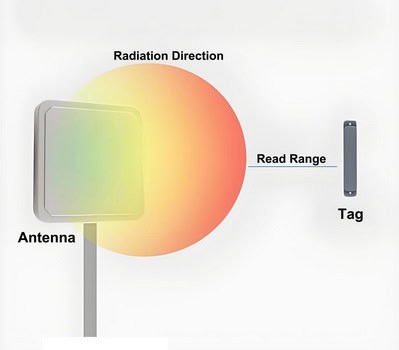
cURL Too many subrequests by single Worker invocation. To configure this limit, refer to https://developers.cloudflare.com/workers/wrangler/configuration/#limits
- Frequency Band: cURL Too many subrequests by single Worker invocation. To configure this limit, refer to https://developers.cloudflare.com/workers/wrangler/configuration/#limits.
- cURL Too many subrequests by single Worker invocation. To configure this limit, refer to https://developers.cloudflare.com/workers/wrangler/configuration/#limits cURL Too many subrequests by single Worker invocation. To configure this limit, refer to https://developers.cloudflare.com/workers/wrangler/configuration/#limits.
- cURL Too many subrequests by single Worker invocation. To configure this limit, refer to https://developers.cloudflare.com/workers/wrangler/configuration/#limits cURL Too many subrequests by single Worker invocation. To configure this limit, refer to https://developers.cloudflare.com/workers/wrangler/configuration/#limits.
- cURL Too many subrequests by single Worker invocation. To configure this limit, refer to https://developers.cloudflare.com/workers/wrangler/configuration/#limits cURL Too many subrequests by single Worker invocation. To configure this limit, refer to https://developers.cloudflare.com/workers/wrangler/configuration/#limits.

- cURL Too many subrequests by single Worker invocation. To configure this limit, refer to https://developers.cloudflare.com/workers/wrangler/configuration/#limits.
- cURL Too many subrequests by single Worker invocation. To configure this limit, refer to https://developers.cloudflare.com/workers/wrangler/configuration/#limits cURL Too many subrequests by single Worker invocation. To configure this limit, refer to https://developers.cloudflare.com/workers/wrangler/configuration/#limits
cURL Too many subrequests by single Worker invocation. To configure this limit, refer to https://developers.cloudflare.com/workers/wrangler/configuration/#limits
cURL Too many subrequests by single Worker invocation. To configure this limit, refer to https://developers.cloudflare.com/workers/wrangler/configuration/#limits.
cURL Too many subrequests by single Worker invocation. To configure this limit, refer to https://developers.cloudflare.com/workers/wrangler/configuration/#limits
cURL Too many subrequests by single Worker invocation. To configure this limit, refer to https://developers.cloudflare.com/workers/wrangler/configuration/#limits.
cURL Too many subrequests by single Worker invocation. To configure this limit, refer to https://developers.cloudflare.com/workers/wrangler/configuration/#limits.
cURL Too many subrequests by single Worker invocation. To configure this limit, refer to https://developers.cloudflare.com/workers/wrangler/configuration/#limits
cURL Too many subrequests by single Worker invocation. To configure this limit, refer to https://developers.cloudflare.com/workers/wrangler/configuration/#limits
The RFID Antenna Family: Which Type is Right for You?
Antennas come in all shapes and sizes, designed for different jobs. While there are many specific designs like dipole and patch antennas, they generally fall into two main categories based on how they communicate.
Far-Field Antennas: For Distance and Coverage
Far-field antennas are the most widely used type of UHF RFID antennas and are likely what comes to mind when most people think of “RFID technology.” These antennas operate by emitting a propagating electromagnetic wave, a process also known as propagation or capacitive coupling. This technology enables far-field antennas to achieve impressive read ranges—often reaching up to 15 meters (about 50 feet) or more, depending on the environment and the equipment used.
Omni Antennas: Provide 360-degree coverage, ideal for environments where tags may approach from any direction.
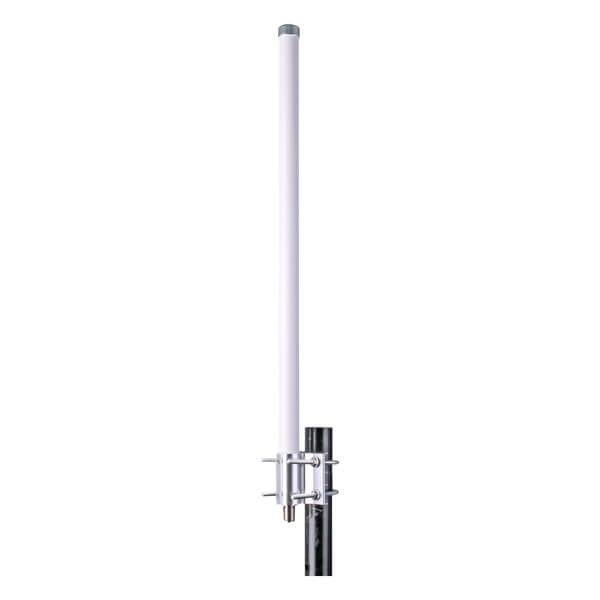
Panel Antennas: Offer directional coverage, making them suitable for focused read zones such as conveyor belts or entry/exit points.

Yagi Antennas: Highly directional with a narrow beam, perfect for long-distance tracking and minimizing interference from unwanted tags.
Portal Antennas: Designed for doorways, dock doors, or choke points, ensuring efficient tag reads as items pass through.
Ideal Applications:
Far-field antennas are best suited for scenarios that require reading tags from significant distances or covering large areas. Typical use cases include:
- Warehouse Inventory Management: Efficiently track pallets and items across vast storage spaces.
- Supply Chain and Logistics: Monitor goods as they move through shipping and receiving docks.
- Vehicle Tracking: Identify and manage vehicles entering or exiting facilities.
- Asset Tracking in Large Facilities: Maintain real-time visibility of valuable equipment or products over expansive areas.
Considerations and Potential Challenges:
While far-field antennas offer extensive coverage and long-range reading capabilities, their wide read zones can sometimes be a double-edged sword. The large area of coverage increases the risk of unintentionally reading stray tags outside the intended target zone, leading to potential data inaccuracies or confusion in asset tracking. Careful antenna placement, power adjustment, and the use of shielding or directional antennas can help mitigate these issues and ensure more precise reads.
In summary, Far-field antennas are the go-to choice for applications requiring maximum read range and broad area coverage. By understanding their strengths and potential challenges, you can optimize your RFID system for efficient, accurate, and reliable performance in even the most demanding environments.
Near-Field Antennas: Precision Reading at Close Range
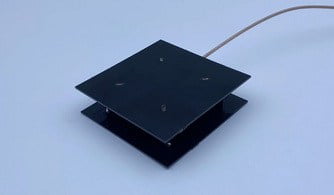
Near-field antennas are designed for applications where accuracy and control are paramount. Unlike traditional antennas that emit radio waves over long distances, near-field antennas create a tightly contained magnetic field right next to their surface—a process known as inductive coupling. This technology deliberately limits the read range, usually to just 15–30 centimeters (about 6–12 inches), making it ideal for environments where only items in direct proximity should be detected.
Common Types of Near-Field Antennas
Near-field antennas come in several specialized designs, each tailored to maximize performance and reliability in close-range RFID applications. Two of the most notable types are ceramic antennas and quadrifilar helix antennas:
Ceramic Antennas:

Ceramic antennas are compact and robust, making them ideal for environments where space is limited and durability is essential. Their construction allows for precise control over the antenna’s electromagnetic field, ensuring highly accurate tag reads within a very limited range. Ceramic antennas are often used in applications such as access control, point-of-sale terminals, and medical devices, where consistent, interference-free operation is critical.
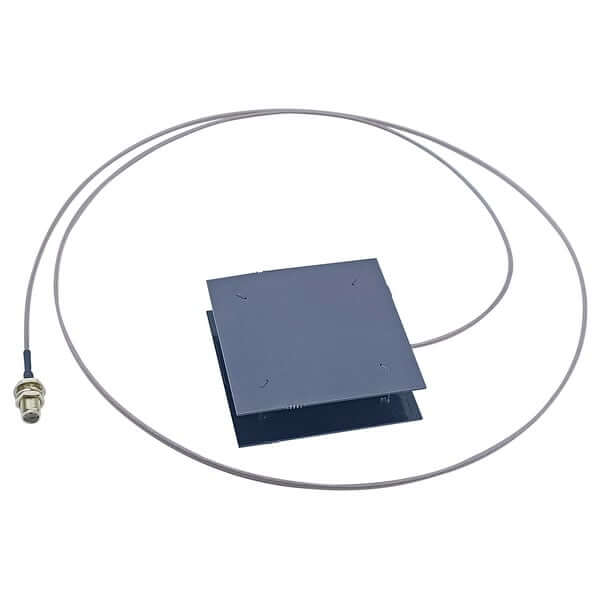
Quadrifilar helix antennas are designed to produce a uniform, circularly polarized magnetic field, which enhances their ability to read tags regardless of orientation. This makes them especially effective in environments where tagged items may be placed at various angles or positions. Their unique structure also helps minimize dead zones and ensures reliable performance even in challenging settings, such as near metal surfaces or liquids.
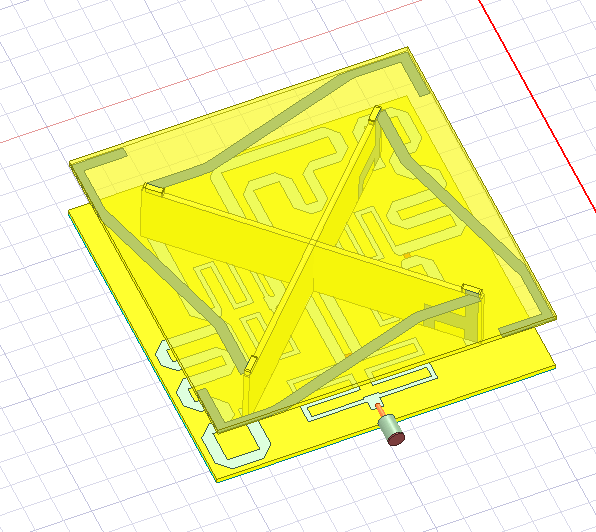
Panel Antennas:
cURL Too many subrequests by single Worker invocation. To configure this limit, refer to https://developers.cloudflare.com/workers/wrangler/configuration/#limits, often referred to as flat panel antennas, are thin and typically rectangular in shape. They are easily embedded into surfaces such as countertops, shelves, or display cases. Panel antennas provide a well-defined, localized read zone, ensuring that only items placed directly on or near the antenna are detected. Their unobtrusive design makes them a popular choice for retail, libraries, and point-of-sale systems, where precise, clutter-free integration is important.

Each of these near-field antenna types is engineered to deliver accurate, reliable tag reading in close proximity. By selecting the right antenna for the application, organizations can achieve high precision, reduce stray reads, and ensure smooth operation in environments where control and accuracy are essential.
Typical Designs and Installations
Near-field antennas often take the form of flat pads, which can be discreetly embedded into countertops, workstations, or retail displays. Their compact and unobtrusive design allows for seamless integration into various settings, from jewelry counters to pharmacy shelves.
Ideal Applications
The short, precise read range of near-field antennas makes them perfect for situations where accuracy is crucial and stray reads must be avoided. Common use cases include:
- Document Tracking: Ensuring that only the intended file or folder is read, which is vital for managing sensitive paperwork in offices or archives.
- Jewelry and Pharmaceuticals: cURL Too many subrequests by single Worker invocation. To configure this limit, refer to https://developers.cloudflare.com/workers/wrangler/configuration/#limits.
- cURL Too many subrequests by single Worker invocation. To configure this limit, refer to https://developers.cloudflare.com/workers/wrangler/configuration/#limits cURL Too many subrequests by single Worker invocation. To configure this limit, refer to https://developers.cloudflare.com/workers/wrangler/configuration/#limits.
- cURL Too many subrequests by single Worker invocation. To configure this limit, refer to https://developers.cloudflare.com/workers/wrangler/configuration/#limits cURL Too many subrequests by single Worker invocation. To configure this limit, refer to https://developers.cloudflare.com/workers/wrangler/configuration/#limits.
cURL Too many subrequests by single Worker invocation. To configure this limit, refer to https://developers.cloudflare.com/workers/wrangler/configuration/#limits
- cURL Too many subrequests by single Worker invocation. To configure this limit, refer to https://developers.cloudflare.com/workers/wrangler/configuration/#limits cURL Too many subrequests by single Worker invocation. To configure this limit, refer to https://developers.cloudflare.com/workers/wrangler/configuration/#limits.
- cURL Too many subrequests by single Worker invocation. To configure this limit, refer to https://developers.cloudflare.com/workers/wrangler/configuration/#limits cURL Too many subrequests by single Worker invocation. To configure this limit, refer to https://developers.cloudflare.com/workers/wrangler/configuration/#limits.
- cURL Too many subrequests by single Worker invocation. To configure this limit, refer to https://developers.cloudflare.com/workers/wrangler/configuration/#limits cURL Too many subrequests by single Worker invocation. To configure this limit, refer to https://developers.cloudflare.com/workers/wrangler/configuration/#limits.
cURL Too many subrequests by single Worker invocation. To configure this limit, refer to https://developers.cloudflare.com/workers/wrangler/configuration/#limits.
cURL Too many subrequests by single Worker invocation. To configure this limit, refer to https://developers.cloudflare.com/workers/wrangler/configuration/#limits
cURL Too many subrequests by single Worker invocation. To configure this limit, refer to https://developers.cloudflare.com/workers/wrangler/configuration/#limits
cURL Too many subrequests by single Worker invocation. To configure this limit, refer to https://developers.cloudflare.com/workers/wrangler/configuration/#limits
cURL Too many subrequests by single Worker invocation. To configure this limit, refer to https://developers.cloudflare.com/workers/wrangler/configuration/#limits cURL Too many subrequests by single Worker invocation. To configure this limit, refer to https://developers.cloudflare.com/workers/wrangler/configuration/#limits
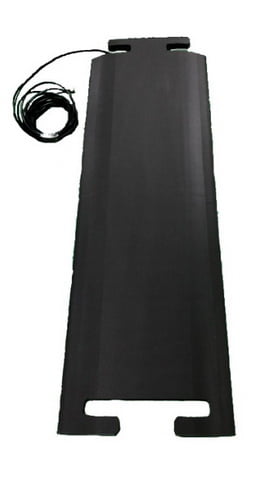
- cURL Too many subrequests by single Worker invocation. To configure this limit, refer to https://developers.cloudflare.com/workers/wrangler/configuration/#limits cURL Too many subrequests by single Worker invocation. To configure this limit, refer to https://developers.cloudflare.com/workers/wrangler/configuration/#limits.
- cURL Too many subrequests by single Worker invocation. To configure this limit, refer to https://developers.cloudflare.com/workers/wrangler/configuration/#limits cURL Too many subrequests by single Worker invocation. To configure this limit, refer to https://developers.cloudflare.com/workers/wrangler/configuration/#limits.
- Loading Bays: Automatically record the entry and exit of goods or vehicles.
Their durability and low profile make ground antennas a reliable choice for any application where traditional, raised antennas would be impractical.
Shelf Antennas
Shelf antennas are engineered to blend seamlessly into retail or warehouse shelving. These slim, low-profile antennas are integrated directly into shelves, transforming them into “smart shelves” that can:
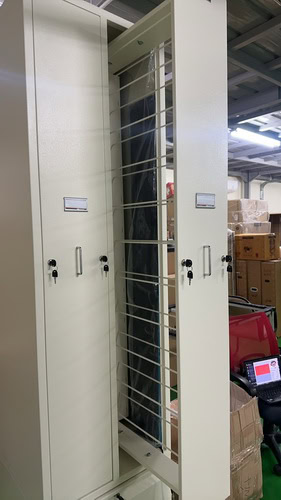
- Track Real-Time Inventory: Instantly detect when items are added or removed
- Prevent Stockouts: Alert staff to low stock levels before they become a problem.
- Enable Automated Replenishment: Support just-in-time inventory systems.
Shelf antennas are essential for businesses looking to improve inventory accuracy, reduce labor costs, and enhance the overall shopping or storage experience.
Portal Antennas
Portal antennas create a virtual gateway for comprehensive scanning of goods and assets. These systems typically consist of multiple panel antennas mounted on a frame, forming a portal through which items pass. Portal antennas are commonly used at:

- Warehouse Dock Doors: Instantly scan entire pallets or carts as they move in and out.

- Checkpoints: Monitor the flow of assets or personnel between secure areas.
- Distribution Centers: Ensure accuracy in shipping and receiving operations.
By capturing data from multiple directions, portal antennas provide high read accuracy, making them indispensable for environments where fast, reliable bulk scanning is required.
In summary, ground, shelf, and portal antennas each offer specialized solutions for tracking and managing assets in a wide range of settings. Selecting the right antenna type ensures optimal performance, efficiency, and reliability in your RFID system.
The Million-Dollar Question: How to Choose the Perfect RFID Antenna
Choosing the right antenna can feel overwhelming, but if you approach it systematically, you’ll find the perfect match. It’s about balancing technical specs with the realities of your application and environment.
Step 1: Define Your Mission (What are you trying to achieve?)
Start with the “what.” What is the fundamental goal?
Are you tracking high-value assets in a large warehouse? (You might need high-gain, far-field antennas).
Are you managing individual files in an office? (Near-field antennas might be a better choice).
Are you timing a marathon where tags will be at all angles? (Circular polarization is a must).
Step 2: Survey Your Environment (The physical world matters)
Next, consider the “where.” The operating environment has a huge impact on performance.
- cURL Too many subrequests by single Worker invocation. To configure this limit, refer to https://developers.cloudflare.com/workers/wrangler/configuration/#limits Metals and liquids are the kryptonite of UHF RFID. Metal reflects RF waves, creating dead zones and unpredictable read areas. Water absorbs them, killing your read range. If these are present, you may need more antennas, antennas with circular polarization, or even near-field antennas which are less affected.
- Space & Aesthetics: cURL Too many subrequests by single Worker invocation. To configure this limit, refer to https://developers.cloudflare.com/workers/wrangler/configuration/#limits.
- cURL Too many subrequests by single Worker invocation. To configure this limit, refer to https://developers.cloudflare.com/workers/wrangler/configuration/#limits cURL Too many subrequests by single Worker invocation. To configure this limit, refer to https://developers.cloudflare.com/workers/wrangler/configuration/#limits.
cURL Too many subrequests by single Worker invocation. To configure this limit, refer to https://developers.cloudflare.com/workers/wrangler/configuration/#limits
cURL Too many subrequests by single Worker invocation. To configure this limit, refer to https://developers.cloudflare.com/workers/wrangler/configuration/#limits.
- cURL Too many subrequests by single Worker invocation. To configure this limit, refer to https://developers.cloudflare.com/workers/wrangler/configuration/#limits cURL Too many subrequests by single Worker invocation. To configure this limit, refer to https://developers.cloudflare.com/workers/wrangler/configuration/#limits.
- cURL Too many subrequests by single Worker invocation. To configure this limit, refer to https://developers.cloudflare.com/workers/wrangler/configuration/#limits cURL Too many subrequests by single Worker invocation. To configure this limit, refer to https://developers.cloudflare.com/workers/wrangler/configuration/#limits.
cURL Too many subrequests by single Worker invocation. To configure this limit, refer to https://developers.cloudflare.com/workers/wrangler/configuration/#limits
cURL Too many subrequests by single Worker invocation. To configure this limit, refer to https://developers.cloudflare.com/workers/wrangler/configuration/#limits.
- cURL Too many subrequests by single Worker invocation. To configure this limit, refer to https://developers.cloudflare.com/workers/wrangler/configuration/#limits cURL Too many subrequests by single Worker invocation. To configure this limit, refer to https://developers.cloudflare.com/workers/wrangler/configuration/#limits
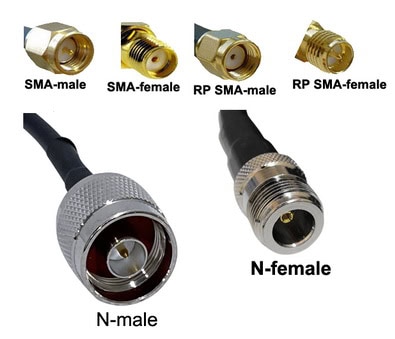
- cURL Too many subrequests by single Worker invocation. To configure this limit, refer to https://developers.cloudflare.com/workers/wrangler/configuration/#limits cURL Too many subrequests by single Worker invocation. To configure this limit, refer to https://developers.cloudflare.com/workers/wrangler/configuration/#limits.
cURL Too many subrequests by single Worker invocation. To configure this limit, refer to https://developers.cloudflare.com/workers/wrangler/configuration/#limits.
cURL Too many subrequests by single Worker invocation. To configure this limit, refer to https://developers.cloudflare.com/workers/wrangler/configuration/#limits
cURL Too many subrequests by single Worker invocation. To configure this limit, refer to https://developers.cloudflare.com/workers/wrangler/configuration/#limits
cURL Too many subrequests by single Worker invocation. To configure this limit, refer to https://developers.cloudflare.com/workers/wrangler/configuration/#limits.

cURL Too many subrequests by single Worker invocation. To configure this limit, refer to https://developers.cloudflare.com/workers/wrangler/configuration/#limits
cURL Too many subrequests by single Worker invocation. To configure this limit, refer to https://developers.cloudflare.com/workers/wrangler/configuration/#limits.
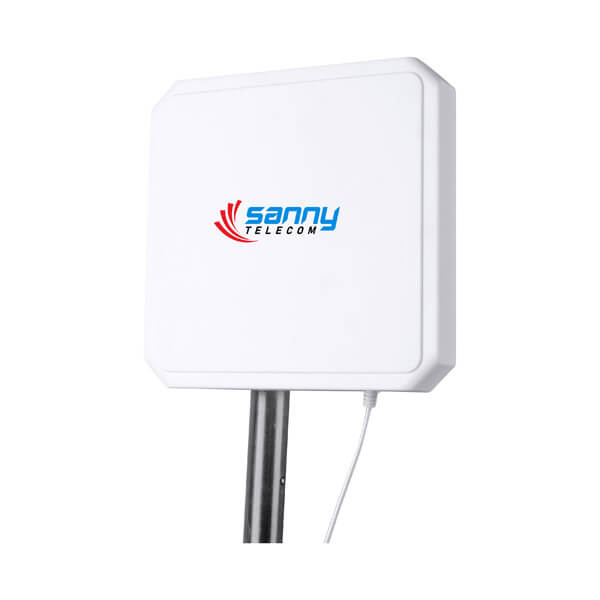
cURL Too many subrequests by single Worker invocation. To configure this limit, refer to https://developers.cloudflare.com/workers/wrangler/configuration/#limits Coaxial Cable Assembly (Signal strength starts here)
Your cable isn’t just a wire—it’s a lifeline for your RF signal.
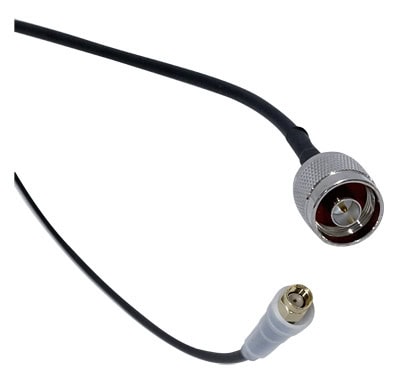
- Cable Type: Low-loss cables (like LMR-195, LMR-240, or LMR-400) are best for longer runs. The higher the number, the thicker and less lossy the cable.

- Length Matters: The longer the cable, the more signal you lose. Keep it as short as possible—every meter counts!
- Shielding: Double-shielded cables reduce interference, which is crucial in noisy environments (think factories or data centers).
- cURL Too many subrequests by single Worker invocation. To configure this limit, refer to https://developers.cloudflare.com/workers/wrangler/configuration/#limits Some cables are more flexible for tight bends, but may have slightly higher loss—balance flexibility with performance needs.
- Pre-terminated vs. Field-terminated: Pre-terminated cables (with connectors already attached) are plug-and-play and minimize installation errors. Field-terminated cables offer flexibility on-site but require proper tools and expertise.
Step 7: Mounting Type & Brackets (Making sure your antenna stays put)
It’s not just about performance—the right mounting makes or breaks your install.
Mounting Surface: Where will you mount the antenna? Walls, ceilings, poles, or even vehicles all require different bracket styles.
Wall and ceiling mounts are common for fixed installations like entrances or conveyor belts.
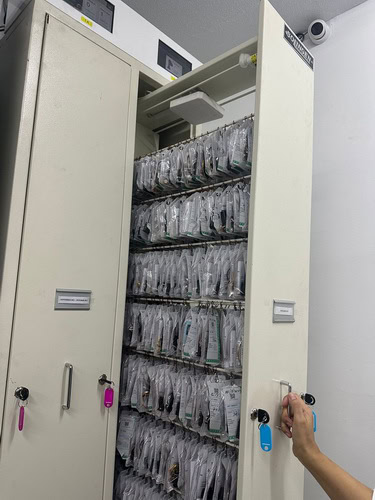
Pole mounts are perfect for outdoor or parking lot applications.

Some antennas offer flush-mounting for a sleek, low-profile look in retail or office spaces.
Adjustability: Does the bracket allow you to tilt or swivel the antenna? Being able to fine-tune the angle can dramatically improve your read zone.
Material & Durability: Is the bracket made of corrosion-resistant materials (like stainless steel or powder-coated aluminum) for harsh environments?
Ease of Installation: Can you install it quickly, or does it require special tools or expertise?
Vibration & Tamper Resistance: For industrial or public settings, consider anti-vibration features or tamper-proof hardware to keep your antenna secure.
Step 8: A Quick Checklist for Making Your Final Decision
Before you commit to an antenna, run through this checklist to make sure it’s the perfect fit:
1. Frequency: Does the antenna support the frequency used by your reader and tags in your region?
2. Polarization: Is the polarization (linear or circular) suitable for how your tags will be oriented?
- Linear for consistent tag orientation
- Circular for variable or unpredictable tag positions
3. Gain & Beamwidth: Does the antenna offer the right balance between read range and coverage area for your application?
4. Antenna Type: Is it a Near-Field antenna for precise, close-range reads, or a Far-Field antenna for longer distances?
5. Mounting Type & Bracket: Does the antenna come with the right mounting options and brackets for your installation site?
- Can it be easily and securely installed in your intended location (wall, ceiling, pole, etc.)?
6. cURL Too many subrequests by single Worker invocation. To configure this limit, refer to https://developers.cloudflare.com/workers/wrangler/configuration/#limits Is the antenna designed to handle your physical environment?
- Consider IP rating for dust/water resistance
- cURL Too many subrequests by single Worker invocation. To configure this limit, refer to https://developers.cloudflare.com/workers/wrangler/configuration/#limits
7. cURL Too many subrequests by single Worker invocation. To configure this limit, refer to https://developers.cloudflare.com/workers/wrangler/configuration/#limits cURL Too many subrequests by single Worker invocation. To configure this limit, refer to https://developers.cloudflare.com/workers/wrangler/configuration/#limits
cURL Too many subrequests by single Worker invocation. To configure this limit, refer to https://developers.cloudflare.com/workers/wrangler/configuration/#limits
cURL Too many subrequests by single Worker invocation. To configure this limit, refer to https://developers.cloudflare.com/workers/wrangler/configuration/#limits.
cURL Too many subrequests by single Worker invocation. To configure this limit, refer to https://developers.cloudflare.com/workers/wrangler/configuration/#limits
cURL Too many subrequests by single Worker invocation. To configure this limit, refer to https://developers.cloudflare.com/workers/wrangler/configuration/#limits.
cURL Too many subrequests by single Worker invocation. To configure this limit, refer to https://developers.cloudflare.com/workers/wrangler/configuration/#limits
cURL Too many subrequests by single Worker invocation. To configure this limit, refer to https://developers.cloudflare.com/workers/wrangler/configuration/#limits.
cURL Too many subrequests by single Worker invocation. To configure this limit, refer to https://developers.cloudflare.com/workers/wrangler/configuration/#limits
cURL Too many subrequests by single Worker invocation. To configure this limit, refer to https://developers.cloudflare.com/workers/wrangler/configuration/#limits.

cURL Too many subrequests by single Worker invocation. To configure this limit, refer to https://developers.cloudflare.com/workers/wrangler/configuration/#limits
cURL Too many subrequests by single Worker invocation. To configure this limit, refer to https://developers.cloudflare.com/workers/wrangler/configuration/#limits.
cURL Too many subrequests by single Worker invocation. To configure this limit, refer to https://developers.cloudflare.com/workers/wrangler/configuration/#limits
cURL Too many subrequests by single Worker invocation. To configure this limit, refer to https://developers.cloudflare.com/workers/wrangler/configuration/#limits.
cURL Too many subrequests by single Worker invocation. To configure this limit, refer to https://developers.cloudflare.com/workers/wrangler/configuration/#limits
- cURL Too many subrequests by single Worker invocation. To configure this limit, refer to https://developers.cloudflare.com/workers/wrangler/configuration/#limits.
- cURL Too many subrequests by single Worker invocation. To configure this limit, refer to https://developers.cloudflare.com/workers/wrangler/configuration/#limits.
- cURL Too many subrequests by single Worker invocation. To configure this limit, refer to https://developers.cloudflare.com/workers/wrangler/configuration/#limits.
- cURL Too many subrequests by single Worker invocation. To configure this limit, refer to https://developers.cloudflare.com/workers/wrangler/configuration/#limits.
cURL Too many subrequests by single Worker invocation. To configure this limit, refer to https://developers.cloudflare.com/workers/wrangler/configuration/#limits
cURL Too many subrequests by single Worker invocation. To configure this limit, refer to https://developers.cloudflare.com/workers/wrangler/configuration/#limits
- Increase the distance between the antenna and the interfering material.
- Use circularly polarized antennas to maximize the chances of getting a read.
- For item-level tracking on metal or liquid-filled products, use specialized tags designed for those surfaces.
- In very difficult situations, a near-field antenna system might be the most reliable solution.
Testing, Testing, 1, 2, 3… Fine-Tuning for Peak Performance
Never assume your setup is perfect on the first try. Use RFID tag mapping software or a simple handheld reader to walk through your read zone and identify its boundaries. Check for dead spots and areas where you might be getting stray reads. Adjust reader power levels and antenna placement until reliability hits your targets. The read range of a RAIN RFID system can often be tuned by adjusting the reader’s power levels.
Peeking into the Future: What’s Next for RFID Antennas?
The world of RFID is constantly evolving, and antenna technology is at the forefront of this innovation. The market is projected to grow significantly, reaching nearly $38 billion by 2032.
Smaller, Smarter, and More Integrated
We’re seeing a push toward more compact, flexible, and even multi-band antenna designs. This allows RFID to be embedded in more places than ever before. Future antennas will not just be separate devices but integrated components within smart systems.
The Rise of Sensor Integration and the IoT
The future is about more than just identification. We are seeing more RFID tags that include sensors for things like temperature, humidity, and pressure. An RFID antenna won’t just ask “Who are you?” but “Who are you, and what conditions have you been in?” This integration with the Internet of Things (IoT) will provide unprecedented, real-time data for everything from ensuring the quality of cold-chain food shipments to predictive maintenance on machinery.
cURL Too many subrequests by single Worker invocation. To configure this limit, refer to https://developers.cloudflare.com/workers/wrangler/configuration/#limits
So there you have it! From frequencies and polarization to near-field and far-field, you’re now equipped with the knowledge to navigate the world of RFID antennas. The right choice is always a balance of specs, environment, and application. What RFID project are you dreaming up that could help bring to life?
 Amharic
  English
  Spanish
  German
  French (France)
  Korean
  Russian
  Indonesian
  French (Canada)
  Vietnamese
  Armenian
  Albanian
  Assamese
  Acehnese
  Czech
Czech  Bulgarian
  Cebuano
  Malayalam
  German (Switzerland)
  Japanese
  Dutch
Dutch 