
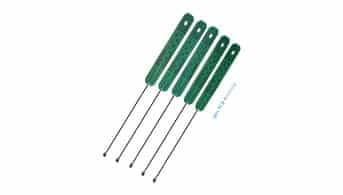
In our increasingly connected world, the demand for reliable and efficient wireless communication continues to grow. Enter the PCB antenna, a sophisticated yet often overlooked hero in the vast arena of wireless technologies. This article delves into the essence of PCB antennas, exploring their functions, benefits, and applications across various industries.
A PCB (Printed Circuit Board) antenna is an essential component designed to transmit and receive electromagnetic signals within a device. Integrated directly into the PCB layout, these antennas utilize the board’s conductive traces to function, offering a compact and efficient solution for wireless communication.
Now that we understand what a PCB antenna is, let’s explore how exactly it functions within electronic devices and why its design is pivotal for the efficacy of modern wireless communication systems.
How Does the PCB Antenna Work?
PCB antennas are designed using conductive traces on a printed circuit board. These traces are typically made of copper and are arranged in specific patterns to form the antenna structure. The shape and size of the traces determine the antenna’s resonant frequency and radiation pattern.
When a signal is applied to the PCB antenna, it generates an electromagnetic field around the conductive traces. This field consists of electric and magnetic components, which propagate away from the antenna as electromagnetic waves.

The conductive traces act as a transmission line, carrying the electromagnetic waves along their length. As the waves propagate through the traces, they generate an electric field that oscillates at the antenna’s resonant frequency. This oscillating electric field then radiates into space, creating an electromagnetic wave that can be received by other antennas or devices.
Similarly, when an electromagnetic wave from another antenna or device reaches the PCB antenna, the conductive traces capture the wave’s electric field. This induces a current in the traces, which can be extracted and used as a received signal.
The size and shape of the conductive traces on the PCB antenna are crucial for its performance. They need to be carefully designed to match the desired frequency of operation. The length of the traces should be a fraction of the wavelength of the desired frequency, typically a quarter or half wavelength. This ensures that the antenna efficiently radiates or captures electromagnetic waves at the desired frequency.
Key Design Considerations for PCB Antennas
While the fundamental operation of a PCB antenna hinges on its conductive traces, several additional design factors play a pivotal role in its efficiency and effectiveness:
Positioning on the PCB
Where you place the antenna matters. Corners of the PCB are often ideal locations, as they allow for multiple transmission and reception directions, enhancing overall performance. However, the application and device layout can influence the final position.
Size and Weight Constraints
PCB antennas are prized for their compactness and light weight. When designing for portable or wearable devices, it’s essential to ensure the antenna does not exceed acceptable limits for size and weight, preserving the device’s overall form factor.
Ground Plane Design
The ground plane beneath or around the antenna must be sized appropriately. An insufficient or poorly placed ground can distort the antenna’s radiation pattern, undermining the efficiency of the entire RF circuit.
Component Clearance
To prevent interference, keep other electronic components, mounting screws, and metallic parts at a reasonable distance from the antenna. Close proximity to such elements can degrade signal transmission and reception.
Transmission Line Layout
The transmission line—essentially the path that carries the RF signal—should be as straight as possible. Bends or unnecessary length can introduce signal loss or degradation, impacting overall antenna performance.
In summary, PCB antennas work by using their conductive traces to generate or capture electromagnetic waves. The size and shape of the traces determine the antenna’s resonant frequency, enabling it to operate at specific frequencies for efficient communication.
In summary, PCB antennas work by using their conductive traces to generate or capture electromagnetic waves. The size and shape of the traces determine the antenna’s resonant frequency, enabling it to operate at specific frequencies for efficient communication.
Key Types of PCB Antennas and Their Distinct Features
PCB antennas come in a diverse array of designs, each with unique structural characteristics and specific advantages that make them suited to particular applications. Understanding these distinctions helps engineers and product designers select the optimal antenna type for their project. Let’s take a closer look at the most notable varieties:
Monopole Antennas
A monopole PCB antenna is constructed with a single straight conductor—often just a slender copper trace. Its straightforward design not only simplifies manufacturing and reduces costs, but also provides omnidirectional coverage, making it a practical choice for situations requiring a wide area of reception or transmission.
Monopole Antennas
Dipole antennas, in contrast, use two conductive elements of equal length arranged in a straight line. This configuration allows the dipole to radiate efficiently in two opposite directions, delivering a bidirectional pattern that’s ideal for certain wireless applications.
Patch Antennas
Patch antennas, frequently seen as flat metallic “patches” on the PCB, can take on rectangular, circular, or other geometric shapes. While they tend to be somewhat larger, these designs offer high gain and are particularly valued for their effectiveness in point-to-point links and applications demanding directional signal strength, such as GPS receivers.
Loop Antennas
When the conductive trace is fashioned into a closed-loop, the result is a loop antenna. These compact designs are easier to implement, though they generally exhibit lower efficiency. They’re ideal for situations where space is at a premium and simplicity is prioritized over maximum range.
Helical Antennas
Helical antennas stand out due to their coiled, spring-like conductive trace. This spiral structure allows the antenna to deliver higher gain and directional coverage, even in tight spaces, making these antennas valuable for portable devices and applications that benefit from a narrow transmission beam.
Slot Antennas
cURL Too many subrequests by single Worker invocation. To configure this limit, refer to https://developers.cloudflare.com/workers/wrangler/configuration/#limits.
cURL Too many subrequests by single Worker invocation. To configure this limit, refer to https://developers.cloudflare.com/workers/wrangler/configuration/#limits
cURL Too many subrequests by single Worker invocation. To configure this limit, refer to https://developers.cloudflare.com/workers/wrangler/configuration/#limits.
cURL Too many subrequests by single Worker invocation. To configure this limit, refer to https://developers.cloudflare.com/workers/wrangler/configuration/#limits
cURL Too many subrequests by single Worker invocation. To configure this limit, refer to https://developers.cloudflare.com/workers/wrangler/configuration/#limits.
cURL Too many subrequests by single Worker invocation. To configure this limit, refer to https://developers.cloudflare.com/workers/wrangler/configuration/#limits
cURL Too many subrequests by single Worker invocation. To configure this limit, refer to https://developers.cloudflare.com/workers/wrangler/configuration/#limits.
cURL Too many subrequests by single Worker invocation. To configure this limit, refer to https://developers.cloudflare.com/workers/wrangler/configuration/#limits.
cURL Too many subrequests by single Worker invocation. To configure this limit, refer to https://developers.cloudflare.com/workers/wrangler/configuration/#limits
cURL Too many subrequests by single Worker invocation. To configure this limit, refer to https://developers.cloudflare.com/workers/wrangler/configuration/#limits.
cURL Too many subrequests by single Worker invocation. To configure this limit, refer to https://developers.cloudflare.com/workers/wrangler/configuration/#limits
- cURL Too many subrequests by single Worker invocation. To configure this limit, refer to https://developers.cloudflare.com/workers/wrangler/configuration/#limits cURL Too many subrequests by single Worker invocation. To configure this limit, refer to https://developers.cloudflare.com/workers/wrangler/configuration/#limits.
- cURL Too many subrequests by single Worker invocation. To configure this limit, refer to https://developers.cloudflare.com/workers/wrangler/configuration/#limits cURL Too many subrequests by single Worker invocation. To configure this limit, refer to https://developers.cloudflare.com/workers/wrangler/configuration/#limits.
- cURL Too many subrequests by single Worker invocation. To configure this limit, refer to https://developers.cloudflare.com/workers/wrangler/configuration/#limits cURL Too many subrequests by single Worker invocation. To configure this limit, refer to https://developers.cloudflare.com/workers/wrangler/configuration/#limits L cURL Too many subrequests by single Worker invocation. To configure this limit, refer to https://developers.cloudflare.com/workers/wrangler/configuration/#limits, c cURL Too many subrequests by single Worker invocation. To configure this limit, refer to https://developers.cloudflare.com/workers/wrangler/configuration/#limits, f cURL Too many subrequests by single Worker invocation. To configure this limit, refer to https://developers.cloudflare.com/workers/wrangler/configuration/#limits cURL Too many subrequests by single Worker invocation. To configure this limit, refer to https://developers.cloudflare.com/workers/wrangler/configuration/#limits cURL Too many subrequests by single Worker invocation. To configure this limit, refer to https://developers.cloudflare.com/workers/wrangler/configuration/#limits.
- Width-to-Depth Ratio: Achieving the correct width-to-height (or width-to-depth) ratio ensures that the antenna exhibits the desired impedance and supports efficient radiation. This ratio is also influenced by the PCB stack-up and overall board thickness.
Always remember, slight variations in trace geometry or substrate type can impact your antenna’s performance. Simulation tools like CST Studio or Ansys HFSS, or handy online calculators from TI or Analog Devices, are invaluable when fine-tuning your design.
When in doubt, prototyping and measurement can save the day—just don’t forget your Smith chart for impedance matching!
Creating Schematics and Layout for a PCB Antenna
Designing an effective PCB antenna begins with meticulous schematics and a thoughtfully optimized layout. Using industry-standard design software such as Altium Designer, KiCad, or Eagle, engineers start by drafting the schematic, carefully selecting and placing the necessary components while defining all the signal paths relevant to the antenna.
The next critical step is translating the schematic into a physical layout on the PCB itself. This involves arranging the antenna elements and associated circuitry in a manner that not only fits the device’s form factor but also supports optimal signal transmission and reception. Trace widths, spacing, and the position of ground planes must be precisely engineered to match the target operating frequency and ensure minimal loss and interference.
Engineers also utilize simulation tools to predict how the antenna will behave in the real world, allowing iterations on the design before moving to production. Attention to detail is crucial here—proper impedance matching and isolation from noisy components on the board can make a world of difference in real-world performance.
By carefully balancing the electrical and physical requirements, a well-crafted schematic and layout set the foundation for a high-performing PCB antenna, setting the stage for reliable wireless connectivity in everything from wearable devices to industrial applications.
Key Electrical Requirements for PCB Antenna Design
When designing a PCB antenna, it’s essential to ensure it meets specific electrical requirements tailored to its intended function and environment. Here are the primary considerations:
- Operating Frequency: The antenna must be precisely designed for the frequency range it will transmit and receive. This involves carefully calculating the trace lengths and shapes to match the desired frequency—typically expressed in megahertz (MHz) or gigahertz (GHz).
- Radiation Pattern: The appropriate radiation pattern depends on whether the application needs the antenna to radiate energy in all directions (omnidirectional) or focus energy in a particular direction (directional). The pattern must suit the device’s operational context to maximize signal reliability.
- Impedance Matching: For optimal performance, the antenna’s impedance should be matched to that of the transmitter or receiver—typically 50 ohms. Proper impedance matching minimizes signal reflection and maximizes power transfer.
- Polarization: Matching the polarization (the orientation of the electric field) between communicating devices enhances performance. Most PCB antennas use linear polarization, but some applications may require circular polarization.
- Bandwidth: The antenna should have sufficient bandwidth to support the intended communication protocol, whether narrowband or wideband operation is required.
Neglecting these electrical parameters can lead to suboptimal range, interference issues, or signal loss, emphasizing the importance of meticulous design at this foundational stage.
How Do You Choose the Type and Board Material for a PCB Antenna?
Selecting the right PCB antenna starts with understanding your device’s requirements and constraints. The antenna type—such as monopole, dipole, patch, or loop—should align with your intended function, preferred radiation pattern, and available space. For example, a monopole antenna may suit compact IoT gadgets, while dipole or patch designs can address broader bandwidth or directional needs.
Equally important is the choice of board material. Common options include FR4, Rogers, and other specialty substrates. Each material offers distinct electrical properties that impact antenna efficiency and signal integrity. While FR4 is cost-effective and widely used, higher-performance substrates like Rogers or Teflon provide lower dielectric losses, benefiting high-frequency or precision applications. Consider factors like frequency range, mechanical durability, manufacturing cost, and size when making your selection.
Thoughtful selection of both the antenna structure and board material lays the foundation for robust, efficient wireless performance in your device.
What Are the Main Steps Involved in Designing a PCB Antenna?
Designing a PCB antenna is a meticulous process, balancing technical precision with creative problem-solving. Let’s break down the essential steps involved to achieve optimal performance:
1. Select the Antenna Type and Board Material
Begin by identifying the best antenna structure for your application—choices may include monopole, dipole, patch, or loop designs. The specific type you choose will depend on required radiation patterns, frequency bands, operational bandwidth, and the space constraints of your device.
Next, choose an appropriate PCB substrate material, such as FR4 or Rogers laminates. The material selection directly influences the antenna’s electrical performance (like dielectric constant), mechanical durability, and overall cost.
2. Determine Antenna Dimensions
Precise sizing is crucial for PCB antennas. Calculate the height, width, and length of the antenna traces based on your target operating frequency and substrate properties. The resonance of the antenna is typically achieved with trace lengths at a quarter or half the wavelength of the intended frequency. Use standard formulas to fine-tune the width and length, taking into account the dielectric constant and thickness of your chosen PCB substrate.
3. Define Electrical Requirements
Establish the operating frequency, desired radiation pattern, polarization, and impedance. These parameters are fundamental in guiding the antenna’s design and ensuring compatibility with the rest of your wireless circuit.
4. Develop Schematics and Layout
Use professional PCB design software to create detailed schematics and lay out the antenna on your circuit board. This ensures the integration of all relevant components, optimal trace routing, and minimal interference or signal loss.
5. Perform Simulations and Validations
cURL Too many subrequests by single Worker invocation. To configure this limit, refer to https://developers.cloudflare.com/workers/wrangler/configuration/#limits.
cURL Too many subrequests by single Worker invocation. To configure this limit, refer to https://developers.cloudflare.com/workers/wrangler/configuration/#limits.
cURL Too many subrequests by single Worker invocation. To configure this limit, refer to https://developers.cloudflare.com/workers/wrangler/configuration/#limits
cURL Too many subrequests by single Worker invocation. To configure this limit, refer to https://developers.cloudflare.com/workers/wrangler/configuration/#limits.
cURL Too many subrequests by single Worker invocation. To configure this limit, refer to https://developers.cloudflare.com/workers/wrangler/configuration/#limits.
cURL Too many subrequests by single Worker invocation. To configure this limit, refer to https://developers.cloudflare.com/workers/wrangler/configuration/#limits.
cURL Too many subrequests by single Worker invocation. To configure this limit, refer to https://developers.cloudflare.com/workers/wrangler/configuration/#limits
cURL Too many subrequests by single Worker invocation. To configure this limit, refer to https://developers.cloudflare.com/workers/wrangler/configuration/#limits
cURL Too many subrequests by single Worker invocation. To configure this limit, refer to https://developers.cloudflare.com/workers/wrangler/configuration/#limits.
2. cURL Too many subrequests by single Worker invocation. To configure this limit, refer to https://developers.cloudflare.com/workers/wrangler/configuration/#limits cURL Too many subrequests by single Worker invocation. To configure this limit, refer to https://developers.cloudflare.com/workers/wrangler/configuration/#limits.

cURL Too many subrequests by single Worker invocation. To configure this limit, refer to https://developers.cloudflare.com/workers/wrangler/configuration/#limits.

cURL Too many subrequests by single Worker invocation. To configure this limit, refer to https://developers.cloudflare.com/workers/wrangler/configuration/#limits.
cURL Too many subrequests by single Worker invocation. To configure this limit, refer to https://developers.cloudflare.com/workers/wrangler/configuration/#limits.
cURL Too many subrequests by single Worker invocation. To configure this limit, refer to https://developers.cloudflare.com/workers/wrangler/configuration/#limits.
cURL Too many subrequests by single Worker invocation. To configure this limit, refer to https://developers.cloudflare.com/workers/wrangler/configuration/#limits.
cURL Too many subrequests by single Worker invocation. To configure this limit, refer to https://developers.cloudflare.com/workers/wrangler/configuration/#limits.
cURL Too many subrequests by single Worker invocation. To configure this limit, refer to https://developers.cloudflare.com/workers/wrangler/configuration/#limits
cURL Too many subrequests by single Worker invocation. To configure this limit, refer to https://developers.cloudflare.com/workers/wrangler/configuration/#limits
- cURL Too many subrequests by single Worker invocation. To configure this limit, refer to https://developers.cloudflare.com/workers/wrangler/configuration/#limits cURL Too many subrequests by single Worker invocation. To configure this limit, refer to https://developers.cloudflare.com/workers/wrangler/configuration/#limits.
- cURL Too many subrequests by single Worker invocation. To configure this limit, refer to https://developers.cloudflare.com/workers/wrangler/configuration/#limits PCB antennas occupy very little space, which is ideal for compact, handheld devices like mobile phones, fitness trackers, and wearable medical monitors.
- Simple integration and manufacturability: With fewer parts to assemble, PCB antennas are easier to integrate during the manufacturing process, streamlining production and reducing complexity.
- Internal placement: These antennas are housed inside the device, protecting them from external damage and contributing to a cleaner, more aesthetically pleasing product design.
What Are the Advantages of a PCB Antenna?
1. Compact size: PCB antennas can be designed to be very small and compact, making them suitable for use in small electronic devices or in applications where space is limited.
2. Cost-effective: PCB antennas are relatively inexpensive to manufacture compared to other types of antennas, such as external or embedded antennas.
3. Easy integration: PCB antennas can be directly integrated into the PCB of the device, eliminating the need for additional external components or connectors. This makes the integration process simpler and more efficient.
4. Customizability: PCB antennas can be easily customized and optimized for specific frequency bands or performance requirements. They can be designed to have specific radiation patterns or gain characteristics, allowing for better signal reception or transmission.
5. Good performance: When properly designed and implemented, PCB antennas can provide good performance in terms of gain, efficiency, and radiation pattern. They can offer reliable wireless connectivity and communication.
6. Durability: PCB antennas are typically more robust and durable compared to external antennas, as they are protected within the device’s housing. They are less prone to damage or breakage.
7. Versatility: PCB antennas can be used in a wide range of applications, including wireless communication devices, IoT devices, mobile phones, tablets, laptops, and other electronic devices that require wireless connectivity.
8. Low power consumption: PCB antennas are designed to have low power consumption, which is essential for battery-powered devices. They can help extend the battery life of portable devices.
9. Compliance: PCB antennas can be designed to comply with regulatory requirements and standards for wireless communication, ensuring that the device meets the necessary certification and approval criteria.
10. Aesthetics: PCB antennas can be hidden within the device’s PCB, resulting in a cleaner and more aesthetically pleasing design.
Considerations and Drawbacks
While PCB antennas offer many advantages, it’s important to note a few limitations:
- Efficiency and bandwidth: The compact size that makes PCB antennas so appealing can also limit their bandwidth and reduce overall efficiency compared to larger or external antennas.
- Environmental interference: Being integrated within the device, PCB antennas can be more susceptible to interference from other electronic components or from external factors such as proximity to metal objects.
- Design complexity: Achieving optimal performance often requires careful design and tuning to match the desired frequency bands while minimizing losses.
Despite these potential drawbacks, the benefits of PCB antennas—cost, integration, and compactness—often outweigh the challenges, especially for devices where space and efficiency are at a premium.
What Are the Disadvantages of a PCB Antenna?
While PCB antennas offer many benefits, they also come with a few trade-offs that are important to consider:
- Limited bandwidth: Due to their small and compact design, PCB antennas often have a narrower bandwidth compared to larger or external antennas. This can restrict the range of frequencies over which they perform optimally.
- Potentially lower efficiency: Miniaturization can sometimes lead to less efficient signal transmission or reception, especially when space constraints limit the physical size of the antenna elements.
- Sensitivity to environment: PCB antennas may be more susceptible to detuning or performance shifts caused by nearby components, the device enclosure, or changes in the surrounding environment. This can lead to variability in wireless performance.
- Design complexity: Achieving optimal performance often requires precise design, careful layout, and proper grounding on the PCB. Small design changes can have a significant impact on antenna characteristics.
- Reduced range: In some cases, the effective communication range of a PCB antenna may be shorter than that of larger, external antenna types.
Despite these limitations, with careful engineering and consideration of application needs, PCB antennas remain a popular choice in many modern electronic devices.
What is the Frequency of a PCB Antenna?
cURL Too many subrequests by single Worker invocation. To configure this limit, refer to https://developers.cloudflare.com/workers/wrangler/configuration/#limits.
cURL Too many subrequests by single Worker invocation. To configure this limit, refer to https://developers.cloudflare.com/workers/wrangler/configuration/#limits.
cURL Too many subrequests by single Worker invocation. To configure this limit, refer to https://developers.cloudflare.com/workers/wrangler/configuration/#limits
cURL Too many subrequests by single Worker invocation. To configure this limit, refer to https://developers.cloudflare.com/workers/wrangler/configuration/#limits.
cURL Too many subrequests by single Worker invocation. To configure this limit, refer to https://developers.cloudflare.com/workers/wrangler/configuration/#limits.
cURL Too many subrequests by single Worker invocation. To configure this limit, refer to https://developers.cloudflare.com/workers/wrangler/configuration/#limits.
cURL Too many subrequests by single Worker invocation. To configure this limit, refer to https://developers.cloudflare.com/workers/wrangler/configuration/#limits.
cURL Too many subrequests by single Worker invocation. To configure this limit, refer to https://developers.cloudflare.com/workers/wrangler/configuration/#limits
cURL Too many subrequests by single Worker invocation. To configure this limit, refer to https://developers.cloudflare.com/workers/wrangler/configuration/#limits.
cURL Too many subrequests by single Worker invocation. To configure this limit, refer to https://developers.cloudflare.com/workers/wrangler/configuration/#limits.
cURL Too many subrequests by single Worker invocation. To configure this limit, refer to https://developers.cloudflare.com/workers/wrangler/configuration/#limits.
cURL Too many subrequests by single Worker invocation. To configure this limit, refer to https://developers.cloudflare.com/workers/wrangler/configuration/#limits
A cURL Too many subrequests by single Worker invocation. To configure this limit, refer to https://developers.cloudflare.com/workers/wrangler/configuration/#limits cURL Too many subrequests by single Worker invocation. To configure this limit, refer to https://developers.cloudflare.com/workers/wrangler/configuration/#limits.
cURL Too many subrequests by single Worker invocation. To configure this limit, refer to https://developers.cloudflare.com/workers/wrangler/configuration/#limits
cURL Too many subrequests by single Worker invocation. To configure this limit, refer to https://developers.cloudflare.com/workers/wrangler/configuration/#limits.
cURL Too many subrequests by single Worker invocation. To configure this limit, refer to https://developers.cloudflare.com/workers/wrangler/configuration/#limits.
cURL Too many subrequests by single Worker invocation. To configure this limit, refer to https://developers.cloudflare.com/workers/wrangler/configuration/#limits.
cURL Too many subrequests by single Worker invocation. To configure this limit, refer to https://developers.cloudflare.com/workers/wrangler/configuration/#limits.
cURL Too many subrequests by single Worker invocation. To configure this limit, refer to https://developers.cloudflare.com/workers/wrangler/configuration/#limits.
cURL Too many subrequests by single Worker invocation. To configure this limit, refer to https://developers.cloudflare.com/workers/wrangler/configuration/#limits.
- cURL Too many subrequests by single Worker invocation. To configure this limit, refer to https://developers.cloudflare.com/workers/wrangler/configuration/#limits.
- It is less affected by environmental factors such as interference, but on the downside, it tends to cost more, may have lower signal strength, and offers a more limited frequency range compared to some alternatives.
2. PCB Antenna:
– A PCB antenna is an antenna that is printed or etched directly onto the PCB itself.
– It is a part of the PCB layout and is created during the manufacturing process.
– PCB antennas are typically planar or patch antennas that are etched onto a metal layer of the PCB.
– They are commonly used in devices like routers, access points, and other wireless devices.
– PCB antennas are designed for applications where a larger antenna size is acceptable and where higher gain and longer range are desired.
– PCB antennas can be more complex to design and integrate into the PCB layout compared to chip antennas.
– They require careful consideration of the PCB material, size, shape, and ground plane for optimal performance.
- While PCB antennas tend to cost less than chip antennas and can produce stronger signals with higher bandwidth, they generally take up more space on the board and can be more susceptible to environmental interference.
In summary, the main difference between a chip antenna and a PCB antenna is their physical form and integration into the PCB. Chip antennas are small, compact components that are surface-mounted onto the PCB, offering ease of integration and resistance to some environmental effects, while PCB antennas are printed or etched directly onto the PCB itself, typically providing higher gain and bandwidth but requiring more design considerations and space.
Overall, PCB antennas are becoming more important as technology advances. They provide a flexible and effective option for wireless communication in small devices. Whether for personal or industrial use, knowing the benefits and capabilities of PCB antennas can greatly improve device design and performance.
 Spanish
  English
  German
  French (France)
  Korean
  Russian
  Indonesian
  French (Canada)
  Vietnamese
  Armenian
  Albanian
  Assamese
  Acehnese
  Amharic
  Czech
Czech  Bulgarian
  Cebuano
  Malayalam
  German (Switzerland)
  Japanese
  Dutch
Dutch