 Перейти к содержимому

Hey there! I’ve spent the better part of the last decade elbow-deep in wireless tech. I’ve seen WiFi evolve from a “nice-to-have” to the absolute backbone of our connected lives. With the full rollout of WiFi 6E and the exciting dawn of WiFi 7, things are getting seriously powerful, but also a bit more complex. Choosing the right antenna is no longer a simple afterthought – it’s crucial for unlocking the full potential of these new standards. In this guide, I’m going to break it all down for you, friend-to-friend, so you can make the best choice for your setup.
Selecting the right antenna for WiFi 6, 6E, or 7 in 2025 depends on your specific needs. For general home use with WiFi 6 or 6E, a dual-band or tri-band omni-directional antenna with at least 5 dBi of gain is a solid starting point. For the emerging WiFi 7 standard, you’ll want to look for tri-band antennas that are specifically designed to support the 6 GHz band and advanced features like Multi-Link Operation (MLO). If your goal is to cover a large, open area or establish a connection to a distant signal, a directional antenna, such as a sector antenna, will be your best bet. Always ensure that the frequency range of the antenna matches the capabilities of your router, whether it’s 2.4 GHz, 5 GHz, and/or 6 GHz.
But that’s just scratching the surface. To really nail your decision and understand why these choices matter, let’s dive deep into the world of WiFi antennas. I promise to make it painless and maybe even a little fun.
What’s the Big Deal with WiFi 6, 6E, and 7?
I know, I know, the numbers and letters can seem like alphabet soup. But trust me, understanding the basics is key to picking the right gear. It’s like knowing the difference between a four-cylinder engine and a V8 before you buy a car. They’ll all get you there, but how they do it is vastly different.
WiFi 6 (802.11ax): The Efficiency King
Think of WiFi 6 not just as a speed boost, but as a smart traffic cop for your increasingly crowded network. In the past, your router could only “talk” to one device at a time, just really, really fast. It was like a frantic single-person delivery service, racing to each house one by one. This worked fine when you just had a laptop and a phone. But now? Now you have smart TVs, gaming consoles, tablets, smart watches, security cameras, and even a smart toaster. Your network is a crowded cul-de-sac.

This is where WiFi 6 shines. It introduced a couple of game-changing technologies:
OFDMA (Orthogonal Frequency-Division Multiple Access): This is the big one. Instead of making one trip per device, OFDMA allows the router to bundle data for multiple devices into a single transmission. Imagine that a delivery truck can now drop off packages to several different houses in one single trip. It’s a massive leap in efficiency, reducing latency (lag) and making everything feel snappier, especially when many devices are active.
MU-MIMO (Multi-User, Multiple-Input, Multiple-Output): While this existed before, WiFi 6 supercharged it. It allows the router to communicate with multiple devices simultaneously. It’s like giving our delivery driver a few extra sets of hands to deliver multiple packages at the exact same time.
WiFi 6 accomplishes all of this on the traditional 2.4 GHz and 5 GHz frequency bands. So, while it’s much smarter, it’s still driving on the same familiar roads.
WiFi 6E: The Exclusive New Highway
This is where things get really interesting. WiFi 6E is everything I just described about WiFi 6, but with a VIP pass to a brand new, exclusive superhighway: the 6 GHz frequency band. For decades, our WiFi has been crammed onto the 2.4 GHz and 5 GHz bands, sharing them with everything from microwaves to baby monitors and your neighbor’s twenty-seven “smart” lightbulbs. The result? Interference and congestion.
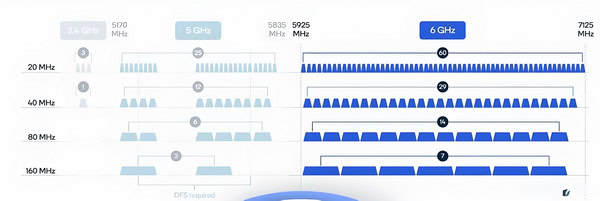
But here’s where things get especially interesting: WiFi 6E—where the “E” stands for “extended”—still follows the same IEEE 802.11ax standard as WiFi 6, but now operates in the 6 GHz band (specifically, from 5.925 GHz all the way up to 7.125 GHz). So, what you get is all the efficiency, speed, and smart traffic management of WiFi 6, turbocharged by access to a pristine chunk of radio spectrum that’s been off-limits until now.
The 6 GHz band is a massive, pristine stretch of radio spectrum with room for up to seven extra-wide 160 MHz channels.
cURL Too many subrequests by single Worker invocation. To configure this limit, refer to https://developers.cloudflare.com/workers/wrangler/configuration/#limits.
cURL Too many subrequests by single Worker invocation. To configure this limit, refer to https://developers.cloudflare.com/workers/wrangler/configuration/#limits “cURL Too many subrequests by single Worker invocation. To configure this limit, refer to https://developers.cloudflare.com/workers/wrangler/configuration/#limits” cURL Too many subrequests by single Worker invocation. To configure this limit, refer to https://developers.cloudflare.com/workers/wrangler/configuration/#limits.
cURL Too many subrequests by single Worker invocation. To configure this limit, refer to https://developers.cloudflare.com/workers/wrangler/configuration/#limits
cURL Too many subrequests by single Worker invocation. To configure this limit, refer to https://developers.cloudflare.com/workers/wrangler/configuration/#limits
cURL Too many subrequests by single Worker invocation. To configure this limit, refer to https://developers.cloudflare.com/workers/wrangler/configuration/#limits cURL Too many subrequests by single Worker invocation. To configure this limit, refer to https://developers.cloudflare.com/workers/wrangler/configuration/#limits cURL Too many subrequests by single Worker invocation. To configure this limit, refer to https://developers.cloudflare.com/workers/wrangler/configuration/#limits.
cURL Too many subrequests by single Worker invocation. To configure this limit, refer to https://developers.cloudflare.com/workers/wrangler/configuration/#limits and cURL Too many subrequests by single Worker invocation. To configure this limit, refer to https://developers.cloudflare.com/workers/wrangler/configuration/#limits.
cURL Too many subrequests by single Worker invocation. To configure this limit, refer to https://developers.cloudflare.com/workers/wrangler/configuration/#limits
cURL Too many subrequests by single Worker invocation. To configure this limit, refer to https://developers.cloudflare.com/workers/wrangler/configuration/#limits802.11becURL Too many subrequests by single Worker invocation. To configure this limit, refer to https://developers.cloudflare.com/workers/wrangler/configuration/#limits
cURL Too many subrequests by single Worker invocation. To configure this limit, refer to https://developers.cloudflare.com/workers/wrangler/configuration/#limits.

cURL Too many subrequests by single Worker invocation. To configure this limit, refer to https://developers.cloudflare.com/workers/wrangler/configuration/#limits cURL Too many subrequests by single Worker invocation. To configure this limit, refer to https://developers.cloudflare.com/workers/wrangler/configuration/#limits.
cURL Too many subrequests by single Worker invocation. To configure this limit, refer to https://developers.cloudflare.com/workers/wrangler/configuration/#limits.
cURL Too many subrequests by single Worker invocation. To configure this limit, refer to https://developers.cloudflare.com/workers/wrangler/configuration/#limits.
“cURL Too many subrequests by single Worker invocation. To configure this limit, refer to https://developers.cloudflare.com/workers/wrangler/configuration/#limits”cURL Too many subrequests by single Worker invocation. To configure this limit, refer to https://developers.cloudflare.com/workers/wrangler/configuration/#limits.
cURL Too many subrequests by single Worker invocation. To configure this limit, refer to https://developers.cloudflare.com/workers/wrangler/configuration/#limits
Let’s get one thing straight: not all antennas are created equal. You can have the most expensive, powerful WiFi 7 router on the market, but if you connect it to cheap, poorly designed antennas, you’ve essentially bought a Ferrari and put bicycle tires on it. Your router’s performance is literally riding on these little sticks (or panels). Let’s break down the specs you’ll see on a product page into plain English.
Gain (dBi): It’s Not About Brute Strength
This is the most common spec people look at, and the most misunderstood. “Gain” measured in dBi (decibels relative to an isotropic radiator), does not mean the antenna creates more power. An antenna is a passive device; it can’t amplify the signal.
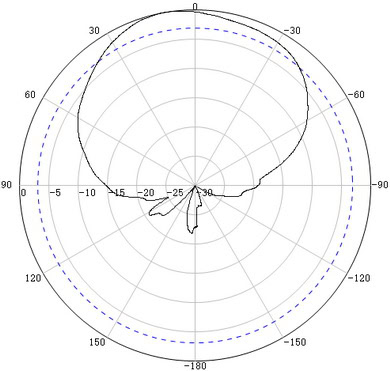
Instead, gain is a measure of how well the antenna focuses the router’s energy in a particular direction.
A low-gain antenna (like 2 dBi) acts like a bare lightbulb, spreading the signal out more or less equally in all directions (a spherical or donut shape).
A high-gain antenna (like 9 dBi) acts like a flashlight or spotlight, concentrating that same amount of energy into a narrower, more focused beam.
Higher dBi isn’t always better. I once had a friend who lived in a small, two-story apartment. He bought these massive 12 dBi “super” antennas for his router, thinking it would give him a crazy-strong signal everywhere. He placed the router on his desk downstairs. The result? The signal on the first floor was incredible, but upstairs it was almost non-existent. Why? Because the high-gain antennas had focused the signal into a very flat, narrow disc, essentially “shouting” horizontally and “whispering” vertically. For his space, a lower-gain 5 dBi antenna, which has a more donut-shaped pattern, would have provided much better coverage to both floors.
My rule of thumb:
- Small to medium, single-floor home/apartment: 3-5 dBi is perfect.
- Large, single-floor home or long, narrow space: 6-9 dBi can help push the signal to the far corners.
- Multi-story home: Stick with lower-to-mid gain (3-5 dBi) antennas and focus on central placement, or consider a mesh system.
Radiation Patterns: Where is Your Signal Going?
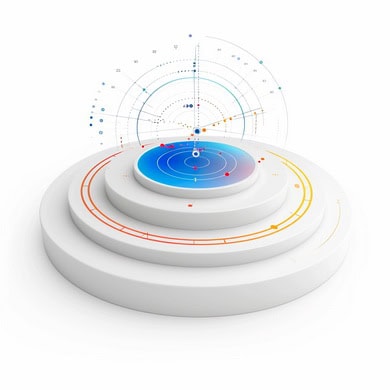
This is directly related to gain. The “radiation pattern” is a visual representation of how an antenna broadcasts its signal. You don’t need to analyze complex charts, but you should know the two main types:
Omni-Directional: This is the most common type of antenna that comes with home routers. They are designed to send the signal out in a 360-degree horizontal pattern. As we discussed, think of a donut shape around the antenna. This is ideal for central placement in a home or office where you need to provide coverage in all directions on a single floor.
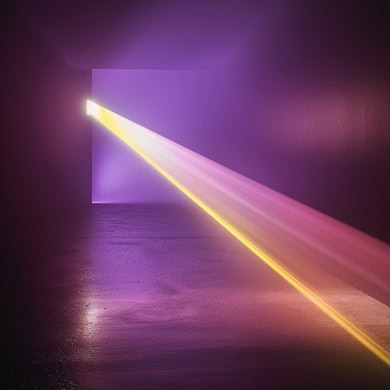
Directional: These antennas are the spotlights of the WiFi world. They focus all their energy in a single, specific direction. Types include “panel” antennas (which look like a small white box), “Yagi” antennas (which look like the old TV antennas on roofs), and “dish” antennas cURL Too many subrequests by single Worker invocation. To configure this limit, refer to https://developers.cloudflare.com/workers/wrangler/configuration/#limits.
cURL Too many subrequests by single Worker invocation. To configure this limit, refer to https://developers.cloudflare.com/workers/wrangler/configuration/#limits
- cURL Too many subrequests by single Worker invocation. To configure this limit, refer to https://developers.cloudflare.com/workers/wrangler/configuration/#limits.
- cURL Too many subrequests by single Worker invocation. To configure this limit, refer to https://developers.cloudflare.com/workers/wrangler/configuration/#limits.
- cURL Too many subrequests by single Worker invocation. To configure this limit, refer to https://developers.cloudflare.com/workers/wrangler/configuration/#limits.
- cURL Too many subrequests by single Worker invocation. To configure this limit, refer to https://developers.cloudflare.com/workers/wrangler/configuration/#limits.
cURL Too many subrequests by single Worker invocation. To configure this limit, refer to https://developers.cloudflare.com/workers/wrangler/configuration/#limits.
cURL Too many subrequests by single Worker invocation. To configure this limit, refer to https://developers.cloudflare.com/workers/wrangler/configuration/#limits
cURL Too many subrequests by single Worker invocation. To configure this limit, refer to https://developers.cloudflare.com/workers/wrangler/configuration/#limits.
cURL Too many subrequests by single Worker invocation. To configure this limit, refer to https://developers.cloudflare.com/workers/wrangler/configuration/#limits.
cURL Too many subrequests by single Worker invocation. To configure this limit, refer to https://developers.cloudflare.com/workers/wrangler/configuration/#limits.
cURL Too many subrequests by single Worker invocation. To configure this limit, refer to https://developers.cloudflare.com/workers/wrangler/configuration/#limits
cURL Too many subrequests by single Worker invocation. To configure this limit, refer to https://developers.cloudflare.com/workers/wrangler/configuration/#limits
cURL Too many subrequests by single Worker invocation. To configure this limit, refer to https://developers.cloudflare.com/workers/wrangler/configuration/#limits.
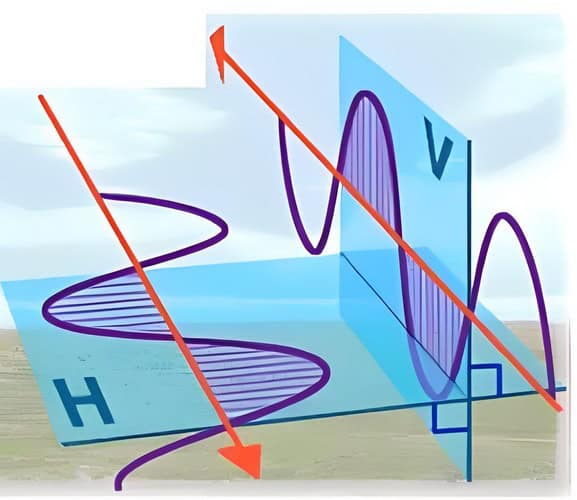
cURL Too many subrequests by single Worker invocation. To configure this limit, refer to https://developers.cloudflare.com/workers/wrangler/configuration/#limits.
cURL Too many subrequests by single Worker invocation. To configure this limit, refer to https://developers.cloudflare.com/workers/wrangler/configuration/#limits
cURL Too many subrequests by single Worker invocation. To configure this limit, refer to https://developers.cloudflare.com/workers/wrangler/configuration/#limits.
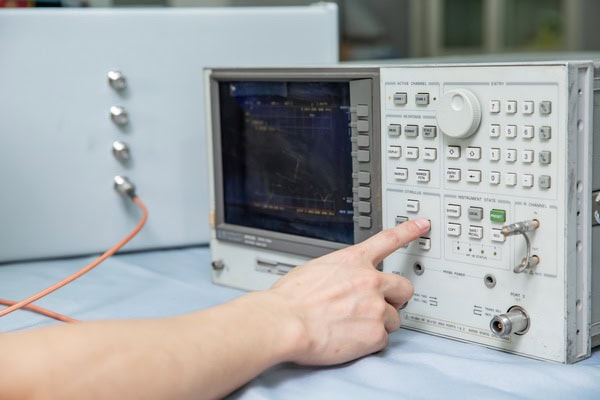
cURL Too many subrequests by single Worker invocation. To configure this limit, refer to https://developers.cloudflare.com/workers/wrangler/configuration/#limits.
VSWR cURL Too many subrequests by single Worker invocation. To configure this limit, refer to https://developers.cloudflare.com/workers/wrangler/configuration/#limits.
cURL Too many subrequests by single Worker invocation. To configure this limit, refer to https://developers.cloudflare.com/workers/wrangler/configuration/#limits.
- cURL Too many subrequests by single Worker invocation. To configure this limit, refer to https://developers.cloudflare.com/workers/wrangler/configuration/#limits.
- cURL Too many subrequests by single Worker invocation. To configure this limit, refer to https://developers.cloudflare.com/workers/wrangler/configuration/#limits.
Cheaper, no-name antennas often have terrible VSWR ratings. This is one of the hidden factors that makes a quality antenna from a trusted brand outperform a knock-off, even if they both claim to have the same “gain.”
Port-to-Port Isolation: Keeping the Antennas from Gossiping
Here’s another behind-the-scenes WiFi trick: port-to-port isolation. If you’ve got a fancy router with multiple antennas (especially on WiFi 6 and beyond), you want each antenna to do its job without “listening in” on its neighbors. That’s what port-to-port isolation is all about.
In plain English, port-to-port isolation measures how much signal from one antenna leaks into another antenna’s port. High isolation means the antennas are minding their own business—no eavesdropping, no interference, just pure, clean signals. If the isolation is poor, your router’s antennas can end up “talking over” each other, causing cross-talk and reducing overall performance. Not ideal!

So, what’s a good number? For WiFi gear, you’ll often see isolation specs like 20 dB or higher. The higher the number, the less interference between antennas, and the better your router can juggle multiple streams of data. It’s especially important for MIMO (multiple-input, multiple-output) setups, where each antenna is supposed to be an independent channel.
In summary: Good port-to-port isolation helps your router’s antennas cooperate without stepping on each other’s toes—making your WiFi faster and more reliable, no matter how many devices are connected.
Types of WiFi Antennas for WiFi 6/6E/7
Alright, let’s get into the nitty-gritty. You wouldn’t use a screwdriver to hammer a nail, right? Same deal with WiFi antennas. Picking the right type of antenna is just as important as obsessing over the specs on the box. And with WiFi 6, 6E, and the beastly WiFi 7, using the right antenna can be the difference between a good network and a great one.
Let’s break down the main players you’ll run into.
Internal vs. External Antennas – The Great Debate
Ever seen one of those super-sleek, minimalist routers that look like modern art and wondered, “Where are the antennas?” Don’t worry—they’re in there! They’re just tucked away inside the casing. This brings us to the first big choice: internal vs. external antennas.
Internal Antennas
These are built right into the device—think routers, laptops, tablets.
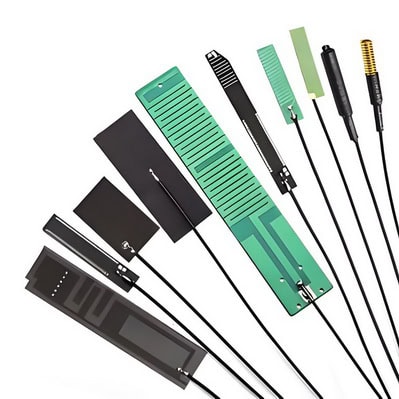
- Pros: They look clean, and you don’t have to worry about breaking or knocking them off. Plus, manufacturers can tune them perfectly for that device.
- Cons: You can’t adjust, reposition, or upgrade them. Whatever performance you get out of the box is what you’re stuck with. And while they’ve gotten better, they usually have lower gain than external antennas.
You know those adjustable “sticks” you see sticking out of high-performance routers? Yep, those are external antennas.
- Pros: You can upgrade and adjust them, which is a massive win. You can physically aim your signal where you need it most. Generally, they offer better range and more flexibility.
- Cons: Let’s be real—a router with eight antennas can look like a mechanical spider. Not exactly subtle. And they can get damaged if you’re not careful.
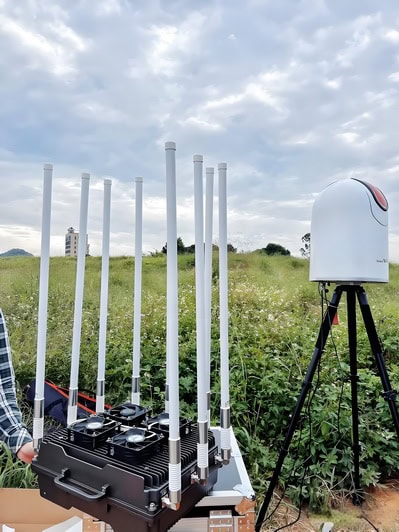
My take: I get the appeal of a clean, antenna-free look. But for me—and anyone serious about squeezing every last drop of performance out of their network—external antennas are the only way to go. Being able to aim your signal and upgrade to a higher-gain model later is a benefit you just can’t ignore.
Formats and Materials in Embedded WiFi 6E Antenna Solutions
Now, what about the guts of the antenna itself? Embedded WiFi 6E antennas come in a handful of clever formats, each aimed at balancing size, flexibility, and performance—especially inside today’s impossibly slim gadgets.
- Surface-mount PCB antennas: These are soldered right onto the device’s circuit board. Think of them as the “stealth” option—no moving parts, just a thin trace of copper doing all the heavy lifting.
- Through-hole PCB antennas: Similar to surface-mount, but plugged through the board instead. Slightly bulkier, but sometimes a better fit for devices that need a more secure attachment or specific placement inside the case.
- Cabled PCB antennas: Here, the antenna is on a small PCB with a shielded cable attached. This lets manufacturers tuck the antenna exactly where it fits best—perfect for cramming good signal in awkward spaces.
- Flexible adhesive-mount antennas: These use ultra-thin, bendy materials (often polyimide or flexible plastic) and stick right onto an interior surface. They go where rigid PCBs can’t, bending around corners or fitting into tight gaps.
In short, modern embedded antennas use everything from rigid circuit boards to super-flexible plastics—whatever it takes to squeeze WiFi 6E’s power into the smallest possible space, while keeping your device sleek and signal strong.
SISO vs. MIMO Antennas – The One vs. Many Game
Let’s clear up a classic WiFi puzzle: SISO vs. MIMO antennas. You’ve probably seen these terms tossed around in spec sheets, but what do they actually mean for your WiFi experience?
SISO (Single Input, Single Output)
cURL Too many subrequests by single Worker invocation. To configure this limit, refer to https://developers.cloudflare.com/workers/wrangler/configuration/#limits cURL Too many subrequests by single Worker invocation. To configure this limit, refer to https://developers.cloudflare.com/workers/wrangler/configuration/#limits.

- Pros: cURL Too many subrequests by single Worker invocation. To configure this limit, refer to https://developers.cloudflare.com/workers/wrangler/configuration/#limits.
- Cons: cURL Too many subrequests by single Worker invocation. To configure this limit, refer to https://developers.cloudflare.com/workers/wrangler/configuration/#limits.
cURL Too many subrequests by single Worker invocation. To configure this limit, refer to https://developers.cloudflare.com/workers/wrangler/configuration/#limits
cURL Too many subrequests by single Worker invocation. To configure this limit, refer to https://developers.cloudflare.com/workers/wrangler/configuration/#limits cURL Too many subrequests by single Worker invocation. To configure this limit, refer to https://developers.cloudflare.com/workers/wrangler/configuration/#limits.
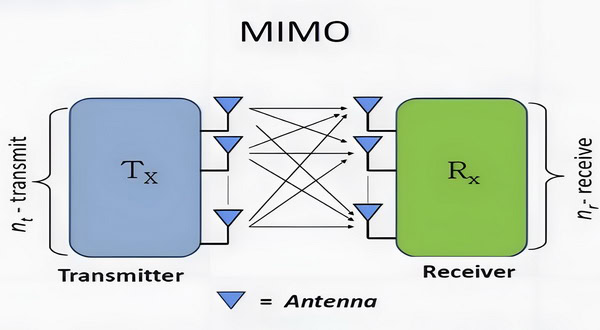
- Pros: cURL Too many subrequests by single Worker invocation. To configure this limit, refer to https://developers.cloudflare.com/workers/wrangler/configuration/#limits.
- Cons: cURL Too many subrequests by single Worker invocation. To configure this limit, refer to https://developers.cloudflare.com/workers/wrangler/configuration/#limits.
cURL Too many subrequests by single Worker invocation. To configure this limit, refer to https://developers.cloudflare.com/workers/wrangler/configuration/#limits cURL Too many subrequests by single Worker invocation. To configure this limit, refer to https://developers.cloudflare.com/workers/wrangler/configuration/#limits.
cURL Too many subrequests by single Worker invocation. To configure this limit, refer to https://developers.cloudflare.com/workers/wrangler/configuration/#limits cURL Too many subrequests by single Worker invocation. To configure this limit, refer to https://developers.cloudflare.com/workers/wrangler/configuration/#limits
cURL Too many subrequests by single Worker invocation. To configure this limit, refer to https://developers.cloudflare.com/workers/wrangler/configuration/#limits.

- Pros: cURL Too many subrequests by single Worker invocation. To configure this limit, refer to https://developers.cloudflare.com/workers/wrangler/configuration/#limits.
- Cons: cURL Too many subrequests by single Worker invocation. To configure this limit, refer to https://developers.cloudflare.com/workers/wrangler/configuration/#limits.
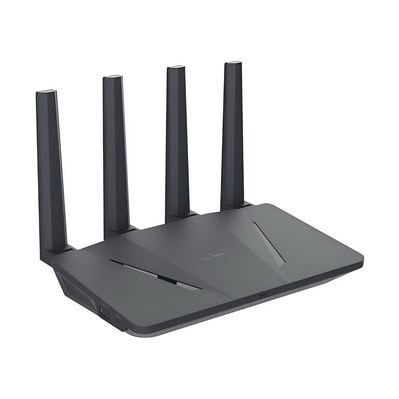
- Pros: cURL Too many subrequests by single Worker invocation. To configure this limit, refer to https://developers.cloudflare.com/workers/wrangler/configuration/#limits.
- Cons: cURL Too many subrequests by single Worker invocation. To configure this limit, refer to https://developers.cloudflare.com/workers/wrangler/configuration/#limits.
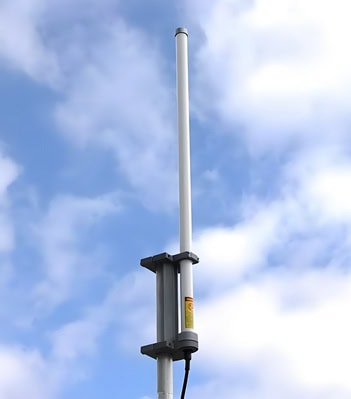
cURL Too many subrequests by single Worker invocation. To configure this limit, refer to https://developers.cloudflare.com/workers/wrangler/configuration/#limits cURL Too many subrequests by single Worker invocation. To configure this limit, refer to https://developers.cloudflare.com/workers/wrangler/configuration/#limits.
cURL Too many subrequests by single Worker invocation. To configure this limit, refer to https://developers.cloudflare.com/workers/wrangler/configuration/#limits cURL Too many subrequests by single Worker invocation. To configure this limit, refer to https://developers.cloudflare.com/workers/wrangler/configuration/#limits
When you picture a router antenna, you’re probably thinking of a dipole. They’re the most common type and the workhorse of the WiFi world for a reason.
What they are: Dipole antennas are omnidirectional, so they radiate signal in a 360-degree pattern. Imagine the signal as a slightly flattened donut around the antenna.
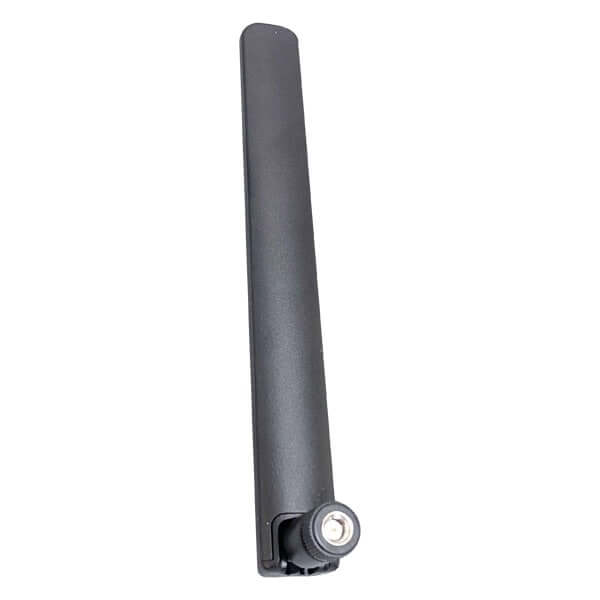
Best for: General coverage in a home or single-floor office. They give you reliable, balanced coverage over a wide area.
Pro Tip for Positioning: That “donut” shape is key! The signal is weakest directly above and below the antenna.
For a single-story home: Keep the antennas pointed straight up (vertical). This spreads the signal horizontally across your floor.
For a multi-story home: Try one antenna vertical for the main floor, and one horizontal (90 degrees) to push the “donut” of signal up and down, helping cover floors above and below.
With WiFi 6/6E/7, your router will likely come with high-quality dual-band or tri-band dipoles, ready to handle 2.4, 5, and 6 GHz frequencies.
Patch Antennas – Your Signal Spotlight
But what if you don’t need to cover your whole house? Maybe you just want a rock-solid, unwavering signal in one specific spot—like your home office or gaming setup in the attic?
Enter the patch antenna.
What they are: Patch antennas are directional, usually flat and rectangular. They focus the WiFi signal in a specific direction, instead of spreading it everywhere. Think of it like swapping a lantern (dipole) for a flashlight (patch). You lose the wide area, but you can shine much further in the direction you want.
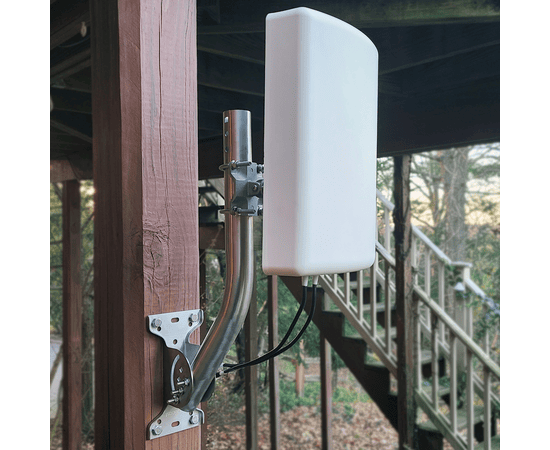
Best for: Sending a strong signal to a single room, connecting to a detached garage, or covering a long, narrow hallway. They’re fantastic for getting through stubborn walls.
For WiFi 6/6E/7: The 6 GHz band is blazing fast, but not the best at punching through walls. A patch antenna is perfect for “punching” that high-frequency signal right where you need it most.
Панельные антенны – The Heavy Hitter
Now we’re talking serious hardware. If a dipole antenna is a lantern, a panel antenna is a spotlight.
What they are: Panel antennas are directional, generally larger and more powerful than dipoles. They provide high gain and a focused beam, making them perfect for long-range communication.
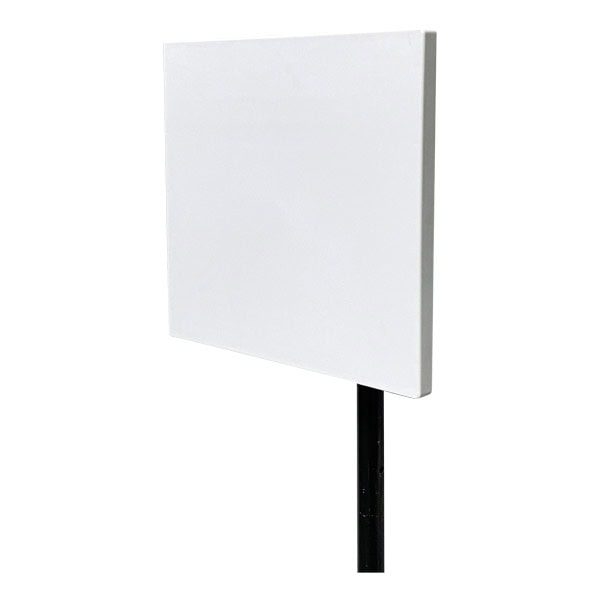
Best for: Point-to-point links between buildings—say, your house and a workshop a few hundred feet away. They’re also used in big indoor spaces like warehouses, where you need to project a signal down long aisles.
My experience: I once helped a friend who couldn’t get a signal in his detached workshop. We mounted a pair of panel antennas—one on his house, one on the workshop, pointed right at each other. He went from zero bars to streaming 4K video without a hiccup. When used right, they’re incredibly effective.
Sector Antennas – The Coverage Slicer
Ever wish you could slice up your WiFi coverage and send it to just one chunk of your property or building? That’s the magic of sector antennas.
What they are: Sector antennas are directional, but instead of a narrow beam, they cover a wide “slice” (think 60° to 120°) of area. Picture a big slice of pie—everything in that wedge gets coverage.
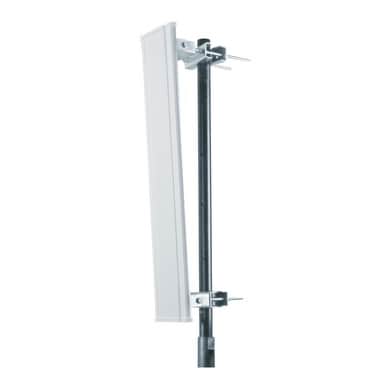
Best for: Outdoor WiFi in parks, stadiums, or large warehouses; anywhere you want to cover a wide area without wasting signal everywhere else. They’re a favorite for wireless ISPs and campus-wide networks.
cURL Too many subrequests by single Worker invocation. To configure this limit, refer to https://developers.cloudflare.com/workers/wrangler/configuration/#limits You can combine multiple sector antennas, each pointing in a different direction, to blanket an entire outdoor area without overlap or dead zones.
Parabolic Dish Antennas – The Long-Range Sniper
Now, if you really need to go the distance—like, really—this is where parabolic dish antennas come in.
What they are: These are the “satellite dish” style antennas. They use a parabolic reflector to focus the WiFi signal into a super-tight, high-gain beam. Think of a sniper rifle instead of a shotgun.
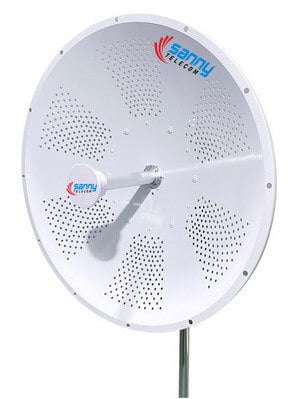
Best for: Point-to-point connections over long distances—like linking two buildings across a big field, or even across town if you’ve got line of sight. They’re also used in some outdoor mesh networks for backbone links.
Heads-up: Parabolic dishes are overkill for most homes, but if you need rock-solid, ultra-long-range WiFi, nothing else comes close.
MIMO & Multi-Beam Antennas – The Secret Sauce of Modern WiFi
cURL Too many subrequests by single Worker invocation. To configure this limit, refer to https://developers.cloudflare.com/workers/wrangler/configuration/#limits.
cURL Too many subrequests by single Worker invocation. To configure this limit, refer to https://developers.cloudflare.com/workers/wrangler/configuration/#limits cURL Too many subrequests by single Worker invocation. To configure this limit, refer to https://developers.cloudflare.com/workers/wrangler/configuration/#limits.
cURL Too many subrequests by single Worker invocation. To configure this limit, refer to https://developers.cloudflare.com/workers/wrangler/configuration/#limits cURL Too many subrequests by single Worker invocation. To configure this limit, refer to https://developers.cloudflare.com/workers/wrangler/configuration/#limits.
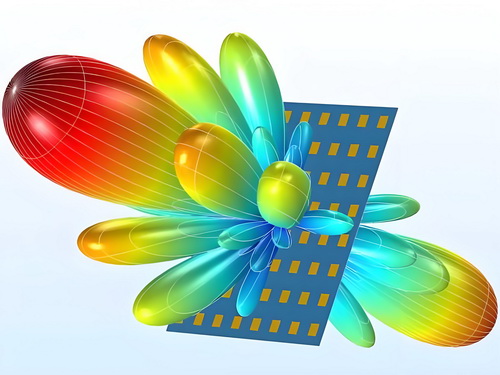
cURL Too many subrequests by single Worker invocation. To configure this limit, refer to https://developers.cloudflare.com/workers/wrangler/configuration/#limits.
cURL Too many subrequests by single Worker invocation. To configure this limit, refer to https://developers.cloudflare.com/workers/wrangler/configuration/#limits
cURL Too many subrequests by single Worker invocation. To configure this limit, refer to https://developers.cloudflare.com/workers/wrangler/configuration/#limits.
cURL Too many subrequests by single Worker invocation. To configure this limit, refer to https://developers.cloudflare.com/workers/wrangler/configuration/#limits
cURL Too many subrequests by single Worker invocation. To configure this limit, refer to https://developers.cloudflare.com/workers/wrangler/configuration/#limits.
cURL Too many subrequests by single Worker invocation. To configure this limit, refer to https://developers.cloudflare.com/workers/wrangler/configuration/#limits cURL Too many subrequests by single Worker invocation. To configure this limit, refer to https://developers.cloudflare.com/workers/wrangler/configuration/#limits dipole antennas cURL Too many subrequests by single Worker invocation. To configure this limit, refer to https://developers.cloudflare.com/workers/wrangler/configuration/#limits.
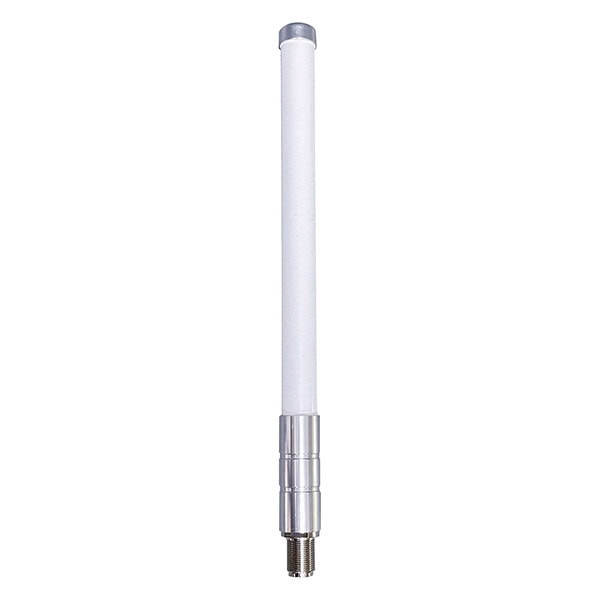
cURL Too many subrequests by single Worker invocation. To configure this limit, refer to https://developers.cloudflare.com/workers/wrangler/configuration/#limits An omni-directional antenna cURL Too many subrequests by single Worker invocation. To configure this limit, refer to https://developers.cloudflare.com/workers/wrangler/configuration/#limits.
cURL Too many subrequests by single Worker invocation. To configure this limit, refer to https://developers.cloudflare.com/workers/wrangler/configuration/#limits
cURL Too many subrequests by single Worker invocation. To configure this limit, refer to https://developers.cloudflare.com/workers/wrangler/configuration/#limits.
cURL Too many subrequests by single Worker invocation. To configure this limit, refer to https://developers.cloudflare.com/workers/wrangler/configuration/#limits A cURL Too many subrequests by single Worker invocation. To configure this limit, refer to https://developers.cloudflare.com/workers/wrangler/configuration/#limits, cURL Too many subrequests by single Worker invocation. To configure this limit, refer to https://developers.cloudflare.com/workers/wrangler/configuration/#limits.
cURL Too many subrequests by single Worker invocation. To configure this limit, refer to https://developers.cloudflare.com/workers/wrangler/configuration/#limits cURL Too many subrequests by single Worker invocation. To configure this limit, refer to https://developers.cloudflare.com/workers/wrangler/configuration/#limits.
🏠 Интернет вещей cURL Too many subrequests by single Worker invocation. To configure this limit, refer to https://developers.cloudflare.com/workers/wrangler/configuration/#limits
cURL Too many subrequests by single Worker invocation. To configure this limit, refer to https://developers.cloudflare.com/workers/wrangler/configuration/#limits.
cURL Too many subrequests by single Worker invocation. To configure this limit, refer to https://developers.cloudflare.com/workers/wrangler/configuration/#limits A multi-polarized MIMO (Multiple-Input, Multiple-Output) antenna system.
cURL Too many subrequests by single Worker invocation. To configure this limit, refer to https://developers.cloudflare.com/workers/wrangler/configuration/#limits This is where using multiple antennas really shines. A MIMO setup uses several antennas, often with different polarizations (some vertical, some horizontal), to create multiple, robust data streams. This allows the router to communicate with many different smart home devices simultaneously and efficiently. The varied polarization helps ensure a solid connection to your IoT gadgets, no matter their location or orientation, ensuring your smart home runs smoothly without constant dropouts.
🌳 Outdoor & Long-Range
Need to get WiFi from your house to a detached workshop, guest house, or just want to cover a big backyard? This is a whole different challenge. Now you’re dealing with distance, trees, and thick walls—so you need the right gear.
cURL Too many subrequests by single Worker invocation. To configure this limit, refer to https://developers.cloudflare.com/workers/wrangler/configuration/#limits High-gain panel antennas or parabolic grid/dish antennas.
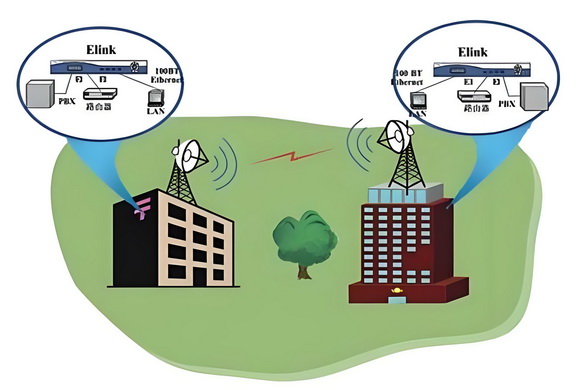
cURL Too many subrequests by single Worker invocation. To configure this limit, refer to https://developers.cloudflare.com/workers/wrangler/configuration/#limits These are the heavy hitters of the WiFi world. High-gain panel antennas focus your signal in a specific direction, making them great for long, straight shots. Parabolic grid or dish antennas (think mini satellite dishes) take it even further, concentrating the signal into a super narrow beam for maximum range. By focusing all that power in one direction, these antennas can bridge distances that regular antennas just can’t handle. If you need a strong, reliable point-to-point link outdoors, these are the way to go.
Choosing Your Champion: The Best Antennas for Each WiFi Standard
Alright, this is the main event. Now that you speak the language, let’s match the right antenna to the right WiFi standard based on your needs.
Antennas for WiFi 6: The Solid All-Rounders
If you’re running a WiFi 6 network, your focus is on efficiency and solid coverage on the 2.4 GHz and 5 GHz bands.
What to look for: A quality “dual-band” omni-directional antenna. Don’t waste money on tri-band antennas if your router is only WiFi 6, as you can’t use the 6 GHz band anyway.
Gain: For most homes and apartments, a set of 5 dBi antennas is the sweet spot. This provides a great balance of horizontal and vertical coverage.
MIMO is your friend: WiFi 6 thrives on MIMO. If your router has three, four, or even eight antenna connectors, use all of them! Don’t think you can just use one or two. The system is designed to use multiple antennas to talk to multiple devices. Make sure you purchase a full set of matching antennas.
My Pick: A set of well-made, 5 dBi dual-band omni-directional antennas with a low VSWR rating from a reputable brand will serve a WiFi 6 setup beautifully.
Antennas for WiFi 6E: Tapping into the 6 GHz Goldmine
With a WiFi 6E router, your entire goal is to leverage that beautiful, empty 6 GHz band. This has one non-negotiable requirement.
The Non-Negotiable: You ‘must‘ buy a “tri-band” antenna that explicitly states it covers the 6 GHz frequency band (which extends up to 7.125 GHz). Your old WiFi 6 antennas are physically not designed to resonate at this higher frequency. Using them would be like trying to listen to an FM radio station on an AM-only receiver.
But there’s more to picking the right antenna than just frequency support. Just as with cutting-edge smart devices, the “engineering” of your antenna setup matters. Miniaturization, internal design, and build quality all play a role in how well that tri-band antenna actually performs once it’s screwed onto your router. Look for antennas that integrate quality components and are built to last—cheap, hollow-feeling options often deliver hollow results.
Don’t Be Fooled: Some sellers might market an antenna as “WiFi 6 compatible,” but that doesn’t mean it supports WiFi 6E. Look for “Tri-Band,” “WiFi 6E,” or explicit mention of the “6 GHz band” in the specifications.
Placement Matters More: Higher frequencies like 6 GHz have a harder time penetrating walls and other obstacles compared to 2.4 GHz. This makes antenna placement even more critical. You’ll want your WiFi 6E router to be as centrally located as possible to give that 6 GHz signal the best chance of reaching your devices.
Durability and Integration: Since WiFi 6E antennas are pushing the limits of current wireless tech, don’t skimp on quality. A well-engineered antenna isn’t just about better signal—it’s about long-term durability, consistent performance, and smooth integration with your router’s other components. Your setup should be a cohesive system, not just a collection of parts slapped together.
In short, the right WiFi 6E antenna isn’t just a checkbox—it’s a smart investment in your network’s real-world speed and reliability.
My Pick: For a WiFi 6E setup, you need a set of tri-band omni-directional antennas. Again, around 5-7 dBi is a great choice for most homes to balance range with coverage.
Why WiFi 6E Antennas Are a Game Changer
Beyond the basics, WiFi 6E antennas bring some serious upgrades to the table:
- cURL Too many subrequests by single Worker invocation. To configure this limit, refer to https://developers.cloudflare.com/workers/wrangler/configuration/#limits cURL Too many subrequests by single Worker invocation. To configure this limit, refer to https://developers.cloudflare.com/workers/wrangler/configuration/#limits.
- cURL Too many subrequests by single Worker invocation. To configure this limit, refer to https://developers.cloudflare.com/workers/wrangler/configuration/#limits cURL Too many subrequests by single Worker invocation. To configure this limit, refer to https://developers.cloudflare.com/workers/wrangler/configuration/#limits.
- cURL Too many subrequests by single Worker invocation. To configure this limit, refer to https://developers.cloudflare.com/workers/wrangler/configuration/#limits cURL Too many subrequests by single Worker invocation. To configure this limit, refer to https://developers.cloudflare.com/workers/wrangler/configuration/#limits.
- cURL Too many subrequests by single Worker invocation. To configure this limit, refer to https://developers.cloudflare.com/workers/wrangler/configuration/#limits cURL Too many subrequests by single Worker invocation. To configure this limit, refer to https://developers.cloudflare.com/workers/wrangler/configuration/#limits.
- cURL Too many subrequests by single Worker invocation. To configure this limit, refer to https://developers.cloudflare.com/workers/wrangler/configuration/#limits cURL Too many subrequests by single Worker invocation. To configure this limit, refer to https://developers.cloudflare.com/workers/wrangler/configuration/#limits.
cURL Too many subrequests by single Worker invocation. To configure this limit, refer to https://developers.cloudflare.com/workers/wrangler/configuration/#limits.
cURL Too many subrequests by single Worker invocation. To configure this limit, refer to https://developers.cloudflare.com/workers/wrangler/configuration/#limits
cURL Too many subrequests by single Worker invocation. To configure this limit, refer to https://developers.cloudflare.com/workers/wrangler/configuration/#limits.
cURL Too many subrequests by single Worker invocation. To configure this limit, refer to https://developers.cloudflare.com/workers/wrangler/configuration/#limits cURL Too many subrequests by single Worker invocation. To configure this limit, refer to https://developers.cloudflare.com/workers/wrangler/configuration/#limits.
cURL Too many subrequests by single Worker invocation. To configure this limit, refer to https://developers.cloudflare.com/workers/wrangler/configuration/#limits cURL Too many subrequests by single Worker invocation. To configure this limit, refer to https://developers.cloudflare.com/workers/wrangler/configuration/#limits.
cURL Too many subrequests by single Worker invocation. To configure this limit, refer to https://developers.cloudflare.com/workers/wrangler/configuration/#limits cURL Too many subrequests by single Worker invocation. To configure this limit, refer to https://developers.cloudflare.com/workers/wrangler/configuration/#limits.
My Pick: cURL Too many subrequests by single Worker invocation. To configure this limit, refer to https://developers.cloudflare.com/workers/wrangler/configuration/#limits.
cURL Too many subrequests by single Worker invocation. To configure this limit, refer to https://developers.cloudflare.com/workers/wrangler/configuration/#limits cURL Too many subrequests by single Worker invocation. To configure this limit, refer to https://developers.cloudflare.com/workers/wrangler/configuration/#limits
cURL Too many subrequests by single Worker invocation. To configure this limit, refer to https://developers.cloudflare.com/workers/wrangler/configuration/#limits.
The “Don’ts” of Router and Antenna Placement
I’ve seen some truly tragic router placements in my time. Avoid these common mistakes at all costs:
The Electronics Graveyard: Don’t shove your router behind the TV, next to your stereo receiver, or surrounded by other electronic devices. They are all sources of interference.
The Metal or Concrete Bunker: Avoid placing your router inside a metal cabinet, on a metal shelf, or right next to a concrete wall. These materials are signal killers.
The Kitchen Nightmare: The kitchen is often a bad spot. Microwave ovens, in particular, operate on the 2.4 GHz frequency and can wreak havoc on your signal when in use.
The Floor is Lava (for WiFi): Never place your router on the floor. WiFi signals tend to radiate outwards and slightly downwards. You want it elevated, at least to desk or table height.
The Art of Antenna Positioning
For a standard home setup with a single router, follow these simple rules:
1. Go Central: Place the router as close to the center of your home as possible. This gives the signal the most equitable path to all corners of the house.
2. Get it Up High: An elevated, open-air position is always best. On top of a bookshelf (not one crammed with books) is a great spot.
3. Angle for Success: For a router with multiple antennas, don’t point them all straight up. For optimal performance, you want to cover different polarizations. A good starting point is to orient the antennas perpendicular to each other. If you have three or more, angle them at 90, 45, and 135 degrees. This creates a more robust signal “net” to catch devices in any orientation.
Mount It Like You Mean It: Choosing Mounting Types and Brackets
Now, let’s talk about mounting—because where and how you mount your antenna matters just as much as where you put your router. Here are the main types and what you need to know:
- Wall Mounts: Great for fixed locations where you want a tidy, out-of-the-way setup. Just make sure you’re not mounting it on a concrete or metal wall (see above!). Use sturdy wall brackets and avoid cramming it into a corner.
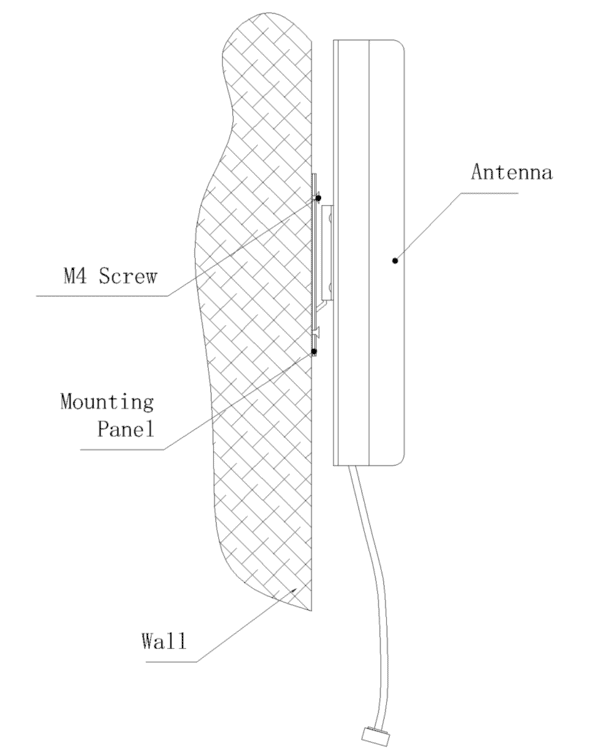
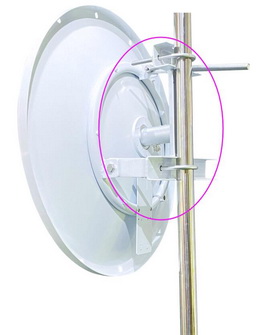
- Pole Mounts: Perfect for outdoor or attic antennas. A pole mount can get your antenna up high, clear of obstacles, and away from household interference. Make sure you use weatherproof brackets if you’re mounting outside.
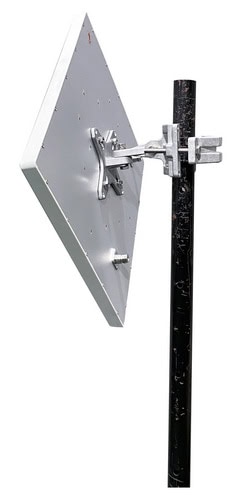
- Ceiling Mounts: Ideal for large, open spaces or multi-story homes. Ceiling mounts can help distribute signals more evenly, especially in tricky layouts.

- Desktop or Shelf Mounts: Sometimes, the simplest solution is best. Placing your router and antenna on a bookshelf or open desk can give you flexibility and easy access for adjustments.
Bracket Selection Tips:
- Choose brackets that match the weight and size of your antenna. Flimsy hardware is an invitation for disaster.
- Look for adjustable brackets if you want to fine-tune antenna orientation.

- For outdoor installations, pick rust-resistant or stainless steel brackets—trust me, you don’t want to replace them every year.
A Note on Cables and Connectors
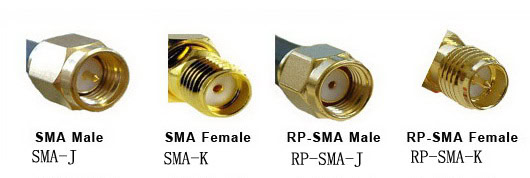
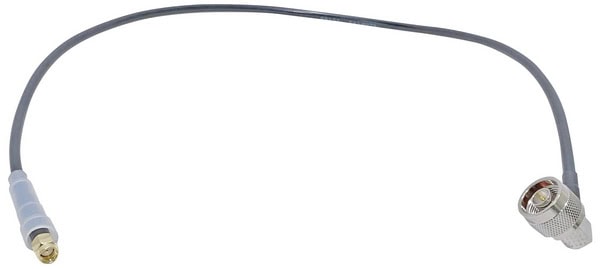
This is one of those classic “gotchas” that’s caught me off guard before. When you’re looking to upgrade your WiFi antennas, matching the connector type is absolutely essential. There isn’t just one standard—N-type, SMA, and RP-SMA (Reverse Polarity SMA) connectors are all commonly used, depending on the device and antenna.
If you’re aiming for better performance with high-gain or specialty antennas, double-check the connector type on both your router and the new antenna before you buy any cables or adapters. Mixing up connectors is a super easy mistake to make, but it can be a real headache to fix later!
cURL Too many subrequests by single Worker invocation. To configure this limit, refer to https://developers.cloudflare.com/workers/wrangler/configuration/#limits
cURL Too many subrequests by single Worker invocation. To configure this limit, refer to https://developers.cloudflare.com/workers/wrangler/configuration/#limits cURL Too many subrequests by single Worker invocation. To configure this limit, refer to https://developers.cloudflare.com/workers/wrangler/configuration/#limits.
cURL Too many subrequests by single Worker invocation. To configure this limit, refer to https://developers.cloudflare.com/workers/wrangler/configuration/#limits cURL Too many subrequests by single Worker invocation. To configure this limit, refer to https://developers.cloudflare.com/workers/wrangler/configuration/#limits.
cURL Too many subrequests by single Worker invocation. To configure this limit, refer to https://developers.cloudflare.com/workers/wrangler/configuration/#limits cURL Too many subrequests by single Worker invocation. To configure this limit, refer to https://developers.cloudflare.com/workers/wrangler/configuration/#limits.

cURL Too many subrequests by single Worker invocation. To configure this limit, refer to https://developers.cloudflare.com/workers/wrangler/configuration/#limits.
cURL Too many subrequests by single Worker invocation. To configure this limit, refer to https://developers.cloudflare.com/workers/wrangler/configuration/#limits
cURL Too many subrequests by single Worker invocation. To configure this limit, refer to https://developers.cloudflare.com/workers/wrangler/configuration/#limits cURL Too many subrequests by single Worker invocation. To configure this limit, refer to https://developers.cloudflare.com/workers/wrangler/configuration/#limits cURL Too many subrequests by single Worker invocation. To configure this limit, refer to https://developers.cloudflare.com/workers/wrangler/configuration/#limits
cURL Too many subrequests by single Worker invocation. To configure this limit, refer to https://developers.cloudflare.com/workers/wrangler/configuration/#limits cURL Too many subrequests by single Worker invocation. To configure this limit, refer to https://developers.cloudflare.com/workers/wrangler/configuration/#limits.
cURL Too many subrequests by single Worker invocation. To configure this limit, refer to https://developers.cloudflare.com/workers/wrangler/configuration/#limits cURL Too many subrequests by single Worker invocation. To configure this limit, refer to https://developers.cloudflare.com/workers/wrangler/configuration/#limits.

LMR240: cURL Too many subrequests by single Worker invocation. To configure this limit, refer to https://developers.cloudflare.com/workers/wrangler/configuration/#limits.
LMR400: cURL Too many subrequests by single Worker invocation. To configure this limit, refer to https://developers.cloudflare.com/workers/wrangler/configuration/#limits.
cURL Too many subrequests by single Worker invocation. To configure this limit, refer to https://developers.cloudflare.com/workers/wrangler/configuration/#limits.
Conclusion
cURL Too many subrequests by single Worker invocation. To configure this limit, refer to https://developers.cloudflare.com/workers/wrangler/configuration/#limits antenna cURL Too many subrequests by single Worker invocation. To configure this limit, refer to https://developers.cloudflare.com/workers/wrangler/configuration/#limits.
 Russian
  English
  Spanish
  German
  French (France)
  Korean
  Indonesian
  French (Canada)
  Vietnamese
  Armenian
  Albanian
  Assamese
  Acehnese
  Amharic
  Czech
Czech  Bulgarian
  Cebuano
  Malayalam
  German (Switzerland)
  Japanese
  Dutch
Dutch 