 콘텐츠로 건너뛰기
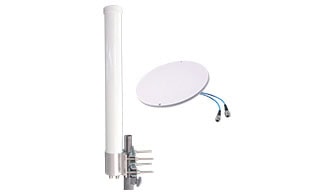
In the rapidly evolving world of wireless communications, understanding the tools that enhance connectivity can be a game changer. Among these, the MIMO Omni antenna stands out. But what exactly does this technology entail and how can it benefit users ranging from tech enthusiasts to industry professionals?
A MIMO Omni antenna is a sophisticated wireless technology that utilizes multiple-input and multiple-output (MIMO) techniques to broadcast and receive signals in all directions. This omni-directional approach ensures wide coverage and enhanced data throughput, making it ideal for environments requiring robust wireless connectivity.
Now that we have a basic understanding of MIMO Omni antennas, let’s explore how they work, what they’re used for, and the advantages they offer in order to fully appreciate their impact on our everyday communication and beyond.
What Does an Omni MIMO Antenna Do?
An omni-directional MIMO antenna is designed to transmit and receive signals in all directions simultaneously. It consists of multiple antenna elements that work together to transmit and receive multiple data streams at the same time. This allows for increased capacity and improved performance in wireless communication systems.
The omni-directional nature of the antenna means that it can communicate with multiple devices located in different directions without the need for the antenna to be physically repositioned. This makes it ideal for use in applications such as Wi-Fi, cellular networks, and other wireless communication systems where there are multiple devices located in different directions.
What Are the MIMO Omni Antennas Used For?
MIMO (Multiple-Input, Multiple-Output) omni-directional antennas are used in wireless communication systems to improve the performance and capacity of the network. They are commonly used in Wi-Fi routers and access points, as well as in cellular base stations and DAS(Distributed Antenna System).
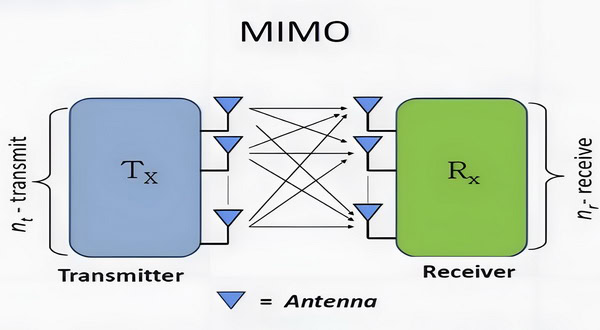
MIMO technology uses multiple antennas at both the transmitter and receiver to transmit and receive multiple data streams simultaneously. This allows for increased data throughput and improved signal quality, leading to faster and more reliable wireless connections.
Omni-directional antennas are designed to radiate and receive signals in all directions, providing 360-degree coverage. This makes them ideal for use in environments where the wireless devices are moving or where there are multiple devices located in different directions from the access point.

The combination of MIMO and omni-directional antennas allows for better coverage and capacity in wireless networks, making them suitable for use in homes, offices, public spaces, and outdoor areas.
When Should You Choose a MIMO Antenna Over a Signal Booster?
MIMO antennas really shine in scenarios where the highest possible data speeds and reliable connectivity are the main goals. For users whose devices are equipped with external antenna ports—such as many 4G/5G routers, hotspots, and certain industrial gateways—a MIMO omni antenna is typically the optimal solution. This is because it enables the device to simultaneously transmit and receive multiple streams of data, unlocking significant improvements in throughput and signal quality without the need for additional signal amplification.
Opt for a MIMO antenna when:
- You want maximum data rates: MIMO technology can dramatically increase wireless speed and performance, particularly in environments with heavy data usage.
- Your device supports external antennas: To take advantage of MIMO, your router, modem, or hotspot must have the appropriate ports for connecting external antennas.
- You need consistent connectivity in all directions: MIMO omni antennas offer 360-degree coverage, making them suitable for setups where devices might be mobile or spread throughout a space.
On the other hand, if your devices do not support external antenna connections, or if you’re aiming to enhance signal strength for multiple devices within a larger area (like throughout a home or office), a signal booster may be a more practical alternative.
Understanding your device’s capabilities and your specific wireless needs is key to making the most effective choice between these two technologies.
How Does the MIMO Omni Antenna Work?
A MIMO (Multiple-Input Multiple-Output) omni-directional antenna is designed to transmit and receive signals in multiple directions simultaneously. It uses multiple antenna elements to create multiple streams of data, increasing the capacity and efficiency of a wireless communication system.
The MIMO omni-directional antenna works by using multiple antenna elements that are spaced apart from each other. Each antenna element is connected to a separate radio frequency chain, allowing for independent transmission and reception of signals.
When transmitting, the MIMO omni-directional antenna uses signal processing techniques to create multiple spatially separated streams of data. These streams are transmitted simultaneously from the different antenna elements, effectively increasing the data throughput of the system. When receiving, the MIMO omni-directional antenna uses the multiple antenna elements to receive signals from multiple directions simultaneously. The received signals are processed and combined to improve the signal quality and increase the data throughput of the system.

The MIMO omni-directional antenna is designed to work in a multi-path environment, where signals can reflect off buildings, objects, and other surfaces. By using multiple antenna elements, the antenna can take advantage of the different paths that the signals can take, improving the signal quality and increasing the data throughput of the system.
Overall, the MIMO omni-directional antenna is a powerful tool for increasing the capacity and efficiency of wireless communication systems. By using multiple antenna elements and signal processing techniques, it can transmit and receive multiple streams of data simultaneously, improving the performance of the system in multi-path environments.
How Do Spatial Multiplexing and Beamforming Enhance Wi-Fi MIMO Performance?
To further understand why MIMO omni-directional antennas are so effective, it helps to look at two key techniques they rely on: spatial multiplexing and beamforming.
cURL Too many subrequests by single Worker invocation. To configure this limit, refer to https://developers.cloudflare.com/workers/wrangler/configuration/#limits
cURL Too many subrequests by single Worker invocation. To configure this limit, refer to https://developers.cloudflare.com/workers/wrangler/configuration/#limits.
cURL Too many subrequests by single Worker invocation. To configure this limit, refer to https://developers.cloudflare.com/workers/wrangler/configuration/#limits
cURL Too many subrequests by single Worker invocation. To configure this limit, refer to https://developers.cloudflare.com/workers/wrangler/configuration/#limits.
cURL Too many subrequests by single Worker invocation. To configure this limit, refer to https://developers.cloudflare.com/workers/wrangler/configuration/#limits.
cURL Too many subrequests by single Worker invocation. To configure this limit, refer to https://developers.cloudflare.com/workers/wrangler/configuration/#limits
cURL Too many subrequests by single Worker invocation. To configure this limit, refer to https://developers.cloudflare.com/workers/wrangler/configuration/#limits.
cURL Too many subrequests by single Worker invocation. To configure this limit, refer to https://developers.cloudflare.com/workers/wrangler/configuration/#limits.
cURL Too many subrequests by single Worker invocation. To configure this limit, refer to https://developers.cloudflare.com/workers/wrangler/configuration/#limits.
cURL Too many subrequests by single Worker invocation. To configure this limit, refer to https://developers.cloudflare.com/workers/wrangler/configuration/#limits
cURL Too many subrequests by single Worker invocation. To configure this limit, refer to https://developers.cloudflare.com/workers/wrangler/configuration/#limits.
cURL Too many subrequests by single Worker invocation. To configure this limit, refer to https://developers.cloudflare.com/workers/wrangler/configuration/#limits.
cURL Too many subrequests by single Worker invocation. To configure this limit, refer to https://developers.cloudflare.com/workers/wrangler/configuration/#limits.
How Do Spatial Multiplexing and Beamforming Enhance Wi-Fi MIMO Performance?
cURL Too many subrequests by single Worker invocation. To configure this limit, refer to https://developers.cloudflare.com/workers/wrangler/configuration/#limits.
cURL Too many subrequests by single Worker invocation. To configure this limit, refer to https://developers.cloudflare.com/workers/wrangler/configuration/#limits
cURL Too many subrequests by single Worker invocation. To configure this limit, refer to https://developers.cloudflare.com/workers/wrangler/configuration/#limits.
cURL Too many subrequests by single Worker invocation. To configure this limit, refer to https://developers.cloudflare.com/workers/wrangler/configuration/#limits
cURL Too many subrequests by single Worker invocation. To configure this limit, refer to https://developers.cloudflare.com/workers/wrangler/configuration/#limits.
cURL Too many subrequests by single Worker invocation. To configure this limit, refer to https://developers.cloudflare.com/workers/wrangler/configuration/#limits.
cURL Too many subrequests by single Worker invocation. To configure this limit, refer to https://developers.cloudflare.com/workers/wrangler/configuration/#limits cURL Too many subrequests by single Worker invocation. To configure this limit, refer to https://developers.cloudflare.com/workers/wrangler/configuration/#limitss?
cURL Too many subrequests by single Worker invocation. To configure this limit, refer to https://developers.cloudflare.com/workers/wrangler/configuration/#limits
1. Increased coverage: A MIMO omni-directional antenna can provide coverage in all directions, allowing for a wider coverage area compared to a directional antenna.
2. Simplified installation: With a MIMO omni-directional antenna, there is no need to align the antenna in a specific direction, simplifying the installation process.
Additionally, the process of positioning your MIMO omni-directional antenna is more forgiving than with directional models. While directional antennas require careful aiming and placement—often involving some trial and error to achieve optimal performance—MIMO omni antennas work right out of the box, providing consistent coverage no matter where you place them. This makes them especially suitable for environments where the direction of incoming and outgoing signals may change or where it’s impractical to continually adjust antenna orientation.
By eliminating the need for precision aiming, MIMO omni-directional antennas offer a practical, user-friendly solution for boosting wireless performance across a broad area.
3. Improved signal quality: The use of multiple antennas in a MIMO system allows for improved signal quality, as the antennas can transmit and receive multiple data streams simultaneously.
4. Increased capacity: MIMO technology can increase the capacity of a wireless network by transmitting multiple data streams at the same time, effectively increasing the data throughput.
5. Better performance in multipath environments: MIMO systems are designed to mitigate the effects of multipath interference, where signals bounce off obstacles and arrive at the receiver at different times. By using multiple antennas, MIMO can improve the signal quality and reliability in these environments.
How Much Faster Is MIMO Compared to SISO Antennas?
When it comes to raw speed and capacity, MIMO (Multiple-Input Multiple-Output) antennas have a distinct edge over SISO (Single-Input Single-Output) antennas. With SISO systems, all data is transmitted and received through a single antenna, which sets a firm limit on both speed and network efficiency.
MIMO technology, by contrast, leverages multiple antennas to send and receive several data streams at the same time. This means:
- Throughput can be doubled or even tripled: For example, a 2×2 MIMO system (using two transmitting and two receiving antennas) can theoretically achieve twice the data rate of a typical single antenna setup in the same conditions. More advanced configurations like 4×4 or 8×8 MIMO can provide even greater gains.
- Network capacity increases: Channels don’t get bogged down as quickly, so more users or devices can enjoy high speeds simultaneously, especially in dense environments.
- Performance boosts in real-world scenarios: While the exact speed improvement depends on environmental factors and device support, many users notice a significant difference, especially in areas with lots of signal reflection or interference.
In short, MIMO doesn’t just improve coverage—it can dramatically enhance the speed of wireless connections compared to traditional SISO antennas, making streaming, gaming, and large downloads much smoother and more reliable.
What Are the Key Differences Between Wi-Fi MIMO and Cellular MIMO Technologies?
While both Wi-Fi MIMO and cellular MIMO harness the benefits of multiple antennas to bolster wireless performance, their applications and underlying complexities differ significantly.
Range and Coverage:
- Wi-Fi MIMO is typically used for short-range communication, such as within homes, offices, or businesses. It is optimized for environments where devices are relatively close to the access point and high throughput is prioritized over long distances.
- Cellular MIMO, by contrast, is engineered for long-range connectivity, supporting mobile users spread across neighborhoods, cities, or even broader regions. It’s built to perform reliably amid changing signal conditions and a larger, more dispersed user base.
System Complexity:
- Wi-Fi MIMO systems generally involve less complex configurations, as the network infrastructure is contained and predictable.
- Cellular MIMO can be far more advanced, utilizing techniques such as Massive MIMO—especially in modern 5G networks—to enable dozens or even hundreds of simultaneous data streams. This requires intensive signal processing and coordination among base stations.
Capacity and User Load:
- Wi-Fi MIMO supports fewer devices and typically handles a modest number of simultaneous connections, which is suitable for households or small businesses.
- Cellular MIMO is built to manage a much higher number of concurrent users, often across multiple sectors and cells, while maintaining robust service quality.
Deployment Environments:
- Wi-Fi MIMO is designed for environments with known layouts and fewer obstacles, like office buildings and homes.
- Cellular MIMO must contend with diverse outdoor scenarios, including urban canyons, rural areas, and everything in between, making advanced interference mitigation and adaptability essential.
In summary, while both technologies use MIMO to enhance wireless communication, Wi-Fi MIMO is suited to smaller, more controlled settings, and cellular MIMO is tailored for broad, variable coverage with a high number of users.
How Do WiFi MIMO and Cellular MIMO Technologies Differ?
While both WiFi and cellular systems utilize MIMO (Multiple-Input Multiple-Output) technology to boost data throughput and improve reliability, there are key distinctions in how these technologies are applied:
Frequency Bands:
WiFi MIMO typically operates in unlicensed frequency bands—most commonly 2.4 GHz and 5 GHz. Cellular MIMO systems, on the other hand, work within a variety of licensed bands, ranging from low (700 MHz) to mid and high bands (up to 6 GHz and beyond, particularly with 5G).
Range and Coverage:
cURL Too many subrequests by single Worker invocation. To configure this limit, refer to https://developers.cloudflare.com/workers/wrangler/configuration/#limits.
cURL Too many subrequests by single Worker invocation. To configure this limit, refer to https://developers.cloudflare.com/workers/wrangler/configuration/#limits
cURL Too many subrequests by single Worker invocation. To configure this limit, refer to https://developers.cloudflare.com/workers/wrangler/configuration/#limits.
cURL Too many subrequests by single Worker invocation. To configure this limit, refer to https://developers.cloudflare.com/workers/wrangler/configuration/#limits
cURL Too many subrequests by single Worker invocation. To configure this limit, refer to https://developers.cloudflare.com/workers/wrangler/configuration/#limits.
cURL Too many subrequests by single Worker invocation. To configure this limit, refer to https://developers.cloudflare.com/workers/wrangler/configuration/#limits
cURL Too many subrequests by single Worker invocation. To configure this limit, refer to https://developers.cloudflare.com/workers/wrangler/configuration/#limits.
cURL Too many subrequests by single Worker invocation. To configure this limit, refer to https://developers.cloudflare.com/workers/wrangler/configuration/#limits.
cURL Too many subrequests by single Worker invocation. To configure this limit, refer to https://developers.cloudflare.com/workers/wrangler/configuration/#limits
cURL Too many subrequests by single Worker invocation. To configure this limit, refer to https://developers.cloudflare.com/workers/wrangler/configuration/#limits.
cURL Too many subrequests by single Worker invocation. To configure this limit, refer to https://developers.cloudflare.com/workers/wrangler/configuration/#limits
- cURL Too many subrequests by single Worker invocation. To configure this limit, refer to https://developers.cloudflare.com/workers/wrangler/configuration/#limits.
- cURL Too many subrequests by single Worker invocation. To configure this limit, refer to https://developers.cloudflare.com/workers/wrangler/configuration/#limits.
- cURL Too many subrequests by single Worker invocation. To configure this limit, refer to https://developers.cloudflare.com/workers/wrangler/configuration/#limits.
cURL Too many subrequests by single Worker invocation. To configure this limit, refer to https://developers.cloudflare.com/workers/wrangler/configuration/#limits
- cURL Too many subrequests by single Worker invocation. To configure this limit, refer to https://developers.cloudflare.com/workers/wrangler/configuration/#limits.
- cURL Too many subrequests by single Worker invocation. To configure this limit, refer to https://developers.cloudflare.com/workers/wrangler/configuration/#limits.
- cURL Too many subrequests by single Worker invocation. To configure this limit, refer to https://developers.cloudflare.com/workers/wrangler/configuration/#limits.
cURL Too many subrequests by single Worker invocation. To configure this limit, refer to https://developers.cloudflare.com/workers/wrangler/configuration/#limits
- cURL Too many subrequests by single Worker invocation. To configure this limit, refer to https://developers.cloudflare.com/workers/wrangler/configuration/#limits.
- cURL Too many subrequests by single Worker invocation. To configure this limit, refer to https://developers.cloudflare.com/workers/wrangler/configuration/#limits.
- cURL Too many subrequests by single Worker invocation. To configure this limit, refer to https://developers.cloudflare.com/workers/wrangler/configuration/#limits.
Summary Table:
| Type | Serves | Number of Antennas | Primary Benefit | Typical Application |
| SU-MIMO | Single user | 2-4 | Higher speed or reliability | Home/office WiFi, 4G/5G |
| MU-MIMO | Multiple users | 4+ | Simultaneous connections | Busy networks, offices |
| Massive MIMO | Many users (100s) | 64+ (can be 100s) | Max network capacity | 5G, stadiums, events |
In summary, while SU-MIMO serves one device at a time and is ideal for boosting individual performance, MU-MIMO enables smooth multi-device connectivity, and Massive MIMO delivers unparalleled capacity and efficiency for huge crowds and data-hungry environments. Each approach addresses different challenges, ensuring that wireless networks meet the needs of everything from home streaming to the busiest public spaces.
What is SU-MIMO (Single User MIMO)?
SU-MIMO, or Single User MIMO, is a technology designed to enhance the performance of wireless systems for an individual device. In this setup, multiple antennas are used on both the transmitter and receiver, allowing a single user to benefit from a higher data rate and improved connection reliability.
There are two primary ways SU-MIMO works:
- cURL Too many subrequests by single Worker invocation. To configure this limit, refer to https://developers.cloudflare.com/workers/wrangler/configuration/#limits Each antenna transmits different data streams simultaneously. This means a device can receive more data at once, resulting in faster download and upload speeds.
- Diversity: Multiple antennas can transmit the same data stream, which helps to counteract issues like fading and signal dropouts, leading to a more stable connection.
This approach is commonly found in modern WiFi routers and cellular devices, providing noticeable boosts in speed and performance for individual users connecting to the network. SU-MIMO focuses on optimizing communication for one device at a time, unlike some advanced forms of MIMO that can serve several users simultaneously.
What Are the Differences Between MIMO Omni Antenna and Single Omni Antennas?
MIMO (Multiple-Input Multiple-Output) omni-directional antennas and single omni-directional antennas are two types of antennas used in wireless communication systems. Here are the main differences between the two:
1. Number of Antennas: MIMO omni-directional antennas have multiple antennas, typically two or more, while single omni-directional antennas have only one antenna.
2. Spatial Multiplexing: MIMO omni-directional antennas use spatial multiplexing to transmit multiple data streams simultaneously, whereas single omni-directional antennas can only transmit one data stream at a time.
3. Diversity: MIMO omni-directional antennas provide diversity by using multiple antennas to improve the signal quality and reliability, especially in environments with fading and interference. Single omni-directional antennas do not provide diversity.
4. Capacity: MIMO omni-directional antennas can increase the capacity of a wireless system by transmitting multiple data streams simultaneously. Single omni-directional antennas have limited capacity as they can only transmit one data stream at a time.
5. Interference Rejection: MIMO omni-directional antennas can reject interference by using multiple antennas to separate the desired signal from the interference. Single omni-directional antennas are more susceptible to interference.
cURL Too many subrequests by single Worker invocation. To configure this limit, refer to https://developers.cloudflare.com/workers/wrangler/configuration/#limits.
cURL Too many subrequests by single Worker invocation. To configure this limit, refer to https://developers.cloudflare.com/workers/wrangler/configuration/#limits
cURL Too many subrequests by single Worker invocation. To configure this limit, refer to https://developers.cloudflare.com/workers/wrangler/configuration/#limits.
cURL Too many subrequests by single Worker invocation. To configure this limit, refer to https://developers.cloudflare.com/workers/wrangler/configuration/#limits.
cURL Too many subrequests by single Worker invocation. To configure this limit, refer to https://developers.cloudflare.com/workers/wrangler/configuration/#limits.
cURL Too many subrequests by single Worker invocation. To configure this limit, refer to https://developers.cloudflare.com/workers/wrangler/configuration/#limits.
cURL Too many subrequests by single Worker invocation. To configure this limit, refer to https://developers.cloudflare.com/workers/wrangler/configuration/#limits
cURL Too many subrequests by single Worker invocation. To configure this limit, refer to https://developers.cloudflare.com/workers/wrangler/configuration/#limits cURL Too many subrequests by single Worker invocation. To configure this limit, refer to https://developers.cloudflare.com/workers/wrangler/configuration/#limits cURL Too many subrequests by single Worker invocation. To configure this limit, refer to https://developers.cloudflare.com/workers/wrangler/configuration/#limits.
cURL Too many subrequests by single Worker invocation. To configure this limit, refer to https://developers.cloudflare.com/workers/wrangler/configuration/#limits.
cURL Too many subrequests by single Worker invocation. To configure this limit, refer to https://developers.cloudflare.com/workers/wrangler/configuration/#limits.
cURL Too many subrequests by single Worker invocation. To configure this limit, refer to https://developers.cloudflare.com/workers/wrangler/configuration/#limits.
cURL Too many subrequests by single Worker invocation. To configure this limit, refer to https://developers.cloudflare.com/workers/wrangler/configuration/#limits
cURL Too many subrequests by single Worker invocation. To configure this limit, refer to https://developers.cloudflare.com/workers/wrangler/configuration/#limits
cURL Too many subrequests by single Worker invocation. To configure this limit, refer to https://developers.cloudflare.com/workers/wrangler/configuration/#limits
cURL Too many subrequests by single Worker invocation. To configure this limit, refer to https://developers.cloudflare.com/workers/wrangler/configuration/#limits.
cURL Too many subrequests by single Worker invocation. To configure this limit, refer to https://developers.cloudflare.com/workers/wrangler/configuration/#limits
cURL Too many subrequests by single Worker invocation. To configure this limit, refer to https://developers.cloudflare.com/workers/wrangler/configuration/#limits.
cURL Too many subrequests by single Worker invocation. To configure this limit, refer to https://developers.cloudflare.com/workers/wrangler/configuration/#limits
cURL Too many subrequests by single Worker invocation. To configure this limit, refer to https://developers.cloudflare.com/workers/wrangler/configuration/#limits.
Microstrip Antennas:
Compact and low-profile, microstrip (or patch) antennas are typically found embedded within devices such as smartphones, routers, and hotspots. They offer basic performance in constrained spaces, sacrificing some gain and polarization flexibility for sleek integration.
Whip Antennas:
Whip antennas are commonly used with Wi-Fi routers, gateways, and some mobile hotspots. Characterized by their straight, flexible rod shape, they provide omni-directional coverage but generally cannot be cross-polarized, which can limit their overall performance compared to more advanced antenna types.
Parabolic Antennas:
Parabolic, or dish, antennas provide high gain and are ideal for long-range, point-to-point connections. While they excel in focusing signals in a single direction, most are designed for SISO (Single Input Single Output) configurations rather than MIMO, making them suitable where maximum range—not capacity—is the top priority.
Each of these antennas fits specific use cases based on coverage needs, directivity, and device integration requirements. Choosing the right type depends on factors such as the desired coverage area, potential interference, and the application environment.
Panel Antenna:
- cURL Too many subrequests by single Worker invocation. To configure this limit, refer to https://developers.cloudflare.com/workers/wrangler/configuration/#limits are characterized by their flat, rectangular design, making them suitable for both indoor installations and mounting on walls or structural surfaces outdoors.
- Unlike highly directional antennas, panel antennas offer a moderate degree of directionality. This allows them to focus wireless coverage toward a specific area without requiring precise alignment.
- They are particularly effective in environments where obstacles block direct line-of-sight to signal sources, as they can capture and utilize reflected signals.
- Common applications for panel antennas include enhancing coverage in offices, conference rooms, and various public indoor spaces, as well as targeted outdoor installations where broad but focused coverage is needed.
Panel antennas strike a balance between ease of use and performance, providing a practical solution for delivering strong, reliable wireless coverage in challenging environments.
Dish Antenna
– Dish antennas, sometimes referred to as parabolic antennas, feature a curved, dish-shaped reflector that concentrates radio waves into a tight, highly directional beam.
– This focused design allows them to achieve exceptionally high gain, making them especially well-suited for long-range point-to-point wireless links, such as those used in microwave transmission, satellite communication, and backhaul networks.
– The main advantage of a dish antenna is its ability to transmit and receive signals over great distances with minimal interference from surrounding signals.
– Because they only focus energy in a specific direction, dish antennas reduce unwanted noise and provide robust performance even in environments with significant obstacles or interference.
Dish antennas are a popular choice for applications that demand a reliable, high-strength, and narrow beam—such as connecting remote sites, establishing wireless internet service provider (WISP) links, or supporting high-capacity data transmission in outdoor settings.
Log-Periodic (LPDA) Antenna
– Log-periodic antennas, commonly referred to as LPDA (Log-Periodic Dipole Array) antennas, are specialized directional antennas designed to operate efficiently across a wide span of frequencies.
– The antenna features a distinctive “fishbone” shape, created by a sequence of metal elements in gradually varying lengths arranged along a central boom. Sometimes, you’ll spot them encased in a triangular or rectangular PVC housing, often in a clean white finish—think of it as the antenna’s business suit.
– So, when is an LPDA antenna the right choice? These antennas excel when you need reliable, high-gain performance over a broad frequency range. For example:
- If you want to connect to a distant cell tower for LTE or 5G data, especially in rural or fringe coverage areas.
- When your signal environment shifts—say, if your equipment must support multiple cellular bands or technologies without swapping out antennas.
- For long-range point-to-point wireless links requiring a consistent, focused beam—like stretching Wi-Fi coverage between buildings on a campus or linking remote monitoring stations.
– LPDAs are most often used in outdoor setups where there’s a clear line of sight to the signal source, such as a cellular tower or another wireless access point. By combining wide frequency support with strong directional gain, they’re a go-to solution for demanding connectivity challenges where a standard omni or single-band yagi just won’t cut it.
cURL Too many subrequests by single Worker invocation. To configure this limit, refer to https://developers.cloudflare.com/workers/wrangler/configuration/#limits Polarizations
MIMO (Multiple-Input Multiple-Output) omni-directional antennas can support different types of polarizations, including horizontal (H), vertical (V), and slant polarizations. Two commonly used slant polarizations are +45° and -45°.
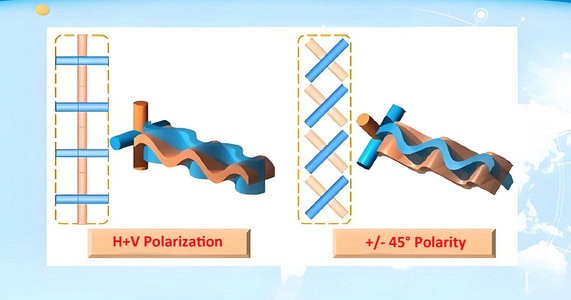
The H+V polarization refers to the combination of horizontal and vertical polarizations. In this configuration, the antenna has multiple elements or ports, with each element or port dedicated to either horizontal or vertical polarization. This allows the antenna to transmit and receive signals in both the horizontal and vertical planes simultaneously.
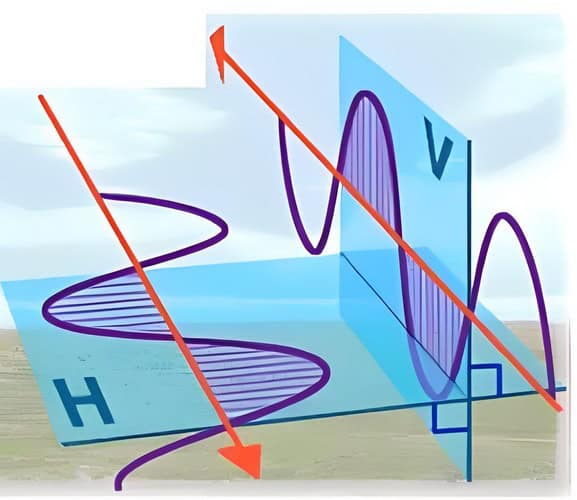
The +/- 45° slant polarizations refer to the two diagonal polarizations that are at a 45° angle from the horizontal and vertical planes. In this configuration, the antenna also has multiple elements or ports, with each element or port dedicated to either the +45° or -45° slant polarization. This allows the antenna to transmit and receive signals in both the +45° and -45° slant planes simultaneously.

Both the H+V polarization and the +/- 45° slant polarizations are commonly used in MIMO systems to increase the capacity and reliability of wireless communication. By using multiple antennas with different polarizations, MIMO systems can exploit the spatial diversity of the radio channel, improving the signal quality and mitigating the effects of fading and interference.
Polarization and Spatial Multiplexing in MIMO Antennas
To maximize spatial multiplexing and overall performance, manufacturers often combine these polarization schemes with specific antenna arrangements:
- 2×2 MIMO antennas typically use cross-polarized elements, with each element set at +45° and -45° to the horizontal. This cross-polarization enables two distinct data streams to be sent and received simultaneously.
- 4×4 MIMO antennas cURL Too many subrequests by single Worker invocation. To configure this limit, refer to https://developers.cloudflare.com/workers/wrangler/configuration/#limits.
- cURL Too many subrequests by single Worker invocation. To configure this limit, refer to https://developers.cloudflare.com/workers/wrangler/configuration/#limits cURL Too many subrequests by single Worker invocation. To configure this limit, refer to https://developers.cloudflare.com/workers/wrangler/configuration/#limits.
cURL Too many subrequests by single Worker invocation. To configure this limit, refer to https://developers.cloudflare.com/workers/wrangler/configuration/#limits.
cURL Too many subrequests by single Worker invocation. To configure this limit, refer to https://developers.cloudflare.com/workers/wrangler/configuration/#limits
cURL Too many subrequests by single Worker invocation. To configure this limit, refer to https://developers.cloudflare.com/workers/wrangler/configuration/#limits
cURL Too many subrequests by single Worker invocation. To configure this limit, refer to https://developers.cloudflare.com/workers/wrangler/configuration/#limits cURL Too many subrequests by single Worker invocation. To configure this limit, refer to https://developers.cloudflare.com/workers/wrangler/configuration/#limits.
cURL Too many subrequests by single Worker invocation. To configure this limit, refer to https://developers.cloudflare.com/workers/wrangler/configuration/#limits cURL Too many subrequests by single Worker invocation. To configure this limit, refer to https://developers.cloudflare.com/workers/wrangler/configuration/#limits.
cURL Too many subrequests by single Worker invocation. To configure this limit, refer to https://developers.cloudflare.com/workers/wrangler/configuration/#limits cURL Too many subrequests by single Worker invocation. To configure this limit, refer to https://developers.cloudflare.com/workers/wrangler/configuration/#limits.
cURL Too many subrequests by single Worker invocation. To configure this limit, refer to https://developers.cloudflare.com/workers/wrangler/configuration/#limits.
cURL Too many subrequests by single Worker invocation. To configure this limit, refer to https://developers.cloudflare.com/workers/wrangler/configuration/#limits
cURL Too many subrequests by single Worker invocation. To configure this limit, refer to https://developers.cloudflare.com/workers/wrangler/configuration/#limits.
cURL Too many subrequests by single Worker invocation. To configure this limit, refer to https://developers.cloudflare.com/workers/wrangler/configuration/#limitscURL Too many subrequests by single Worker invocation. To configure this limit, refer to https://developers.cloudflare.com/workers/wrangler/configuration/#limits.
cURL Too many subrequests by single Worker invocation. To configure this limit, refer to https://developers.cloudflare.com/workers/wrangler/configuration/#limitscURL Too many subrequests by single Worker invocation. To configure this limit, refer to https://developers.cloudflare.com/workers/wrangler/configuration/#limits.
cURL Too many subrequests by single Worker invocation. To configure this limit, refer to https://developers.cloudflare.com/workers/wrangler/configuration/#limits
cURL Too many subrequests by single Worker invocation. To configure this limit, refer to https://developers.cloudflare.com/workers/wrangler/configuration/#limits.
cURL Too many subrequests by single Worker invocation. To configure this limit, refer to https://developers.cloudflare.com/workers/wrangler/configuration/#limits.
Quick Tips:
- For current cellular networks: stick with +/- 45° slant polarization.
- For certain Wi-Fi and legacy equipment: use H+V polarization, if that’s what the network supports.
- When in doubt, check the specifications or consult the system documentation; some antennas can be rotated to switch between polarizations as needed.
Matching the antenna polarization with the system ensures optimal signal integrity and overall network efficiency.
Polarized Antenna Pairs vs. Spaced Antenna Pairs in MIMO Systems
When designing a MIMO system, there are two key methods for deploying multiple antennas: using polarized antenna pairs or spaced antenna pairs. Both approaches have their own strengths and are chosen based on the requirements of the wireless environment.
Polarized Antenna Pairs
Polarized antenna pairs utilize antennas with different polarizations—most commonly horizontal and vertical (H+V), or slant polarizations like +45° and -45°. The advantage of this setup is that each polarization acts as an independent channel—since signals sent on, for example, a vertical polarization are largely ignored by the horizontal polarization, and vice versa. This separation helps reduce interference and allows for more efficient transmission and reception of simultaneous data streams. Deploying these pairs is especially helpful where adding extra space for antennas isn’t practical, such as within compact equipment enclosures or indoor access points.
Spaced Antenna Pairs
Alternatively, spaced antenna pairs are two or more identical antennas placed physically apart. By separating antennas, the system creates spatial diversity, allowing it to receive multiple versions of the same signal that have traveled different paths. This turns multipath propagation—a common challenge where signals bounce off walls and other surfaces—into an advantage. The system can combine these various signals to boost reliability and mitigate fading. Spaced antenna deployment is often seen on outdoor base stations and in environments where antenna separation is feasible.
Choosing Between the Two
- Polarized pairs are ideal in space-limited or indoor scenarios, taking advantage of polarization diversity without requiring large antenna separations.
- Spaced pairs excel in larger environments or outdoor settings, where multipath can be harnessed for improved signal quality.
Both techniques can even be combined in advanced MIMO systems, further increasing capacity, resilience, and data throughput.
Understanding MU-MIMO in Cellular Communication
MU-MIMO, or Multi-User Multiple-Input Multiple-Output, is a key technology deployed in modern cellular systems, including both 4G and 5G networks. Unlike traditional MIMO, which serves one user at a time using multiple antennas, MU-MIMO allows a single base station to simultaneously transmit to and receive data from several devices. Each connected device can receive its own unique data stream—all at the same time—without waiting in line behind other users.
This is achieved by leveraging advanced antenna arrays and signal processing techniques that separate multiple users’ signals spatially. The result? Improved network efficiency, higher data rates, and a better experience for everyone connected, even in environments like stadiums or busy urban areas where many devices compete for bandwidth.
MIMO Omni Antennas Applications
MIMO (Multiple Input Multiple Output) omni-directional antennas are widely used in WiFi and cellular networks to improve the performance and coverage of wireless communication systems. Here are some of the applications of MIMO omni-directional antennas in these networks:
1. WiFi Networks: MIMO omni-directional antennas are used in WiFi routers and access points to enhance the data rate and coverage area. By utilizing multiple antennas, MIMO technology enables the transmission and reception of multiple data streams simultaneously, resulting in increased data throughput and improved network performance. MIMO omni-directional antennas are particularly useful in environments with high interference and signal fading, such as in crowded urban areas or multi-story buildings.
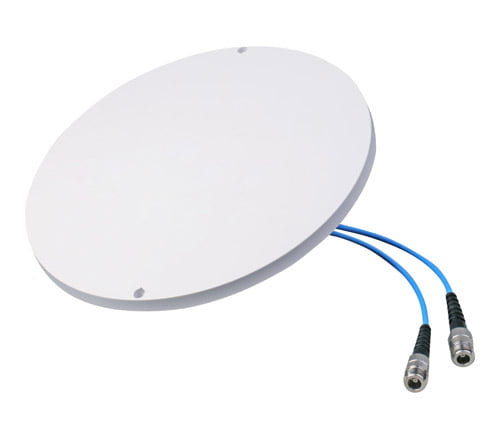
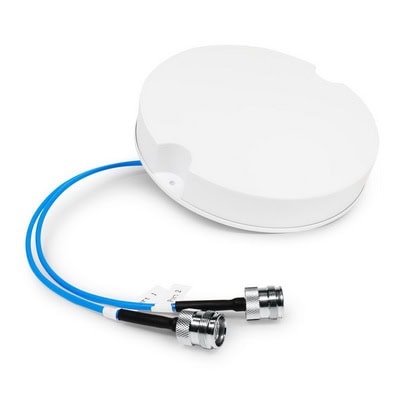
2. Cellular Networks: MIMO omni dome antennas are widely used in DAS to improve the capacity and coverage of cellular networks. In LTE (Long-Term Evolution) and 5G networks, MIMO technology is employed to increase the data rate and spectral efficiency. MIMO omni-directional antennas allow for the simultaneous transmission and reception of multiple data streams, which enables higher data rates, better signal quality, and improved network capacity.
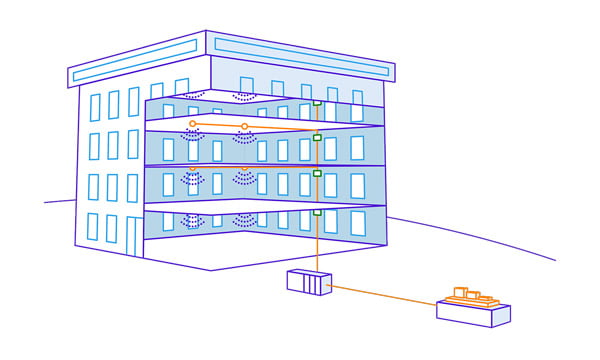
3. Public Hotspots: MIMO omni-directional antennas are used in public WiFi hotspots to provide reliable and high-speed internet connectivity in public areas like parks, airports, and shopping malls. These antennas ensure a wide coverage area and enable multiple users to connect to the hotspot simultaneously, without experiencing significant degradation in signal quality or speed.
4. Smart Cities: MIMO omni-directional antennas are employed in smart city applications to provide wireless connectivity for various IoT (Internet of Things) devices and sensors. These antennas enable the deployment of smart city infrastructure, such as smart streetlights, smart parking systems, and environmental monitoring systems, by ensuring reliable and efficient wireless communication.
5. Wireless Mesh Networks: MIMO omni-directional antennas are used in wireless mesh networks to create a self-healing and self-configuring network infrastructure. These antennas enable the establishment of wireless links between nodes in the network, allowing for the transmission of data over long distances without the need for physical cables. MIMO technology enhances the network performance by increasing the data rate and improving the reliability of the wireless links.
Overall, MIMO omni-directional antennas play a crucial role in improving the performance, coverage, and capacity of WiFi and cellular networks. These antennas are essential for providing reliable and high-speed wireless communication in various applications and environments.
MIMO 2×2 vs 4×4 Omni Antennas
MIMO (Multiple-Input Multiple-Output) refers to a wireless communication technology that uses multiple antennas to transmit and receive data simultaneously. By using multiple antennas, MIMO can increase the data throughput and improve the overall performance of a wireless system.
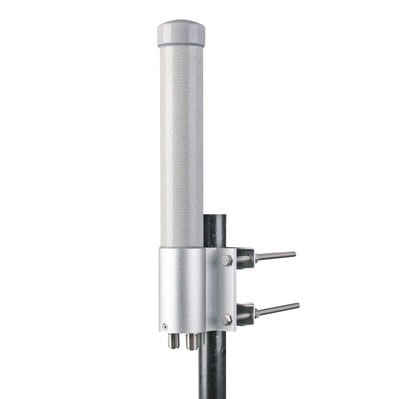
In the context of MIMO 2×2 vs 4×4 omni-directional antennas, the numbers 2×2 and 4×4 refer to the number of antennas used for transmission and reception. A 2×2 MIMO system uses two antennas for both transmission and reception, while a 4×4 MIMO system uses four antennas for both transmission and reception.

The main difference between a 2×2 MIMO system and a 4×4 MIMO system is the number of antennas used. A 4×4 MIMO system has twice the number of antennas as a 2×2 MIMO system, which means it can potentially achieve higher data throughput and better performance.
However, it’s important to note that the benefits of a 4×4 MIMO system over a 2×2 MIMO system may not be fully realized in all situations. The performance of a MIMO system depends on various factors, including the wireless environment, the distance between the antennas, and the presence of obstacles or interference. In some cases, a 2×2 MIMO system may be sufficient to achieve the desired performance, while in other cases a 4×4 MIMO system may be necessary.
Additionally, the use of omni-directional antennas means that the antennas radiate and receive signals in all directions. This can be beneficial in scenarios where the wireless devices are moving or where the direction of the signal is constantly changing. However, omni-directional antennas may not provide the same level of gain or coverage as directional antennas, which are designed to focus the signal in a specific direction.
In summary, a 4×4 MIMO system with omni-directional antennas has the potential to provide higher data throughput and better performance compared to a 2×2 MIMO system. However, the actual benefits will depend on the specific wireless environment and the requirements of the application.
What is a WiFi Omni MIMO Antenna?
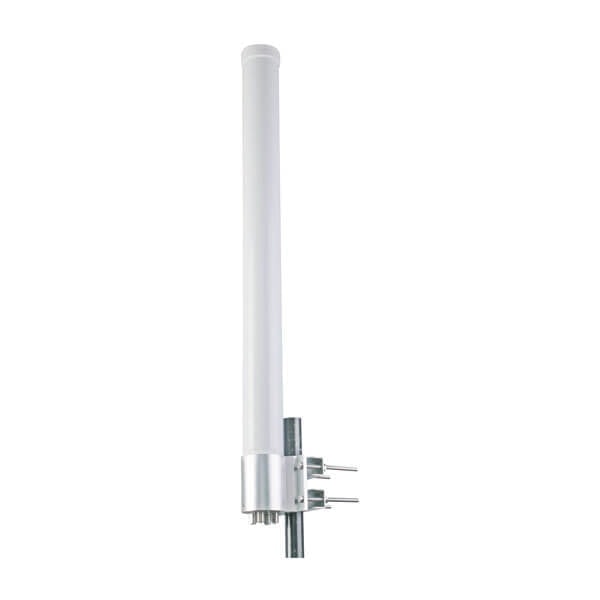
A WiFi omni-directional MIMO antenna is a type of antenna that can receive and transmit signals in multiple directions at the same time. MIMO stands for Multiple-Input Multiple-Output, which means that the antenna has multiple input and output ports to support multiple data streams.
An omni-directional antenna is designed to radiate and receive signals in all directions, providing a 360-degree coverage pattern. This is in contrast to a directional antenna, which focuses its signal in a specific direction.
cURL Too many subrequests by single Worker invocation. To configure this limit, refer to https://developers.cloudflare.com/workers/wrangler/configuration/#limits.
cURL Too many subrequests by single Worker invocation. To configure this limit, refer to https://developers.cloudflare.com/workers/wrangler/configuration/#limits.
cURL Too many subrequests by single Worker invocation. To configure this limit, refer to https://developers.cloudflare.com/workers/wrangler/configuration/#limits.
cURL Too many subrequests by single Worker invocation. To configure this limit, refer to https://developers.cloudflare.com/workers/wrangler/configuration/#limits
cURL Too many subrequests by single Worker invocation. To configure this limit, refer to https://developers.cloudflare.com/workers/wrangler/configuration/#limits.
cURL Too many subrequests by single Worker invocation. To configure this limit, refer to https://developers.cloudflare.com/workers/wrangler/configuration/#limits.
cURL Too many subrequests by single Worker invocation. To configure this limit, refer to https://developers.cloudflare.com/workers/wrangler/configuration/#limits.
cURL Too many subrequests by single Worker invocation. To configure this limit, refer to https://developers.cloudflare.com/workers/wrangler/configuration/#limits.
cURL Too many subrequests by single Worker invocation. To configure this limit, refer to https://developers.cloudflare.com/workers/wrangler/configuration/#limits.
cURL Too many subrequests by single Worker invocation. To configure this limit, refer to https://developers.cloudflare.com/workers/wrangler/configuration/#limits
cURL Too many subrequests by single Worker invocation. To configure this limit, refer to https://developers.cloudflare.com/workers/wrangler/configuration/#limits.
cURL Too many subrequests by single Worker invocation. To configure this limit, refer to https://developers.cloudflare.com/workers/wrangler/configuration/#limits.
cURL Too many subrequests by single Worker invocation. To configure this limit, refer to https://developers.cloudflare.com/workers/wrangler/configuration/#limits cURL Too many subrequests by single Worker invocation. To configure this limit, refer to https://developers.cloudflare.com/workers/wrangler/configuration/#limits cURL Too many subrequests by single Worker invocation. To configure this limit, refer to https://developers.cloudflare.com/workers/wrangler/configuration/#limits.
cURL Too many subrequests by single Worker invocation. To configure this limit, refer to https://developers.cloudflare.com/workers/wrangler/configuration/#limits.
cURL Too many subrequests by single Worker invocation. To configure this limit, refer to https://developers.cloudflare.com/workers/wrangler/configuration/#limits.
cURL Too many subrequests by single Worker invocation. To configure this limit, refer to https://developers.cloudflare.com/workers/wrangler/configuration/#limits
MIMO (Multiple-Input Multiple-Output) omni-directional antennas cURL Too many subrequests by single Worker invocation. To configure this limit, refer to https://developers.cloudflare.com/workers/wrangler/configuration/#limits
cURL Too many subrequests by single Worker invocation. To configure this limit, refer to https://developers.cloudflare.com/workers/wrangler/configuration/#limits.
cURL Too many subrequests by single Worker invocation. To configure this limit, refer to https://developers.cloudflare.com/workers/wrangler/configuration/#limits.
cURL Too many subrequests by single Worker invocation. To configure this limit, refer to https://developers.cloudflare.com/workers/wrangler/configuration/#limits.
4. Polarization: Antennas can have vertical, horizontal, or dual polarization. The polarization of the antenna should match the polarization of your wireless devices for optimal signal reception. Dual polarization antennas can support both vertical and horizontal polarization.
5. Connector Type: Ensure that the antenna has the correct connector type to connect to your wireless devices. Common connector types include SMA, RP-SMA, and N-type connectors.
6. Mounting Options: Consider how you plan to mount the antenna. Some antennas come with mounting brackets or hardware, while others require additional accessories for mounting. Choose an antenna that is suitable for your mounting requirements.
7. Environmental Conditions: Consider the environmental conditions where the antenna will be installed. Some antennas are designed for indoor use only, while others are weatherproof and can be used outdoors. If you plan to install the antenna outdoors, ensure that it is rated for the specific weather conditions in your area.
8. Budget: Finally, consider your budget. Antennas vary in price depending on their features and capabilities. Set a budget and choose an antenna that fits within that range.
By considering these factors, you can choose a MIMO omni-directional antenna that meets your specific requirements and improves the wireless communication in your environment.
Conclusion
In conclusion, MIMO Omni antennas are essential for modern wireless technology as they provide better coverage, faster speeds, and more reliable connections. Whether you are upgrading your personal network or designing a system for a large venue, it is important to understand the capabilities and uses of these antennas.
 Korean
  English
  Spanish
  German
  French (France)
  Russian
  Indonesian
  French (Canada)
  Vietnamese
  Armenian
  Albanian
  Assamese
  Acehnese
  Amharic
  Czech
Czech  Bulgarian
  Cebuano
  Malayalam
  German (Switzerland)
  Japanese
  Dutch
Dutch 