 Skip to content
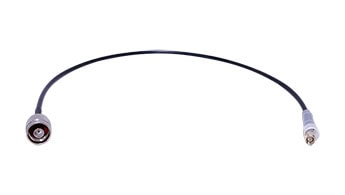
In the rapidly evolving landscape of wireless communication, the focus often falls on high-gain antennas, cutting-edge routers, or the latest surveillance cameras. Yet, tucked quietly between these devices and their antennas is a small but crucial component that can make or break your system’s performance: the coaxial cable assembly, commonly known as the pigtail. This humble assembly acts as the physical bridge, ensuring seamless and efficient transmission of high-frequency signals between antennas and various communication equipment—routers, wireless access points (APs), customer premises equipment (CPE), RFID readers, and even CCTV systems.
In this article, we’ll pull back the curtain on coaxial cable assemblies. We’ll explore why their quality and specifications are so important, what types and models are commonly used, and how to select the right connectors for your application. Whether you’re an installer, a system integrator, or a tech enthusiast, understanding the role and selection of coaxial pigtails can help you unlock the full potential of your wireless network.
What is a Coaxial Cable Assembly?
A coaxial cable assembly, or pigtail, is a short length of coaxial cable terminated with connectors at one or both ends. Its primary role is to connect an antenna to a device such as a router, AP, CPE, RFID reader or camera. While it may seem like a simple component, the cable assembly is critical in preserving signal integrity, minimizing loss, and ensuring compatibility between equipment.

Why Not Connect Directly? Most communication devices and antennas have different types of connectors and may be located in awkward or tight spaces. The pigtail provides flexibility, allows for easy installation, and bridges the gap between the fixed connectors on the device and the antenna, often adapting between different connector types or cable sizes.
The Role of Pigtails in Modern Communications
Coaxial pigtails are found everywhere wireless signals are transmitted or received:
Routers & Wireless Access Points (APs):

Many enterprise and industrial-grade routers/APs use external antennas for better range and coverage. Pigtails connect these antennas to the device’s RF ports.
Customer Premises Equipment (CPE):
In fixed wireless broadband, CPE units use pigtails to connect to outdoor directional antennas, ensuring strong signal reception from the base station.

Base Stations:
Wireless base stations, including those for cellular, WiFi, or private radio networks, often use pigtails to link internal RF modules to high-gain external antennas for extended coverage.
Repeaters & Signal Boosters:
Repeaters and signal boosters amplify weak wireless signals. Pigtails are used to connect these devices to both donor (receiving) and service (transmitting) antennas, optimizing signal strength and quality.

Surveillance Cameras (CCTV):
cURL Too many subrequests by single Worker invocation. To configure this limit, refer to https://developers.cloudflare.com/workers/wrangler/configuration/#limits.
cURL Too many subrequests by single Worker invocation. To configure this limit, refer to https://developers.cloudflare.com/workers/wrangler/configuration/#limits
cURL Too many subrequests by single Worker invocation. To configure this limit, refer to https://developers.cloudflare.com/workers/wrangler/configuration/#limits.

cURL Too many subrequests by single Worker invocation. To configure this limit, refer to https://developers.cloudflare.com/workers/wrangler/configuration/#limits
cURL Too many subrequests by single Worker invocation. To configure this limit, refer to https://developers.cloudflare.com/workers/wrangler/configuration/#limits cURL Too many subrequests by single Worker invocation. To configure this limit, refer to https://developers.cloudflare.com/workers/wrangler/configuration/#limits, cURL Too many subrequests by single Worker invocation. To configure this limit, refer to https://developers.cloudflare.com/workers/wrangler/configuration/#limits, cURL Too many subrequests by single Worker invocation. To configure this limit, refer to https://developers.cloudflare.com/workers/wrangler/configuration/#limits.
cURL Too many subrequests by single Worker invocation. To configure this limit, refer to https://developers.cloudflare.com/workers/wrangler/configuration/#limits.
cURL Too many subrequests by single Worker invocation. To configure this limit, refer to https://developers.cloudflare.com/workers/wrangler/configuration/#limits
A cURL Too many subrequests by single Worker invocation. To configure this limit, refer to https://developers.cloudflare.com/workers/wrangler/configuration/#limits, cURL Too many subrequests by single Worker invocation. To configure this limit, refer to https://developers.cloudflare.com/workers/wrangler/configuration/#limits.

cURL Too many subrequests by single Worker invocation. To configure this limit, refer to https://developers.cloudflare.com/workers/wrangler/configuration/#limits.
cURL Too many subrequests by single Worker invocation. To configure this limit, refer to https://developers.cloudflare.com/workers/wrangler/configuration/#limits
cURL Too many subrequests by single Worker invocation. To configure this limit, refer to https://developers.cloudflare.com/workers/wrangler/configuration/#limits
cURL Too many subrequests by single Worker invocation. To configure this limit, refer to https://developers.cloudflare.com/workers/wrangler/configuration/#limits.
cURL Too many subrequests by single Worker invocation. To configure this limit, refer to https://developers.cloudflare.com/workers/wrangler/configuration/#limits
cURL Too many subrequests by single Worker invocation. To configure this limit, refer to https://developers.cloudflare.com/workers/wrangler/configuration/#limits.
cURL Too many subrequests by single Worker invocation. To configure this limit, refer to https://developers.cloudflare.com/workers/wrangler/configuration/#limits.
cURL Too many subrequests by single Worker invocation. To configure this limit, refer to https://developers.cloudflare.com/workers/wrangler/configuration/#limits.
cURL Too many subrequests by single Worker invocation. To configure this limit, refer to https://developers.cloudflare.com/workers/wrangler/configuration/#limits
cURL Too many subrequests by single Worker invocation. To configure this limit, refer to https://developers.cloudflare.com/workers/wrangler/configuration/#limits A classic 50 Ohm cable, roughly 5mm thick, known for its flexibility and ease of termination. It’s suitable for most WiFi, radio, and general RF applications, especially for short runs.
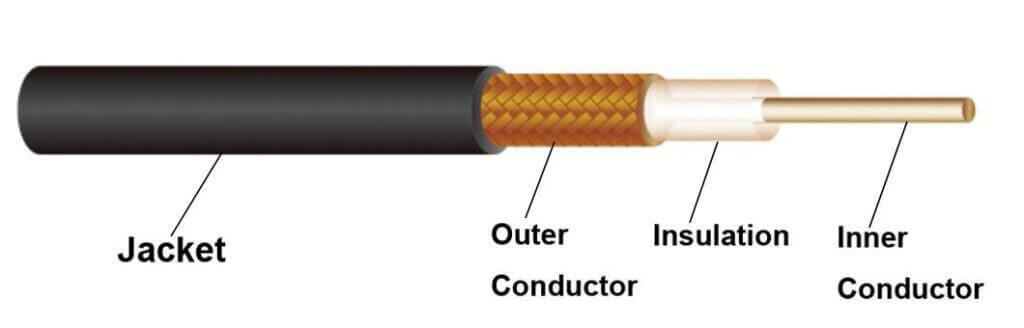
RG174: A slim 2.8mm cable, offering excellent flexibility and compactness, making it a go-to for consumer electronics, compact devices, and internal wiring where space is at a premium.
RG316: Even thinner (2.5mm), featuring a Teflon jacket for higher temperature resistance and tight bend radii. It’s often found in internal device connections, test leads, and compact assemblies.
Applications: RG58 is favored for external pigtails, while RG174 and RG316 are widely used in consumer electronics, small devices, and internal RF paths.
3. LMR Series (LMR195 / LMR240 / LMR400)
LMR195: Comparable in size to RG58, but with superior shielding and lower attenuation, making it a solid choice for short to moderate-length pigtails.

LMR240: Thicker, with even lower attenuation, ideal for medium-length runs where signal preservation is crucial.
LMR400: A robust, thick cable with exceptionally low loss, especially at higher frequencies. While less flexible, it’s the preferred option for long runs or high-power applications.
Applications: Widely used in wireless infrastructure, outdoor antennas, and high-frequency links.
4. Low PIM Coaxial Cables
RG401: This semi-rigid 50 Ohm coaxial cable features a solid copper or copper-clad steel outer conductor and PTFE dielectric, offering excellent shielding effectiveness and extremely stable electrical characteristics. Its construction minimizes passive intermodulation (PIM), making it a reliable choice for demanding cellular and distributed antenna system (DAS) environments. RG401 is commonly specified for high-frequency, low-loss signal transmission in both indoor and outdoor wireless infrastructure.
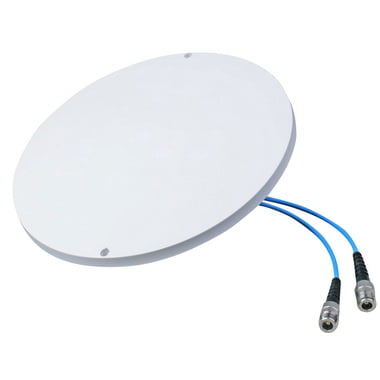
RG402: Slightly smaller in diameter than RG401, RG402 shares the same semi-rigid design and low PIM attributes. With robust shielding and consistent impedance, it ensures minimal signal degradation and intermodulation interference. RG402 is often selected for RF jumpers, interconnects in test and measurement setups, and critical links within 4G/5G base stations and in-building wireless systems.
141 Cable (also known as Semi-Rigid .141″): This 0.141-inch diameter semi-rigid coaxial cable is widely recognized for its low PIM performance, mechanical stability, and precise impedance control. Its solid metal outer sheath and PTFE insulation provide superior shielding and minimal signal leakage, making it ideal for applications where signal purity and intermodulation resistance are vital. 141 Cable is extensively used in RF modules, cellular repeaters, and DAS head-end equipment.
Other Common Low PIM Models: In addition to the above, other semi-rigid and conformable cables—such as 086 Cable (0.086″ diameter)—are frequently employed in low PIM scenarios. These cables are selected for their ability to maintain signal integrity and suppress unwanted intermodulation products, especially in multi-carrier and high-density RF installations.
Applications:
Low PIM coaxial cables are indispensable in modern wireless networks, including 4G/5G macro and micro cells, indoor DAS, small cell deployments, and any environment where minimizing PIM is essential for maintaining network performance and reliability.
5. Super Flexible RF Coaxial Cables (1/4”, 1/2”, 5/8”)
Super flexible RF coaxial cables are heavy-duty cables engineered for optimal performance in demanding environments. Available in popular sizes—1/4 inch, 1/2 inch, and 5/8 inch—these cables are constructed with a corrugated or helically-wound outer conductor, allowing for exceptional flexibility even with their relatively large diameters. Their design ensures low signal attenuation, making them ideal for high-frequency applications where reliable transmission is critical.

1/4″ Superflex: With an outer diameter of approximately 7.2 mm (0.28″), this cable is lightweight and highly flexible, perfect for installations with space constraints or tight bends.
1/2″ Superflex: Featuring an outer diameter of about 13 mm (0.51″), this size strikes a balance between flexibility and even lower signal loss, making it suitable for medium-length runs in complex layouts.
5/8″ Superflex: With an outer diameter nearing 16 mm (0.63″), this heavy-duty cable offers the lowest attenuation among the three, providing outstanding performance for long cable runs while still retaining good flexibility due to its corrugated construction.
Key Features:
- Exceptional Flexibility: cURL Too many subrequests by single Worker invocation. To configure this limit, refer to https://developers.cloudflare.com/workers/wrangler/configuration/#limits.
- cURL Too many subrequests by single Worker invocation. To configure this limit, refer to https://developers.cloudflare.com/workers/wrangler/configuration/#limits cURL Too many subrequests by single Worker invocation. To configure this limit, refer to https://developers.cloudflare.com/workers/wrangler/configuration/#limits.
- cURL Too many subrequests by single Worker invocation. To configure this limit, refer to https://developers.cloudflare.com/workers/wrangler/configuration/#limits cURL Too many subrequests by single Worker invocation. To configure this limit, refer to https://developers.cloudflare.com/workers/wrangler/configuration/#limits.
cURL Too many subrequests by single Worker invocation. To configure this limit, refer to https://developers.cloudflare.com/workers/wrangler/configuration/#limits
- cURL Too many subrequests by single Worker invocation. To configure this limit, refer to https://developers.cloudflare.com/workers/wrangler/configuration/#limits cURL Too many subrequests by single Worker invocation. To configure this limit, refer to https://developers.cloudflare.com/workers/wrangler/configuration/#limits.
- cURL Too many subrequests by single Worker invocation. To configure this limit, refer to https://developers.cloudflare.com/workers/wrangler/configuration/#limits.
- cURL Too many subrequests by single Worker invocation. To configure this limit, refer to https://developers.cloudflare.com/workers/wrangler/configuration/#limits cURL Too many subrequests by single Worker invocation. To configure this limit, refer to https://developers.cloudflare.com/workers/wrangler/configuration/#limits.
- cURL Too many subrequests by single Worker invocation. To configure this limit, refer to https://developers.cloudflare.com/workers/wrangler/configuration/#limits cURL Too many subrequests by single Worker invocation. To configure this limit, refer to https://developers.cloudflare.com/workers/wrangler/configuration/#limits.
cURL Too many subrequests by single Worker invocation. To configure this limit, refer to https://developers.cloudflare.com/workers/wrangler/configuration/#limits.
cURL Too many subrequests by single Worker invocation. To configure this limit, refer to https://developers.cloudflare.com/workers/wrangler/configuration/#limits
cURL Too many subrequests by single Worker invocation. To configure this limit, refer to https://developers.cloudflare.com/workers/wrangler/configuration/#limits cURL Too many subrequests by single Worker invocation. To configure this limit, refer to https://developers.cloudflare.com/workers/wrangler/configuration/#limits.
Applications: cURL Too many subrequests by single Worker invocation. To configure this limit, refer to https://developers.cloudflare.com/workers/wrangler/configuration/#limits.
cURL Too many subrequests by single Worker invocation. To configure this limit, refer to https://developers.cloudflare.com/workers/wrangler/configuration/#limits
cURL Too many subrequests by single Worker invocation. To configure this limit, refer to https://developers.cloudflare.com/workers/wrangler/configuration/#limits.
cURL Too many subrequests by single Worker invocation. To configure this limit, refer to https://developers.cloudflare.com/workers/wrangler/configuration/#limits
cURL Too many subrequests by single Worker invocation. To configure this limit, refer to https://developers.cloudflare.com/workers/wrangler/configuration/#limits
SMA (SubMiniature version A)
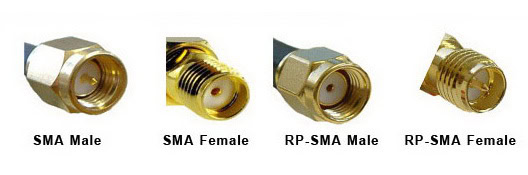
SMA Male/Female: Widely used in WiFi, LTE, and GPS equipment. The male has a center pin, while the female has a center socket. SMA connectors are compact, reliable, and support frequencies up to 18 GHz.
RP-SMA (Reverse Polarity SMA):
Common in consumer WiFi equipment. The gender of the center pin is reversed to prevent accidental connection to non-compliant devices.
N-Type
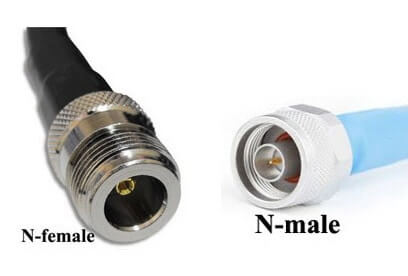
N Male/Female: Large, robust, and weatherproof, N-type connectors are used for outdoor antennas, cellular base stations, and high-power applications. They offer low loss and excellent performance up to 11 GHz.
TNC (Threaded Neill–Concelman)
TNC Male/Female: Similar to BNC but with a threaded coupling for better vibration resistance. Used in some wireless and cellular equipment, especially in industrial environments.
RP-TNC (Reverse Polarity TNC):
Like RP-SMA, the center pin gender is reversed. RP-TNC is often found on older WiFi routers and access points, particularly from brands like Linksys.

BNC (Bayonet Neill–Concelman)
BNC Male/Female: Quick-connect/disconnect bayonet style. Less common in modern WiFi/4G gear but still found in CCTV and some test equipment.

F-Type
F Male/Female: Used primarily for cable TV and some broadband internet connections, but occasionally seen in certain CPE or IoT devices.
MCX/MMCX
MCX/MMCX: Micro connectors for very compact devices, such as GPS modules, small IoT sensors, and embedded WiFi modules.

U.FL/IPEX
U.FL/IPEX: Ultra-miniature connectors found on internal PCB antennas, WiFi cards, and embedded modules. They require special care during connection due to their small size.

7/16 DIN
7/16 DIN Male/Female: Very large, rugged connectors designed for high-power RF transmission, especially in cellular base stations and broadcast towers. They offer excellent performance up to 7.5 GHz and are prized for their low intermodulation and weather resistance.
4.3-10
4.3-10 Male/Female: A modern alternative to 7/16 DIN, these connectors are smaller, lighter, and easier to handle while still supporting high power and low PIM (Passive Intermodulation). Widely used in new cellular infrastructure, especially for 4G and 5G deployments.

2.2-5
2.2-5 Male/Female: Even more compact than 4.3-10, this connector is designed for space-constrained applications in modern mobile networks. It maintains low PIM and high-frequency performance, making it suitable for dense 5G installations.
Choosing the Right Connector: Always match the connector type and gender to both the antenna and the device. Adapters can be used in a pinch, but each additional connection can introduce loss and potential failure points.
Key Considerations When Selecting a Coaxial Cable Assembly
1. Frequency and Signal Loss
Higher frequencies (like 5 GHz and 6GHz WiFi ) are more susceptible to cable loss. Choose a low-loss cable (such as LMR195 or LMR240) for these applications, especially if the cable run exceeds a few feet.
2. Cable Length
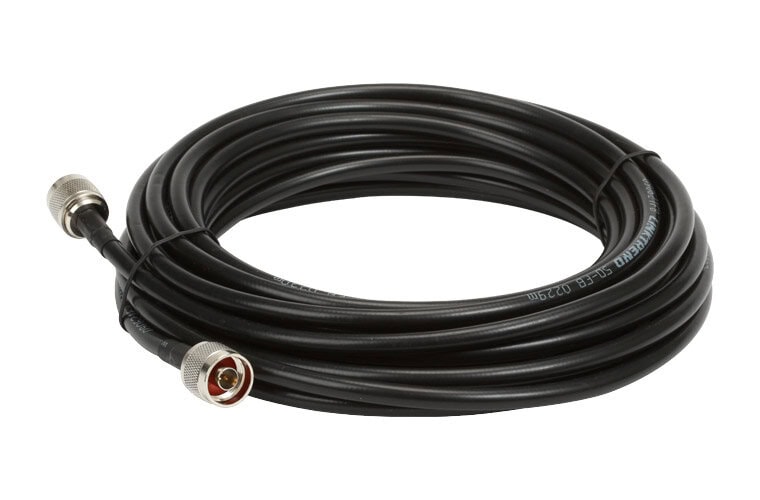
Keep your pigtail as short as possible. Every extra inch of cable adds attenuation. For internal device connections, RG316 or RG174 might be fine, but for longer runs, step up to LMR195, LMR240, or even LMR400.
3. Indoor vs. Outdoor
Use If your installation is outdoors, you definitely want to pick cables and connectors rated for UV exposure, moisture, and temperature extremes. Indoor-only cables might degrade quickly if used outside.
4. Flexibility and Durability
For installations where the cable needs to bend or twist, a more flexible cable like RG316 or LMR195 is preferable. For outdoor or harsh environments, look for UV-resistant, waterproof jackets, or direct-burial rated cables.
5. Connector Quality
Inferior connectors can cause high resistance, intermittent connections, or even damage to the device’s RF port. Always use assemblies with high-quality, precisely machined connectors, and ensure they are securely attached.
6. Impedance Matching
Most wireless communication equipment and antennas use 50 Ohm systems. Make sure your cable and connectors match this impedance to avoid signal reflection and loss.
cURL Too many subrequests by single Worker invocation. To configure this limit, refer to https://developers.cloudflare.com/workers/wrangler/configuration/#limits
cURL Too many subrequests by single Worker invocation. To configure this limit, refer to https://developers.cloudflare.com/workers/wrangler/configuration/#limits.
cURL Too many subrequests by single Worker invocation. To configure this limit, refer to https://developers.cloudflare.com/workers/wrangler/configuration/#limits
cURL Too many subrequests by single Worker invocation. To configure this limit, refer to https://developers.cloudflare.com/workers/wrangler/configuration/#limits.
cURL Too many subrequests by single Worker invocation. To configure this limit, refer to https://developers.cloudflare.com/workers/wrangler/configuration/#limits
cURL Too many subrequests by single Worker invocation. To configure this limit, refer to https://developers.cloudflare.com/workers/wrangler/configuration/#limits.
cURL Too many subrequests by single Worker invocation. To configure this limit, refer to https://developers.cloudflare.com/workers/wrangler/configuration/#limits
cURL Too many subrequests by single Worker invocation. To configure this limit, refer to https://developers.cloudflare.com/workers/wrangler/configuration/#limits.
cURL Too many subrequests by single Worker invocation. To configure this limit, refer to https://developers.cloudflare.com/workers/wrangler/configuration/#limits
cURL Too many subrequests by single Worker invocation. To configure this limit, refer to https://developers.cloudflare.com/workers/wrangler/configuration/#limits.
cURL Too many subrequests by single Worker invocation. To configure this limit, refer to https://developers.cloudflare.com/workers/wrangler/configuration/#limits cURL Too many subrequests by single Worker invocation. To configure this limit, refer to https://developers.cloudflare.com/workers/wrangler/configuration/#limits
- cURL Too many subrequests by single Worker invocation. To configure this limit, refer to https://developers.cloudflare.com/workers/wrangler/configuration/#limits
- cURL Too many subrequests by single Worker invocation. To configure this limit, refer to https://developers.cloudflare.com/workers/wrangler/configuration/#limits
- cURL Too many subrequests by single Worker invocation. To configure this limit, refer to https://developers.cloudflare.com/workers/wrangler/configuration/#limits
- cURL Too many subrequests by single Worker invocation. To configure this limit, refer to https://developers.cloudflare.com/workers/wrangler/configuration/#limits.

cURL Too many subrequests by single Worker invocation. To configure this limit, refer to https://developers.cloudflare.com/workers/wrangler/configuration/#limits cURL Too many subrequests by single Worker invocation. To configure this limit, refer to https://developers.cloudflare.com/workers/wrangler/configuration/#limits
- cURL Too many subrequests by single Worker invocation. To configure this limit, refer to https://developers.cloudflare.com/workers/wrangler/configuration/#limits
- cURL Too many subrequests by single Worker invocation. To configure this limit, refer to https://developers.cloudflare.com/workers/wrangler/configuration/#limits
- cURL Too many subrequests by single Worker invocation. To configure this limit, refer to https://developers.cloudflare.com/workers/wrangler/configuration/#limits
- cURL Too many subrequests by single Worker invocation. To configure this limit, refer to https://developers.cloudflare.com/workers/wrangler/configuration/#limits.

Example 3: Linking an RFID Reader to a Remote Antenna
- Cable: LMR195 for very short runs (up to 5 meters), LMR240 or LMR400 for longer distances
- Connectors: Typically SMA male (RFID reader) to N male (antenna)
- Length: As short as possible; RFID signals are easily weakened by excess cable length
- Tip: Use shielded cables and connectors for industrial or outdoor environments to prevent interference.

Example 4: Installing a Signal Booster with an External Antenna
- Cable: LMR195 recommended for most installations due to its low loss over longer distances
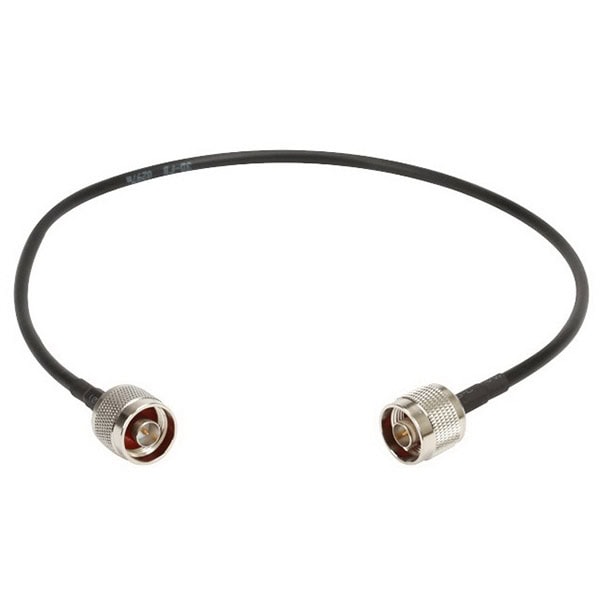
- Connectors: N male (antenna or booster) to N male, or N male to SMA male (booster connectors can vary)
- Length: Try to keep under 10 meters; longer runs require higher-grade cable to prevent signal degradation
- Tip: Mount both antenna and booster in locations with good airflow to avoid overheating, and always follow manufacturer guidelines for grounding and surge protection.
General Advice
General Advice: When setting up wireless equipment, always match the cable type and connectors to your specific devices. Use high-quality, low-loss cables, and avoid unnecessary length to maintain a strong, reliable signal. If in doubt, consult your equipment’s datasheet or contact the manufacturer for recommendations.
For best results, follow established best practices for antenna and coaxial cabling installations. Double-check connector compatibility, ensure all connections are properly tightened, and avoid sharp bends in the cable that could compromise performance. Whenever possible, route cables away from sources of electrical interference (like power lines or large motors) and use outdoor-rated, weatherproof materials for any exposed runs. Taking these precautions not only optimizes your wireless performance but also helps prevent unexpected signal drops and extends the lifespan of your equipment.
Summary:
In wireless networking and communication, choosing the appropriate coaxial cable and connector is key to achieving the best performance. Whether you’re connecting an access point, upgrading CCTV antennas, installing an RFID reader, or setting up a signal booster, the right selections will minimize signal loss and interference. Always consider cable length, connector compatibility, and installation environment to ensure your wireless system operates efficiently and reliably.
Quick Installation Guides for Antennas
If you’re looking for straightforward, region-specific installation guides for various antenna types, good news: handy resources do exist to make your setup process painless.
Whether you’ve got a GNSS heading antenna, a GPS unit, or specialized spotbeam antennas destined for Asia Pacific, EAME, or Gulf of Mexico operations, there are concise guides tailored to each. These step-by-step instructions typically walk you through:
- Optimal mounting locations for interference-free performance
- Proper cable routing and weatherproofing
- Essential grounding and surge protection methods
- Connector selection and secure attachment
Respected industry sources and third-party brands like Trimble, Tallysman, and NovAtel often supply downloadable PDFs or quick-reference cards on their support pages. Always double-check that your installation guide matches both the antenna model and your operating region—requirements can differ based on local environments and regulations.
With the right installation reference in hand, achieving a reliable, high-performance connection is much easier, no matter where your project takes you.
Need More Guidance? Explore These Antenna Installation Resources
If you’re considering other types of antenna setups or want to dive a bit deeper, a variety of detailed guides are out there to help you get your installation right the first time:
- GNSS Heading Antenna Setup: Comprehensive walk-throughs on aligning and mounting GNSS antennas, including tips to optimize satellite reception and avoid interference.
- GPS Antenna Quick Start: Short and sweet instructions for GPS antenna placement, grounding, and ensuring maximum visibility of the sky.
- Spotbeam Antenna Installation for Various Regions: Step-by-step advice tailored to regions like Asia Pacific, Europe/Africa/Middle East, and the Gulf of Mexico, addressing unique environmental and regulatory considerations.
- UHF/VHF and Wi-Fi Antenna Mounting: Thorough overviews for setting up UHF, VHF, and Wi-Fi antennas on vehicles, rooftops, or challenging environments.
cURL Too many subrequests by single Worker invocation. To configure this limit, refer to https://developers.cloudflare.com/workers/wrangler/configuration/#limits.
cURL Too many subrequests by single Worker invocation. To configure this limit, refer to https://developers.cloudflare.com/workers/wrangler/configuration/#limits
cURL Too many subrequests by single Worker invocation. To configure this limit, refer to https://developers.cloudflare.com/workers/wrangler/configuration/#limits antenna cURL Too many subrequests by single Worker invocation. To configure this limit, refer to https://developers.cloudflare.com/workers/wrangler/configuration/#limits.
cURL Too many subrequests by single Worker invocation. To configure this limit, refer to https://developers.cloudflare.com/workers/wrangler/configuration/#limits.
 Malayalam
  English
  Spanish
  German
  French (France)
  Korean
  Russian
  Indonesian
  French (Canada)
  Vietnamese
  Armenian
  Albanian
  Assamese
  Acehnese
  Amharic
  Czech
Czech  Bulgarian
  Cebuano
  German (Switzerland)
  Japanese
  Dutch
Dutch 