 Skip to content

When it comes to wireless communications, selecting the correct antenna can have a big impact on network performance, coverage, and reliability. There are many different types of antennas to choose from, but two of the most popular ones for different applications, such as mobile networks and Wi-Fi setups, are omni antennas and sector antennas. This article will explain the basic differences between these two types of antennas, the benefits of each, common uses, and how to choose the right one for your needs.
Key Considerations in a Wireless Site Survey
Before installing any wireless system, carrying out a detailed site survey is essential to ensure optimal performance and coverage. A site survey helps you identify the unique requirements of your environment and choose the right type of antenna—whether omni or sector—for your specific application.
Here are some important factors to keep in mind:
- Layout and Obstacles: Evaluate the building layout, including walls, floors, furniture, and any physical obstructions that may interfere with radio signals. Materials like concrete or metal can significantly impact signal strength.
- Coverage Area: Determine the size and shape of the area you need to cover. Large, open spaces often benefit from omni antennas, while directional or sector antennas can help target coverage to specific zones.
- Interference Sources: Identify potential sources of interference, such as other electronic devices, Wi-Fi networks, or even microwaves. Understanding existing RF conditions helps prevent unexpected drops in performance.
- Capacity Needs: Assess how many devices will be connecting and what sort of data throughput is required. High-capacity environments may require more precise antenna placement and orientation.
- Flexibility & Growth: Consider how easily your network can adapt to future changes. A well-planned site survey should accommodate both current needs and potential expansion.
By taking these elements into account, you’ll be better equipped to select the appropriate antenna and deployment strategy, ensuring your wireless network is both robust and reliable.
Why a Site Survey Matters for Indoor Antenna Selection
Indoor wireless environments pose unique challenges, thanks to walls, floors, and surprising obstacles like elevator shafts or hidden steel beams. Unlike outdoor scenarios where line of sight is often straightforward, indoor radio frequency (RF) signals can bounce, reflect, and be absorbed by various building materials—from lightweight drywall to thick, steel-reinforced concrete.
Coverage isn’t just about how “strong” the signal is on paper. For example, you might see high signal readings, but if the quality is compromised by interference, your network speed and reliability will suffer. Concrete and metal can sharply reduce signal range, while wood or plaster lets RF waves pass through more easily. The same goes for frequency: higher frequencies, like those used in Wi-Fi Alliance 6 (802.11ax) or 802.11a, have shorter wavelengths that get absorbed more quickly by dense materials.
The real trouble is unpredictability. Furniture moves, people come and go, and even opening a door alters how signals bounce around. Because of these variables, guessing antenna placement rarely works out. That’s where a thorough site survey comes in.
During a site survey, you’ll:
- Identify physical barriers that weaken signals.
- Test different antenna types and positions to minimize dead zones or interference.
- Assess how building materials affect overall coverage and signal quality.
- Determine the best channels to reduce overlap with neighboring networks.
In short, a site survey provides the real-world data you need, well beyond what specs and datasheets can tell you. Adjusting the antenna type and location based on this hands-on testing can be the difference between a reliable indoor network and a patchy, frustrating one.
Isotropic vs. Dipole Antennas: Radiation Patterns and Gain
To understand how antennas perform, it’s helpful to compare two key types: isotropic and dipole antennas.
An isotropic antenna is a theoretical concept used as a reference point. Imagine it as a perfect point source radiating energy equally in every direction—think of it like a tiny light bulb glowing in all directions with a uniform spherical pattern. This antenna doesn’t exist in the real world but serves as the baseline for measuring other antennas. Its gain is set at 1 (or 0 dB), representing no amplification or loss in signal strength.
On the other hand, a dipole antenna is practical and widely used. Its radiation pattern differs—it sends signals out in a full circle horizontally, but its vertical reach is more limited, resulting in a shape that looks similar to a donut. Because the dipole concentrates energy more effectively in the horizontal plane compared to the isotropic standard, it offers a slight boost in gain—about 2.14 dB over an isotropic antenna, often abbreviated as 2.14 dBi.
In summary:
- Isotropic antenna: purely theoretical, radiates equally in every direction (ideal sphere), gain of 0 dB.
- Dipole antenna: real-world example, radiates in a donut-shaped pattern (360° horizontally, ~75° vertically), gain of 2.14 dBi.
Understanding these differences helps you compare antennas more easily, as most specifications reference either the isotropic or dipole standard for clarity.
Understanding Polarization and Its Effects on Antenna Performance
To make sense of how antennas interact with wireless signals, it’s important to understand polarization. In simple terms, polarization refers to the orientation of the electromagnetic field that leaves or enters an antenna—think of it as the “alignment” of the radio waves being sent or received.
For most omni antennas, this orientation is vertical, meaning radio waves travel up and down rather than side to side. This is commonly referred to as “vertical polarization.” Because all devices in a network must match the polarization to communicate efficiently, mismatched polarizations (for example, one device set vertically and another horizontally) can lead to significant signal loss.
Polarization doesn’t just affect basic performance; it also influences how well an antenna can deal with interference. Some specialized antennas use different types of polarization—like “cross polarization” (utilizing both vertical and horizontal components)—to better resist interference and improve signal clarity. However, omni antennas, by design, typically stick to a single polarization, which limits this particular benefit. So, while they offer great coverage in every direction, their ability to dodge interference through polarization techniques is more limited compared to other antenna types.
Now that we’ve unpacked polarization, let’s take a look at what makes an omni antenna unique and where you’ll most often find them in action.
What is an Omni Antenna?
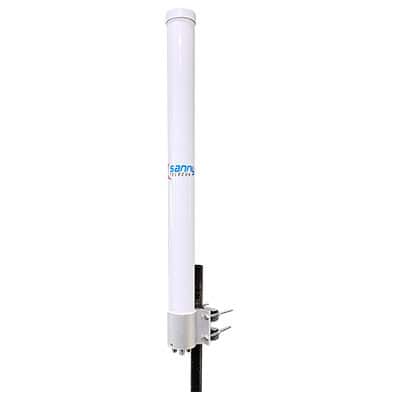
An omni antenna, short for omni-directional antenna, is a type of antenna that radiates or receives radio waves in all directions equally. It is designed to provide a 360-degree coverage pattern, allowing it to transmit or receive signals from any direction without the need for constant adjustment or pointing towards a specific target. Omni antennas are commonly used in wireless communication systems, such as Wi-Fi networks, cellular networks, and radio broadcasting, to ensure a wide coverage area and to provide connectivity to multiple devices in different locations.
What is the range of an omni antenna?
The range of an omni antenna can vary depending on several factors, including the frequency it operates at, the power output of the transmitter, and the surrounding environment. Generally, the range of an omni antenna can range from a few meters to a few hundred meters . However, it is important to note that the range can be affected by obstacles such as buildings, trees, and other obstructions that can attenuate the signal.
How does antenna gain affect coverage distance and angle?
Antenna gain plays a key role in shaping how signals are transmitted and received. Gain essentially refers to how effectively an antenna can direct radio energy compared to a standard reference antenna. When an antenna’s gain increases, it doesn’t actually create more power, but rather concentrates the signal in a specific direction.
For directional antennas, higher gain means the signal travels a greater distance, but covers a narrower angle—think of it like using a flashlight with a focused beam versus one that lights up an entire room. As the gain increases, the “beam” becomes tighter, reaching farther but illuminating a smaller area. This makes high-gain, directional antennas ideal for point-to-point connections where you want to maximize range in one direction, while lower-gain antennas provide wider coverage over a shorter distance.
In summary, higher antenna gain extends the reach but narrows the field of coverage, while lower gain offers broader coverage but at closer range.
How does indoor wireless signal propagation differ from outdoor propagation?
Indoor signal propagation is a different beast compared to outdoor environments, thanks to the sheer variety of obstacles and materials found inside buildings. Unlike the open air, wireless signals indoors must contend with walls, ceilings, floors, and even furniture—all of which can weaken, absorb, or reflect radio waves, leading to signal loss and unpredictable coverage.
Obstacles and Multipath Effects
Within a building, signals often bounce off surfaces and objects before reaching their destination. This phenomenon, known as multipath, means that instead of traveling in a straight line, signals may arrive via several indirect routes. In environments where you can see the access point, such as open hallways (near line of sight), these reflected signals are generally weaker than the main one and don’t cause much trouble. But in offices packed with cubicles or rooms with closed doors and walls (non-line of sight), reflected signals may actually compete with the main signal, causing interference and reducing performance.
Additionally, indoor environments are far from static—moving people, carts, or even large pets can shift the paths the signals travel, resulting in constantly changing signal quality over time.
Signal Strength Versus Signal Quality
It’s worth noting that a strong received signal (high Rx level) doesn’t guarantee a good internet experience. Even with strong signals, excessive interference or poor signal quality can lead to dropped connections or slow speeds. So, when troubleshooting, don’t just look at the signal bars; pay attention to both signal strength and quality. If both are low, you’re likely facing heavy blockage from walls or other obstructions.
Impact of Building Materials
What a building is made of plays a big role, too. Lightweight partitions like drywall or wood allow signals to travel through several rooms with minimal loss. Thicker or denser materials—like concrete, brick, or especially steel-reinforced concrete—can drastically limit how far the signal travels. Metal, in particular, tends to block or reflect wireless signals, making coverage between floors or heavily fortified rooms especially challenging.
The Role of Frequency
Higher-frequency signals, such as those used in 5GHz Wi-Fi, are more likely to be absorbed or distorted by building materials than lower frequencies, like those used in 2.4GHz. That’s why 5GHz Wi-Fi often provides faster speeds but may not reach as far or penetrate walls as effectively.
Why Site Surveys Matter
Given these complexities, testing is essential. Before finalizing antenna type or placement, it’s important to perform a site survey—measuring real signal levels throughout your space and noting how different locations or materials affect coverage. Tweaking antenna locations, trying different antenna types, and reviewing channel plans can help minimize interference and provide more consistent service across your building.
What are the advantages of omni antennas?
Omnidirectional antennas have several advantages:
1. 360-degree coverage: Omnidirectional antennas radiate and receive signals in all directions, providing a 360-degree coverage pattern. This allows them to pick up signals from any direction without the need for manual adjustment or pointing towards a specific source.
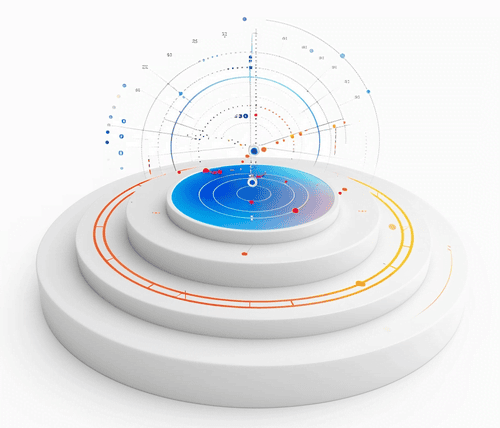
2. Ease of installation: Omnidirectional antennas are easy to install and require minimal setup. They do not need to be aligned or pointed towards a specific direction, making them a convenient choice for users who are not technically inclined or do not have the expertise to set up directional antennas.
3. Versatility: Due to their ability to receive and transmit signals in all directions, omnidirectional antennas are versatile and can be used in various applications. They are commonly used in wireless communication systems, such as Wi-Fi networks, cellular networks, and radio broadcasting, where signals need to be received from multiple directions.
4. Increased signal strength: Omnidirectional antennas can receive signals from multiple sources simultaneously. This can help improve signal strength and reception quality, especially in areas with multiple signal sources or in environments with signal obstructions.
5. Mobility: Omnidirectional antennas are often used in mobile applications, such as on vehicles or ships, where the direction of the signal source may vary. Their ability to receive signals from any direction makes them suitable for moving environments.
6. Cost-effective: Omnidirectional antennas are generally more cost-effective compared to directional antennas. They are simpler in design and do not require additional equipment or mechanisms for pointing towards a specific direction, making them a budget-friendly option for many users.
What are the disadvantages of omni antennas?
There are several disadvantages of omnidirectional antennas:
1. Limited range: Omnidirectional antennas have a limited range compared to directional antennas. They radiate signals in all directions, which can result in a weaker signal strength over long distances. This makes them less suitable for long-range communications.
2. Interference: Omnidirectional antennas are more susceptible to interference from other devices and signals. Since they pick up signals from all directions, they can be affected by other nearby devices operating on the same frequency, causing signal degradation and reduced performance.
This interference often comes from a variety of sources—other Wi-Fi devices, Bluetooth gadgets, cordless phones, microwave ovens, and even radar signals from nearby airports. In the 2.4 GHz unlicensed band, where only three non-overlapping channels are available, avoiding interference can be particularly challenging. Overlapping channels and a crowded spectrum mean that signal fluctuations—known as fading—are common. Fading can be caused by both interference and a phenomenon called multipath, where signals bounce off objects and arrive at the antenna from different directions or at different times. The result? The receive signal strength may vary quickly, especially in environments with lots of reflective surfaces, leading to increased packet retries and reduced network performance.
3. Lower gain: Omnidirectional antennas generally have lower gain compared to directional antennas. Gain refers to the ability of an antenna to focus its energy in a particular direction. Due to their design, omnidirectional antennas distribute their energy in all directions equally, resulting in lower gain and reduced signal strength. Normally, there is a limit of the gain which is 12dBi for most of the omni-directional antenna.
4. Less focused coverage: Omnidirectional antennas radiate signals in a circular pattern, which means the coverage area is not as focused as with directional antennas. This can result in signal leakage and reduced efficiency, especially in environments with obstacles or where precise coverage is required.
5. Limited signal penetration: Omnidirectional antennas may have difficulty penetrating obstacles such as walls, buildings, or dense vegetation. Since they radiate signals in all directions, the energy is dispersed, making it harder for the signal to penetrate obstacles and reach its intended destination.
6. Multipath interference: Omnidirectional antennas are more susceptible to multipath interference, where signals bounce off objects and arrive at the antenna from different directions. This can cause signal distortion and reduced performance, particularly in environments with reflective surfaces or obstructions.
Additionally, multipath and interference can increase the required signal to noise ratio (SNR) to maintain a reliable connection at higher data rates. In areas where interference or multipath is significant, the packet retry count can climb, leading to noticeable slowdowns and connection drops. While antenna gain can help improve system performance by increasing the signal and interference to noise ratio (SINR), omnidirectional antennas generally lack the ability to reject unwanted signals from outside their primary coverage area. This makes them less effective than directional antennas at combating interference, particularly in complex indoor environments or areas with many competing signals.
In summary, while omnidirectional antennas offer ease of use and broad coverage, their susceptibility to interference, lower gain, and vulnerability to multipath effects can limit their effectiveness in noisy or obstacle-rich environments.
How does downtilt affect antenna coverage, and why is it difficult with omni antennas?
In some antennas, particularly directional types, engineers use a technique called “downtilt” to adjust the coverage area. Downtilt involves angling the antenna or altering its internal design so that the signal is projected more towards the ground, enhancing coverage in areas directly below or closer to the antenna. This can help control interference with distant sites and improve service for users nearby.
However, implementing downtilt with an omnidirectional antenna isn’t straightforward. Because omni antennas are designed to radiate signals uniformly in all horizontal directions, their vertical coverage is inherently limited and symmetrical. Adjusting the vertical angle of coverage—essentially “pointing” the signal downward—is not easily achievable without disrupting the even 360-degree pattern. As a result, solutions like downtilt, commonly used with sector or panel antennas, don’t offer the same benefits or flexibility when it comes to omnidirectional models.
What is multipath and diversity in wireless communications, and how do they affect performance?
In wireless communications, two important concepts that often come into play—especially when using omnidirectional antennas—are multipath and diversity.
Multipath occurs when a wireless signal travels from the transmitter to the receiver using multiple paths. These different paths are usually the result of the signal bouncing off objects such as walls, buildings, trees, or even vehicles. As a result, the receiver may get multiple copies of the same signal arriving at slightly different times. This can cause interference, signal fading, and distortion. Multipath effects are particularly noticeable in complex environments—think city streets filled with glass buildings, or industrial spaces with lots of machinery—where reflections are abundant.
Diversity is a strategy used to combat the negative impacts of multipath. It involves using multiple antennas or different frequencies to receive the same signal. The idea is that if one signal copy is weak or distorted due to interference or an obstacle, another might be stronger or clearer. Modern wireless technologies like LTE and Wi-Fi (including brands like Netgear or Ubiquiti) often rely on diversity techniques—such as spatial or frequency diversity—to improve reception quality and maintain a robust connection.
In summary, while multipath can introduce challenges by causing signal interference and degradation, employing diversity methods helps ensure more reliable wireless performance, especially in challenging environments where omnidirectional antennas are frequently deployed.
What types of interference can affect wireless LANs operating in unlicensed frequency bands?
Wireless LANs that operate in unlicensed frequency bands, such as 2.4 GHz, can encounter a variety of interference sources that may impact performance and reliability.
Common sources of interference
- Other wireless devices: Devices like Wi-Fi routers, Bluetooth gadgets, baby monitors, security cameras, and even Zigbee-equipped smart home products often share the same frequency bands, especially the crowded 2.4 GHz band. With only three non-overlapping channels available in 2.4 GHz, competition for bandwidth is fierce.
- Household appliances: Everyday electronics such as microwave ovens, cordless phones, and wireless video transmitters can emit signals in the same range, creating additional noise and interference for wireless LANs.
- Industrial and commercial equipment: Equipment used in manufacturing, medical monitoring devices, and other commercial wireless systems may also utilize these frequencies, leading to further interference.
- Environmental reflections: Indoors, wireless signals can bounce off walls, glass, metal fixtures, and other surfaces, resulting in multipath interference. These reflections cause signals to overlap, sometimes adding together but often canceling each other out, which can create areas of weak or inconsistent reception—commonly called fading.
Effects of interference on wireless LANs
- Fading and signal fluctuation: The combination of interference and multipath effects causes the received signal strength to fluctuate rapidly, especially when the devices or users are moving. This phenomenon, known as fading, impacts the reliability and consistency of wireless connections.
- Elevated noise floor: Multiple sources of interference raise the ambient noise level—sometimes called the noise floor—which can drown out weaker signals and require a higher signal-to-noise ratio (SNR) for stable communication.
- Reduced performance: As interference increases, devices may experience more dropped packets, higher packet retry rates, and slower data throughput.
- Channel limitations: In environments with high interference, finding a clear channel becomes challenging, particularly in the constrained 2.4 GHz band.
Mitigating interference
Changing the antenna type or its position can help reduce the impact of multipath interference. Antennas with higher gain can also improve the signal-to-interference-plus-noise ratio (SINR), making communication more robust even in environments with significant interference.
By understanding these challenges, users can better design and deploy wireless networks that maintain performance—even in busy, signal-filled spaces.
What is delay spread, and how does it relate to multipath interference?
Delay spread refers to the difference in arrival times between the earliest and latest versions of a transmitted signal that reach the receiver. This happens because, in environments filled with obstacles like walls, metal structures, or furniture, signals can bounce off various surfaces before finally arriving at their destination. Each reflected signal takes a slightly different path, which results in some copies arriving sooner than others.
Multipath interference occurs when these multiple versions of the same signal overlap at the receiver. The more obstacles and reflective surfaces there are—such as on a manufacturing floor packed with machinery or in a building with several walls and floors—the greater the variation in arrival times, and thus, the higher the delay spread. Unlike open outdoor areas, indoor environments typically see much higher delay spread values.
A large delay spread causes more significant multipath interference, leading to signal distortion and a reduction in network performance. High delay spread means data from earlier and later paths can interfere with each other, leading to errors and lower throughput, especially at higher data rates. Understanding delay spread is crucial when designing wireless networks for complex indoor environments, since it directly impacts the achievable speeds and reliability of the connection.
Under what circumstances would you use an omni antenna?
An omni antenna is typically used in situations where the signal needs to be transmitted or received in all directions equally. Here are some circumstances where an omni antenna would be used:
1. Wireless networking: In a home or office environment, an omni antenna is commonly used for Wi-Fi routers to provide coverage in all directions. This allows devices to connect to the network from any location within the range of the antenna.

2. Broadcasting: In radio and television broadcasting, omni antennas are used to transmit signals in all directions, ensuring that the signal can be received by anyone within the broadcast area.
3. Mobile communication: In mobile networks, such as cellular networks, omni antennas are used in cell towers to provide coverage in all directions. This allows mobile devices to connect to the network regardless of their location relative to the tower.
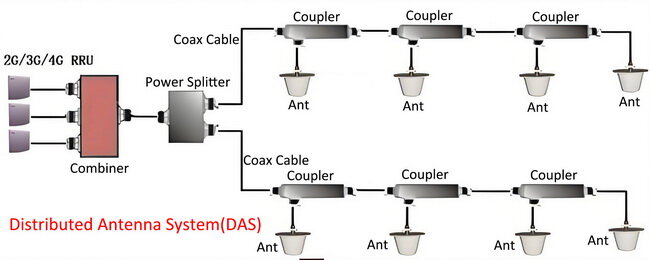
4. Public safety and emergency services: Omni antennas are often used by public safety agencies, such as police and fire departments, to communicate over radio frequencies. These antennas ensure that the signals can be transmitted and received from any direction, allowing for effective communication in emergency situations.
5. Marine and aviation communication: In marine and aviation industries, omnidirectional antennas are used for communication systems to provide coverage in all directions. This ensures that the signals can be transmitted and received from any location, allowing for effective communication between vessels, aircraft, and control towers.

Overall, an omnidirectional antenna is used when the goal is to provide coverage in all directions or when the direction of transmission or reception is not a critical factor.
When should an omni antenna be considered?
An omnidirectional antenna should be considered when there is a need to transmit or receive signals in all directions equally. This is particularly useful in situations where the source of the signal is constantly changing or cannot be predicted, or when there is a need for a wide coverage area. Omnidirectional antennas are commonly used in applications such as Wi-Fi networks, radio broadcasting, and mobile communication systems.
What is a Sector Antenna?
A sector antenna is a type of antenna that is designed to cover a specific sector or angle of coverage. It is commonly used in wireless communication systems, such as Wi-Fi networks and cellular networks, to provide coverage to a specific area.
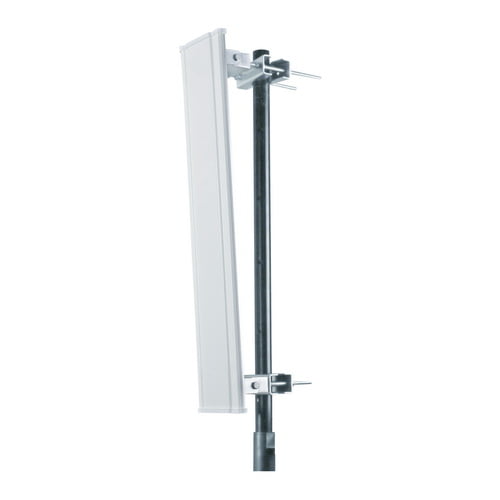
A sector antenna typically consists of multiple individual antennas arranged in a specific pattern to create a beam that covers a specific angle. The individual antennas are usually connected to a single feed point or a set of feed points, which are connected to the transmitter or receiver.
The main advantage of a sector antenna is its ability to provide directional coverage, which allows for better signal strength and capacity in a specific area. This makes it ideal for providing coverage to a specific location, such as a building or a street, without wasting energy and resources on areas that do not require coverage. Sector antennas are commonly used in outdoor environments, such as on top of buildings or cell towers, to provide coverage to a specific area or sector.
What is beamwidth, and how is it measured for antennas?
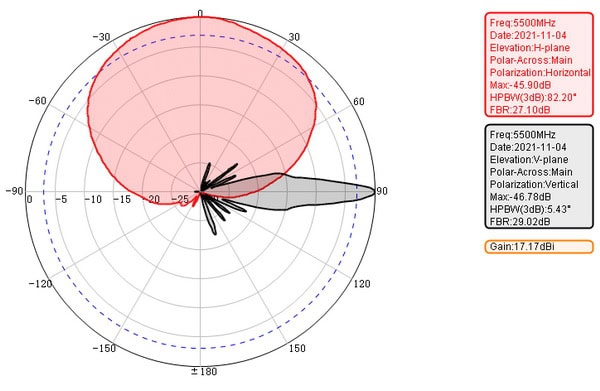
Beamwidth refers to the angle over which an antenna radiates or receives the majority of its signal strength. Specifically, it’s the angle measured between the points on the radiation pattern where the signal drops to half (or -3dB) of its maximum value.
Antennas, including sector antennas, have both horizontal and vertical beamwidths:
- Horizontal beamwidth defines the width of the coverage area from side to side.
- Vertical beamwidth refers to the coverage angle from top to bottom.
To measure beamwidth, engineers typically look at antenna radiation diagrams and identify the points on either side of the main lobe where the signal strength falls to half its peak. The angle between these two points is the beamwidth in that plane. This characteristic is useful in determining how focused or wide the antenna’s coverage will be, allowing you to match the antenna’s pattern with the intended coverage area.
For example, a sector antenna with a 120-degree horizontal beamwidth will cover a third of a circle, making it ideal for targeting specific areas while limiting interference with other sectors. Beamwidth is a key factor in planning wireless networks, especially when using multiple antennas to achieve seamless coverage or to avoid overlap and interference.
What is the range of a sector antenna?
The range of a sector antenna can vary depending on various factors such as the power output of the transmitter, the frequency being used, the height of the antenna, and the surrounding environment. However, in general, sector antennas typically have a range of a few miles to several miles.
What are the advantages of sector antennas?
There are several advantages of sector antennas, including:
1. Wide coverage: Sector antennas provide a wider coverage area compared to other types of antennas, such as omni-directional antennas. They are designed to cover a specific sector or angle, typically 60 degrees, 90 degrees, or 120 degrees. This makes them ideal for providing wireless coverage in large open areas.
2. Directional signal: Sector antennas are directional, which means they focus their signal in a specific direction. This helps to reduce interference and increase the signal strength in the desired coverage area. It also allows for better control of the wireless network by limiting the signal propagation in unwanted directions.
3. High gain: Sector antennas typically have higher gain compared to omni-directional antennas. The gain of an antenna determines the strength of the signal it can transmit or receive. Higher gain antennas can transmit signals over longer distances and provide better signal quality.
4. Scalability: Sector antennas can be easily deployed in a scalable manner to cover larger areas. By adding multiple sector antennas, each covering a specific sector, it is possible to create a wireless network that covers the entire area with high-speed connectivity.
5. Interference reduction: The directional nature of sector antennas helps to reduce interference from other wireless networks operating in the same area. By focusing the signal in a specific direction, sector antennas can minimize the impact of interference from neighboring networks and improve the overall network performance.
6. Cost-effective: Sector antennas are generally more cost-effective compared to other types of antennas, such as parabolic or dish antennas. They offer a good balance between coverage, gain, and cost, making them a popular choice for wireless network deployments.
Overall, sector antennas provide wide coverage, directional signal, high gain, scalability, interference reduction, and cost-effectiveness, making them suitable for various wireless communication applications.
What are the disadvantages of sector antennas?
1. Limited Coverage: Sector antennas provide coverage in a specific direction, typically in a 65- degree, 90-degree or 120-degree arc. As a result, the coverage area is limited compared to omnidirectional antennas.
2. Interference: Due to their directional nature, sector antennas are more susceptible to interference from other devices or antennas operating in the same frequency range. This can result in degraded performance or reduced signal quality.
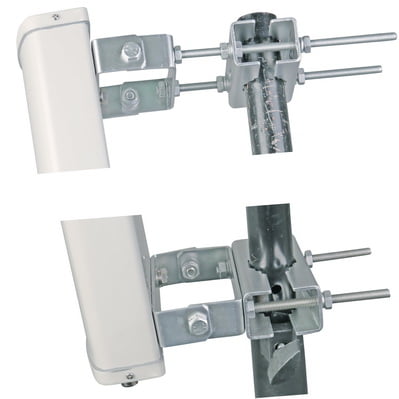
3. Installation Complexity: Sector antennas require precise alignment and positioning to ensure optimal performance. This can be challenging and time-consuming, especially when deploying multiple sector antennas in a network.
4. Cost: Sector antennas are generally more expensive than omnidirectional antennas. Additionally, to achieve full coverage, multiple sector antennas may be required, further increasing the cost.
5. Limited Flexibility: Sector antennas are designed to provide coverage in a specific direction, making them less flexible for applications that require coverage in multiple directions or for mobile devices that move around.
6. Signal Penetration: Due to their narrow beamwidth, sector antennas may have reduced signal penetration through obstacles such as buildings or trees. This can result in weaker signal strength or dead zones in areas with obstacles.
7. Limited Range: Sector antennas typically have a shorter range compared to high-gain directional antennas. This can be a disadvantage in situations where long-range coverage is required.
Understanding the Front-to-Back Ratio
The front-to-back ratio is another key performance metric for antennas, especially sector antennas. Simply put, this ratio compares the amount of signal the antenna sends forward—into the desired coverage area—to the amount that “leaks” out the back. Think of it as a way of measuring how focused and efficient the antenna is in directing its energy.
A high front-to-back ratio means that most of the energy is being sent where you want it, and very little is wasted behind the antenna. This is particularly important for minimizing interference from unwanted directions and for maximizing signal quality in the intended sector. For most applications, a front-to-back ratio of around 20 dB is considered good, ensuring that the antenna provides strong, targeted coverage without bleeding too much signal into areas where it’s not needed.
When should a sector antenna be considered?
A sector antenna should be considered when there is a need to provide wireless coverage to a specific area or sector. It is commonly used in wireless communication systems, such as cellular networks, Wi-Fi networks, and point-to-multipoint systems, where it is necessary to provide coverage to a particular area or sector rather than a full 360-degree coverage.
Some situations where a sector antenna should be considered include:
1. Providing coverage to a specific area: If there is a need to provide wireless coverage to a specific area, such as a building, a park, or a campus, a sector antenna can be used to focus the signal in that direction.
2. Reducing interference: By using a sector antenna, the wireless signal can be directed towards the intended area, reducing the chances of interference from other sources or neighboring networks.
3. Increasing network capacity: Sector antennas can be used in high-density areas where multiple users or devices need to be served simultaneously. By using multiple sector antennas pointing in different directions, the network capacity can be increased.
4. Point-to-multipoint communication: In point-to-multipoint systems, where a central base station communicates with multiple remote stations, sector antennas are commonly used to provide coverage to different sectors or areas where the remote stations are located.
In addition, while directional antennas—including sector antennas—can offer significant benefits for outdoor or targeted coverage scenarios, it’s important to note that most indoor wireless installations utilize omnidirectional antennas. This is due to their ability to distribute signal evenly in all directions, which is often more effective in enclosed environments with multiple reflective surfaces. The decision between sector and omnidirectional antennas should always be guided by a thorough site survey, taking into account coverage requirements, environmental obstacles, and the specific needs of your deployment.
Overall, a sector antenna should be considered when there is a need to provide focused coverage to a specific area or sector, reduce interference, increase network capacity, or enable point-to-multipoint communication.
Common Issues Impacting Radio Frequency Communication
Several factors can disrupt or degrade radio frequency (RF) communication within wireless networks. Being aware of these common culprits can help troubleshoot poor signal quality or connectivity problems:
- Interference from Other Devices: Wireless networks often compete with household electronics like microwave ovens, cordless phones, and even Bluetooth devices. Overlapping frequencies, especially in the crowded 2.4 GHz band, can introduce static and diminish performance.
- Physical Obstructions: Thick walls, metal structures, dense trees, or even large furniture can weaken or block RF signals, resulting in dead zones or unreliable connections.
- Distance and Signal Attenuation: The farther a device is from the transmitting antenna, the weaker its received signal. Signal loss is also affected by obstacles or adverse weather conditions.
- Multipath Fading: In environments with many reflective surfaces—think offices with glass walls or warehouses with metal racks—signals can bounce and arrive out of phase, causing distortion and decreased performance.
- Channel Overlap and Congestion: When too many nearby networks use the same or adjacent RF channels, signals may overlap, leading to congestion and data packet loss.
- Antenna Misalignment: Improper antenna orientation or placement can send signal power in the wrong direction, reducing effective range and coverage.
- Faulty Equipment: Issues with cables, connectors, or the antennas themselves—including damage, corrosion, or manufacturing defects—can lead to intermittent connectivity or total failure.
Regularly checking these factors can help maintain robust, reliable wireless communication and ensure your network meets performance expectations.
Comparing Omni and Sector Antennas
The choice between an omni and sector antenna hinges on several factors:
- Coverage Requirements: If the need is for uniform coverage around a central point without a focus on range, an omni antenna is preferable. For long-distance coverage in a specific direction, a sector antenna is more suitable.
- Physical Environment: In open environments without lots of obstructions, an omni antenna’s ability to broadcast in all directions can be advantageous. In contrast, a sector antenna might be better in urban areas with lots of obstructions where its directional capabilities maximize reach and performance.
When considering directional (sector) antennas, it’s important to note that they focus RF energy in a particular direction, allowing coverage over longer distances. This makes them particularly effective for near line-of-sight (LOS) coverage scenarios—think along hallways, long corridors, or aisles where you want the signal to travel farther rather than wider. However, because the beamwidth is narrower, sector antennas aren’t ideal if you need to cover a large area around the access point; their strength is in delivering a strong signal to targeted zones rather than providing all-around coverage.
Keep in mind that mounting sector antennas requires careful planning—they need to face the area where coverage is most needed, which can sometimes pose installation challenges depending on your environment.
Additionally, a sector antenna is better suited for long-range coverage in rural areas.
- Network Scale and Purpose: For small-scale networks like a home Wi-Fi, an omni antenna generally suffices. For most indoor environments, omnidirectional antennas are typically preferred due to their ability to provide even, 360-degree coverage—making them ideal for spaces where users and devices move around or are spread throughout a room or building. That said, the decision between using an omni or sector (directional) antenna should always be guided by a proper site survey. Assessing the unique layout, obstacles, and coverage needs of the deployment area ensures the right antenna is selected for optimal performance. In some cases, such as specialized indoor setups or challenging environments, a directional antenna may offer distinct benefits, but for the majority of standard indoor installations, an omni antenna remains the practical choice. However, for large-scale or commercial applications like a WISP, sector antennas can provide tailored coverage and better bandwidth management.
- Interference Management: In environments with high potential for interference from other wireless signals, sector antennas offer an advantage due to their focused coverage which naturally reduces noise from outside their designated coverage angle.
Troubleshooting Connectivity in Wireless LAN Networks
When a wireless LAN starts acting up, pinpointing the trouble can feel a bit like searching for a lost sock in an overstuffed laundry basket—equal parts detective work, patience, and luck. However, there are a few tried-and-true methods to help get those elusive bars back:
- Check the Obvious First: Make sure devices are within range of the access point and not sitting behind an impenetrable wall of concrete or a particularly ornery filing cabinet. Sometimes moving just a few feet can make a world of difference.
- Scan for Interference: Everything from that wireless speaker in the breakroom to the old microwave near the kitchenette can wreak havoc on Wi-Fi signals. Tools like NetSpot or inSSIDer can help map out signal strength and identify sources of interference.
- Verify Network Settings: Double-check SSIDs, encryption types, and password entries. A simple typo—or connecting to the neighbor’s Wi-Fi by accident—can sabotage your connection.
- Inspect Channel Overlap: In bustling environments, competing networks may stomp all over each other. Using software to analyze which channels are busiest and adjusting your Wi-Fi to less crowded real estate can restore order.
- Update Firmware and Drivers: Just as you wouldn’t trust a map from 1997 to navigate a modern city, outdated firmware or network drivers can struggle with current devices. Keep both routers and client devices up to date.
- Test Cabling and Hardware: Rule out deeper issues by checking Ethernet cables, power supplies, and the health of access points—sometimes the culprit is simply a loose plug or a piece of equipment ready for retirement.
- Monitor Network Traffic: A surge in streaming video or a secret multiplayer gaming session can hog bandwidth. Tools like Wireshark can help spot unexpected traffic patterns or rogue devices draining your network resources.
By systematically checking each of these areas, you can tame most wireless LAN gremlins before they spiral into larger problems. Consistent network maintenance and keeping an eye on the physical environment will help ensure your wireless connectivity remains as smooth as a newly paved runway.
Conclusion
In conclusion, the decision between omni and sector antennas should be based on the specific needs of the deployment scenario. Omni antennas are great for general coverage and easy setup, making them ideal for small-scale, non-directional networks. Sector antennas provide better performance and precision, making them the choice for larger, more structured deployments where control over the network’s reach and quality is critical.
Understanding the operational environment and specific network needs is crucial in making an informed decision that ensures optimal performance and efficiency in wireless communication networks. Whether it’s the expansive reach of a sector antenna in a targeted application or the broad coverage of an omni antenna in a bustling urban center, each plays a vital role in the world of modern wireless communications.
 Acehnese
  English
  Spanish
  German
  French (France)
  Korean
  Russian
  Indonesian
  French (Canada)
  Vietnamese
  Armenian
  Albanian
  Assamese
  Amharic
  Czech
Czech  Bulgarian
  Cebuano
  Malayalam
  German (Switzerland)
  Japanese
  Dutch
Dutch