 Skip to content
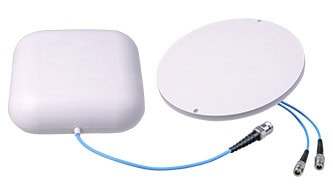
As the world rapidly transitions into the era of 5G, the demand for high-speed, reliable, and expansive wireless coverage has never been greater. At the heart of this technological revolution are Distributed Antenna Systems (DAS), which play a crucial role in enhancing network performance and ensuring seamless connectivity in diverse environments. Whether you’re a network engineer, a facility manager, or a business owner exploring the best options to boost your 5G infrastructure, understanding how to choose the right DAS antennas is essential.
Introduction
In this ultimate guide, we delve into the critical factors that influence the selection of 5G DAS antennas. From understanding the basics of DAS technology and the unique challenges posed by different environments, to evaluating key specifications and performance metrics, this comprehensive resource aims to equip you with the knowledge needed to make informed decisions. Join us as we explore the intricacies of 5G DAS antennas and unlock the potential to transform your wireless network into a powerhouse of connectivity and efficiency.
Overview of 5G Technology and Its Impact
5G technology is the next generation of wireless communication that promises to bring faster speeds, lower latency, and greater capacity compared to previous generations. It is expected to have a significant impact on various industries and sectors, including telecommunications, healthcare, transportation, and manufacturing.

One of the main advantages of 5G technology is its increased speed. It is estimated to be up to 100 times faster than 4G, allowing for quicker download and upload speeds. This will enable users to stream high-definition videos, play online games, and download large files in a matter of seconds.
Another key feature of 5G is its lower latency. Latency refers to the time it takes for data to travel between devices. With 5G, latency is expected to be as low as one millisecond, which is significantly faster than the 20 milliseconds of 4G. This will enable real-time communication and faster response times, making it ideal for applications such as autonomous vehicles and remote surgeries.
5G technology also offers greater capacity, meaning it can support more devices simultaneously. This is crucial as the number of connected devices continues to grow with the rise of the Internet of Things (IoT). With 5G, networks will be able to handle a massive number of devices, allowing for seamless connectivity and data transfer.
The impact of 5G technology will be felt across various industries. In healthcare, for example, it can enable remote patient monitoring, telemedicine, and the use of medical robots for surgeries. In transportation, 5G can support connected and autonomous vehicles, improving road safety and reducing traffic congestion. In manufacturing, it can enable the use of smart factories and industrial automation, leading to increased efficiency and productivity.
However, the deployment of 5G technology also comes with challenges. One of the main challenges is the need for a dense network of small cells to support the high-frequency bands used by 5G. This requires significant infrastructure investments and may face opposition due to concerns about health effects and aesthetics.
Overall, 5G technology has the potential to transform industries and enable new applications that were previously not possible. Its faster speeds, lower latency, and greater capacity will revolutionize the way we communicate, work, and live.
Importance of DAS in 5G Networks
Distributed Antenna Systems (DAS) play a crucial role in the deployment and performance of 5G networks. Here are some key reasons why DAS is important for 5G:
1. Enhanced Coverage: DAS helps in extending the coverage of 5G signals, especially in areas where traditional cell towers may not reach effectively, such as inside buildings, underground facilities, and densely populated urban areas. This ensures that the 5G network can provide consistent service across a wider area, including challenging environments.
2. Improved Capacity: 5G networks aim to handle significantly higher data volumes compared to previous generations. DAS can help distribute the load more evenly across the network by using multiple antennas, thus improving the overall capacity and reducing congestion in high-traffic areas.
3. Better Signal Quality: By bringing antennas closer to end-users, DAS can reduce signal degradation caused by obstacles and distance. This results in better signal strength and quality, leading to faster data speeds, lower latency, and a more reliable connection.
4. Support for High-Frequency Bands: 5G networks utilize a range of frequency bands, including high-frequency millimeter waves (mmWave) that have limited range and poor penetration through obstacles. DAS can help mitigate these limitations by strategically placing antennas to ensure adequate coverage and performance for high-frequency bands.
5. Scalability and Flexibility: DAS is highly scalable and can be customized to meet the specific needs of different environments, whether it’s a small office building or a large stadium. This flexibility makes it easier to deploy and expand 5G networks as demand grows.
6. Energy Efficiency: By reducing the need for high-power transmissions from a central location, DAS can help lower the overall energy consumption of the network. This is particularly important for 5G, which aims to be more energy-efficient despite its higher performance capabilities.
7. Cost-Effectiveness: While the initial deployment of DAS can be costly, it can lead to long-term savings by reducing the need for new cell towers and infrastructure. Moreover, the improved network performance and user experience can lead to higher customer satisfaction and retention.
8. Support for IoT and Dense Environments: 5G is expected to support a massive number of connected devices, including IoT applications. DAS can help manage this density by providing robust and reliable connectivity, ensuring that all devices can communicate effectively without overwhelming the network.
9. Public Safety and Emergency Services: DAS can be critical for ensuring that public safety and emergency services have reliable communication, especially in large buildings and complex environments where traditional signals might fail.
In summary, Distributed Antenna Systems are vital for the successful deployment and operation of 5G networks. They address many of the challenges associated with 5G, such as coverage, capacity, signal quality, and support for high-frequency bands, making them an essential component of modern wireless infrastructure.
Purpose and Scope of the Guide
The “Ultimate Guide to Choose the Right 5G DAS Antennas” is designed to provide comprehensive information and practical advice for selecting the most suitable Distributed Antenna System (DAS) antennas for 5G networks. The purpose and scope of this guide include:
1. Understanding 5G Technology:
– Explain the fundamentals of 5G technology, including its benefits over previous generations.
– Describe the specific requirements and challenges associated with 5G deployment.
2. Introduction to DAS (Distributed Antenna Systems):
– Define DAS and its role in enhancing wireless coverage and capacity.
– Discuss the importance of DAS in the context of 5G networks.
3. Types of DAS Antennas:
cURL Too many subrequests by single Worker invocation. To configure this limit, refer to https://developers.cloudflare.com/workers/wrangler/configuration/#limits.
cURL Too many subrequests by single Worker invocation. To configure this limit, refer to https://developers.cloudflare.com/workers/wrangler/configuration/#limits.
cURL Too many subrequests by single Worker invocation. To configure this limit, refer to https://developers.cloudflare.com/workers/wrangler/configuration/#limits
cURL Too many subrequests by single Worker invocation. To configure this limit, refer to https://developers.cloudflare.com/workers/wrangler/configuration/#limits.
cURL Too many subrequests by single Worker invocation. To configure this limit, refer to https://developers.cloudflare.com/workers/wrangler/configuration/#limits.
cURL Too many subrequests by single Worker invocation. To configure this limit, refer to https://developers.cloudflare.com/workers/wrangler/configuration/#limits.
cURL Too many subrequests by single Worker invocation. To configure this limit, refer to https://developers.cloudflare.com/workers/wrangler/configuration/#limits.
cURL Too many subrequests by single Worker invocation. To configure this limit, refer to https://developers.cloudflare.com/workers/wrangler/configuration/#limits.
cURL Too many subrequests by single Worker invocation. To configure this limit, refer to https://developers.cloudflare.com/workers/wrangler/configuration/#limits.
cURL Too many subrequests by single Worker invocation. To configure this limit, refer to https://developers.cloudflare.com/workers/wrangler/configuration/#limits
cURL Too many subrequests by single Worker invocation. To configure this limit, refer to https://developers.cloudflare.com/workers/wrangler/configuration/#limits.
cURL Too many subrequests by single Worker invocation. To configure this limit, refer to https://developers.cloudflare.com/workers/wrangler/configuration/#limits.
cURL Too many subrequests by single Worker invocation. To configure this limit, refer to https://developers.cloudflare.com/workers/wrangler/configuration/#limits
cURL Too many subrequests by single Worker invocation. To configure this limit, refer to https://developers.cloudflare.com/workers/wrangler/configuration/#limits.
cURL Too many subrequests by single Worker invocation. To configure this limit, refer to https://developers.cloudflare.com/workers/wrangler/configuration/#limits.
cURL Too many subrequests by single Worker invocation. To configure this limit, refer to https://developers.cloudflare.com/workers/wrangler/configuration/#limits
cURL Too many subrequests by single Worker invocation. To configure this limit, refer to https://developers.cloudflare.com/workers/wrangler/configuration/#limits.
cURL Too many subrequests by single Worker invocation. To configure this limit, refer to https://developers.cloudflare.com/workers/wrangler/configuration/#limits.
cURL Too many subrequests by single Worker invocation. To configure this limit, refer to https://developers.cloudflare.com/workers/wrangler/configuration/#limits
cURL Too many subrequests by single Worker invocation. To configure this limit, refer to https://developers.cloudflare.com/workers/wrangler/configuration/#limits.
cURL Too many subrequests by single Worker invocation. To configure this limit, refer to https://developers.cloudflare.com/workers/wrangler/configuration/#limits.
9. Installation and Maintenance:
– Provide tips for the proper installation of 5G DAS antennas.
– Discuss maintenance practices to ensure optimal performance over time.
10. Troubleshooting Common Issues:
– Identify common problems that may arise with 5G DAS antennas.
– Offer solutions and troubleshooting steps to resolve these issues.
By covering these topics, the guide aims to equip readers with the knowledge and tools necessary to make informed decisions when selecting 5G DAS antennas, ensuring effective deployment and optimal performance of their 5G networks.
Chapter 1: Understanding DAS and 5G Technology
What is DAS?
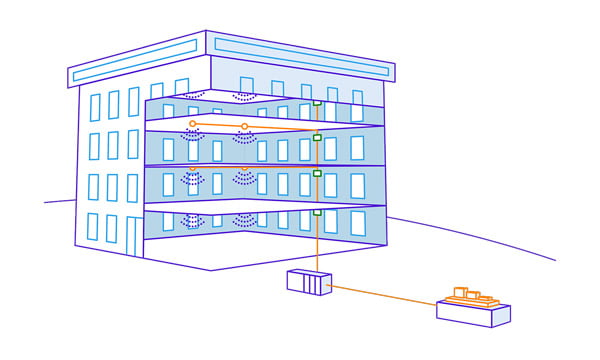
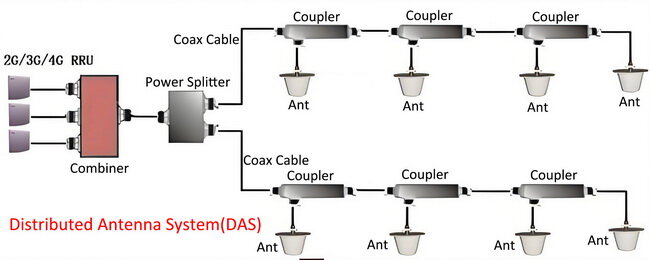
Distributed Antenna Systems (DAS) are network solutions designed to enhance wireless coverage and capacity in specific areas where traditional macrocell networks may be insufficient. DAS involves the use of multiple, strategically placed antennas connected to a common source to provide seamless wireless service within a particular area, such as a building, stadium, airport, or urban environment.
Key Components of DAS
1. Head-End Equipment: This includes the base station or signal source, which may come from a carrier’s network or an on-site base station.
2. Distribution System: This comprises the cabling (often fiber optic or coaxial) and other infrastructure that connects the head-end equipment to the remote antennas.
3. Remote Antennas: These are the antennas placed throughout the coverage area to distribute the wireless signal. They can be mounted on walls, ceilings, or other structures.
Types
1. Active DAS: Uses fiber optic cables and electronic equipment to amplify and distribute signals. It is suitable for large areas and high-capacity requirements.
2. Passive DAS: Relies on coaxial cables and passive components like splitters and couplers to distribute signals. It is typically used for smaller areas.
3. Hybrid DAS: Combines elements of both active and passive DAS to optimize performance and cost.
Benefits
1. Improved Coverage: DAS can eliminate dead zones and provide uniform coverage in challenging environments.
2. Enhanced Capacity: It can support a high number of users and devices, making it ideal for high-density areas.
3. Scalability: DAS can be easily expanded to accommodate growing demand.
4. Carrier Flexibility: DAS can support multiple carriers and technologies (e.g., 4G, 5G, Wi-Fi) simultaneously.
5. Better Quality of Service: By providing consistent and reliable signal strength, DAS improves the overall user experience.
Applications
Commercial Buildings: Ensures reliable wireless connectivity for employees and visitors.
Hospitals: Provides critical communication capabilities for healthcare providers.
Stadiums and Arenas: Supports large crowds with high data demands.
Transportation Hubs: Enhances connectivity in airports, train stations, and subways.
Urban Areas: Fills coverage gaps and boosts capacity in densely populated areas.
In summary, DAS is a versatile and effective solution for improving wireless coverage and capacity in various environments, ensuring that users have reliable and high-quality connectivity.
Introduction to 5G Technology

5G, or the fifth generation of mobile networks, represents a significant leap forward from its predecessor, 4G LTE (Long-Term Evolution). This new generation of mobile technology is designed to meet the ever-growing demand for faster and more reliable wireless communication. 5G aims to provide enhanced mobile broadband, ultra-reliable low-latency communication, and massive machine-type communication, making it a cornerstone for future innovations such as smart cities, autonomous vehicles, and the Internet of Things (IoT).
Key Features of 5G
1. Enhanced Mobile Broadband (eMBB):
cURL Too many subrequests by single Worker invocation. To configure this limit, refer to https://developers.cloudflare.com/workers/wrangler/configuration/#limits.
cURL Too many subrequests by single Worker invocation. To configure this limit, refer to https://developers.cloudflare.com/workers/wrangler/configuration/#limits.
2. cURL Too many subrequests by single Worker invocation. To configure this limit, refer to https://developers.cloudflare.com/workers/wrangler/configuration/#limits cURL Too many subrequests by single Worker invocation. To configure this limit, refer to https://developers.cloudflare.com/workers/wrangler/configuration/#limits
cURL Too many subrequests by single Worker invocation. To configure this limit, refer to https://developers.cloudflare.com/workers/wrangler/configuration/#limits.
cURL Too many subrequests by single Worker invocation. To configure this limit, refer to https://developers.cloudflare.com/workers/wrangler/configuration/#limits.
3. cURL Too many subrequests by single Worker invocation. To configure this limit, refer to https://developers.cloudflare.com/workers/wrangler/configuration/#limits cURL Too many subrequests by single Worker invocation. To configure this limit, refer to https://developers.cloudflare.com/workers/wrangler/configuration/#limits
cURL Too many subrequests by single Worker invocation. To configure this limit, refer to https://developers.cloudflare.com/workers/wrangler/configuration/#limits.
cURL Too many subrequests by single Worker invocation. To configure this limit, refer to https://developers.cloudflare.com/workers/wrangler/configuration/#limits.
cURL Too many subrequests by single Worker invocation. To configure this limit, refer to https://developers.cloudflare.com/workers/wrangler/configuration/#limits
cURL Too many subrequests by single Worker invocation. To configure this limit, refer to https://developers.cloudflare.com/workers/wrangler/configuration/#limits.
cURL Too many subrequests by single Worker invocation. To configure this limit, refer to https://developers.cloudflare.com/workers/wrangler/configuration/#limits
cURL Too many subrequests by single Worker invocation. To configure this limit, refer to https://developers.cloudflare.com/workers/wrangler/configuration/#limits.
cURL Too many subrequests by single Worker invocation. To configure this limit, refer to https://developers.cloudflare.com/workers/wrangler/configuration/#limits
cURL Too many subrequests by single Worker invocation. To configure this limit, refer to https://developers.cloudflare.com/workers/wrangler/configuration/#limits.
cURL Too many subrequests by single Worker invocation. To configure this limit, refer to https://developers.cloudflare.com/workers/wrangler/configuration/#limits
cURL Too many subrequests by single Worker invocation. To configure this limit, refer to https://developers.cloudflare.com/workers/wrangler/configuration/#limits
cURL Too many subrequests by single Worker invocation. To configure this limit, refer to https://developers.cloudflare.com/workers/wrangler/configuration/#limits.
cURL Too many subrequests by single Worker invocation. To configure this limit, refer to https://developers.cloudflare.com/workers/wrangler/configuration/#limits.
cURL Too many subrequests by single Worker invocation. To configure this limit, refer to https://developers.cloudflare.com/workers/wrangler/configuration/#limits
cURL Too many subrequests by single Worker invocation. To configure this limit, refer to https://developers.cloudflare.com/workers/wrangler/configuration/#limits.
5G: Latency as low as 1 millisecond, enabling real-time applications.
3. Spectrum Usage:
4G: Primarily uses frequencies below 3 GHz.
5G: Utilizes a broader range of frequencies, including sub-6 GHz and millimeter-wave (24 GHz and above), providing more bandwidth and faster speeds.
4. Network Architecture:
4G: Based on a monolithic core network.
5G: Employs a more flexible, service-based architecture with network slicing capabilities.
5. Device Density:
4G: Can support about 2,000 devices per square kilometer.
5G: Designed to connect up to a million devices per square kilometer, essential for IoT applications.
6. Energy Efficiency:
4G: Less optimized for low power consumption.
5G: More energy-efficient, with features designed to extend battery life for IoT devices.
7. Reliability:
4G: Suitable for general mobile communication needs.
5G: Offers ultra-reliable communication, crucial for applications where failure is not an option, such as remote surgery and industrial automation.
In summary, 5G technology brings a multitude of advancements over 4G, making it a pivotal enabler for future technological innovations and applications. Its enhanced speed, capacity, low latency, and ability to support a massive number of devices will transform how we interact with technology and each other.
Understanding Private 5G and the Role of DAS
Private 5G networks represent a new approach to wireless connectivity, giving enterprises, utilities, government agencies, and other organizations the ability to deploy and control their own cellular networks. Unlike public 5G networks managed by major carriers, private 5G is built specifically for a single organization, tailored to their unique requirements for coverage, security, and capacity.
Most private 5G deployments utilize the Citizens Broadband Radio Service (CBRS) spectrum, particularly the 3.5 GHz band, which offers a balance between range and performance. Although earlier private networks leaned on 4G LTE for connectivity, the rapid evolution of 5G means newer deployments are taking advantage of lower latency, enhanced device density, and improved throughput.
When it comes to coverage within buildings or large venues, organizations have a few options for distributing their private 5G signal:
- Standalone Small Cells: The most common approach, where compact cellular nodes are strategically placed throughout a facility to provide targeted coverage.
- Distributed Antenna Systems (DAS): In some cases, especially if a DAS is already present or if there’s a need to offer both private and commercial cellular service, a DAS can be used to extend the reach of private 5G. DAS acts as a network of antennas, relaying the cellular signal to areas that might otherwise be challenging to cover.
- Multi-Operator Core Networks (MOCN): For venues looking to support multiple carriers or blend private and public access, technologies like MOCN can enable flexible use of available spectrum, such as the CBRS band.
It’s important to note that deploying private 5G does not always require a DAS; many organizations achieve their goals with standalone small cells. However, when consistent coverage across large or complex spaces is a priority—or when integrating commercial carrier service—the flexibility of a DAS can make it a valuable part of the network architecture.
How DAS Supports 5G Networks
Distributed Antenna Systems (DAS) play a crucial role in supporting 5G networks by addressing some of the key challenges associated with this advanced technology. Here’s how DAS contributes to enhanced capacity and coverage, as well as low latency and high-speed connectivity in 5G networks:
Enhanced Capacity and Coverage
1. Signal Distribution:
DAS involves a network of spatially separated antenna nodes connected to a common source. This setup helps distribute the 5G signal more evenly across a given area, ensuring that users experience consistent service quality.
2. In-Building Solutions:
One of the significant challenges of 5G is providing reliable coverage inside buildings, where signals can be weakened by walls and other obstacles. DAS can be installed within buildings to amplify the 5G signal, ensuring strong and consistent connectivity indoors.
3. Scalability:
DAS can be scaled to cover large areas such as stadiums, airports, and shopping malls, where a high number of users might be concentrated. This helps in managing the increased data traffic and ensures that all users have access to the network without significant drops in performance.
4. Interference Management:
cURL Too many subrequests by single Worker invocation. To configure this limit, refer to https://developers.cloudflare.com/workers/wrangler/configuration/#limits.
cURL Too many subrequests by single Worker invocation. To configure this limit, refer to https://developers.cloudflare.com/workers/wrangler/configuration/#limits
cURL Too many subrequests by single Worker invocation. To configure this limit, refer to https://developers.cloudflare.com/workers/wrangler/configuration/#limits
cURL Too many subrequests by single Worker invocation. To configure this limit, refer to https://developers.cloudflare.com/workers/wrangler/configuration/#limits.
cURL Too many subrequests by single Worker invocation. To configure this limit, refer to https://developers.cloudflare.com/workers/wrangler/configuration/#limits
cURL Too many subrequests by single Worker invocation. To configure this limit, refer to https://developers.cloudflare.com/workers/wrangler/configuration/#limits.
cURL Too many subrequests by single Worker invocation. To configure this limit, refer to https://developers.cloudflare.com/workers/wrangler/configuration/#limits
cURL Too many subrequests by single Worker invocation. To configure this limit, refer to https://developers.cloudflare.com/workers/wrangler/configuration/#limits.
cURL Too many subrequests by single Worker invocation. To configure this limit, refer to https://developers.cloudflare.com/workers/wrangler/configuration/#limits mmWave cURL Too many subrequests by single Worker invocation. To configure this limit, refer to https://developers.cloudflare.com/workers/wrangler/configuration/#limits
cURL Too many subrequests by single Worker invocation. To configure this limit, refer to https://developers.cloudflare.com/workers/wrangler/configuration/#limits.
Conclusion
cURL Too many subrequests by single Worker invocation. To configure this limit, refer to https://developers.cloudflare.com/workers/wrangler/configuration/#limits.
cURL Too many subrequests by single Worker invocation. To configure this limit, refer to https://developers.cloudflare.com/workers/wrangler/configuration/#limits
cURL Too many subrequests by single Worker invocation. To configure this limit, refer to https://developers.cloudflare.com/workers/wrangler/configuration/#limits
cURL Too many subrequests by single Worker invocation. To configure this limit, refer to https://developers.cloudflare.com/workers/wrangler/configuration/#limits
cURL Too many subrequests by single Worker invocation. To configure this limit, refer to https://developers.cloudflare.com/workers/wrangler/configuration/#limits
cURL Too many subrequests by single Worker invocation. To configure this limit, refer to https://developers.cloudflare.com/workers/wrangler/configuration/#limits.
cURL Too many subrequests by single Worker invocation. To configure this limit, refer to https://developers.cloudflare.com/workers/wrangler/configuration/#limits.
cURL Too many subrequests by single Worker invocation. To configure this limit, refer to https://developers.cloudflare.com/workers/wrangler/configuration/#limits.
cURL Too many subrequests by single Worker invocation. To configure this limit, refer to https://developers.cloudflare.com/workers/wrangler/configuration/#limits.
cURL Too many subrequests by single Worker invocation. To configure this limit, refer to https://developers.cloudflare.com/workers/wrangler/configuration/#limits
cURL Too many subrequests by single Worker invocation. To configure this limit, refer to https://developers.cloudflare.com/workers/wrangler/configuration/#limits.
Signal-to-Noise Ratio (SNR): A high SNR is crucial for maintaining signal quality. An SNR of 20 dB or higher is generally considered good for 5G.
Throughput: Ensure that the system can handle the required data rates. 5G aims to provide very high throughput, often in the range of gigabits per second.
Latency: 5G is designed to offer low latency, often below 10 milliseconds. The DAS should support this low-latency requirement.
Interference Management: Minimize interference from other wireless systems and ensure that the DAS antennas are placed to avoid self-interference.
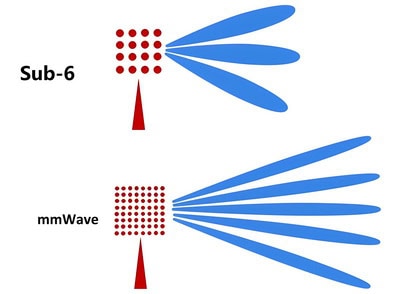
Frequency Bands: 5G operates in multiple frequency bands, including low-band (sub-1 GHz), mid-band (1-6 GHz), and high-band (mmWave, above 24 GHz). Each band has different propagation characteristics and will affect the placement and number of antennas.
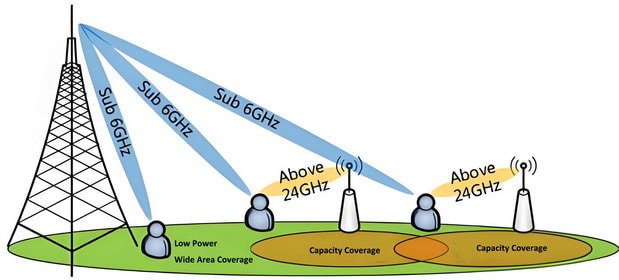
Beamforming and MIMO: Utilize advanced technologies like beamforming and Multiple Input Multiple Output (MIMO) to enhance signal strength and quality. These technologies can help focus the signal towards the user and improve overall performance.
Power Levels: Ensure that the power levels of the antennas are appropriately set to cover the desired area without causing excessive interference.
Backhaul Capacity: Ensure that the backhaul network supporting the DAS has sufficient capacity to handle the high data rates and low latency requirements of 5G.
Additional Considerations
Regulatory Compliance: Ensure that the DAS complies with local regulations and standards for electromagnetic radiation and safety.
Scalability: Design the system to be scalable, allowing for future expansion as the number of 5G users and devices increases.
Maintenance and Monitoring: Implement monitoring systems to continuously assess the performance of the DAS and perform maintenance as needed.
Conclusion
Meeting the coverage requirements for a 5G DAS antenna system involves a careful balance of area and range considerations, along with ensuring strong and high-quality signal performance. Proper planning, advanced technologies, and ongoing monitoring are key to achieving optimal 5G coverage.
Frequency Bands

Distributed Antenna Systems (DAS) are a network of spatially separated antenna nodes connected to a common source that provides wireless service within a geographic area or structure. When it comes to 5G DAS antennas, they are designed to operate in multiple frequency bands to support the various spectrum allocations for 5G services. Here are the primary frequency bands used in 5G DAS systems:
1. Low-Band (Sub-1 GHz):
600 MHz: Used in some regions for extended coverage and better penetration through buildings.
700 MHz: Commonly used for 4G LTE and now being refarmed for 5G.
800 MHz: Also used in some regions for 4G LTE and 5G.
2. Mid-Band (1-6 GHz):
1.8 GHz, 1.9 GHz, 2.1 GHz: These bands are often used for existing 4G LTE services and are being refarmed for 5G.
2.5 GHz: Used by some carriers for 5G due to its balance of coverage and capacity.
3.5 GHz (C-Band): One of the most important bands for 5G, offering a good balance between coverage and capacity.
4.9 GHz: Used in some regions for public safety and other specialized applications.
3. High-Band (Millimeter Wave, 24-100 GHz):
24 GHz, 26 GHz, 28 GHz: These bands provide very high data rates and capacity but have limited range and penetration.
37 GHz, 39 GHz: Additional mmWave bands that offer high capacity for dense urban environments.
60 GHz: Used for very short-range, high-capacity applications.
4. Unlicensed Bands:
5 GHz: Sometimes used for unlicensed 5G applications.
6 GHz: Recently opened up for unlicensed use, providing additional spectrum for 5G.
5. Specialized Bands:
3.7-4.2 GHz (CBRS in the U.S.): Citizens Broadband Radio Service, used for shared spectrum access.
Each of these frequency bands has its own characteristics in terms of coverage, capacity, and penetration, and they are often used in combination to provide comprehensive 5G service. Low-band frequencies offer broader coverage and better indoor penetration, while mid-band frequencies provide a balance of coverage and capacity. High-band frequencies (mmWave) offer the highest data rates and capacity but are best suited for dense urban areas due to their limited range and penetration capabilities.
Gain and Beamwidth
A Distributed Antenna System (DAS) is an infrastructure that enhances wireless coverage by distributing the signal through multiple antennas. In the context of 5G, DAS can be crucial for providing consistent and high-quality coverage, especially in dense urban environments or inside buildings.
Gain of 5G DAS Antennas
Gain is a measure of how well an antenna can direct or concentrate radio frequency energy in a specific direction compared to an isotropic radiator (an idealized antenna that radiates equally in all directions).
cURL Too many subrequests by single Worker invocation. To configure this limit, refer to https://developers.cloudflare.com/workers/wrangler/configuration/#limits.
cURL Too many subrequests by single Worker invocation. To configure this limit, refer to https://developers.cloudflare.com/workers/wrangler/configuration/#limits.
cURL Too many subrequests by single Worker invocation. To configure this limit, refer to https://developers.cloudflare.com/workers/wrangler/configuration/#limits.
cURL Too many subrequests by single Worker invocation. To configure this limit, refer to https://developers.cloudflare.com/workers/wrangler/configuration/#limits.
cURL Too many subrequests by single Worker invocation. To configure this limit, refer to https://developers.cloudflare.com/workers/wrangler/configuration/#limits
cURL Too many subrequests by single Worker invocation. To configure this limit, refer to https://developers.cloudflare.com/workers/wrangler/configuration/#limits.
cURL Too many subrequests by single Worker invocation. To configure this limit, refer to https://developers.cloudflare.com/workers/wrangler/configuration/#limits
cURL Too many subrequests by single Worker invocation. To configure this limit, refer to https://developers.cloudflare.com/workers/wrangler/configuration/#limits.
cURL Too many subrequests by single Worker invocation. To configure this limit, refer to https://developers.cloudflare.com/workers/wrangler/configuration/#limits.
cURL Too many subrequests by single Worker invocation. To configure this limit, refer to https://developers.cloudflare.com/workers/wrangler/configuration/#limits.
Conclusion
cURL Too many subrequests by single Worker invocation. To configure this limit, refer to https://developers.cloudflare.com/workers/wrangler/configuration/#limits.
cURL Too many subrequests by single Worker invocation. To configure this limit, refer to https://developers.cloudflare.com/workers/wrangler/configuration/#limits
cURL Too many subrequests by single Worker invocation. To configure this limit, refer to https://developers.cloudflare.com/workers/wrangler/configuration/#limits.
cURL Too many subrequests by single Worker invocation. To configure this limit, refer to https://developers.cloudflare.com/workers/wrangler/configuration/#limits
cURL Too many subrequests by single Worker invocation. To configure this limit, refer to https://developers.cloudflare.com/workers/wrangler/configuration/#limits
cURL Too many subrequests by single Worker invocation. To configure this limit, refer to https://developers.cloudflare.com/workers/wrangler/configuration/#limits.
cURL Too many subrequests by single Worker invocation. To configure this limit, refer to https://developers.cloudflare.com/workers/wrangler/configuration/#limits.
cURL Too many subrequests by single Worker invocation. To configure this limit, refer to https://developers.cloudflare.com/workers/wrangler/configuration/#limits.
cURL Too many subrequests by single Worker invocation. To configure this limit, refer to https://developers.cloudflare.com/workers/wrangler/configuration/#limits.

cURL Too many subrequests by single Worker invocation. To configure this limit, refer to https://developers.cloudflare.com/workers/wrangler/configuration/#limits.
cURL Too many subrequests by single Worker invocation. To configure this limit, refer to https://developers.cloudflare.com/workers/wrangler/configuration/#limits
cURL Too many subrequests by single Worker invocation. To configure this limit, refer to https://developers.cloudflare.com/workers/wrangler/configuration/#limits
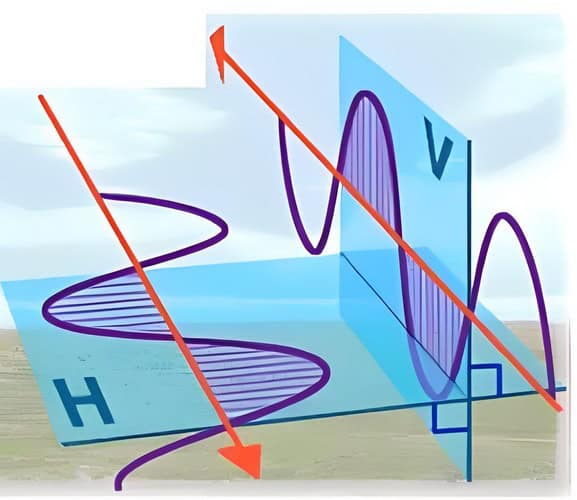
1. Omnidirectional Pattern: Radiates equally in all horizontal directions. This is useful for providing uniform coverage in open areas or large rooms.
2. Directional Pattern: Focuses energy in a specific direction. This can be used to cover long corridors, specific sections of a building, or to reduce interference by limiting radiation in unwanted directions.
3. Sectorized Pattern: Divides the coverage area into sectors, each served by a different antenna or antenna array. This is common in stadiums or large venues where different areas need targeted coverage.
5G DAS antennas often employ advanced techniques like beamforming, which dynamically adjusts the radiation pattern to focus energy toward users or areas with higher demand. This is essential for maximizing efficiency and capacity in dense environments.
In summary, the polarization and radiation patterns of 5G DAS antennas are critical for achieving the desired coverage, capacity, and performance in various deployment scenarios. The use of dual polarization, advanced beamforming, and careful consideration of the environment are key factors in the design and implementation of effective 5G DAS solutions.
Low PIM Specifications and Power levels
Low PIM is critical for maintaining signal integrity and minimizing interference in 5G networks. PIM is typically measured in dBc (decibels relative to the carrier), and lower values indicate better performance. For 5G DAS applications, the following PIM specifications are generally desirable:

Importance of Low PIM Value for 5G DAS Systems
1. Signal Integrity: Passive Intermodulation (PIM) can cause significant signal distortion and interference. In 5G networks, which require high data rates and low latency, maintaining signal integrity is crucial. Low PIM values help ensure clear signal transmission and reception.
2. Network Performance: High PIM levels can degrade the performance of the Distributed Antenna System (DAS) by introducing noise and interference, leading to dropped calls, reduced data throughput, and poor user experience. Low PIM antennas help in maintaining optimal network performance.
3. Capacity and Coverage: 5G networks are designed to handle a large number of devices and high data volumes. Low PIM antennas help in maximizing the capacity and coverage of the DAS by minimizing interference and ensuring efficient signal propagation.
4. Regulatory Compliance: Regulatory bodies may have stringent requirements for PIM levels in network components. Using low PIM antennas helps in complying with these regulations and avoiding potential fines or sanctions.
Key Factors and Components Impacting Low PIM Value
1. Antenna Design: The design of the antenna itself plays a crucial role in determining its PIM performance. Factors such as the type of materials used, the physical structure, and the manufacturing process can all impact PIM levels.
2. Materials: The use of high-quality, low-PIM materials such as low-PIM connectors, cables, and mounting hardware can significantly reduce PIM. Materials that are less prone to oxidation and corrosion are preferred.
3. Connector Quality: Connectors are common sources of PIM. Using precision-engineered, low-PIM connectors and ensuring proper torque and alignment during installation can help reduce PIM.
4. Installation Practices: Proper installation techniques are essential to minimize PIM. This includes avoiding sharp bends in cables, ensuring tight and secure connections, and using appropriate mounting hardware.
5. Environmental Factors: Environmental conditions such as temperature, humidity, and physical stress can affect PIM levels. Antennas designed to withstand harsh environmental conditions without degrading in performance are preferred.
6. Testing and Certification: Regular testing and certification of antennas for PIM performance ensure that they meet the required specifications. This includes factory testing as well as field testing after installation.
PIM Levels and Power Levels
PIM Levels
-150 dBc or lower: This is considered excellent and is often required for high-performance 5G networks.
-140 dBc: This is a common specification for many high-quality DAS components.
-130 dBc: This might be acceptable in some less critical applications but is not ideal for high-density or high-capacity 5G environments.
Power Levels
The power handling capability of omni ceiling antennas is another crucial factor. In 5G DAS, the power levels can vary, but typical specifications include:
Maximum Input Power
2W to 50W: This range covers most DAS applications. Higher power handling is typically needed in larger or more complex installations.
10W to 20W: Common for many indoor DAS setups, balancing performance and safety.
Conclusion
Low PIM specifications are critical for the efficient operation of 5G DAS systems. By focusing on high-quality materials, precise manufacturing, and proper installation practices, it is possible to achieve low PIM values that enhance signal integrity, network performance, and user experience. Regular testing and adherence to industry standards further ensure that these systems meet the demanding requirements of modern 5G networks.
Antenna Connector Types
Distributed Antenna Systems (DAS) are critical for enhancing coverage and capacity in 5G networks, especially in indoor environments and densely populated areas. The antennas used in DAS for 5G networks typically require robust and reliable connectors to ensure optimal performance. Here are some common connector types used for DAS antennas in 5G networks:
1. N-Type Connectors:
Frequency Range: Up to 11 GHz.
Usage: Widely used in DAS applications due to their reliability and relatively low cost. They are suitable for both indoor and outdoor installations.
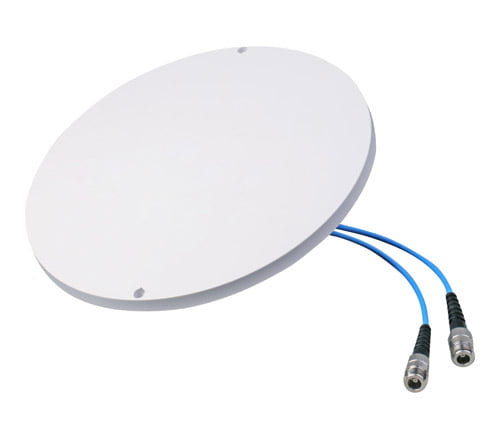
Characteristics: Larger in size, providing good power handling and low loss.
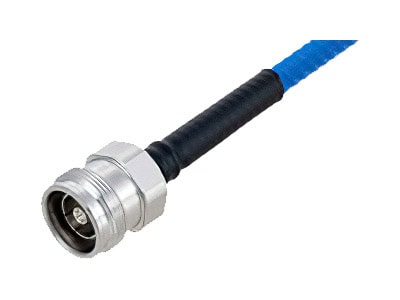
2. 4.3-10 Connector:
Frequency Range: Up to 6 GHz.
cURL Too many subrequests by single Worker invocation. To configure this limit, refer to https://developers.cloudflare.com/workers/wrangler/configuration/#limits.
cURL Too many subrequests by single Worker invocation. To configure this limit, refer to https://developers.cloudflare.com/workers/wrangler/configuration/#limits.
cURL Too many subrequests by single Worker invocation. To configure this limit, refer to https://developers.cloudflare.com/workers/wrangler/configuration/#limits
cURL Too many subrequests by single Worker invocation. To configure this limit, refer to https://developers.cloudflare.com/workers/wrangler/configuration/#limits.
cURL Too many subrequests by single Worker invocation. To configure this limit, refer to https://developers.cloudflare.com/workers/wrangler/configuration/#limits.
cURL Too many subrequests by single Worker invocation. To configure this limit, refer to https://developers.cloudflare.com/workers/wrangler/configuration/#limits.
cURL Too many subrequests by single Worker invocation. To configure this limit, refer to https://developers.cloudflare.com/workers/wrangler/configuration/#limits.
cURL Too many subrequests by single Worker invocation. To configure this limit, refer to https://developers.cloudflare.com/workers/wrangler/configuration/#limits
cURL Too many subrequests by single Worker invocation. To configure this limit, refer to https://developers.cloudflare.com/workers/wrangler/configuration/#limits
cURL Too many subrequests by single Worker invocation. To configure this limit, refer to https://developers.cloudflare.com/workers/wrangler/configuration/#limits
cURL Too many subrequests by single Worker invocation. To configure this limit, refer to https://developers.cloudflare.com/workers/wrangler/configuration/#limits.

cURL Too many subrequests by single Worker invocation. To configure this limit, refer to https://developers.cloudflare.com/workers/wrangler/configuration/#limits.
cURL Too many subrequests by single Worker invocation. To configure this limit, refer to https://developers.cloudflare.com/workers/wrangler/configuration/#limits.
cURL Too many subrequests by single Worker invocation. To configure this limit, refer to https://developers.cloudflare.com/workers/wrangler/configuration/#limits
cURL Too many subrequests by single Worker invocation. To configure this limit, refer to https://developers.cloudflare.com/workers/wrangler/configuration/#limits.

cURL Too many subrequests by single Worker invocation. To configure this limit, refer to https://developers.cloudflare.com/workers/wrangler/configuration/#limits.
cURL Too many subrequests by single Worker invocation. To configure this limit, refer to https://developers.cloudflare.com/workers/wrangler/configuration/#limits.
cURL Too many subrequests by single Worker invocation. To configure this limit, refer to https://developers.cloudflare.com/workers/wrangler/configuration/#limits
cURL Too many subrequests by single Worker invocation. To configure this limit, refer to https://developers.cloudflare.com/workers/wrangler/configuration/#limits.
cURL Too many subrequests by single Worker invocation. To configure this limit, refer to https://developers.cloudflare.com/workers/wrangler/configuration/#limits
cURL Too many subrequests by single Worker invocation. To configure this limit, refer to https://developers.cloudflare.com/workers/wrangler/configuration/#limits.
cURL Too many subrequests by single Worker invocation. To configure this limit, refer to https://developers.cloudflare.com/workers/wrangler/configuration/#limits.
Each mounting type has its own set of advantages and considerations, including coverage area, aesthetic impact, ease of installation, and maintenance requirements. The choice of mounting type will depend on the specific needs of the 5G network and the characteristics of the deployment environment.
Installation Environment
When deploying Distributed Antenna Systems (DAS) for 5G networks, the installation environment significantly impacts the design, installation, and performance of the system. Two primary deployment environments to consider are urban and rural areas, each presenting unique challenges and requirements. Additionally, the building materials and structures in these environments play a crucial role in the deployment process.
Urban Deployment
Characteristics
1. High User Density: Urban areas have a high concentration of users, necessitating robust and high-capacity DAS installations to manage the increased demand for data.
2. Dense Infrastructure: The presence of numerous buildings, skyscrapers, and other infrastructure can cause signal obstruction and multipath interference.
3. Regulatory Constraints: Urban deployments often face stringent regulatory requirements and zoning laws that can impact antenna placement and installation procedures.
Challenges
1. Signal Interference: The dense environment can lead to significant signal interference from other electronic devices and networks.
2. Physical Space: Limited space for installing equipment and antennas due to crowded rooftops and building facades.
3. Aesthetic Concerns: Maintaining the visual appeal of the urban landscape can restrict the types and placement of antennas.
Solutions
1. Small Cells and Microcells: Deploying small cells and microcells to enhance coverage and capacity in high-density areas.
2. Advanced Beamforming: Utilizing beamforming technology to direct signals precisely and reduce interference.
3. Indoor DAS: Installing indoor DAS in large buildings, malls, and stadiums to ensure adequate indoor coverage.
Rural Deployment
Characteristics
1. Low User Density: Rural areas typically have fewer users spread over larger areas, requiring different strategies for coverage.
2. Sparse Infrastructure: Fewer buildings and obstacles but more open space, which can simplify some aspects of deployment.
3. Topographical Variations: The presence of hills, valleys, and other natural features can impact signal propagation.
Challenges
1. Coverage Area: Ensuring wide-area coverage with fewer base stations due to the lower population density.
2. Backhaul Connectivity: Limited availability of high-speed backhaul connections, which are essential for 5G networks.
3. Power Supply: Ensuring reliable power supply to remote DAS installations.
Solutions
1. High-Gain Antennas: Using high-gain antennas to extend the coverage range of each base station.
2.Satellite Backhaul: Employing satellite or microwave links for backhaul connectivity in areas where fiber is not available.
3.Renewable Energy: Utilizing solar or wind power solutions to provide reliable power to remote installations.
Building Materials and Structures
Impact on DAS Deployment
1. Signal Penetration: Different building materials have varying levels of signal attenuation. For example, concrete and metal structures significantly reduce signal penetration, while glass and wood have less impact.
2. Antenna Placement: The internal layout and structure of buildings influence the placement of antennas and other equipment to ensure optimal coverage.
3. Cabling and Conduits: The design and materials of a building affect the ease of running cables and installing conduits for the DAS.
Considerations
1. Material Attenuation: Conducting a thorough site survey to understand the materials used in building construction and their impact on signal propagation.
2. Strategic Placement: Placing antennas in locations that minimize signal obstruction and maximize coverage, such as near windows or in central areas.
3. Building Codes: Adhering to local building codes and regulations when installing DAS equipment, especially in older buildings with historical significance.
Conclusion
Deploying DAS for 5G networks requires careful consideration of the environment, whether urban or rural, and the specific characteristics of the buildings involved. Urban deployments focus on managing high user density and interference, while rural deployments prioritize wide-area coverage and reliable backhaul. Understanding the impact of building materials and structures is crucial for optimizing signal propagation and ensuring effective coverage. By addressing these factors, network providers can deliver reliable and high-performance 5G connectivity to users in diverse environments.
Regulatory and Compliance Issues
Distributed Antenna Systems (DAS) are critical components in the deployment of 5G networks, enhancing coverage and capacity by distributing signals inside buildings and challenging environments. However, implementing DAS for 5G networks involves navigating various regulatory and compliance issues, which can be broadly categorized into local and international standards, as well as licensing requirements.
cURL Too many subrequests by single Worker invocation. To configure this limit, refer to https://developers.cloudflare.com/workers/wrangler/configuration/#limits
cURL Too many subrequests by single Worker invocation. To configure this limit, refer to https://developers.cloudflare.com/workers/wrangler/configuration/#limits
cURL Too many subrequests by single Worker invocation. To configure this limit, refer to https://developers.cloudflare.com/workers/wrangler/configuration/#limitscURL Too many subrequests by single Worker invocation. To configure this limit, refer to https://developers.cloudflare.com/workers/wrangler/configuration/#limitscURL Too many subrequests by single Worker invocation. To configure this limit, refer to https://developers.cloudflare.com/workers/wrangler/configuration/#limits.
cURL Too many subrequests by single Worker invocation. To configure this limit, refer to https://developers.cloudflare.com/workers/wrangler/configuration/#limits
cURL Too many subrequests by single Worker invocation. To configure this limit, refer to https://developers.cloudflare.com/workers/wrangler/configuration/#limitscURL Too many subrequests by single Worker invocation. To configure this limit, refer to https://developers.cloudflare.com/workers/wrangler/configuration/#limitscURL Too many subrequests by single Worker invocation. To configure this limit, refer to https://developers.cloudflare.com/workers/wrangler/configuration/#limits.
cURL Too many subrequests by single Worker invocation. To configure this limit, refer to https://developers.cloudflare.com/workers/wrangler/configuration/#limits
cURL Too many subrequests by single Worker invocation. To configure this limit, refer to https://developers.cloudflare.com/workers/wrangler/configuration/#limits
cURL Too many subrequests by single Worker invocation. To configure this limit, refer to https://developers.cloudflare.com/workers/wrangler/configuration/#limits cURL Too many subrequests by single Worker invocation. To configure this limit, refer to https://developers.cloudflare.com/workers/wrangler/configuration/#limits
cURL Too many subrequests by single Worker invocation. To configure this limit, refer to https://developers.cloudflare.com/workers/wrangler/configuration/#limits cURL Too many subrequests by single Worker invocation. To configure this limit, refer to https://developers.cloudflare.com/workers/wrangler/configuration/#limits
cURL Too many subrequests by single Worker invocation. To configure this limit, refer to https://developers.cloudflare.com/workers/wrangler/configuration/#limits cURL Too many subrequests by single Worker invocation. To configure this limit, refer to https://developers.cloudflare.com/workers/wrangler/configuration/#limits
cURL Too many subrequests by single Worker invocation. To configure this limit, refer to https://developers.cloudflare.com/workers/wrangler/configuration/#limits.
cURL Too many subrequests by single Worker invocation. To configure this limit, refer to https://developers.cloudflare.com/workers/wrangler/configuration/#limits
cURL Too many subrequests by single Worker invocation. To configure this limit, refer to https://developers.cloudflare.com/workers/wrangler/configuration/#limits
cURL Too many subrequests by single Worker invocation. To configure this limit, refer to https://developers.cloudflare.com/workers/wrangler/configuration/#limits.
cURL Too many subrequests by single Worker invocation. To configure this limit, refer to https://developers.cloudflare.com/workers/wrangler/configuration/#limits.
Licensing Requirements
1. Spectrum Licensing
Operating a DAS for 5G networks requires access to specific frequency bands. Spectrum licenses are typically auctioned or allocated by national regulatory authorities. Key considerations include:
Type of License: Exclusive, shared, or unlicensed spectrum.
License Duration: Time period for which the spectrum can be used.
Geographical Coverage: Specific areas where the DAS can operate.
2. Building and Zoning Permits
Installing DAS often involves physical infrastructure changes, which may require building and zoning permits from local authorities. This includes:
Building Codes Compliance: Ensuring that installations meet structural and safety regulations.
Zoning Laws: Adhering to local zoning laws that may restrict the placement of antennas and related equipment.
3. Operational Licenses
In some jurisdictions, operators may need additional licenses to run telecommunications equipment. This includes:
Network Operator License: Authorization to provide telecommunications services.
Equipment Certification: Ensuring that all equipment used in the DAS meets national and international standards.
4. Environmental and Public Safety Regulations
Compliance with environmental regulations is essential to mitigate the impact of DAS installations. This includes:
Environmental Impact Assessments (EIA): Evaluating the potential environmental effects of the installation.
Public Safety Regulations: Ensuring that the deployment does not pose risks to public safety, such as structural integrity or interference with emergency services.
Conclusion
Deploying a Distributed Antenna System for 5G networks involves a complex landscape of regulatory and compliance issues. Adherence to local and international standards ensures interoperability and safety, while obtaining the necessary licenses and permits is crucial for legal operation. Stakeholders must stay informed about evolving regulations and engage with regulatory bodies to ensure compliance throughout the deployment process.
Selecting the Right Systems Integrator
One essential aspect often overlooked in the deployment of a 5G Distributed Antenna System is partnering with the right systems integrator. Selecting an experienced integrator isn’t just about installation—it’s about ensuring long-term performance, ongoing compliance, and a seamless path from planning through to operation.
A qualified systems integrator brings valuable expertise in navigating technical requirements, regulatory landscapes, and varied environments, whether you’re retrofitting a hospital, upgrading a shopping mall, or building a system for a new airport. They understand the intricacies of 5G technology, the nuances of DAS design, and how to align both with local and international standards—from 3GPP specifications to site-specific safety protocols.
Key reasons to carefully choose your systems integrator include:
- Standards Compliance: They ensure your installation meets evolving standards from bodies like 3GPP, ITU, FCC, and ICNIRP, reducing the risk of regulatory hurdles.
- Optimized System Design: Integrators evaluate your unique space and requirements, selecting the right equipment and architecture for uniform coverage and efficient operation.
- Smooth Project Management: An established integrator manages timelines, permitting, and coordination with building authorities, minimizing project delays.
- End-to-End Support: From initial assessment to final commissioning and ongoing maintenance, the right partner stands with you at each step, troubleshooting issues and ensuring performance over the system’s lifecycle.
Ultimately, the right systems integrator acts as your guide through the complexities of 5G DAS deployment, helping to avoid costly mistakes while delivering robust, reliable connectivity.
Chapter 3: Types of 5G DAS Antennas
Omni Ceiling Antennas
Features and Advantages
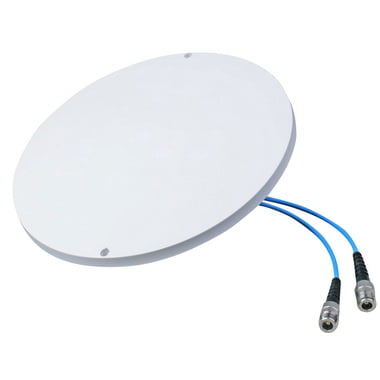
1. Omni-directional Coverage:
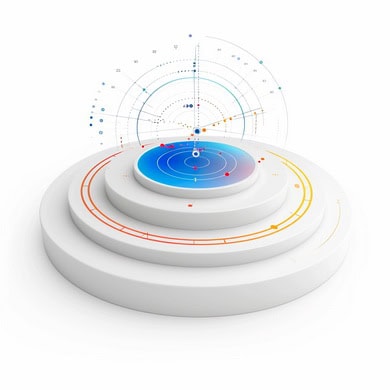
Feature: Omni ceiling antennas provide 360-degree coverage, ensuring a uniform signal distribution in all directions.
Advantage: This is ideal for environments where users are spread out in different directions, such as office spaces, shopping malls, and airports.
cURL Too many subrequests by single Worker invocation. To configure this limit, refer to https://developers.cloudflare.com/workers/wrangler/configuration/#limits
cURL Too many subrequests by single Worker invocation. To configure this limit, refer to https://developers.cloudflare.com/workers/wrangler/configuration/#limits.
cURL Too many subrequests by single Worker invocation. To configure this limit, refer to https://developers.cloudflare.com/workers/wrangler/configuration/#limits.
cURL Too many subrequests by single Worker invocation. To configure this limit, refer to https://developers.cloudflare.com/workers/wrangler/configuration/#limits
cURL Too many subrequests by single Worker invocation. To configure this limit, refer to https://developers.cloudflare.com/workers/wrangler/configuration/#limits.
cURL Too many subrequests by single Worker invocation. To configure this limit, refer to https://developers.cloudflare.com/workers/wrangler/configuration/#limits.
cURL Too many subrequests by single Worker invocation. To configure this limit, refer to https://developers.cloudflare.com/workers/wrangler/configuration/#limits
cURL Too many subrequests by single Worker invocation. To configure this limit, refer to https://developers.cloudflare.com/workers/wrangler/configuration/#limits.
cURL Too many subrequests by single Worker invocation. To configure this limit, refer to https://developers.cloudflare.com/workers/wrangler/configuration/#limits.
cURL Too many subrequests by single Worker invocation. To configure this limit, refer to https://developers.cloudflare.com/workers/wrangler/configuration/#limits
cURL Too many subrequests by single Worker invocation. To configure this limit, refer to https://developers.cloudflare.com/workers/wrangler/configuration/#limits.
cURL Too many subrequests by single Worker invocation. To configure this limit, refer to https://developers.cloudflare.com/workers/wrangler/configuration/#limits.
cURL Too many subrequests by single Worker invocation. To configure this limit, refer to https://developers.cloudflare.com/workers/wrangler/configuration/#limits
cURL Too many subrequests by single Worker invocation. To configure this limit, refer to https://developers.cloudflare.com/workers/wrangler/configuration/#limits.
cURL Too many subrequests by single Worker invocation. To configure this limit, refer to https://developers.cloudflare.com/workers/wrangler/configuration/#limits.
cURL Too many subrequests by single Worker invocation. To configure this limit, refer to https://developers.cloudflare.com/workers/wrangler/configuration/#limits
cURL Too many subrequests by single Worker invocation. To configure this limit, refer to https://developers.cloudflare.com/workers/wrangler/configuration/#limits.
cURL Too many subrequests by single Worker invocation. To configure this limit, refer to https://developers.cloudflare.com/workers/wrangler/configuration/#limits.
cURL Too many subrequests by single Worker invocation. To configure this limit, refer to https://developers.cloudflare.com/workers/wrangler/configuration/#limits
cURL Too many subrequests by single Worker invocation. To configure this limit, refer to https://developers.cloudflare.com/workers/wrangler/configuration/#limits
cURL Too many subrequests by single Worker invocation. To configure this limit, refer to https://developers.cloudflare.com/workers/wrangler/configuration/#limits.
cURL Too many subrequests by single Worker invocation. To configure this limit, refer to https://developers.cloudflare.com/workers/wrangler/configuration/#limits.
2. Shopping Malls and Retail Spaces:
Use Case: Enhancing the shopping experience by providing robust 5G connectivity throughout large retail environments.
Benefit : Supports mobile payments, augmented reality shopping experiences, and real-time inventory management.
3. Healthcare Facilities:
Use Case: Ensuring reliable 5G connectivity in hospitals and clinics for telemedicine, real-time patient monitoring, and data transfer.
Benefit: Improves patient care and operational efficiency by enabling advanced medical applications and communications.
4. Educational Institutions:
Use Case: Providing high-speed internet access in schools, colleges, and universities.
Benefit: Supports e-learning, virtual classrooms, and research activities, enhancing the educational experience.
5. Transportation Hubs:
Use Case: Ensuring consistent 5G coverage in airports, train stations, and bus terminals.
Benefit: Enhances passenger experience with fast internet access for streaming, navigation, and communication while on the move.
6. Residential Complexes:
Use Case: Deploying 5G coverage in high-density residential areas and apartment buildings.
Benefit: Provides residents with high-speed internet access for streaming, gaming, and smart home applications.
7. Event Venues:
Use Case: Ensuring reliable 5G connectivity in stadiums, concert halls, and convention centers.
Benefit: Enhances the experience for attendees with seamless streaming, social media sharing, and real-time event updates.
In summary, omni ceiling antennas play a crucial role in the deployment of Distributed Antenna Systems (DAS) for 5G networks, offering extensive coverage, high performance, and flexibility for various indoor environments. Their features and advantages make them an essential component for ensuring reliable and high-speed 5G connectivity in diverse use cases.
Panel Antennas
Distributed Antenna Systems (DAS) are critical for enhancing cellular coverage and capacity, especially in challenging environments like large buildings, stadiums, and urban areas. Panel antennas are a crucial component of DAS, particularly in 5G networks, where they help ensure high-speed, low-latency connectivity. Below, we explore the differences between indoor and outdoor panel antennas, their features and advantages, and their use cases in 5G DAS systems.
Indoor Panel Antennas
Design: Typically more aesthetically pleasing and compact to blend into indoor environments.
Frequency Range: Can cover a broader range of frequencies, including low-band (e.g.600 MHz to 960MHz) and mid-band( (e.g., 1710-2700MHz and 3300-4000MHz) for wider coverage and better penetration, as well as mid-band and high-band frequencies.

Installation: Easier to install due to less stringent weatherproofing requirements. Can be mounted on walls or ceilings.
Coverage: Designed to provide coverage in enclosed spaces, ensuring signal penetration through walls and floors.
Outdoor Panel Antennas
Design: Built to withstand harsh weather conditions, including rain, wind, and temperature extremes. Typically larger and more robust.
Frequency Range: Can cover a broader range of frequencies, including low-band (e.g.600 MHz to 960MHz) and mid-band( (e.g., 1710-2700MHz and 3300-4000MHz) for wider coverage and better penetration, as well as mid-band and high-band frequencies.

Installation: Requires more rigorous mounting solutions to ensure stability and durability in outdoor environments.
Coverage: Designed for wide-area coverage, often used to blanket large outdoor spaces or to provide a bridge between outdoor and indoor networks.
Features and Advantages
Features
Low Gain: Both indoor and outdoor panel antennas offer low gain, which enhances signal strength and extends coverage.
MIMO Support: Multiple Input Multiple Output (MIMO) technology is often supported, which is essential for achieving the high data rates required by 5G.
Polarization: Dual-polarized antennas help improve signal quality and reliability by reducing the impact of multi-path interference.
Advantages
Enhanced Coverage: Panel antennas provide improved coverage, especially in areas with weak signals or high user density.
Better Capacity: By supporting advanced features like MIMO and beamforming, panel antennas help increase network capacity, accommodating more users and higher data rates.
Scalability: DAS with panel antennas can be easily scaled to cover large and complex environments.
Flexibility: They can be tailored to specific needs, whether it’s indoor environments like offices and malls or outdoor areas like campuses and stadiums.
cURL Too many subrequests by single Worker invocation. To configure this limit, refer to https://developers.cloudflare.com/workers/wrangler/configuration/#limits
cURL Too many subrequests by single Worker invocation. To configure this limit, refer to https://developers.cloudflare.com/workers/wrangler/configuration/#limits
cURL Too many subrequests by single Worker invocation. To configure this limit, refer to https://developers.cloudflare.com/workers/wrangler/configuration/#limits.
cURL Too many subrequests by single Worker invocation. To configure this limit, refer to https://developers.cloudflare.com/workers/wrangler/configuration/#limits.
cURL Too many subrequests by single Worker invocation. To configure this limit, refer to https://developers.cloudflare.com/workers/wrangler/configuration/#limits.
cURL Too many subrequests by single Worker invocation. To configure this limit, refer to https://developers.cloudflare.com/workers/wrangler/configuration/#limits.
cURL Too many subrequests by single Worker invocation. To configure this limit, refer to https://developers.cloudflare.com/workers/wrangler/configuration/#limits
cURL Too many subrequests by single Worker invocation. To configure this limit, refer to https://developers.cloudflare.com/workers/wrangler/configuration/#limits.
cURL Too many subrequests by single Worker invocation. To configure this limit, refer to https://developers.cloudflare.com/workers/wrangler/configuration/#limits.
cURL Too many subrequests by single Worker invocation. To configure this limit, refer to https://developers.cloudflare.com/workers/wrangler/configuration/#limits.
cURL Too many subrequests by single Worker invocation. To configure this limit, refer to https://developers.cloudflare.com/workers/wrangler/configuration/#limits.
cURL Too many subrequests by single Worker invocation. To configure this limit, refer to https://developers.cloudflare.com/workers/wrangler/configuration/#limits.
cURL Too many subrequests by single Worker invocation. To configure this limit, refer to https://developers.cloudflare.com/workers/wrangler/configuration/#limits
cURL Too many subrequests by single Worker invocation. To configure this limit, refer to https://developers.cloudflare.com/workers/wrangler/configuration/#limits.
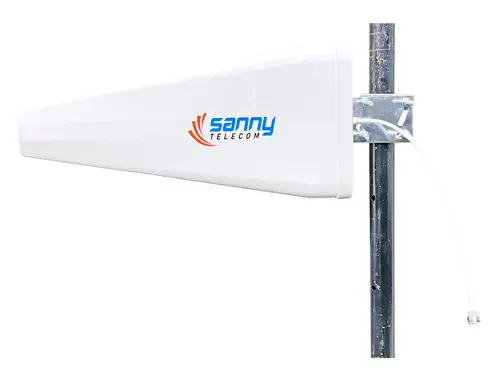
Features and Advantages
cURL Too many subrequests by single Worker invocation. To configure this limit, refer to https://developers.cloudflare.com/workers/wrangler/configuration/#limits
cURL Too many subrequests by single Worker invocation. To configure this limit, refer to https://developers.cloudflare.com/workers/wrangler/configuration/#limits.
cURL Too many subrequests by single Worker invocation. To configure this limit, refer to https://developers.cloudflare.com/workers/wrangler/configuration/#limits.
cURL Too many subrequests by single Worker invocation. To configure this limit, refer to https://developers.cloudflare.com/workers/wrangler/configuration/#limits
cURL Too many subrequests by single Worker invocation. To configure this limit, refer to https://developers.cloudflare.com/workers/wrangler/configuration/#limits.
cURL Too many subrequests by single Worker invocation. To configure this limit, refer to https://developers.cloudflare.com/workers/wrangler/configuration/#limits.
cURL Too many subrequests by single Worker invocation. To configure this limit, refer to https://developers.cloudflare.com/workers/wrangler/configuration/#limits
cURL Too many subrequests by single Worker invocation. To configure this limit, refer to https://developers.cloudflare.com/workers/wrangler/configuration/#limits.
Advantage: This directionality improves signal coverage and reduces interference, enhancing the overall performance of the DAS.
4. Compact and Lightweight:
Feature: LPAs are typically compact and lightweight compared to other wideband antennas.
Advantage: Their size and weight make them easier to install and integrate into existing infrastructure, particularly in urban environments where space is at a premium.
5. Scalability:
Feature: LPAs can be designed to cover a wide range of frequencies, making them scalable.
Advantage: This scalability is beneficial for future-proofing the network, as they can accommodate new frequency bands as they become available.
6. Cost-Effective:
Feature: The design and manufacturing process of LPAs is relatively straightforward.
Advantage: This simplicity translates into lower costs, making them a cost-effective solution for large-scale deployments in 5G DAS.
cURL Too many subrequests by single Worker invocation. To configure this limit, refer to https://developers.cloudflare.com/workers/wrangler/configuration/#limits
1. Indoor Coverage:
Application: LPAs can be used in indoor DAS to provide consistent and reliable 5G coverage in large buildings, shopping malls, airports, and stadiums.
Benefit: Ensures seamless connectivity and high data throughput for users in indoor environments.
2. Outdoor Urban Coverage:
Application: In urban areas, LPAs can be deployed on rooftops and street furniture to enhance 5G coverage and capacity.
Benefit: Improves signal penetration and reduces dead zones in densely populated areas.
3. Rural and Suburban Coverage:
Application: LPAs can be used in DAS to extend 5G coverage to rural and suburban areas where traditional macro cells might be less effective.
Benefit: Provides high-speed internet access to underserved areas, bridging the digital divide.
4. Enterprise Networks:
Application: Enterprises can use LPAs in their private DAS to ensure robust 5G connectivity throughout their campuses, including office buildings, manufacturing plants, and warehouses.
Benefit: Enhances operational efficiency and supports IoT applications within the enterprise.
5. Transportation Hubs:
Application: LPAs can be deployed in transportation hubs such as train stations, bus terminals, and airports to provide continuous 5G coverage.
Benefit: Ensures that travelers have access to high-speed internet and can use bandwidth-intensive applications without interruption.
6. Public Safety Networks:
Application: Public safety agencies can use LPAs in their DAS to ensure reliable 5G communication for first responders in emergency situations.
Benefit: Enhances the effectiveness of emergency response operations by providing robust and reliable communication channels.
7. Smart Cities:
Application: LPAs can be part of the DAS infrastructure in smart cities to support a wide range of applications, from smart lighting and traffic management to public Wi-Fi and surveillance systems.
Benefit: Facilitates the implementation of smart city initiatives by providing the necessary connectivity backbone.
In conclusion, Log Periodic Antennas offer a range of features and advantages that make them well-suited for use in the DAS of 5G networks. Their wide frequency range, consistent gain, and directional radiation pattern, combined with their compact size and cost-effectiveness, make them a versatile solution for enhancing 5G coverage and capacity in various environments.
Specialty 5G Antennas
5G networks are revolutionizing telecommunications with their high-speed, low-latency capabilities, and the deployment of 5G requires specialized antennas to handle the unique demands of this technology. Here’s an overview of the specialty antennas used in Distributed Antenna Systems (DAS) for 5G networks, focusing on mmWave antennas and small cell antennas.
mmWave Antennas

1. Characteristics:
Frequency Range: Operates in the millimeter wave spectrum, typically between 24 GHz and 100 GHz.
Bandwidth: Offers very high bandwidth, essential for achieving the high data rates promised by 5G.
Beamforming: Utilizes advanced beamforming techniques to direct signals precisely, enhancing signal strength and reducing interference.
cURL Too many subrequests by single Worker invocation. To configure this limit, refer to https://developers.cloudflare.com/workers/wrangler/configuration/#limits.
cURL Too many subrequests by single Worker invocation. To configure this limit, refer to https://developers.cloudflare.com/workers/wrangler/configuration/#limits
cURL Too many subrequests by single Worker invocation. To configure this limit, refer to https://developers.cloudflare.com/workers/wrangler/configuration/#limits.
cURL Too many subrequests by single Worker invocation. To configure this limit, refer to https://developers.cloudflare.com/workers/wrangler/configuration/#limits.
cURL Too many subrequests by single Worker invocation. To configure this limit, refer to https://developers.cloudflare.com/workers/wrangler/configuration/#limits.
cURL Too many subrequests by single Worker invocation. To configure this limit, refer to https://developers.cloudflare.com/workers/wrangler/configuration/#limits
cURL Too many subrequests by single Worker invocation. To configure this limit, refer to https://developers.cloudflare.com/workers/wrangler/configuration/#limits.
cURL Too many subrequests by single Worker invocation. To configure this limit, refer to https://developers.cloudflare.com/workers/wrangler/configuration/#limits.
cURL Too many subrequests by single Worker invocation. To configure this limit, refer to https://developers.cloudflare.com/workers/wrangler/configuration/#limits
1. Characteristics:
cURL Too many subrequests by single Worker invocation. To configure this limit, refer to https://developers.cloudflare.com/workers/wrangler/configuration/#limits.
cURL Too many subrequests by single Worker invocation. To configure this limit, refer to https://developers.cloudflare.com/workers/wrangler/configuration/#limits.
cURL Too many subrequests by single Worker invocation. To configure this limit, refer to https://developers.cloudflare.com/workers/wrangler/configuration/#limits.
cURL Too many subrequests by single Worker invocation. To configure this limit, refer to https://developers.cloudflare.com/workers/wrangler/configuration/#limits.
cURL Too many subrequests by single Worker invocation. To configure this limit, refer to https://developers.cloudflare.com/workers/wrangler/configuration/#limits
cURL Too many subrequests by single Worker invocation. To configure this limit, refer to https://developers.cloudflare.com/workers/wrangler/configuration/#limits.
cURL Too many subrequests by single Worker invocation. To configure this limit, refer to https://developers.cloudflare.com/workers/wrangler/configuration/#limits.
cURL Too many subrequests by single Worker invocation. To configure this limit, refer to https://developers.cloudflare.com/workers/wrangler/configuration/#limits.
cURL Too many subrequests by single Worker invocation. To configure this limit, refer to https://developers.cloudflare.com/workers/wrangler/configuration/#limits
cURL Too many subrequests by single Worker invocation. To configure this limit, refer to https://developers.cloudflare.com/workers/wrangler/configuration/#limits.
cURL Too many subrequests by single Worker invocation. To configure this limit, refer to https://developers.cloudflare.com/workers/wrangler/configuration/#limits.
cURL Too many subrequests by single Worker invocation. To configure this limit, refer to https://developers.cloudflare.com/workers/wrangler/configuration/#limits.
Conclusion
cURL Too many subrequests by single Worker invocation. To configure this limit, refer to https://developers.cloudflare.com/workers/wrangler/configuration/#limits.
cURL Too many subrequests by single Worker invocation. To configure this limit, refer to https://developers.cloudflare.com/workers/wrangler/configuration/#limits
Commercial Buildings
High-Rise Offices
Case Study: One World Trade Center, New York City
One World Trade Center, a symbol of resilience and innovation, is one of the tallest buildings in the Western Hemisphere. To ensure seamless connectivity for its tenants and visitors, the building integrated a 5G Distributed Antenna System (DAS).

Challenges
Structural Complexity: The high-rise structure and dense materials like steel and concrete posed significant challenges for signal penetration.
High User Density: The building houses numerous businesses, leading to high demand for reliable and high-speed internet connectivity.
Security and Maintenance: Being a high-profile building, maintaining security while installing and maintaining the system was critical.
Solution
Comprehensive Site Survey: Detailed planning and site surveys were conducted to understand the signal propagation characteristics within the building.
Hybrid DAS Deployment: A combination of fiber and coaxial cables ensured robust signal distribution across all floors.
Small Cells Integration: Small cells were strategically placed to handle high user density areas, such as conference rooms and common areas.
Security Protocols: Advanced security measures were implemented to ensure the integrity of the network during and after installation.
Outcome
Enhanced Connectivity: Tenants and visitors experienced improved mobile network performance, with faster download and upload speeds.
Increased Tenant Satisfaction: Reliable 5G connectivity became a key selling point, attracting high-profile tenants.
Operational Efficiency: Businesses within the building benefited from improved communication and operational efficiency.
Shopping Malls
Case Study: Mall of America, Bloomington, Minnesota

The Mall of America, one of the largest shopping malls in the United States, attracts millions of visitors annually. To enhance the shopping experience and support modern retail operations, the mall implemented a 5G DAS.
Challenges
Large Area Coverage: Covering the massive area of the mall, including retail spaces, entertainment zones, and parking areas, required a meticulous deployment strategy.
Varied Building Materials: Different sections of the mall used various building materials, affecting signal propagation.
High Foot Traffic: The mall experiences high foot traffic, especially during holidays and special events, necessitating a reliable and high-capacity network.
Solution
Zonal Approach: The mall was divided into zones, with each zone receiving a tailored DAS solution to address specific connectivity challenges.
Advanced Antenna Systems: High-gain antennas and repeaters were used to ensure consistent signal strength throughout the mall.
Public Safety Integration: The DAS also supported public safety communications, ensuring that emergency services had reliable connectivity.
IoT Integration: The 5G network supported IoT applications, such as smart lighting, digital signage, and security systems.
Outcome
Improved Shopper Experience: Visitors enjoyed seamless connectivity, enhancing their shopping experience with features like mobile payments and augmented reality applications.
Increased Sales: Retailers benefited from improved customer engagement and operational efficiencies, leading to increased sales.
Enhanced Security: The integration of public safety communications and IoT applications improved overall security within the mall.
Conclusion
The implementation of 5G DAS in high-rise offices and shopping malls demonstrates the transformative potential of advanced connectivity solutions. These case studies highlight the importance of tailored deployment strategies, advanced technologies, and integration with existing systems to achieve optimal outcomes. As 5G technology continues to evolve, its applications in commercial buildings are expected to expand, driving innovation and enhancing user experiences.
Public Venues
1. Stadiums and Arenas
Case Study: AT&T Stadium, Arlington, Texas
AT&T Stadium, home to the Dallas Cowboys, is a prime example of a public venue that has successfully implemented a 5G Distributed Antenna System (DAS) to enhance connectivity for thousands of fans.

cURL Too many subrequests by single Worker invocation. To configure this limit, refer to https://developers.cloudflare.com/workers/wrangler/configuration/#limits
cURL Too many subrequests by single Worker invocation. To configure this limit, refer to https://developers.cloudflare.com/workers/wrangler/configuration/#limits.
cURL Too many subrequests by single Worker invocation. To configure this limit, refer to https://developers.cloudflare.com/workers/wrangler/configuration/#limits.
Benefits
cURL Too many subrequests by single Worker invocation. To configure this limit, refer to https://developers.cloudflare.com/workers/wrangler/configuration/#limits.
cURL Too many subrequests by single Worker invocation. To configure this limit, refer to https://developers.cloudflare.com/workers/wrangler/configuration/#limits.
cURL Too many subrequests by single Worker invocation. To configure this limit, refer to https://developers.cloudflare.com/workers/wrangler/configuration/#limits.
Case Study: cURL Too many subrequests by single Worker invocation. To configure this limit, refer to https://developers.cloudflare.com/workers/wrangler/configuration/#limits, cURL Too many subrequests by single Worker invocation. To configure this limit, refer to https://developers.cloudflare.com/workers/wrangler/configuration/#limits
cURL Too many subrequests by single Worker invocation. To configure this limit, refer to https://developers.cloudflare.com/workers/wrangler/configuration/#limits.
cURL Too many subrequests by single Worker invocation. To configure this limit, refer to https://developers.cloudflare.com/workers/wrangler/configuration/#limits
cURL Too many subrequests by single Worker invocation. To configure this limit, refer to https://developers.cloudflare.com/workers/wrangler/configuration/#limits.
cURL Too many subrequests by single Worker invocation. To configure this limit, refer to https://developers.cloudflare.com/workers/wrangler/configuration/#limits.
Benefits
cURL Too many subrequests by single Worker invocation. To configure this limit, refer to https://developers.cloudflare.com/workers/wrangler/configuration/#limits.
cURL Too many subrequests by single Worker invocation. To configure this limit, refer to https://developers.cloudflare.com/workers/wrangler/configuration/#limits.
cURL Too many subrequests by single Worker invocation. To configure this limit, refer to https://developers.cloudflare.com/workers/wrangler/configuration/#limits.
cURL Too many subrequests by single Worker invocation. To configure this limit, refer to https://developers.cloudflare.com/workers/wrangler/configuration/#limits
Case Study: cURL Too many subrequests by single Worker invocation. To configure this limit, refer to https://developers.cloudflare.com/workers/wrangler/configuration/#limits, cURL Too many subrequests by single Worker invocation. To configure this limit, refer to https://developers.cloudflare.com/workers/wrangler/configuration/#limits
cURL Too many subrequests by single Worker invocation. To configure this limit, refer to https://developers.cloudflare.com/workers/wrangler/configuration/#limits.
cURL Too many subrequests by single Worker invocation. To configure this limit, refer to https://developers.cloudflare.com/workers/wrangler/configuration/#limits
cURL Too many subrequests by single Worker invocation. To configure this limit, refer to https://developers.cloudflare.com/workers/wrangler/configuration/#limits.
cURL Too many subrequests by single Worker invocation. To configure this limit, refer to https://developers.cloudflare.com/workers/wrangler/configuration/#limits.
Benefits
cURL Too many subrequests by single Worker invocation. To configure this limit, refer to https://developers.cloudflare.com/workers/wrangler/configuration/#limits.
cURL Too many subrequests by single Worker invocation. To configure this limit, refer to https://developers.cloudflare.com/workers/wrangler/configuration/#limits.
Future-Proofing: The 5G infrastructure positions Changi Airport as a future-ready hub, capable of integrating emerging technologies such as autonomous vehicles and advanced robotics.
Case Study: Los Angeles International Airport (LAX), USA
LAX, one of the busiest airports in the world, has adopted 5G DAS to manage the high volume of passengers and ensure efficient operations.

cURL Too many subrequests by single Worker invocation. To configure this limit, refer to https://developers.cloudflare.com/workers/wrangler/configuration/#limits
Network Deployment: A comprehensive 5G DAS network was deployed across all terminals, parking structures, and common areas, ensuring consistent coverage.
Enhanced Connectivity: High-density antennas and small cells were installed to manage the high data traffic, particularly during peak travel times.
Benefits
Seamless Passenger Connectivity: Travelers experience uninterrupted high-speed internet, allowing them to stay connected and access travel-related information effortlessly.
Operational Improvements: The 5G network supports advanced applications such as biometric boarding, automated check-ins, and real-time flight updates, streamlining airport operations.
Enhanced Security: Improved connectivity allows for better coordination among security personnel and real-time monitoring of security systems, enhancing overall safety.
Conclusion
The implementation of 5G DAS in public venues such as stadiums, arenas, airports, and transportation hubs demonstrates significant improvements in connectivity, operational efficiency, and customer experience. These case studies highlight the transformative potential of 5G technology in enhancing the functionality and appeal of large public spaces.
Industrial and Healthcare Facilities
5G Distributed Antenna Systems (DAS) are revolutionizing various sectors by providing enhanced connectivity, low latency, and high bandwidth. Below are detailed case studies and real-world applications in factories, warehouses, hospitals, and medical centers:
Factories and Warehouses
Case Study: Smart Manufacturing Facility
Location: Germany
Industry: Automotive Manufacturing
Objective: Implement a 5G DAS to enhance production efficiency and enable real-time data analytics.
cURL Too many subrequests by single Worker invocation. To configure this limit, refer to https://developers.cloudflare.com/workers/wrangler/configuration/#limits
5G DAS Installation: A comprehensive 5G DAS was installed across the entire facility, including production lines, assembly areas, and storage zones.
IoT Integration: Connected IoT devices were deployed to monitor machinery, track inventory, and manage logistics.
Robotics and Automation: 5G-enabled robots and automated guided vehicles (AGVs) were used to streamline operations.
Outcomes
Increased Productivity: Real-time data analytics allowed for predictive maintenance, reducing downtime by 30%.
Enhanced Safety: Improved communication between machines and human operators reduced workplace accidents by 20%.
Operational Efficiency: Automated processes led to a 25% increase in production speed.
Case Study: Smart Warehouse
Location: United States
Industry: E-commerce
Objective: Optimize warehouse operations using 5G DAS to handle increased order volumes.
cURL Too many subrequests by single Worker invocation. To configure this limit, refer to https://developers.cloudflare.com/workers/wrangler/configuration/#limits
5G DAS Deployment: A robust 5G network was established throughout the warehouse to ensure seamless connectivity.
Automated Inventory Management: 5G-enabled drones and robots were used for real-time inventory tracking and management.
Augmented Reality (AR): AR glasses connected via 5G assisted workers in locating items and navigating the warehouse efficiently.
Outcomes
Reduced Order Fulfillment Time: Order processing time decreased by 40% due to efficient inventory management.
Improved Accuracy: Inventory accuracy improved by 35%, minimizing errors in order fulfillment.
Cost Savings: Labor costs were reduced by 25% due to automation and efficient resource utilization.
Hospitals and Medical Centers
Case Study: Smart Hospital
Location: South Korea
cURL Too many subrequests by single Worker invocation. To configure this limit, refer to https://developers.cloudflare.com/workers/wrangler/configuration/#limits
cURL Too many subrequests by single Worker invocation. To configure this limit, refer to https://developers.cloudflare.com/workers/wrangler/configuration/#limits.
cURL Too many subrequests by single Worker invocation. To configure this limit, refer to https://developers.cloudflare.com/workers/wrangler/configuration/#limits
cURL Too many subrequests by single Worker invocation. To configure this limit, refer to https://developers.cloudflare.com/workers/wrangler/configuration/#limits.
cURL Too many subrequests by single Worker invocation. To configure this limit, refer to https://developers.cloudflare.com/workers/wrangler/configuration/#limits.
cURL Too many subrequests by single Worker invocation. To configure this limit, refer to https://developers.cloudflare.com/workers/wrangler/configuration/#limits.
Outcomes
cURL Too many subrequests by single Worker invocation. To configure this limit, refer to https://developers.cloudflare.com/workers/wrangler/configuration/#limits.
cURL Too many subrequests by single Worker invocation. To configure this limit, refer to https://developers.cloudflare.com/workers/wrangler/configuration/#limits.
cURL Too many subrequests by single Worker invocation. To configure this limit, refer to https://developers.cloudflare.com/workers/wrangler/configuration/#limits.
cURL Too many subrequests by single Worker invocation. To configure this limit, refer to https://developers.cloudflare.com/workers/wrangler/configuration/#limits
cURL Too many subrequests by single Worker invocation. To configure this limit, refer to https://developers.cloudflare.com/workers/wrangler/configuration/#limits
cURL Too many subrequests by single Worker invocation. To configure this limit, refer to https://developers.cloudflare.com/workers/wrangler/configuration/#limits
cURL Too many subrequests by single Worker invocation. To configure this limit, refer to https://developers.cloudflare.com/workers/wrangler/configuration/#limits.
cURL Too many subrequests by single Worker invocation. To configure this limit, refer to https://developers.cloudflare.com/workers/wrangler/configuration/#limits
cURL Too many subrequests by single Worker invocation. To configure this limit, refer to https://developers.cloudflare.com/workers/wrangler/configuration/#limits.
cURL Too many subrequests by single Worker invocation. To configure this limit, refer to https://developers.cloudflare.com/workers/wrangler/configuration/#limits.
cURL Too many subrequests by single Worker invocation. To configure this limit, refer to https://developers.cloudflare.com/workers/wrangler/configuration/#limits.
Outcomes
cURL Too many subrequests by single Worker invocation. To configure this limit, refer to https://developers.cloudflare.com/workers/wrangler/configuration/#limits.
cURL Too many subrequests by single Worker invocation. To configure this limit, refer to https://developers.cloudflare.com/workers/wrangler/configuration/#limits.
cURL Too many subrequests by single Worker invocation. To configure this limit, refer to https://developers.cloudflare.com/workers/wrangler/configuration/#limits.
Conclusion
cURL Too many subrequests by single Worker invocation. To configure this limit, refer to https://developers.cloudflare.com/workers/wrangler/configuration/#limits.
cURL Too many subrequests by single Worker invocation. To configure this limit, refer to https://developers.cloudflare.com/workers/wrangler/configuration/#limits
cURL Too many subrequests by single Worker invocation. To configure this limit, refer to https://developers.cloudflare.com/workers/wrangler/configuration/#limits
cURL Too many subrequests by single Worker invocation. To configure this limit, refer to https://developers.cloudflare.com/workers/wrangler/configuration/#limits Sky Residences, New York City
The Sky Residences is a luxury high-rise apartment building in New York City, offering premium amenities and state-of-the-art facilities. With over 500 units, the management faced challenges in providing consistent and high-speed wireless connectivity to all residents, especially in common areas and underground parking.

cURL Too many subrequests by single Worker invocation. To configure this limit, refer to https://developers.cloudflare.com/workers/wrangler/configuration/#limits
To address these issues, the management decided to implement a Distributed Antenna System (DAS) to enhance 5G coverage throughout the building. The project involved:
Site Survey and Planning: A comprehensive survey was conducted to identify dead zones and areas with weak signals.
Installation: Small cell antennas were strategically placed in common areas, hallways, and parking garages.
Integration: The DAS was integrated with existing infrastructure to ensure seamless connectivity without disrupting the building’s aesthetics.
Results
Improved Connectivity: Residents experienced significantly better 5G coverage and faster internet speeds.
Increased Property Value: Enhanced connectivity contributed to higher rental and property values.
Resident Satisfaction: Surveys indicated a marked improvement in resident satisfaction regarding wireless services.
Key Takeaways
Strategic Placement: Proper planning and strategic placement of antennas are crucial to maximize coverage.
Integration: Seamless integration with existing infrastructure minimizes disruption and maintains building aesthetics.
Resident Engagement: Regular feedback from residents helps in fine-tuning the system for optimal performance.
2. Gated Communities
Case Study: Green Valley Estates, California
Green Valley Estates is a large gated community in California, home to over 1,000 families. The community spans several acres, including residential units, parks, recreational facilities, and a clubhouse. The management aimed to provide robust 5G connectivity to support smart home devices, security systems, and residents’ daily internet usage.

cURL Too many subrequests by single Worker invocation. To configure this limit, refer to https://developers.cloudflare.com/workers/wrangler/configuration/#limits
The community management partnered with a telecom provider to deploy a 5G DAS network. The key steps included:
Needs Assessment: Understanding the specific needs of the community, including high-speed internet for smart home devices and comprehensive coverage for outdoor areas.
Design and Deployment: Designing a DAS network that covers both indoor and outdoor areas, including homes, parks, and communal facilities.
Testing and Optimization: Conducting thorough testing to ensure coverage and performance, followed by continuous optimization based on user feedback.
Results
Enhanced Smart Home Integration: Residents could seamlessly integrate smart home devices, enhancing convenience and security.
Improved Security: Enhanced connectivity supported advanced security systems, including CCTV and remote monitoring.
Community Engagement: The community reported higher satisfaction levels and increased engagement with communal activities facilitated by better connectivity.
Key Takeaways
Comprehensive Coverage: Ensuring both indoor and outdoor areas are covered is essential for gated communities.
Smart Home Support: Robust 5G connectivity supports the growing demand for smart home technologies.
Continuous Optimization: Ongoing testing and optimization are necessary to maintain high performance and address any connectivity issues.
Conclusion
Implementing 5G DAS in residential complexes, whether in high-rise apartment buildings or sprawling gated communities, significantly enhances connectivity, supporting modern living standards and smart technologies. These real-world applications demonstrate the importance of strategic planning, seamless integration, and continuous optimization to achieve the best results.
Chapter 5: Installation and Maintenance
Planning and Design
Designing a Distributed Antenna System (DAS) for 5G networks involves several critical steps to ensure optimal coverage, capacity, and performance. Below is a detailed guide on the planning and design process, divided into two main sections: Site Surveys and Needs Assessment, and Network Design and Layout.
1. Site Surveys and Needs Assessment
A. Initial Site Survey
Objective: Understand the physical and RF environment.
Activities:
Walkthrough: Conduct a physical walkthrough of the site to identify potential challenges like thick walls, metal structures, and other obstructions.
Identify Key Areas: Determine high-traffic areas, dead zones, and areas requiring enhanced coverage.
cURL Too many subrequests by single Worker invocation. To configure this limit, refer to https://developers.cloudflare.com/workers/wrangler/configuration/#limits.
cURL Too many subrequests by single Worker invocation. To configure this limit, refer to https://developers.cloudflare.com/workers/wrangler/configuration/#limits
cURL Too many subrequests by single Worker invocation. To configure this limit, refer to https://developers.cloudflare.com/workers/wrangler/configuration/#limits.
cURL Too many subrequests by single Worker invocation. To configure this limit, refer to https://developers.cloudflare.com/workers/wrangler/configuration/#limits.
Activities:
cURL Too many subrequests by single Worker invocation. To configure this limit, refer to https://developers.cloudflare.com/workers/wrangler/configuration/#limits.
cURL Too many subrequests by single Worker invocation. To configure this limit, refer to https://developers.cloudflare.com/workers/wrangler/configuration/#limits.
cURL Too many subrequests by single Worker invocation. To configure this limit, refer to https://developers.cloudflare.com/workers/wrangler/configuration/#limits.
cURL Too many subrequests by single Worker invocation. To configure this limit, refer to https://developers.cloudflare.com/workers/wrangler/configuration/#limits
cURL Too many subrequests by single Worker invocation. To configure this limit, refer to https://developers.cloudflare.com/workers/wrangler/configuration/#limits.
cURL Too many subrequests by single Worker invocation. To configure this limit, refer to https://developers.cloudflare.com/workers/wrangler/configuration/#limits.
cURL Too many subrequests by single Worker invocation. To configure this limit, refer to https://developers.cloudflare.com/workers/wrangler/configuration/#limits.
cURL Too many subrequests by single Worker invocation. To configure this limit, refer to https://developers.cloudflare.com/workers/wrangler/configuration/#limits.
cURL Too many subrequests by single Worker invocation. To configure this limit, refer to https://developers.cloudflare.com/workers/wrangler/configuration/#limits.
cURL Too many subrequests by single Worker invocation. To configure this limit, refer to https://developers.cloudflare.com/workers/wrangler/configuration/#limits
cURL Too many subrequests by single Worker invocation. To configure this limit, refer to https://developers.cloudflare.com/workers/wrangler/configuration/#limits.
Activities:
cURL Too many subrequests by single Worker invocation. To configure this limit, refer to https://developers.cloudflare.com/workers/wrangler/configuration/#limits.
cURL Too many subrequests by single Worker invocation. To configure this limit, refer to https://developers.cloudflare.com/workers/wrangler/configuration/#limits.
cURL Too many subrequests by single Worker invocation. To configure this limit, refer to https://developers.cloudflare.com/workers/wrangler/configuration/#limits
cURL Too many subrequests by single Worker invocation. To configure this limit, refer to https://developers.cloudflare.com/workers/wrangler/configuration/#limits
cURL Too many subrequests by single Worker invocation. To configure this limit, refer to https://developers.cloudflare.com/workers/wrangler/configuration/#limits.
cURL Too many subrequests by single Worker invocation. To configure this limit, refer to https://developers.cloudflare.com/workers/wrangler/configuration/#limits
cURL Too many subrequests by single Worker invocation. To configure this limit, refer to https://developers.cloudflare.com/workers/wrangler/configuration/#limits.
Remote Units (RUs): Distributed units that amplify and distribute the signal.
Antennas: Various types (e.g., omni-directional, directional) to cover different areas.
Cabling: Fiber optic or coaxial cables to connect the HEU and RUs.
B. Coverage Planning
Objective: Ensure comprehensive coverage throughout the site.
Activities:
Antenna Placement: Strategically place antennas to cover all required areas, minimizing overlap and interference.
Propagation Modeling: Use software tools to model RF propagation and optimize antenna placement.
Signal Strength Targets: Set target signal strength levels for different areas.
C. Capacity Planning
Objective: Ensure the system can handle the expected user load.
Activities:
Bandwidth Allocation: Allocate sufficient bandwidth to meet user demand.
Load Balancing: Distribute users and devices across multiple RUs to avoid congestion.
Redundancy and Resilience: Design for redundancy to ensure continuous operation in case of component failure.
D. Integration with 5G Core Network
Objective: Seamlessly integrate the DAS with the existing 5G core network.
Activities:
Backhaul Connectivity: Ensure reliable and high-capacity backhaul connections from the HEU to the core network.
Synchronization: Ensure proper synchronization between the DAS and the core network to avoid timing issues.
Network Management: Integrate the DAS with network management systems for monitoring and control.
E. Testing and Optimization
Objective: Validate the design and optimize performance.
Activities
Initial Testing: Perform initial tests to verify signal strength, coverage, and capacity.
Optimization: Adjust antenna placements, power levels, and configurations based on test results.
Final Validation: Conduct comprehensive testing to ensure the system meets all requirements.
F. Documentation and Training
Objective: Provide thorough documentation and training for ongoing operation and maintenance.
Activities
Documentation: Create detailed documentation, including system diagrams, configuration settings, and maintenance procedures.
Training: Train the IT staff and maintenance personnel on system operation, troubleshooting, and maintenance.
By following these steps, you can design and deploy a robust DAS system that meets the specific needs of a 5G network, ensuring optimal coverage, capacity, and performance for users.
Integrating Private Networks with Commercial Cellular Service
Offering both private networks and commercial cellular service within a building is entirely feasible with careful planning and the right infrastructure choices. One common approach uses standalone small cells strategically placed throughout the premises to deliver a dedicated private 4G or 5G network for tenants, staff, or specialized applications. This setup provides controlled, secure connectivity tailored to an organization’s needs.
However, if the facility already has a Distributed Antenna System (DAS) in place—or is planning to install one for broader cellular coverage—the same DAS can often be configured to support private network signals alongside those from public carriers. This dual-purpose deployment maximizes the value of existing infrastructure and ensures seamless connectivity for both private and commercial users.
For venues aiming to support multiple public network operators while maintaining a private network, deploying a Multi-Operator Core Network (MOCN) is another practical solution. MOCN technology allows for the sharing of radio access network resources, enabling commercial carriers to operate over the same frequencies (such as CBRS, in the U.S.) as the private network. This architecture streamlines hardware requirements and can simplify ongoing management while expanding service options for building occupants.
Installation Best Practices
Distributed Antenna Systems (DAS) are critical for enhancing cellular coverage, especially for 5G networks, which require precise and efficient installations. Here are some best practices for mounting, positioning, cabling, and connections:

Mounting and Positioning
1. Site Survey and Planning:
Conduct a thorough site survey to understand the building layout, materials, and existing infrastructure.
cURL Too many subrequests by single Worker invocation. To configure this limit, refer to https://developers.cloudflare.com/workers/wrangler/configuration/#limits.
cURL Too many subrequests by single Worker invocation. To configure this limit, refer to https://developers.cloudflare.com/workers/wrangler/configuration/#limits
cURL Too many subrequests by single Worker invocation. To configure this limit, refer to https://developers.cloudflare.com/workers/wrangler/configuration/#limits.
cURL Too many subrequests by single Worker invocation. To configure this limit, refer to https://developers.cloudflare.com/workers/wrangler/configuration/#limits.
cURL Too many subrequests by single Worker invocation. To configure this limit, refer to https://developers.cloudflare.com/workers/wrangler/configuration/#limits.
cURL Too many subrequests by single Worker invocation. To configure this limit, refer to https://developers.cloudflare.com/workers/wrangler/configuration/#limits
cURL Too many subrequests by single Worker invocation. To configure this limit, refer to https://developers.cloudflare.com/workers/wrangler/configuration/#limits.
cURL Too many subrequests by single Worker invocation. To configure this limit, refer to https://developers.cloudflare.com/workers/wrangler/configuration/#limits.
cURL Too many subrequests by single Worker invocation. To configure this limit, refer to https://developers.cloudflare.com/workers/wrangler/configuration/#limits
cURL Too many subrequests by single Worker invocation. To configure this limit, refer to https://developers.cloudflare.com/workers/wrangler/configuration/#limits.
cURL Too many subrequests by single Worker invocation. To configure this limit, refer to https://developers.cloudflare.com/workers/wrangler/configuration/#limits.
cURL Too many subrequests by single Worker invocation. To configure this limit, refer to https://developers.cloudflare.com/workers/wrangler/configuration/#limits
cURL Too many subrequests by single Worker invocation. To configure this limit, refer to https://developers.cloudflare.com/workers/wrangler/configuration/#limits.
cURL Too many subrequests by single Worker invocation. To configure this limit, refer to https://developers.cloudflare.com/workers/wrangler/configuration/#limits.
cURL Too many subrequests by single Worker invocation. To configure this limit, refer to https://developers.cloudflare.com/workers/wrangler/configuration/#limits
cURL Too many subrequests by single Worker invocation. To configure this limit, refer to https://developers.cloudflare.com/workers/wrangler/configuration/#limits
cURL Too many subrequests by single Worker invocation. To configure this limit, refer to https://developers.cloudflare.com/workers/wrangler/configuration/#limits.
cURL Too many subrequests by single Worker invocation. To configure this limit, refer to https://developers.cloudflare.com/workers/wrangler/configuration/#limits.
cURL Too many subrequests by single Worker invocation. To configure this limit, refer to https://developers.cloudflare.com/workers/wrangler/configuration/#limits
cURL Too many subrequests by single Worker invocation. To configure this limit, refer to https://developers.cloudflare.com/workers/wrangler/configuration/#limits.
cURL Too many subrequests by single Worker invocation. To configure this limit, refer to https://developers.cloudflare.com/workers/wrangler/configuration/#limits.
cURL Too many subrequests by single Worker invocation. To configure this limit, refer to https://developers.cloudflare.com/workers/wrangler/configuration/#limits
Use high-quality connectors that match the cable type and ensure a secure, low-loss connection.
Avoid using adapters or connectors that can introduce additional signal loss or points of failure.
4. Termination and Testing:
Properly terminate cables using appropriate tools and techniques to ensure reliable connections.
Test each cable segment for continuity, signal loss, and reflection using a network analyzer or similar tool.
5. Labeling and Documentation:
Clearly label all cables, connectors, and equipment for easy identification and troubleshooting.
Maintain detailed documentation of the installation, including cable routes, antenna locations, and test results.
6. Power and Grounding:
Ensure proper grounding of all DAS components to protect against electrical surges and ensure safety.
Use power supplies and backup systems that meet the power requirements of the DAS equipment.
7. Signal Splitters and Amplifiers:
Use signal splitters and amplifiers as needed to distribute the signal evenly and boost weak signals.
Ensure that splitters and amplifiers are compatible with the DAS system and do not introduce significant signal loss or noise.
By adhering to these best practices, you can ensure a reliable and efficient DAS installation that enhances 5G network coverage and performance. Regular maintenance and periodic testing are also recommended to keep the system operating at its best.
Testing and Optimization
Distributed Antenna Systems (DAS) play a crucial role in enhancing the coverage and capacity of 5G networks. Proper testing and optimization of DAS are essential to ensure optimal performance. Below are the key aspects to consider:
Signal Testing and Calibration
1. Initial Site Survey
Objective: Assess the current signal strength and identify areas with weak coverage.
Tools: Spectrum analyzers, signal generators, and mobile devices with network testing apps.
Procedure: Conduct a walk-through survey to map existing signal levels and interference sources.
2. Installation Verification
Objective: Ensure that all components (antennas, cables, amplifiers) are correctly installed.
Tools: Visual inspection tools, cable testers, and antenna alignment tools.
Procedure: Verify physical connections, proper grounding, and correct antenna orientation.
3. Signal Calibration
Objective: Fine-tune the system for optimal performance.
Tools: Network analyzers, power meters, and signal generators.
Procedure:
Power Level Adjustment: Adjust the power levels of amplifiers and repeaters to ensure uniform coverage.
Frequency Calibration: Ensure that the DAS system operates within the designated frequency bands for 5G.
Antenna Alignment: Optimize the orientation and placement of antennas for maximum coverage and minimal interference.
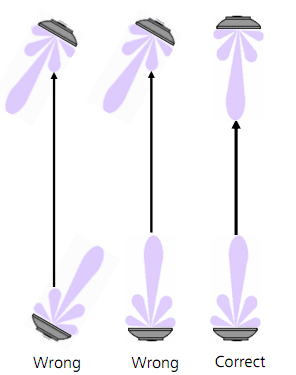
4. Performance Testing
Objective: Evaluate the performance of the DAS system under various conditions.
Tools: Mobile devices with network testing apps, throughput testers, and latency measurement tools.
Procedure:
Throughput Testing: Measure data rates to ensure they meet the expected 5G performance levels.
Latency Testing: Test the round-trip time to ensure it meets low-latency requirements.
cURL Too many subrequests by single Worker invocation. To configure this limit, refer to https://developers.cloudflare.com/workers/wrangler/configuration/#limits.
cURL Too many subrequests by single Worker invocation. To configure this limit, refer to https://developers.cloudflare.com/workers/wrangler/configuration/#limits

cURL Too many subrequests by single Worker invocation. To configure this limit, refer to https://developers.cloudflare.com/workers/wrangler/configuration/#limits
cURL Too many subrequests by single Worker invocation. To configure this limit, refer to https://developers.cloudflare.com/workers/wrangler/configuration/#limits.
cURL Too many subrequests by single Worker invocation. To configure this limit, refer to https://developers.cloudflare.com/workers/wrangler/configuration/#limits
cURL Too many subrequests by single Worker invocation. To configure this limit, refer to https://developers.cloudflare.com/workers/wrangler/configuration/#limits.
cURL Too many subrequests by single Worker invocation. To configure this limit, refer to https://developers.cloudflare.com/workers/wrangler/configuration/#limits.
cURL Too many subrequests by single Worker invocation. To configure this limit, refer to https://developers.cloudflare.com/workers/wrangler/configuration/#limits
cURL Too many subrequests by single Worker invocation. To configure this limit, refer to https://developers.cloudflare.com/workers/wrangler/configuration/#limits.
cURL Too many subrequests by single Worker invocation. To configure this limit, refer to https://developers.cloudflare.com/workers/wrangler/configuration/#limits
cURL Too many subrequests by single Worker invocation. To configure this limit, refer to https://developers.cloudflare.com/workers/wrangler/configuration/#limits.
cURL Too many subrequests by single Worker invocation. To configure this limit, refer to https://developers.cloudflare.com/workers/wrangler/configuration/#limits.
cURL Too many subrequests by single Worker invocation. To configure this limit, refer to https://developers.cloudflare.com/workers/wrangler/configuration/#limits
cURL Too many subrequests by single Worker invocation. To configure this limit, refer to https://developers.cloudflare.com/workers/wrangler/configuration/#limits.
cURL Too many subrequests by single Worker invocation. To configure this limit, refer to https://developers.cloudflare.com/workers/wrangler/configuration/#limits
cURL Too many subrequests by single Worker invocation. To configure this limit, refer to https://developers.cloudflare.com/workers/wrangler/configuration/#limits.
cURL Too many subrequests by single Worker invocation. To configure this limit, refer to https://developers.cloudflare.com/workers/wrangler/configuration/#limits.
cURL Too many subrequests by single Worker invocation. To configure this limit, refer to https://developers.cloudflare.com/workers/wrangler/configuration/#limits
cURL Too many subrequests by single Worker invocation. To configure this limit, refer to https://developers.cloudflare.com/workers/wrangler/configuration/#limits.
cURL Too many subrequests by single Worker invocation. To configure this limit, refer to https://developers.cloudflare.com/workers/wrangler/configuration/#limits
cURL Too many subrequests by single Worker invocation. To configure this limit, refer to https://developers.cloudflare.com/workers/wrangler/configuration/#limits.
cURL Too many subrequests by single Worker invocation. To configure this limit, refer to https://developers.cloudflare.com/workers/wrangler/configuration/#limits.
cURL Too many subrequests by single Worker invocation. To configure this limit, refer to https://developers.cloudflare.com/workers/wrangler/configuration/#limits
cURL Too many subrequests by single Worker invocation. To configure this limit, refer to https://developers.cloudflare.com/workers/wrangler/configuration/#limits.
cURL Too many subrequests by single Worker invocation. To configure this limit, refer to https://developers.cloudflare.com/workers/wrangler/configuration/#limits
Review Configuration Settings: Ensure that the DAS system is correctly configured to work with the 5G core network.
Update Firmware: Ensure that all DAS components are running the latest firmware.
Conclusion
Testing and optimizing a DAS system for 5G networks requires a systematic approach to ensure robust performance. By conducting thorough signal testing and calibration, and addressing common issues through effective troubleshooting, you can achieve optimal coverage and capacity for 5G deployments. Regular maintenance and updates are also essential to keep the DAS system performing at its best.
Ongoing Maintenance
Maintaining a Distributed Antenna System (DAS) for 5G networks is crucial to ensure optimal performance, reliability, and longevity. Here are some key aspects of ongoing maintenance:
Routine Inspections and Upgrades
1. Regular Site Surveys:
Conduct periodic site surveys to assess the physical condition of antennas, cables, and other hardware.
Check for any signs of wear, corrosion, or physical damage.
2. Performance Monitoring:
Utilize network monitoring tools to continuously track the performance of the DAS.
Monitor key performance indicators (KPIs) such as signal strength, data throughput, and latency.
3. Firmware and Software Updates:
Keep all DAS components up to date with the latest firmware and software versions.
Implement security patches and updates to protect against vulnerabilities.
4. System Calibration:
Regularly calibrate the system to ensure that it is operating within the specified parameters.
Adjust signal levels and configurations as needed to maintain optimal performance.
5. Capacity Upgrades:
Assess the need for capacity upgrades based on user demand and network traffic patterns.
Plan and execute upgrades to support increased data rates and user density.
Ensuring Longevity and Performance
1. Preventive Maintenance:
Implement a preventive maintenance schedule to address potential issues before they become critical.
Clean and inspect equipment to prevent dust and debris from affecting performance.
2. Environmental Controls:
Ensure that equipment is housed in environments with proper temperature and humidity controls.
Use protective enclosures to shield equipment from environmental hazards.
3. Backup Power Systems:
Maintain and test backup power systems, such as uninterruptible power supplies (UPS) and generators.
Ensure that power redundancy is in place to prevent downtime during power outages.
4. Documentation and Record Keeping:
Keep detailed records of all maintenance activities, inspections, and upgrades.
Use documentation to track the lifespan of components and plan for future replacements.
5. Training and Knowledge Sharing:
Provide ongoing training for maintenance personnel to keep them updated on the latest technologies and best practices.
Encourage knowledge sharing among team members to improve overall maintenance efficiency.
6. Vendor Support and Partnerships:
cURL Too many subrequests by single Worker invocation. To configure this limit, refer to https://developers.cloudflare.com/workers/wrangler/configuration/#limits.
cURL Too many subrequests by single Worker invocation. To configure this limit, refer to https://developers.cloudflare.com/workers/wrangler/configuration/#limits.
cURL Too many subrequests by single Worker invocation. To configure this limit, refer to https://developers.cloudflare.com/workers/wrangler/configuration/#limits
cURL Too many subrequests by single Worker invocation. To configure this limit, refer to https://developers.cloudflare.com/workers/wrangler/configuration/#limits.
cURL Too many subrequests by single Worker invocation. To configure this limit, refer to https://developers.cloudflare.com/workers/wrangler/configuration/#limits.
cURL Too many subrequests by single Worker invocation. To configure this limit, refer to https://developers.cloudflare.com/workers/wrangler/configuration/#limits.
cURL Too many subrequests by single Worker invocation. To configure this limit, refer to https://developers.cloudflare.com/workers/wrangler/configuration/#limits
cURL Too many subrequests by single Worker invocation. To configure this limit, refer to https://developers.cloudflare.com/workers/wrangler/configuration/#limits
cURL Too many subrequests by single Worker invocation. To configure this limit, refer to https://developers.cloudflare.com/workers/wrangler/configuration/#limits
cURL Too many subrequests by single Worker invocation. To configure this limit, refer to https://developers.cloudflare.com/workers/wrangler/configuration/#limits
cURL Too many subrequests by single Worker invocation. To configure this limit, refer to https://developers.cloudflare.com/workers/wrangler/configuration/#limits
cURL Too many subrequests by single Worker invocation. To configure this limit, refer to https://developers.cloudflare.com/workers/wrangler/configuration/#limits.
cURL Too many subrequests by single Worker invocation. To configure this limit, refer to https://developers.cloudflare.com/workers/wrangler/configuration/#limits.

cURL Too many subrequests by single Worker invocation. To configure this limit, refer to https://developers.cloudflare.com/workers/wrangler/configuration/#limits
cURL Too many subrequests by single Worker invocation. To configure this limit, refer to https://developers.cloudflare.com/workers/wrangler/configuration/#limits.
cURL Too many subrequests by single Worker invocation. To configure this limit, refer to https://developers.cloudflare.com/workers/wrangler/configuration/#limits.
cURL Too many subrequests by single Worker invocation. To configure this limit, refer to https://developers.cloudflare.com/workers/wrangler/configuration/#limits
cURL Too many subrequests by single Worker invocation. To configure this limit, refer to https://developers.cloudflare.com/workers/wrangler/configuration/#limits.
cURL Too many subrequests by single Worker invocation. To configure this limit, refer to https://developers.cloudflare.com/workers/wrangler/configuration/#limits.
cURL Too many subrequests by single Worker invocation. To configure this limit, refer to https://developers.cloudflare.com/workers/wrangler/configuration/#limits
cURL Too many subrequests by single Worker invocation. To configure this limit, refer to https://developers.cloudflare.com/workers/wrangler/configuration/#limits
cURL Too many subrequests by single Worker invocation. To configure this limit, refer to https://developers.cloudflare.com/workers/wrangler/configuration/#limits.
Enhanced Throughput: By transmitting multiple data streams simultaneously, massive MIMO significantly boosts data throughput, which is essential for 5G’s high-speed requirements.
2. Spatial Multiplexing
Parallel Data Streams: Spatial multiplexing allows multiple data streams to be transmitted over the same frequency channel, effectively multiplying the data rate without requiring additional bandwidth.
Improved Spectral Efficiency: This technique enhances spectral efficiency, which is critical for managing the limited spectrum resources available for 5G.
3. Diversity Techniques
Transmit Diversity: By sending the same signal from multiple antennas, transmit diversity improves signal robustness and reduces the probability of signal fading.
Receive Diversity: Multiple antennas at the receiver end can combine signals to improve reception quality, enhancing overall network reliability.
Integration in 5G DAS Networks
1. Enhanced Coverage
Indoor and Outdoor Solutions: Smart antennas and MIMO technologies are integrated into DAS to provide seamless coverage in both indoor and outdoor environments, addressing the challenges of signal penetration and propagation.
Small Cells and Repeaters: These technologies are also used in small cells and repeaters within DAS to extend coverage and capacity in densely populated areas.
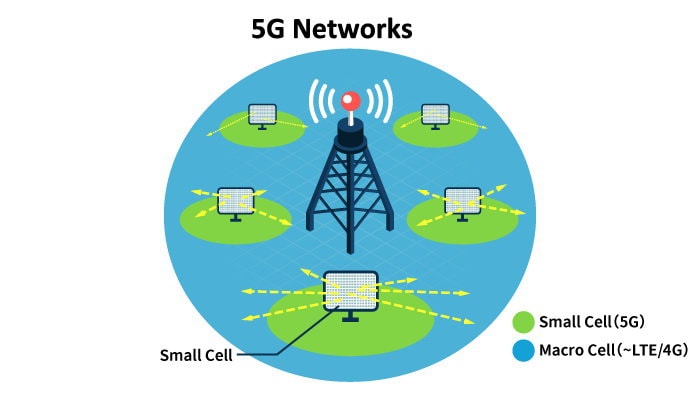
2. Improved User Experience
Higher Data Rates: With the combination of beamforming, spatial multiplexing, and massive MIMO, users experience significantly higher data rates and lower latency, essential for applications like augmented reality (AR) and virtual reality (VR).
Consistent Connectivity: Dynamic reconfiguration and adaptive beamforming ensure that users maintain consistent connectivity even in high-mobility scenarios, such as in vehicles or crowded urban areas.
Challenges and Future Directions
1. Complexity and Cost
Design and Deployment: The complexity of designing and deploying smart antennas and massive MIMO systems can be high, requiring sophisticated algorithms and hardware.
Cost Considerations: The initial cost of implementing these advanced systems can be significant, though the long-term benefits often justify the investment.
2. Standardization and Interoperability
Industry Standards: Ensuring that smart antennas and MIMO technologies comply with industry standards is crucial for interoperability and seamless integration into existing networks.
Vendor Collaboration: Collaboration between different vendors and stakeholders is essential to address compatibility and standardization issues.
Conclusion
Innovations in smart antennas and MIMO technologies are at the forefront of 5G DAS network development, driving improvements in coverage, capacity, and user experience. While challenges remain, ongoing research and development efforts are likely to yield even more advanced solutions, paving the way for the full realization of 5G’s potential.
Integration with Emerging Technologies
The advent of 5G Distributed Antenna Systems (DAS) opens up a plethora of opportunities for integrating emerging technologies, particularly the Internet of Things (IoT) and Edge Computing. Here’s how these technologies can be synergistically integrated:
1. Internet of Things (IoT) Applications

a. Enhanced Connectivity:
5G DAS networks provide the high-speed, low-latency, and high-capacity connectivity that IoT devices require. This is particularly important for applications such as smart cities, industrial automation, healthcare, and autonomous vehicles.
b. Scalability:
With 5G DAS, the network can support a massive number of connected devices, which is essential for IoT ecosystems where thousands of sensors and devices might be deployed in a single environment.
c. Real-time Data Processing:
The low latency of 5G DAS networks enables real-time data collection and processing from IoT devices. This is crucial for applications that require immediate responses, such as autonomous driving, remote surgery, and real-time monitoring systems.
d. Energy Efficiency:
5G networks are designed to be more energy-efficient, which is beneficial for IoT devices that often operate on batteries. Efficient power usage extends the operational life of these devices.
e. Enhanced Security:
5G DAS networks incorporate advanced security features that can help protect IoT devices and the data they generate from cyber threats.
2. Edge Computing
a. Reduced Latency:
Edge computing brings data processing closer to the source of data generation. When integrated with 5G DAS, this reduces the latency even further, enabling faster decision-making processes for critical applications.
cURL Too many subrequests by single Worker invocation. To configure this limit, refer to https://developers.cloudflare.com/workers/wrangler/configuration/#limits
cURL Too many subrequests by single Worker invocation. To configure this limit, refer to https://developers.cloudflare.com/workers/wrangler/configuration/#limits.
cURL Too many subrequests by single Worker invocation. To configure this limit, refer to https://developers.cloudflare.com/workers/wrangler/configuration/#limits
cURL Too many subrequests by single Worker invocation. To configure this limit, refer to https://developers.cloudflare.com/workers/wrangler/configuration/#limits.
cURL Too many subrequests by single Worker invocation. To configure this limit, refer to https://developers.cloudflare.com/workers/wrangler/configuration/#limits
cURL Too many subrequests by single Worker invocation. To configure this limit, refer to https://developers.cloudflare.com/workers/wrangler/configuration/#limits.
cURL Too many subrequests by single Worker invocation. To configure this limit, refer to https://developers.cloudflare.com/workers/wrangler/configuration/#limits
cURL Too many subrequests by single Worker invocation. To configure this limit, refer to https://developers.cloudflare.com/workers/wrangler/configuration/#limits.
cURL Too many subrequests by single Worker invocation. To configure this limit, refer to https://developers.cloudflare.com/workers/wrangler/configuration/#limits
cURL Too many subrequests by single Worker invocation. To configure this limit, refer to https://developers.cloudflare.com/workers/wrangler/configuration/#limits
cURL Too many subrequests by single Worker invocation. To configure this limit, refer to https://developers.cloudflare.com/workers/wrangler/configuration/#limits.
cURL Too many subrequests by single Worker invocation. To configure this limit, refer to https://developers.cloudflare.com/workers/wrangler/configuration/#limits
cURL Too many subrequests by single Worker invocation. To configure this limit, refer to https://developers.cloudflare.com/workers/wrangler/configuration/#limits.
cURL Too many subrequests by single Worker invocation. To configure this limit, refer to https://developers.cloudflare.com/workers/wrangler/configuration/#limits
cURL Too many subrequests by single Worker invocation. To configure this limit, refer to https://developers.cloudflare.com/workers/wrangler/configuration/#limits.
cURL Too many subrequests by single Worker invocation. To configure this limit, refer to https://developers.cloudflare.com/workers/wrangler/configuration/#limits
cURL Too many subrequests by single Worker invocation. To configure this limit, refer to https://developers.cloudflare.com/workers/wrangler/configuration/#limits.
cURL Too many subrequests by single Worker invocation. To configure this limit, refer to https://developers.cloudflare.com/workers/wrangler/configuration/#limits
cURL Too many subrequests by single Worker invocation. To configure this limit, refer to https://developers.cloudflare.com/workers/wrangler/configuration/#limits.
Conclusion
cURL Too many subrequests by single Worker invocation. To configure this limit, refer to https://developers.cloudflare.com/workers/wrangler/configuration/#limits.
cURL Too many subrequests by single Worker invocation. To configure this limit, refer to https://developers.cloudflare.com/workers/wrangler/configuration/#limits
cURL Too many subrequests by single Worker invocation. To configure this limit, refer to https://developers.cloudflare.com/workers/wrangler/configuration/#limits

1. Increased Adoption in Urban Areas: As cities become more densely populated, the demand for high-speed, reliable connectivity will grow. 5G DAS networks will be crucial in providing seamless coverage in urban environments, including high-rise buildings, stadiums, and shopping malls.
2. Enhanced Network Capacity and Speed: 5G DAS will significantly increase network capacity and data speeds, supporting the growing number of connected devices and the demand for high-bandwidth applications such as video streaming, virtual reality, and augmented reality.
3. Integration with IoT: The Internet of Things (IoT) is expected to expand rapidly, with billions of devices connected to the internet. 5G DAS will play a critical role in supporting the connectivity and communication needs of these IoT devices, enabling smart cities, smart homes, and industrial automation.
4. Improved Energy Efficiency: Advances in technology and design will lead to more energy-efficient 5G DAS networks. This will help reduce the environmental impact of expanding network infrastructure and lower operational costs for service providers.
5. Private 5G Networks: There will be an increasing demand for private 5G networks, particularly in industries such as manufacturing, logistics, healthcare, and education. 5G DAS will be integral in deploying these private networks, providing secure and reliable connectivity tailored to specific organizational needs.
6. Edge Computing Integration: The integration of edge computing with 5G DAS networks will become more prevalent. This will enable real-time data processing and analytics closer to the source, reducing latency and improving the performance of applications such as autonomous vehicles, telemedicine, and industrial automation.
7. Advanced Network Management and Automation: The use of artificial intelligence (AI) and machine learning (ML) for network management and optimization will become more common. These technologies will help in predicting network issues, optimizing resource allocation, and ensuring efficient operation of 5G DAS networks.
8. Enhanced Security Features: As 5G networks become more critical to various sectors, the focus on security will intensify. 5G DAS networks will incorporate advanced security measures to protect against cyber threats and ensure the integrity and confidentiality of data.
9. Expansion into Rural Areas: While initial 5G DAS deployments will focus on urban areas, there will be a gradual expansion into rural and underserved regions. This will help bridge the digital divide and provide high-speed connectivity to remote communities.
10. Collaboration with Satellite Networks: The integration of 5G DAS with satellite networks will enhance coverage in areas where traditional terrestrial networks are not feasible. This collaboration will provide global connectivity, supporting applications such as maritime communication, remote sensing, and disaster recovery.
11. Regulatory and Standardization Developments: As 5G technology evolves, there will be ongoing developments in regulations and standards. These will shape the deployment and operation of 5G DAS networks, ensuring interoperability, safety, and compliance with international guidelines.
Overall, the future of 5G DAS networks looks promising, with numerous advancements and innovations on the horizon. These developments will not only enhance connectivity and communication but also drive economic growth and improve the quality of life for people around the world.
Conclusion
Final Considerations for Choosing 5G DAS Antennas
Choosing the right Distributed Antenna System (DAS) antennas for a 5G network is crucial for ensuring optimal performance, coverage, and user experience. Here are some final considerations to keep in mind:

1. Frequency Bands:
Ensure the antenna supports the specific frequency bands used by your 5G network (e.g., sub-6 GHz, mmWave).
Check for multi-band support if your network operates across multiple frequency bands.
2. Coverage Area:
Determine the size and layout of the area that needs coverage.
Choose antennas with the appropriate gain and radiation pattern to match the coverage requirements (e.g., omni-directional for wide coverage, directional for focused coverage).
3. Capacity Requirements:
Assess the number of users and the expected data traffic in the coverage area.
Select antennas that can handle the anticipated load and provide the necessary throughput.
4. Antenna Type:
Decide between indoor and outdoor antennas based on the deployment environment.
Consider the form factor and mounting options (e.g., ceiling-mount, wall-mount, pole-mount) that best suit the installation site.
5. MIMO Support:
Ensure the antennas support Multiple Input Multiple Output (MIMO) technology, which is essential for achieving high data rates and reliability in 5G networks.
6. Interference Management:
Evaluate the potential for interference from other wireless systems and select antennas with appropriate isolation and filtering capabilities.
Consider using beamforming antennas to minimize interference and improve signal quality.
7. Antenna Gain:
Higher gain antennas can provide better coverage and signal strength but may have a narrower beamwidth.
Balance gain and beamwidth to match the specific coverage needs and avoid coverage gaps.
8. Environmental Considerations:
For outdoor deployments, ensure the antennas are weatherproof and can withstand harsh environmental conditions (e.g., rain, wind, temperature extremes).
Check for compliance with relevant standards and certifications (e.g., IP rating for ingress protection).
9. Scalability and Future-Proofing:
cURL Too many subrequests by single Worker invocation. To configure this limit, refer to https://developers.cloudflare.com/workers/wrangler/configuration/#limits.
cURL Too many subrequests by single Worker invocation. To configure this limit, refer to https://developers.cloudflare.com/workers/wrangler/configuration/#limits.
cURL Too many subrequests by single Worker invocation. To configure this limit, refer to https://developers.cloudflare.com/workers/wrangler/configuration/#limits.
cURL Too many subrequests by single Worker invocation. To configure this limit, refer to https://developers.cloudflare.com/workers/wrangler/configuration/#limits.
cURL Too many subrequests by single Worker invocation. To configure this limit, refer to https://developers.cloudflare.com/workers/wrangler/configuration/#limits
cURL Too many subrequests by single Worker invocation. To configure this limit, refer to https://developers.cloudflare.com/workers/wrangler/configuration/#limits.
cURL Too many subrequests by single Worker invocation. To configure this limit, refer to https://developers.cloudflare.com/workers/wrangler/configuration/#limits.
cURL Too many subrequests by single Worker invocation. To configure this limit, refer to https://developers.cloudflare.com/workers/wrangler/configuration/#limits
cURL Too many subrequests by single Worker invocation. To configure this limit, refer to https://developers.cloudflare.com/workers/wrangler/configuration/#limits.
cURL Too many subrequests by single Worker invocation. To configure this limit, refer to https://developers.cloudflare.com/workers/wrangler/configuration/#limits.
cURL Too many subrequests by single Worker invocation. To configure this limit, refer to https://developers.cloudflare.com/workers/wrangler/configuration/#limits
cURL Too many subrequests by single Worker invocation. To configure this limit, refer to https://developers.cloudflare.com/workers/wrangler/configuration/#limits.
cURL Too many subrequests by single Worker invocation. To configure this limit, refer to https://developers.cloudflare.com/workers/wrangler/configuration/#limits.
cURL Too many subrequests by single Worker invocation. To configure this limit, refer to https://developers.cloudflare.com/workers/wrangler/configuration/#limits.
cURL Too many subrequests by single Worker invocation. To configure this limit, refer to https://developers.cloudflare.com/workers/wrangler/configuration/#limits
cURL Too many subrequests by single Worker invocation. To configure this limit, refer to https://developers.cloudflare.com/workers/wrangler/configuration/#limits

cURL Too many subrequests by single Worker invocation. To configure this limit, refer to https://developers.cloudflare.com/workers/wrangler/configuration/#limits
cURL Too many subrequests by single Worker invocation. To configure this limit, refer to https://developers.cloudflare.com/workers/wrangler/configuration/#limits.
cURL Too many subrequests by single Worker invocation. To configure this limit, refer to https://developers.cloudflare.com/workers/wrangler/configuration/#limits
cURL Too many subrequests by single Worker invocation. To configure this limit, refer to https://developers.cloudflare.com/workers/wrangler/configuration/#limits.
cURL Too many subrequests by single Worker invocation. To configure this limit, refer to https://developers.cloudflare.com/workers/wrangler/configuration/#limits
cURL Too many subrequests by single Worker invocation. To configure this limit, refer to https://developers.cloudflare.com/workers/wrangler/configuration/#limits.
Online Courses and Tutorials
1. Coursera – “5G Technology”
A series of courses offered by leading universities and institutions covering various aspects of 5G technology.
2. edX – “5G: Next Generation Networks”
Courses and certifications offered by top universities to understand the technical and business aspects of 5G.
3. Udemy – “5G for Absolute Beginners”
A beginner-friendly course to understand the basics of 5G technology.
Industry Websites and Forums
1. cURL Too many subrequests by single Worker invocation. To configure this limit, refer to https://developers.cloudflare.com/workers/wrangler/configuration/#limits (3rd Generation Partnership Project)
The official site for the global standards body that develops protocols for mobile telephony. It’s a great resource for technical specifications and updates.
2. GSMA (GSM Association)
Provides resources, research papers, and industry insights into mobile communications, including 5G.
Offers tutorials, articles, and resources on RF and wireless technologies, including 5G and DAS.
4. Reddit – r/5GTechnology
A community-driven forum where you can ask questions, share knowledge, and stay updated with the latest in 5G technology.
Manufacturer Resources
1. CommScope
Offers white papers, technical guides, and case studies on DAS and 5G antenna solutions.
2. Corning Optical Communications
Provides detailed resources and support for their DAS and 5G products.
Offers comprehensive guides, white papers, and technical support for their 5G solutions.
A professional antenna manufacturer of 4G/5G low PIM DAS antennas from China.
Conferences and Webinars
1. Mobile World Congress (MWC)
One of the largest conferences focusing on mobile technology, including 5G and DAS.
2. IEEE International Conference on Communications (ICC)
A premier conference for researchers and practitioners in the fields of communications and networking.
3. Webinars by Telecom Industry Leaders
Many companies like Ericsson, Huawei, cURL Too many subrequests by single Worker invocation. To configure this limit, refer to https://developers.cloudflare.com/workers/wrangler/configuration/#limits Qualcomm frequently host webinars on 5G topics.
cURL Too many subrequests by single Worker invocation. To configure this limit, refer to https://developers.cloudflare.com/workers/wrangler/configuration/#limits
cURL Too many subrequests by single Worker invocation. To configure this limit, refer to https://developers.cloudflare.com/workers/wrangler/configuration/#limits.
cURL Too many subrequests by single Worker invocation. To configure this limit, refer to https://developers.cloudflare.com/workers/wrangler/configuration/#limits.
cURL Too many subrequests by single Worker invocation. To configure this limit, refer to https://developers.cloudflare.com/workers/wrangler/configuration/#limits
cURL Too many subrequests by single Worker invocation. To configure this limit, refer to https://developers.cloudflare.com/workers/wrangler/configuration/#limits
cURL Too many subrequests by single Worker invocation. To configure this limit, refer to https://developers.cloudflare.com/workers/wrangler/configuration/#limits.
cURL Too many subrequests by single Worker invocation. To configure this limit, refer to https://developers.cloudflare.com/workers/wrangler/configuration/#limits
cURL Too many subrequests by single Worker invocation. To configure this limit, refer to https://developers.cloudflare.com/workers/wrangler/configuration/#limits.
cURL Too many subrequests by single Worker invocation. To configure this limit, refer to https://developers.cloudflare.com/workers/wrangler/configuration/#limits
1. cURL Too many subrequests by single Worker invocation. To configure this limit, refer to https://developers.cloudflare.com/workers/wrangler/configuration/#limits cURL Too many subrequests by single Worker invocation. To configure this limit, refer to https://developers.cloudflare.com/workers/wrangler/configuration/#limits
cURL Too many subrequests by single Worker invocation. To configure this limit, refer to https://developers.cloudflare.com/workers/wrangler/configuration/#limits.
cURL Too many subrequests by single Worker invocation. To configure this limit, refer to https://developers.cloudflare.com/workers/wrangler/configuration/#limits.
cURL Too many subrequests by single Worker invocation. To configure this limit, refer to https://developers.cloudflare.com/workers/wrangler/configuration/#limits.
cURL Too many subrequests by single Worker invocation. To configure this limit, refer to https://developers.cloudflare.com/workers/wrangler/configuration/#limits
cURL Too many subrequests by single Worker invocation. To configure this limit, refer to https://developers.cloudflare.com/workers/wrangler/configuration/#limits

cURL Too many subrequests by single Worker invocation. To configure this limit, refer to https://developers.cloudflare.com/workers/wrangler/configuration/#limits
cURL Too many subrequests by single Worker invocation. To configure this limit, refer to https://developers.cloudflare.com/workers/wrangler/configuration/#limits.
cURL Too many subrequests by single Worker invocation. To configure this limit, refer to https://developers.cloudflare.com/workers/wrangler/configuration/#limits
Selecting the appropriate antenna ensures optimal coverage, capacity, and performance of the 5G network, meeting specific needs and environmental conditions.
3. What are the different types of 5G DAS antennas available?
Types include omnidirectional, directional, panel, yagi, and small cell antennas, each suited for different applications and environments.
4. How do I determine the coverage area for a 5G DAS antenna?
Coverage area depends on factors such as antenna type, placement, power, and environmental obstructions. Site surveys and propagation modeling can help determine this.
5. What frequency bands do 5G DAS antennas support?
5G DAS antennas support various frequency bands, commonly including low-band (600 MHz to 1 GHz), mid-band (1 GHz to 6 GHz), and high-band (millimeter-wave, 24 GHz and above).
- Low-band 5G (below 1 GHz): Offers the greatest range and is ideal for ensuring broad coverage, especially in rural or hard-to-reach areas. While it travels far and penetrates buildings well, it provides lower capacity compared to higher frequencies.
- Mid-band 5G (1 GHz to 6 GHz): Strikes a balance between coverage and capacity, making it well-suited for both urban and suburban environments. These “sub-6 GHz” frequencies are widely recommended for in-building DAS deployments as they offer robust capacity and can efficiently penetrate walls and windows.
- High-band (mmWave) 5G (24 GHz and above): Delivers extremely high speeds and capacity but is limited in range. Millimeter-wave antennas are typically reserved for specialized use cases, such as stadiums or large open venues, since the signal is easily blocked by walls and other obstacles.
For most in-building DAS solutions, focusing on mid-band 5G frequencies provides the optimal combination of price, coverage, and performance. In some high-capacity venues, mmWave DAS may also be considered, but deployments are generally limited to open spaces or single large rooms.
6. What is the difference between indoor and outdoor 5G DAS antennas?
Indoor antennas are designed for environments like buildings and tunnels, focusing on aesthetics and low power, while outdoor antennas are built to withstand weather conditions and cover larger areas.
7. How does antenna gain affect 5G DAS performance?
Antenna gain measures how well an antenna converts input power into radio waves in a specific direction, impacting the range and quality of the signal.
8. What are the key considerations for antenna placement in a 5G DAS?
Key considerations include height, distance from obstructions, orientation, and proximity to users, ensuring optimal signal strength and coverage.
9. How does the environment impact 5G DAS antenna performance?
Physical obstructions, materials, and interference sources can affect signal propagation, requiring careful planning and possibly more antennas to ensure coverage.
10. What is MIMO, and why is it important for 5G DAS antennas?
MIMO (Multiple Input Multiple Output) uses multiple antennas to transmit and receive more data simultaneously, enhancing capacity and performance, crucial for 5G networks.
11. Can 5G DAS antennas be used for both 4G and 5G networks?
Yes, many 5G DAS antennas are designed to be backward compatible with 4G LTE, allowing for a smoother transition and co-existence.In many cases, existing 4G DAS systems—especially modular solutions from brands like Corning, ADRF, SOLiD, and Commscope—can be upgraded to support new 5G frequencies with the addition of the right modules. However, whether an upgrade is possible depends on the equipment already in place and whether it supports the frequency bands required for 5G.
Some non-modular DAS systems can be updated to support 5G on existing 4G frequency bands, sometimes just with a software update. That said, support for newly allocated 5G bands (such as T-Mobile’s n71 and n41) often requires hardware that is capable of those frequencies from the start.
It’s also important to note that for full 5G performance, particularly features like advanced MIMO (Multiple Input Multiple Output), newer DAS hardware may be necessary, as older systems may not support the advanced antenna configurations needed for optimal 5G speeds and capacity.
In summary, while many 5G DAS antennas and systems can support both 4G and 5G networks, the exact upgrade path depends on the capabilities of your existing infrastructure and the specific frequencies you need to support.
12. What are the power requirements for 5G DAS antennas?
Power requirements vary based on antenna type and application, with considerations for power supply, backup, and energy efficiency.
13. How do I handle interference issues with 5G DAS antennas?
Interference can be managed through careful frequency planning, proper antenna placement, and using filters and shielding techniques.
14. What is beamforming, and how does it relate to 5G DAS antennas?
Beamforming is a technology that directs signals towards specific users rather than broadcasting in all directions, improving efficiency and performance.
15. How do I ensure my 5G DAS antenna system is future-proof?
Choose antennas that support a wide range of frequencies and technologies, and consider modular systems that can be easily upgraded.
16. What are the installation requirements for 5G DAS antennas?
cURL Too many subrequests by single Worker invocation. To configure this limit, refer to https://developers.cloudflare.com/workers/wrangler/configuration/#limits.
cURL Too many subrequests by single Worker invocation. To configure this limit, refer to https://developers.cloudflare.com/workers/wrangler/configuration/#limits
cURL Too many subrequests by single Worker invocation. To configure this limit, refer to https://developers.cloudflare.com/workers/wrangler/configuration/#limits.
cURL Too many subrequests by single Worker invocation. To configure this limit, refer to https://developers.cloudflare.com/workers/wrangler/configuration/#limits
cURL Too many subrequests by single Worker invocation. To configure this limit, refer to https://developers.cloudflare.com/workers/wrangler/configuration/#limits.
cURL Too many subrequests by single Worker invocation. To configure this limit, refer to https://developers.cloudflare.com/workers/wrangler/configuration/#limits
cURL Too many subrequests by single Worker invocation. To configure this limit, refer to https://developers.cloudflare.com/workers/wrangler/configuration/#limits.
cURL Too many subrequests by single Worker invocation. To configure this limit, refer to https://developers.cloudflare.com/workers/wrangler/configuration/#limits
cURL Too many subrequests by single Worker invocation. To configure this limit, refer to https://developers.cloudflare.com/workers/wrangler/configuration/#limits.
cURL Too many subrequests by single Worker invocation. To configure this limit, refer to https://developers.cloudflare.com/workers/wrangler/configuration/#limits.
cURL Too many subrequests by single Worker invocation. To configure this limit, refer to https://developers.cloudflare.com/workers/wrangler/configuration/#limits
cURL Too many subrequests by single Worker invocation. To configure this limit, refer to https://developers.cloudflare.com/workers/wrangler/configuration/#limits
cURL Too many subrequests by single Worker invocation. To configure this limit, refer to https://developers.cloudflare.com/workers/wrangler/configuration/#limits.
cURL Too many subrequests by single Worker invocation. To configure this limit, refer to https://developers.cloudflare.com/workers/wrangler/configuration/#limits.
cURL Too many subrequests by single Worker invocation. To configure this limit, refer to https://developers.cloudflare.com/workers/wrangler/configuration/#limits.
cURL Too many subrequests by single Worker invocation. To configure this limit, refer to https://developers.cloudflare.com/workers/wrangler/configuration/#limits
cURL Too many subrequests by single Worker invocation. To configure this limit, refer to https://developers.cloudflare.com/workers/wrangler/configuration/#limits“cURL Too many subrequests by single Worker invocation. To configure this limit, refer to https://developers.cloudflare.com/workers/wrangler/configuration/#limits”cURL Too many subrequests by single Worker invocation. To configure this limit, refer to https://developers.cloudflare.com/workers/wrangler/configuration/#limits
cURL Too many subrequests by single Worker invocation. To configure this limit, refer to https://developers.cloudflare.com/workers/wrangler/configuration/#limits.
cURL Too many subrequests by single Worker invocation. To configure this limit, refer to https://developers.cloudflare.com/workers/wrangler/configuration/#limits“cURL Too many subrequests by single Worker invocation. To configure this limit, refer to https://developers.cloudflare.com/workers/wrangler/configuration/#limits” by Yan Zhang, Jijun Luo, and Honglin Hu
This book covers the fundamentals and advancements in Distributed Antenna Systems, offering insights into their architecture and applications in modern wireless communications.
Research Papers and Articles:
cURL Too many subrequests by single Worker invocation. To configure this limit, refer to https://developers.cloudflare.com/workers/wrangler/configuration/#limits“A Survey on 5G: The Next Generation of Mobile Communication” by Akhil Gupta and Rakesh Kumar Jha
This paper provides an extensive survey of 5G technology, including its architecture, key features, and the role of DAS in enhancing network performance.
– [Link to Paper](https://ieeexplore.ieee.org/document/7807172)
2. “Design and Deployment Considerations for 5G Small Cell Networks” by Harpreet S. Dhillon and Jeffrey G. Andrews
– This article discusses the design and deployment strategies for 5G small cell networks, which are closely related to DAS implementations.
– [Link to Paper](https://ieeexplore.ieee.org/document/7876858)
Standards and Technical Reports
1. 3GPP Technical Specifications
– The 3rd Generation Partnership Project (3GPP) provides a series of technical specifications and reports that define the standards for 5G networks, including aspects relevant to DAS.
– [3GPP Specifications](https://www.3gpp.org/specifications)
2. “5G Americas White Papers”
– 5G Americas publishes white papers that offer insights into various aspects of 5G technology, including deployment strategies and the role of DAS.
– [5G Americas White Papers](https://www.5gamericas.org/white-papers/)
Industry Reports
1. “5G Technology Market – Global Forecast to 2026” by MarketsandMarkets
– This market research report provides an analysis of the 5G technology market, including trends, growth factors, and the adoption of DAS in 5G networks.
– [MarketsandMarkets Report](https://www.marketsandmarkets.com/Market-Reports/5g-technology-market-202955795.html)
2. “Global Distributed Antenna System (DAS) Market Report” by Grand View Research
– This report offers an in-depth analysis of the DAS market, including key players, market trends, and the impact of 5G technology.
– [Grand View Research Report](https://www.grandviewresearch.com/industry-analysis/distributed-antenna-system-das-market)
Online Resources
1. 5G.co.uk
– A comprehensive resource for news, articles, and guides related to 5G technology, including DAS.
– [5G.co.uk](https://5g.co.uk/)
2. RF Wireless World
– This website offers tutorials, articles, and resources on RF and wireless technologies, including DAS and 5G.
– [RF Wireless World](https://www.rfwireless-world.com/)
3. CommScope Blog
– CommScope provides a blog with articles and insights on DAS, 5G, and other wireless communication technologies.
– [CommScope Blog](https://www.commscope.com/blog/)
These resources should provide you with a solid foundation and deeper understanding of the factors to consider when choosing the right 5G DAS antennas.
Contact Information
If you need further assistance, you can contact Andrew Chen, an antenna expert with 15 years’ experience and know-how from Sanny Telecom. His contact information is as follows:
– Website: www.sannytelecom.com
– Email: andrew@sannytelecom.com
– WhatsApp: +86 189 3430 8461
 Cebuano
  English
  Spanish
  German
  French (France)
  Korean
  Russian
  Indonesian
  French (Canada)
  Vietnamese
  Armenian
  Albanian
  Assamese
  Acehnese
  Amharic
  Czech
Czech  Bulgarian
  Malayalam
  German (Switzerland)
  Japanese
  Dutch
Dutch 