 Skip to content

Choosing the right WiFi antenna is essential for reliable and efficient wireless communication. Whether you are using it for personal or business purposes, the performance of your wireless network heavily depends on the antenna. In this article, we will provide you with eight essential tips to help you choose the right WiFi antenna for your needs and environment.
Understand the Different Types of WiFi Antennas
Omni-directional antennas are commonly used in home WiFi routers and access points. They radiate the WiFi signal in a 360-degree pattern, providing coverage in all directions. This makes them ideal for situations where the WiFi device needs to provide coverage to multiple areas in different directions, such as in the center of a room or on the ceiling.
What Is a Dipole Antenna and How Does It Provide Coverage?
A dipole antenna is one of the most common types of omnidirectional antennas you’ll encounter in WiFi applications. Structurally, it consists of two identical conductive elements, typically rods or wires, aligned end to end. When wireless signals pass through a dipole antenna, it emits radio frequency energy evenly in a 360-degree horizontal pattern—imagine standing still and tossing bits of confetti in every direction at once.
This broad, donut-shaped coverage makes dipole antennas especially suitable for indoor environments like homes and offices, where you want consistent WiFi access all around a central location. Think of placing a dipole antenna in the center of a room: it will provide reliable connection to all devices within its range, whether they’re in the corners or moving about.
Dipole antennas excel in point-to-multipoint communication because they can connect with numerous devices in different directions at the same time. And while their primary use is indoors, you’ll occasionally find them on rooftops, providing symmetrical coverage to adjacent buildings or open areas.
Directional antennas, on the other hand, focus the WiFi signal in a specific direction. They have a narrow beamwidth, meaning they provide a concentrated signal in one direction while minimizing signal spread in other directions. These antennas are often used in point-to-point or point-to-multipoint setups, where the WiFi signal needs to be sent over a long distance or directed to a specific location. For example, directional antennas are commonly used in outdoor WiFi setups to connect buildings or to provide WiFi to a specific area, like a park or a campground.
When it comes to directional antennas, there are several types to consider based on your coverage needs:
- Highly Directional Antennas: These are designed for long-distance, point-to-point communication. They offer high gain and produce a very focused, narrow beam—think of a spotlight rather than a floodlight. Two common examples are parabolic (dish) antennas and grid antennas. Dish antennas resemble the satellite dishes you might see on rooftops, though often much larger for WiFi applications. Grid antennas, which look like a grill, are particularly suited for outdoor environments with higher wind loads, making them a popular choice for bridging networks between distant buildings.
- Sector Antennas: Sector antennas combine several highly directional antennas, each covering a “pie-shaped” sector, to provide broader coverage. Mounted high above the ground and angled for optimal terrain coverage, sector antennas are often used in scenarios where omni-directional antennas would waste signal upward or into unwanted areas. Because sector antennas work together, they can cover large areas efficiently and can deliver higher throughput, as multiple antennas are transmitting and receiving at once. These are commonly found in large-scale applications like cell towers and sports venues.
Choosing between these different directional antenna types depends on whether you need to bridge a long-distance gap (such as between two buildings), cover a targeted outdoor area, or provide reliable signal to many users spread out over a wide sector.
How Sector Antennas Compare to Omnidirectional Antennas
Sector antennas offer a unique approach to WiFi coverage compared to traditional omnidirectional antennas. Instead of broadcasting the signal evenly in every direction, sector antennas use multiple directional elements arranged to create broad, customizable coverage across specific zones. Each element covers a “slice” of the area—much like cutting a pie—allowing network designers to target coverage where it’s needed most.
These antennas are often mounted high and angled downward, which allows each sector to be fine-tuned based on the shape of the terrain or layout of the site. For example, in larger outdoor environments or multi-building campuses, sector antennas can be aimed to blanket all necessary areas without wasting signal in useless directions, such as up into the sky or into obstacles. By contrast, if you tilt an omni antenna down, you lose coverage on the opposite side and risk sending signal where no devices are present.
Sector setups can also provide greater overall throughput than a single omni antenna. Since each sector is essentially a separate antenna, your network can serve more devices efficiently and reduce congestion. This makes sector antennas a popular choice for large venues, outdoor hotspots, or any scenario that requires both targeted coverage and enhanced performance.
When to Use Semi-Directional Antennas
Semi-directional antennas offer a focused signal that is perfect for environments where coverage is needed in a specific direction but not as narrowly as with full directional antennas. Think of them as the spotlight compared to an omni’s lantern—they shine the WiFi signal where you need it most, reducing wasted coverage and minimizing interference.
These antennas shine in settings like:
- Campus environments: Where you need to bridge two buildings across a quad or connect separate structures without blanketing the entire area.
- Long corridors and aisles: In places like warehouses, libraries, hospitals, or big-box retail stores, where shelves or walls would usually block an omni-directional signal. Mounting a patch or panel antenna high up and pointing it down a hallway ensures strong, consistent coverage along that specific path.
- Outdoor areas with defined targets: If you want to extend coverage down a city street, parking lot, or between sections of a park, semi-directional antennas keep the signal strong in the desired direction without spilling over to unnecessary areas.
Common types such as patch/panel antennas work well indoors for forward-reaching coverage, while Yagi antennas are often used outdoors to connect spaces that would be tough for an omni-directional antenna to reach.
In short, environments that benefit from semi-directional antennas typically have physical barriers, long linear spaces, or a need to connect distinct points without broadcasting everywhere in between. Selecting this antenna type helps you target your WiFi where it matters most, enhancing both coverage and overall network performance.
The choice of WiFi antenna depends on the specific requirements of your WiFi setup. If you need coverage in all directions, an omni-directional antenna is the best choice. If you need to extend the WiFi signal in a specific direction, a directional is more suitable.
When to Choose Semi-Directional Antennas Over Omnidirectional
While omni-directional antennas are perfect when you need uniform coverage in every direction, there are situations where a more focused approach is necessary. Semi-directional antennas step in when you want to concentrate your WiFi signal on a specific area or path rather than blanket an entire space.
These antennas are particularly useful in environments where you need to connect two separate locations or cover long, narrow areas where omni-directional antennas fall short. For instance, if you’re setting up WiFi between buildings on a campus or extending coverage down a lengthy hallway, warehouse aisle, or row of library stacks, a semi-directional antenna like a patch, panel, or Yagi may be the right tool for the job.
Patch and panel antennas typically excel indoors, mounted high on a wall to effectively direct the signal down corridors or between shelving. Their focused beam reduces signal loss and limits interference in adjacent areas. Yagi antennas, with their higher gain and longer reach, are better suited for outdoor scenarios—think bridging WiFi between two remote offices or covering distance across parking lots that an omni-directional antenna can’t handle.
To summarize, choose a semi-directional antenna instead of an omni-directional one when:
- You need to send a strong signal from one point to another, especially over a medium distance.
- The environment includes obstacles or layouts—like warehouses, hospitals, or retail spaces—that block or scatter signals coming from all directions.
- cURL Too many subrequests.
cURL Too many subrequests.
cURL Too many subrequests.
cURL Too many subrequests.
cURL Too many subrequests.
cURL Too many subrequests.
- cURL Too many subrequests. cURL Too many subrequests.
- cURL Too many subrequests. cURL Too many subrequests.
- cURL Too many subrequests. cURL Too many subrequests.
cURL Too many subrequests.
cURL Too many subrequests.
cURL Too many subrequests.
cURL Too many subrequests.
cURL Too many subrequests.
cURL Too many subrequests.
cURL Too many subrequests.
Patch/Panel Antennas:
Patch or panel antennas are typically installed indoors and are designed to send the WiFi signal forward into a defined area. Their radiation pattern is broad—often up to 180 degrees horizontally—making them ideal for covering spaces like long hallways, aisles, or areas with rows of shelving. You’ll commonly find these antennas in places such as warehouses, retail stores, hospitals, or libraries, where obstacles can block the signal from an omni-directional antenna. By mounting the patch/panel antenna high on a wall and aiming it into the desired space, you can achieve focused coverage with less interference in unintended areas.
Yagi Antennas:
In contrast, Yagi antennas are generally used outdoors and have a much narrower beam focus. They excel at transmitting signals over longer distances, making them perfect for bridging WiFi between buildings or reaching remote locations that are out of range for omni or panel antennas. Their directional design minimizes interference from other directions and allows for a stronger connection between two fixed points.
In summary:
- Patch/Panel: Best for indoor use, wide horizontal coverage, great for hallways and rows.
- Yagi: Best for outdoor long-distance links, narrow focus, ideal for point-to-point connections between distant locations.
Explore Parabolic (Dish) and Grid Antennas
Parabolic, or “dish,” antennas are well-known for their distinctive curved shape, much like the satellite dishes you might see mounted on rooftops—though WiFi versions can range significantly in size. These antennas excel at focusing wireless signals into a narrow, powerful beam, making them perfect for long-distance, point-to-point links. Because of their high gain and precision, parabolic antennas are often chosen for outdoor links that need to span several kilometers, such as connecting office buildings on a campus or reaching remote facilities.
Grid antennas, in contrast, feature an open, mesh-like structure resembling a grill or lattice. This design not only keeps them lightweight but also reduces wind resistance, making them particularly suited for windy outdoor environments. Like dish antennas, grid antennas concentrate the signal in a specific direction, but their construction allows them to maintain performance even under challenging weather conditions. They are commonly used in rural areas or locations where strong winds could pose a problem for solid dish antennas.
Choosing between these two comes down to your specific needs—parabolic antennas are ideal when maximum range and pinpoint accuracy are required, while grid antennas balance focused signal delivery with enhanced durability for exposed installations.
Determine the Frequency Range
WiFi signals operate on different frequency bands, such as 2.4GHz, 5GHz, 6.4GHz or higher. It’s important to choose an antenna that is compatible with the frequency range of your WiFi router or access point.
Most WiFi antennas are designed to work with those frequency ranges, but it’s always a good idea to double-check the specifications to ensure compatibility.
Consider the Gain of the Antenna
cURL Too many subrequests. gain of a WiFi antenna refers to its ability to focus and amplify the signal. Antennas with higher gain can transmit and receive signals over longer distances. However, it’s important to note that higher gain antennas may also have a narrower coverage area.
If you need to cover a large area, a low gain antenna may be sufficient. But if you need to cover a long distance or have a lot of obstacles in the way, a higher gain antenna may be necessary.
Evaluate the Polarization and Beamwidth
Polarization and beamwidth are important factors to consider when evaluating antennas.
Polarization refers to the orientation of the electric field in an electromagnetic wave. In the case of WiFi signals, they can be vertically polarized or horizontally polarized.
When setting up a WiFi network, it is important to choose an antenna that matches the polarization of your devices. This is because the performance of the WiFi connection can be affected by the mismatch in polarization.
If your WiFi device has a vertically polarized antenna, it is recommended to use a vertically polarized antenna on your WiFi router or access point. Similarly, if your device has a horizontally polarized antenna, you should use a horizontally polarized antenna on your router or access point.
By matching the polarization of the antennas, you can ensure that the electric fields of the WiFi signals are aligned, which helps to maximize the signal strength and minimize interference.
Beamwidth refers to the angle at which the antenna radiates or receives the signal. It determines how wide or narrow the antenna’s signal is spread. For directional antennas, beamwidth is a crucial factor to consider. A narrow beamwidth concentrates the signal into a smaller area, making it ideal for long-distance, point-to-point connections. On the other hand, a wider beamwidth spreads the signal out over a larger area, making it better for covering larger regions.
When selecting an antenna, you need to consider the required beamwidth for your specific application. If you need to establish a long-range, point-to-point link, a narrow beamwidth is preferable. However, if you need to provide coverage over a larger area, a wider beamwidth is more suitable.
Check the Power Handling Capacity
The power handling capacity of an antenna refers to its ability to handle higher power levels without getting damaged. This is particularly important if you plan to use the antenna outdoors or in environments where the signal strength may vary.
Make sure to choose an antenna with a power handling capacity that matches your requirements to ensure optimal performance and durability.
Consider the weather resistance
If you plan to use the WiFi antenna outdoors, it’s important to choose one that is weather resistant. Look for antennas that are specifically designed for outdoor use and can withstand various weather conditions, such as rain, snow, and extreme temperatures.
Outdoor WiFi antennas are typically made with materials that can withstand exposure to the elements. They are often made with UV-resistant plastic or fiberglass, which helps prevent damage from the sun’s rays. Additionally, they are sealed to protect the internal components from moisture, such as rain or snow. Some antennas are also designed to withstand extreme temperatures, ensuring they can function properly in both hot and cold climates.
When selecting a weather-resistant WiFi antenna, it’s important to check the manufacturer’s specifications to ensure it is suitable for your specific climate and weather conditions. Additionally, consider the installation location and make sure it is properly mounted and protected from direct exposure to the elements.
cURL Too many subrequests.
cURL Too many subrequests.
cURL Too many subrequests.
cURL Too many subrequests.
cURL Too many subrequests. cURL Too many subrequests., cURL Too many subrequests.
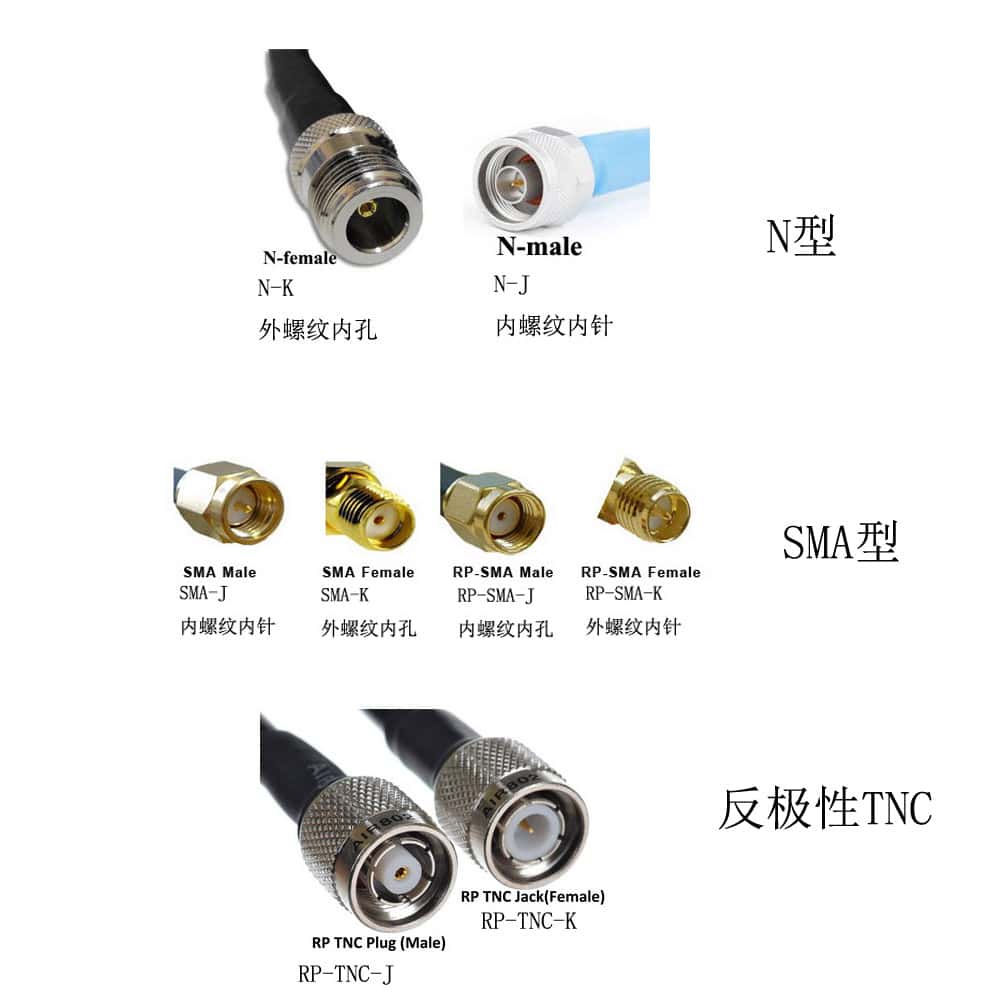
cURL Too many subrequests.
cURL Too many subrequests.
cURL Too many subrequests.

cURL Too many subrequests. cURL Too many subrequests., cURL Too many subrequests.
cURL Too many subrequests.
cURL Too many subrequests.
cURL Too many subrequests.
cURL Too many subrequests.
cURL Too many subrequests.
cURL Too many subrequests.
WiFi antennas can be mounted in different ways, depending on your specific needs.
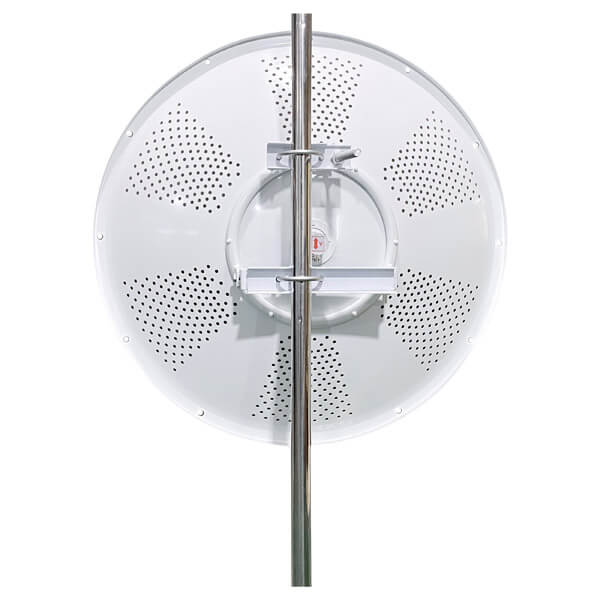
Some antennas come with a magnetic base that allows you to attach them to metal surfaces, such as filing cabinets or metal shelves. Other antennas may come with mounting brackets that allow you to attach them to walls or poles.
Consider where you plan to install the antenna and choose a mounting option that suits your needs.
Consider Professional Installation
If you’re not comfortable installing the WiFi antenna yourself or if you have complex requirements, it may be worth considering professional installation.
A professional installer can assess your needs, recommend the right antenna, and ensure proper installation for optimal performance. This can save you time and effort while ensuring that your WiFi network is set up correctly.
Test and Adjust as Needed
Once you’ve installed your WiFi antenna, it’s important to test the signal strength and performance. Use a WiFi analyzer or signal strength meter to determine if the antenna is working effectively.
If you’re not satisfied with the results, you may need to adjust the position or orientation of the antenna. Experiment with different angles and placements to find the optimal setup for your specific environment.
Consider the cost
WiFi antennas come in a range of prices, so it’s important to consider your budget when choosing an antenna. However, keep in mind that cheaper antennas may not offer the same performance and durability as more expensive options.
It’s worth investing in a high-quality antenna that meets your needs and will last for a long time, rather than opting for a cheaper option that may need to be replaced sooner.
Choosing the right WiFi antenna involves more than just picking the one with the highest gain or the lowest price. It requires a thorough understanding of your specific needs, the installation environment, and the technical specifications of the antennas.
By considering the types of antennas, gain, polarization, beamwidth, environment, device compatibility, frequency band, future network requirements, and brand reliability, you can ensure that your wireless network performs optimally.
Remember, the right antenna can significantly enhance your WiFi network’s range, strength, and overall performance, making it a critical component of your wireless infrastructure.
 German (Switzerland)
  English
  Spanish
  German
  French (France)
  Korean
  Russian
  Indonesian
  French (Canada)
  Vietnamese
  Armenian
  Albanian
  Assamese
  Acehnese
  Amharic
  Czech
Czech  Bulgarian
  Cebuano
  Malayalam
  Japanese
  Dutch
Dutch