 Aller au contenu

In today’s world, having a strong and reliable internet connection is more important than ever. Whether you’re streaming TV shows, working from home, or using smart devices in your house, the quality of your WiFi signal can greatly affect what you can do. However, getting good WiFi coverage can be hard, especially in larger houses or offices with lots of walls and other things that can block the signal. That’s where WiFi cURL Too many subrequests by single Worker invocation. To configure this limit, refer to https://developers.cloudflare.com/workers/wrangler/configuration/#limits come in.
WiFi panel antennas are designed to make your WiFi network work better and send the signal where you need it most. But with so many options to choose from, picking the right WiFi panel antenna can be hard. This guide will help you choose the right WiFi panel antenna by explaining the important things you need to think about. You’ll learn about the different types of antennas and how to use them, what the different numbers mean, and how to put them up. By the time you’re done, you’ll know what you need to know to get great WiFi in your house or office.
Introduction
Brief Overview of WiFi Technology
WiFi (Wireless Fidelity) is a technology that enables electronic devices to connect to the internet and communicate wirelessly within a local area network (LAN). It operates based on the IEEE 802.11 standards, which define the protocols for implementing wireless local area network (WLAN) communication in various frequency bands. Key components of a WiFi network include:

1. Access Points (APs): Devices that broadcast WiFi signals and manage connections between the network and user devices.

2. Client Devices: Devices such as smartphones, laptops, tablets, and IoT gadgets that connect to the network via WiFi.
3. Router: A device that routes data between the local network and the internet.
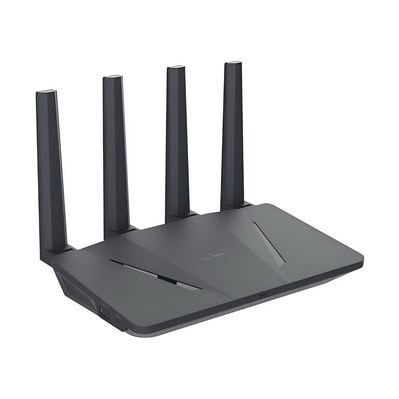
4. Customer Premises Equipment (CPE): Equipment located at the customer’s premises, such as modems, routers, and set-top boxes, that provides access to the network services.

5. Frequency Bands: WiFi typically operates in the 2.4 GHz and 5 GHz frequency bands, with newer standards also utilizing the 6 GHz band.
WiFi technology has evolved through multiple generations, each offering improvements in speed, range, and reliability. The latest standards, such as WiFi 6 (802.11ax), promise higher data rates, increased capacity, and better performance in dense environments.
Brief Overview of WiFi Panel Antenna
Panel antennas are a type of directional antenna commonly used in wireless communication systems to enhance signal strength and coverage. They are particularly useful for extending the range of WiFi networks, improving signal quality, and focusing the signal in specific directions. Here is a detailed overview of WiFi panel antennas:
1. Definition and Importance
– Definition: A WiFi panel antenna is a flat, rectangular antenna designed to transmit and receive radio frequency signals in a specific direction. These antennas are typically enclosed in a plastic or metal casing to protect the internal components.
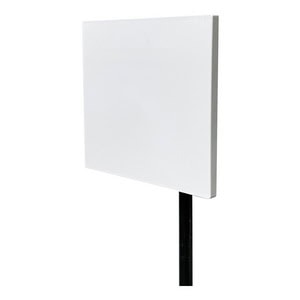
– Importance: Panel antennas are crucial for applications requiring focused signal transmission and reception, such as point-to-point communication, long-distance WiFi links, and situations where signal interference needs to be minimized.
2. Key Characteristics
– Directional Beam: Panel antennas emit a focused beam of radio waves, which helps in directing the signal towards a specific area or device. This directional focus helps in reducing interference from other sources.
– Gain: The gain of a panel antenna is a measure of its ability to direct radio waves in a specific direction. Higher gain values indicate a more focused and stronger signal. Panel antennas typically have gains ranging from 8 dBi to 20 dBi or higher.
– Frequency Range: WiFi panel antennas are designed to operate within specific frequency ranges, commonly 2.4 GHz (802.11b/g/n) , 5 GHz (802.11a/n/ac/ax) and 6 GHz (802.11be) . Some models support dual-band and triple-band operation, allowing them to work efficiently across both frequency bands.
– Polarization: Polarization refers to the orientation of the radio waves emitted by the antenna. Panel antennas can be vertically or horizontally polarized, or in some cases, circularly polarized to match the polarization of the receiving antenna.
– VSWR (Voltage Standing Wave Ratio): VSWR is a measure of how efficiently the antenna transmits power from the transmitter to the air. A lower VSWR indicates better performance and less signal reflection.
3. Installation and Mounting
– Mounting Options: Panel antennas come with various mounting options, including wall mounts, pole mounts, and adjustable brackets, allowing for flexible installation in different environments.
– Alignment: Proper alignment is crucial for maximizing the performance of a panel antenna. Tools like signal strength meters or software applications can assist in aligning the antenna accurately towards the desired direction.
– Weatherproofing: Many panel antennas are designed to be weatherproof, making them suitable for outdoor use in various weather conditions.
4. Advantages and Disadvantages
– cURL Too many subrequests by single Worker invocation. To configure this limit, refer to https://developers.cloudflare.com/workers/wrangler/configuration/#limits:
– Improved signal strength and range in the desired direction.
– Reduced interference from unwanted sources.
– Suitable for long-distance communication.
– Disadvantages:
– Limited coverage area compared to omnidirectional antennas and sector antennas.
– Requires precise alignment for optimal performance.
– Generally more expensive than omnidirectional antennas.
cURL Too many subrequests by single Worker invocation. To configure this limit, refer to https://developers.cloudflare.com/workers/wrangler/configuration/#limits
cURL Too many subrequests by single Worker invocation. To configure this limit, refer to https://developers.cloudflare.com/workers/wrangler/configuration/#limits
cURL Too many subrequests by single Worker invocation. To configure this limit, refer to https://developers.cloudflare.com/workers/wrangler/configuration/#limits.
cURL Too many subrequests by single Worker invocation. To configure this limit, refer to https://developers.cloudflare.com/workers/wrangler/configuration/#limits.
cURL Too many subrequests by single Worker invocation. To configure this limit, refer to https://developers.cloudflare.com/workers/wrangler/configuration/#limits.
cURL Too many subrequests by single Worker invocation. To configure this limit, refer to https://developers.cloudflare.com/workers/wrangler/configuration/#limits.
cURL Too many subrequests by single Worker invocation. To configure this limit, refer to https://developers.cloudflare.com/workers/wrangler/configuration/#limits.
cURL Too many subrequests by single Worker invocation. To configure this limit, refer to https://developers.cloudflare.com/workers/wrangler/configuration/#limits
cURL Too many subrequests by single Worker invocation. To configure this limit, refer to https://developers.cloudflare.com/workers/wrangler/configuration/#limits
cURL Too many subrequests by single Worker invocation. To configure this limit, refer to https://developers.cloudflare.com/workers/wrangler/configuration/#limits.
cURL Too many subrequests by single Worker invocation. To configure this limit, refer to https://developers.cloudflare.com/workers/wrangler/configuration/#limits.
cURL Too many subrequests by single Worker invocation. To configure this limit, refer to https://developers.cloudflare.com/workers/wrangler/configuration/#limits.
cURL Too many subrequests by single Worker invocation. To configure this limit, refer to https://developers.cloudflare.com/workers/wrangler/configuration/#limits.

cURL Too many subrequests by single Worker invocation. To configure this limit, refer to https://developers.cloudflare.com/workers/wrangler/configuration/#limits.
cURL Too many subrequests by single Worker invocation. To configure this limit, refer to https://developers.cloudflare.com/workers/wrangler/configuration/#limits
cURL Too many subrequests by single Worker invocation. To configure this limit, refer to https://developers.cloudflare.com/workers/wrangler/configuration/#limits
cURL Too many subrequests by single Worker invocation. To configure this limit, refer to https://developers.cloudflare.com/workers/wrangler/configuration/#limits.
cURL Too many subrequests by single Worker invocation. To configure this limit, refer to https://developers.cloudflare.com/workers/wrangler/configuration/#limits
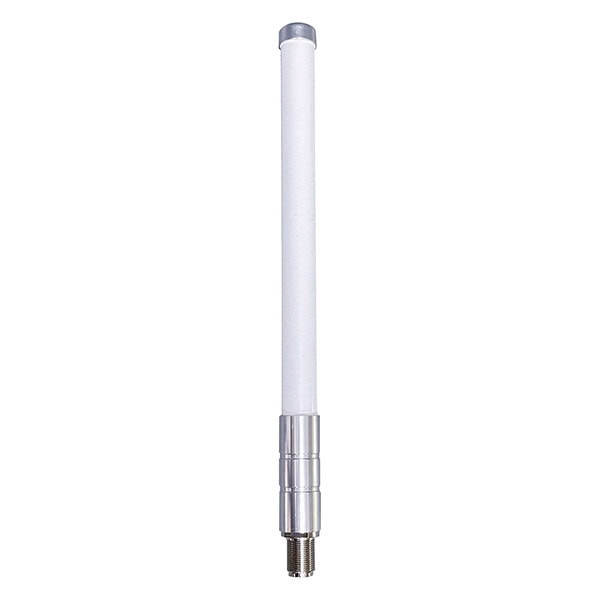
1. Antennes omnidirectionnelles
cURL Too many subrequests by single Worker invocation. To configure this limit, refer to https://developers.cloudflare.com/workers/wrangler/configuration/#limits.
cURL Too many subrequests by single Worker invocation. To configure this limit, refer to https://developers.cloudflare.com/workers/wrangler/configuration/#limits.
cURL Too many subrequests by single Worker invocation. To configure this limit, refer to https://developers.cloudflare.com/workers/wrangler/configuration/#limits.
cURL Too many subrequests by single Worker invocation. To configure this limit, refer to https://developers.cloudflare.com/workers/wrangler/configuration/#limits.
2. Sector Antennas
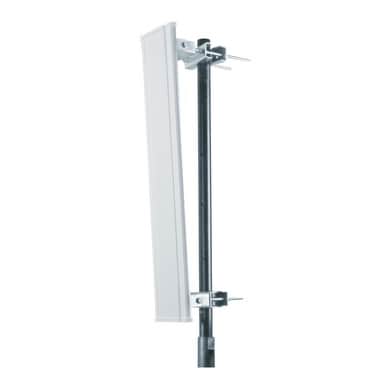
– Coverage Pattern: Sector antennas provide a fan-shaped coverage pattern, often covering a 60 to 120-degree horizontal arc.
– Use Case: Commonly used in cellular networks and large WiFi deployments to cover specific sectors of an area, such as different sections of a stadium or a large open space.
– Range and Signal Strength: Offer a good balance between coverage area and signal strength, with better range than omni antennas but typically less focused than panel antennas.
– Interference: Moderate susceptibility to interference, as they cover a broader area than panel antennas but less than omni antennas.
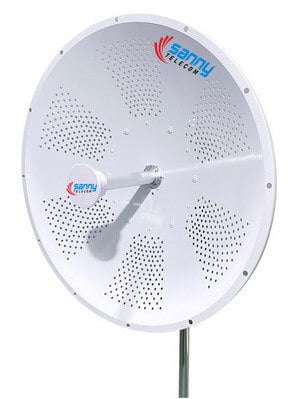
– Coverage Pattern: Parabolic dish antennas provide a highly focused, narrow beam of coverage.
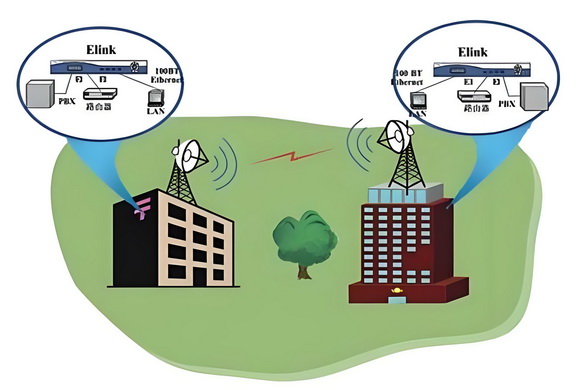
– Use Case: Ideal for long-distance point-to-point communication, such as connecting two remote buildings or establishing a backhaul link.
– Range and Signal Strength: Offer the highest range and signal strength, with a very narrow beamwidth that minimizes interference.
– Interference: Least susceptible to interference due to their highly directional nature, but require precise alignment for optimal performance.
cURL Too many subrequests by single Worker invocation. To configure this limit, refer to https://developers.cloudflare.com/workers/wrangler/configuration/#limits
– Panel Antennas: Directional coverage, moderate range, and signal strength, suitable for targeted areas.
– Omni Antennas: 360-degree coverage, shorter range, and lower signal strength, suitable for general-purpose coverage.
– Sector Antennas: Fan-shaped coverage, moderate range, and signal strength, suitable for sector-specific coverage in large areas.
– Parabolic Dish Antennas: Highly directional coverage, longest range, and highest signal strength, suitable for long-distance point-to-point links.
Each type of antenna has its specific use cases and advantages, making them suitable for different scenarios and network requirements.
How WiFi Panel Antennas Work
WiFi panel antennas are specialized antennas used to enhance wireless communication by focusing the signal in a specific direction, which increases the effective range and signal strength in that direction. Here is a detailed explanation of how they work:
1. Basic Concept
A WiFi panel antenna is a type of directional antenna, meaning it radiates and receives signals more efficiently in a particular direction compared to omnidirectional antennas, which radiate signals uniformly in all directions. This focused approach allows for better performance over longer distances and in environments where signal interference is an issue.
2. Design and Structure
WiFi panel antennas typically have a flat, rectangular shape, resembling a panel. The design includes several key components:
– Radiating Elements: These are usually metal strips or patches that emit and receive electromagnetic waves. The design and arrangement of these elements determine the antenna’s frequency range and radiation pattern.
– Reflector: A metallic surface behind the radiating elements that reflects signals, helping to focus the transmission and reception in one direction.
– Dielectric Material: This is an insulating material placed between the radiating elements and the reflector to improve efficiency and bandwidth.
– Enclosure: The entire assembly is enclosed in a protective casing that shields it from environmental factors like weather and physical damage.
3. Operation
The operation of a WiFi panel antenna involves several steps:
Signal Transmission
1. Generation of RF Signal: The process begins with the generation of a Radio Frequency (RF) signal by a WiFi transmitter, such as a router or an access point. The RF signal is typically in the 2.4 GHz , 5 GHz or 6 GHz frequency bands for WiFi applications.
2. Transmission Line: The RF signal is fed into a transmission line, usually a coaxial cable or a microstrip line, which guides the signal to the panel antenna.
3. Antenna Elements: The panel antenna consists of multiple radiating elements, often arranged in an array. These elements convert the guided RF signal into electromagnetic waves.
4. Electromagnetic Radiation: As the RF current oscillates within the antenna elements, it generates alternating electric and magnetic fields. These fields propagate away from the antenna as electromagnetic waves.
5. Beamforming: Panel antennas often employ beamforming techniques to direct the electromagnetic waves in a specific direction. This is achieved by adjusting the phase and amplitude of the signal fed to each radiating element, thereby creating constructive and destructive interference patterns that shape the radiation beam.
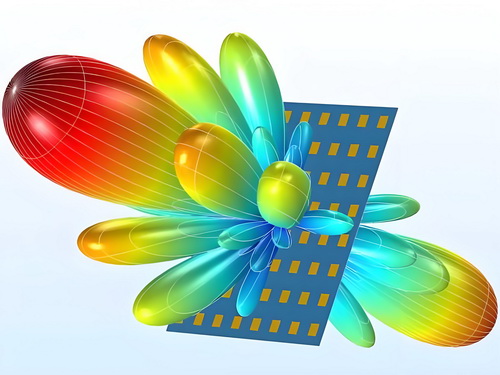
Signal Reception
1. Electromagnetic Wave Reception: When an incoming electromagnetic wave, such as a WiFi signal from a device, reaches the panel antenna, it induces an alternating current in the antenna elements.
2. Antenna Elements: The induced current in the antenna elements is then collected and combined. The array configuration helps in enhancing the signal strength and directivity.
3. Transmission Line: The collected RF signal is guided back through the transmission line to the receiver circuitry.
4. Signal Processing: The receiver circuitry processes the RF signal, converting it back into a digital signal that can be understood by the WiFi device, such as a computer or smartphone.
Key Components of a Panel Antenna
1. Radiating Elements: These are the individual components that emit and receive electromagnetic waves. They can be dipoles, patches, or other types of radiators.

cURL Too many subrequests by single Worker invocation. To configure this limit, refer to https://developers.cloudflare.com/workers/wrangler/configuration/#limits.
cURL Too many subrequests by single Worker invocation. To configure this limit, refer to https://developers.cloudflare.com/workers/wrangler/configuration/#limits.

cURL Too many subrequests by single Worker invocation. To configure this limit, refer to https://developers.cloudflare.com/workers/wrangler/configuration/#limits.
cURL Too many subrequests by single Worker invocation. To configure this limit, refer to https://developers.cloudflare.com/workers/wrangler/configuration/#limits.
cURL Too many subrequests by single Worker invocation. To configure this limit, refer to https://developers.cloudflare.com/workers/wrangler/configuration/#limits.
cURL Too many subrequests by single Worker invocation. To configure this limit, refer to https://developers.cloudflare.com/workers/wrangler/configuration/#limits.
cURL Too many subrequests by single Worker invocation. To configure this limit, refer to https://developers.cloudflare.com/workers/wrangler/configuration/#limits.
cURL Too many subrequests by single Worker invocation. To configure this limit, refer to https://developers.cloudflare.com/workers/wrangler/configuration/#limits
cURL Too many subrequests by single Worker invocation. To configure this limit, refer to https://developers.cloudflare.com/workers/wrangler/configuration/#limits
1. Point-to-Point Links:
cURL Too many subrequests by single Worker invocation. To configure this limit, refer to https://developers.cloudflare.com/workers/wrangler/configuration/#limits.
cURL Too many subrequests by single Worker invocation. To configure this limit, refer to https://developers.cloudflare.com/workers/wrangler/configuration/#limits.
cURL Too many subrequests by single Worker invocation. To configure this limit, refer to https://developers.cloudflare.com/workers/wrangler/configuration/#limits
cURL Too many subrequests by single Worker invocation. To configure this limit, refer to https://developers.cloudflare.com/workers/wrangler/configuration/#limits.
cURL Too many subrequests by single Worker invocation. To configure this limit, refer to https://developers.cloudflare.com/workers/wrangler/configuration/#limits.
cURL Too many subrequests by single Worker invocation. To configure this limit, refer to https://developers.cloudflare.com/workers/wrangler/configuration/#limits
cURL Too many subrequests by single Worker invocation. To configure this limit, refer to https://developers.cloudflare.com/workers/wrangler/configuration/#limits.
cURL Too many subrequests by single Worker invocation. To configure this limit, refer to https://developers.cloudflare.com/workers/wrangler/configuration/#limits.
cURL Too many subrequests by single Worker invocation. To configure this limit, refer to https://developers.cloudflare.com/workers/wrangler/configuration/#limits
cURL Too many subrequests by single Worker invocation. To configure this limit, refer to https://developers.cloudflare.com/workers/wrangler/configuration/#limits.
cURL Too many subrequests by single Worker invocation. To configure this limit, refer to https://developers.cloudflare.com/workers/wrangler/configuration/#limits.

cURL Too many subrequests by single Worker invocation. To configure this limit, refer to https://developers.cloudflare.com/workers/wrangler/configuration/#limits
cURL Too many subrequests by single Worker invocation. To configure this limit, refer to https://developers.cloudflare.com/workers/wrangler/configuration/#limits.
– Reducing Dead Zones: By strategically placing panel antennas, users can eliminate WiFi dead zones and ensure consistent coverage throughout their property.
6. Rural and Remote Areas:
– Internet Access: In rural or remote areas where traditional wired internet infrastructure is lacking, panel antennas can be used to connect to distant WiFi hotspots or cellular networks.
– Community Networks: They can help establish community networks, providing internet access to multiple households within a rural area.
7. Specialized Industrial Applications:
– Mining and Oil Fields: In remote industrial sites, panel antennas can provide reliable communication links for monitoring and control systems.
– Transportation Hubs: Airports, train stations, and seaports can use panel antennas to ensure robust WiFi coverage for both operational needs and passenger use.
8. IoT (Internet of Things) Applications:
– Smart Cities: Panel antennas can be part of the infrastructure that supports IoT devices in smart cities, providing connectivity for sensors, cameras, and other smart devices.
– Agricultural Monitoring: In smart agriculture, panel antennas can help connect various IoT devices used for monitoring crop health, soil conditions, and weather data.
Overall, WiFi panel antennas are versatile tools that can enhance wireless network performance in a variety of settings, from urban environments to remote rural areas. Their ability to focus the signal in a specific direction makes them particularly useful for targeted coverage and long-distance communication.
Chapter 2: Types of WiFi Panel Antennas
Single-band vs. Dual-band vs Triple-band Panel Antennas
Frequency Bands:
– Single-band Antennas: Operate on one frequency band, typically either 2.4 GHz or 5 GHz.
– Dual-band Antennas: Operate on both 2.4 GHz and 5 GHz frequency bands.
– Tri-band Antennas: Operate on three frequency bands: 2.4 GHz, 5 GHz, and the newer 6 GHz band.
Performance:
– Single-band Antennas: Limited to the characteristics of one frequency band. For example, 2.4 GHz offers longer range but lower speeds, while 5 GHz offers higher speeds but shorter range.
– Dual-band Antennas: Provide the benefits of both 2.4 GHz and 5 GHz, allowing devices to switch between these bands for optimal performance.
– Tri-band Antennas: Offer the advantages of 2.4 GHz, 5 GHz, and 6 GHz bands. The 6 GHz band provides even higher speeds and lower latency, but with a shorter range compared to 5 GHz.
cURL Too many subrequests by single Worker invocation. To configure this limit, refer to https://developers.cloudflare.com/workers/wrangler/configuration/#limits
– Single-band Antennas: More prone to interference if operating in the crowded 2.4 GHz spectrum.
– Dual-band Antennas: Can switch to the less crowded 5 GHz band to avoid interference.
– Tri-band Antennas: Can switch among 2.4 GHz, 5 GHz, and 6 GHz bands, significantly reducing interference and congestion.
Complexity and Cost:
– Single-band Antennas: Generally simpler and less expensive.
– Dual-band Antennas: More complex and typically more expensive due to the need to support two frequency bands.
– Tri-band Antennas: The most complex and expensive, as they need to support three frequency bands.
Applications
Single-band WiFi Panel Antennas
– Residential Use: Suitable for homes where the network requirements are basic and interference is minimal.
– Small Offices: Adequate for small office environments with fewer devices and lower bandwidth requirements.
– Specific Use Cases: Ideal for applications where only one frequency band is needed, such as long-range outdoor setups using the 2.4 GHz band.
Dual-band WiFi Panel Antennas

– Residential Use: Ideal for modern homes with multiple devices that require both range and high-speed connectivity.
– Large Offices: Suitable for larger office environments where multiple devices need to connect simultaneously, and bandwidth requirements are higher.
– Public Spaces: Useful in public areas like cafes, libraries, and airports where a large number of users and devices are present.
– High-Performance Applications: Beneficial for applications that require high data rates and low latency, such as video conferencing, online gaming, and streaming.
Tri-band WiFi Panel Antennas
cURL Too many subrequests by single Worker invocation. To configure this limit, refer to https://developers.cloudflare.com/workers/wrangler/configuration/#limits.
cURL Too many subrequests by single Worker invocation. To configure this limit, refer to https://developers.cloudflare.com/workers/wrangler/configuration/#limits.
cURL Too many subrequests by single Worker invocation. To configure this limit, refer to https://developers.cloudflare.com/workers/wrangler/configuration/#limits.
cURL Too many subrequests by single Worker invocation. To configure this limit, refer to https://developers.cloudflare.com/workers/wrangler/configuration/#limits.
cURL Too many subrequests by single Worker invocation. To configure this limit, refer to https://developers.cloudflare.com/workers/wrangler/configuration/#limits
cURL Too many subrequests by single Worker invocation. To configure this limit, refer to https://developers.cloudflare.com/workers/wrangler/configuration/#limits.
cURL Too many subrequests by single Worker invocation. To configure this limit, refer to https://developers.cloudflare.com/workers/wrangler/configuration/#limits.
cURL Too many subrequests by single Worker invocation. To configure this limit, refer to https://developers.cloudflare.com/workers/wrangler/configuration/#limits.
cURL Too many subrequests by single Worker invocation. To configure this limit, refer to https://developers.cloudflare.com/workers/wrangler/configuration/#limits
cURL Too many subrequests by single Worker invocation. To configure this limit, refer to https://developers.cloudflare.com/workers/wrangler/configuration/#limits MIMO cURL Too many subrequests by single Worker invocation. To configure this limit, refer to https://developers.cloudflare.com/workers/wrangler/configuration/#limits

cURL Too many subrequests by single Worker invocation. To configure this limit, refer to https://developers.cloudflare.com/workers/wrangler/configuration/#limits
cURL Too many subrequests by single Worker invocation. To configure this limit, refer to https://developers.cloudflare.com/workers/wrangler/configuration/#limits
cURL Too many subrequests by single Worker invocation. To configure this limit, refer to https://developers.cloudflare.com/workers/wrangler/configuration/#limits.
cURL Too many subrequests by single Worker invocation. To configure this limit, refer to https://developers.cloudflare.com/workers/wrangler/configuration/#limits.
cURL Too many subrequests by single Worker invocation. To configure this limit, refer to https://developers.cloudflare.com/workers/wrangler/configuration/#limits
cURL Too many subrequests by single Worker invocation. To configure this limit, refer to https://developers.cloudflare.com/workers/wrangler/configuration/#limits.
cURL Too many subrequests by single Worker invocation. To configure this limit, refer to https://developers.cloudflare.com/workers/wrangler/configuration/#limits.
cURL Too many subrequests by single Worker invocation. To configure this limit, refer to https://developers.cloudflare.com/workers/wrangler/configuration/#limits
cURL Too many subrequests by single Worker invocation. To configure this limit, refer to https://developers.cloudflare.com/workers/wrangler/configuration/#limits.
cURL Too many subrequests by single Worker invocation. To configure this limit, refer to https://developers.cloudflare.com/workers/wrangler/configuration/#limits.
cURL Too many subrequests by single Worker invocation. To configure this limit, refer to https://developers.cloudflare.com/workers/wrangler/configuration/#limits
cURL Too many subrequests by single Worker invocation. To configure this limit, refer to https://developers.cloudflare.com/workers/wrangler/configuration/#limits.
– MIMO: Can provide better range and coverage due to the diversity and spatial multiplexing gains.
5. Complexity and Cost:
– SISO: Simpler and generally less expensive to implement.
– MIMO: More complex and costly due to the need for multiple antennas and more sophisticated signal processing.
Applications:
1. SISO Panel Antennas:
– Home WiFi Networks: Suitable for small home networks where the demand for high data rates and coverage is limited.
– IoT Devices: Many IoT devices use SISO due to lower power consumption and simpler design.
– Basic Wireless Communication: Ideal for basic communication needs where high throughput and extensive coverage are not critical.

– Enterprise WiFi Networks: Used in enterprise environments to provide robust, high-speed wireless connectivity across large areas.
– Public WiFi Hotspots: Deployed in public areas like airports, stadiums, and shopping malls to handle high user density and demand.
– Advanced IoT Applications: Employed in advanced IoT applications requiring high data rates and reliable connections.
– Fixed Wireless Access: Used to provide broadband internet in rural or underserved areas where wired connections are not feasible.
cURL Too many subrequests by single Worker invocation. To configure this limit, refer to https://developers.cloudflare.com/workers/wrangler/configuration/#limits
– SISO Panel Antennas: Simpler, cost-effective, and suitable for basic, low-demand applications.
– MIMO Panel Antennas: More complex, higher performance, and ideal for high-demand environments requiring robust, high-speed wireless connectivity.
Choosing between SISO and MIMO panel antennas depends on the specific requirements of the application, including data rate needs, coverage area, user density, and budget considerations.
Indoor vs. Outdoor Panel Antennas
Differences Between Indoor and Outdoor Panel Antennas
1. Design and Build Quality:
– Indoor Panel Antennas: Typically designed to be more aesthetically pleasing and compact. They are made from materials that are suitable for indoor environments and are less rugged.
– Outdoor Panel Antennas: Built to withstand harsh environmental conditions such as rain, wind, snow, and extreme temperatures. They are often encased in weatherproof, UV-resistant materials.
2. Range and Coverage:
– Indoor Panel Antennas: Generally have a shorter range compared to outdoor antennas. They are designed to cover specific areas within a building, such as a single room or a small office space.
– Outdoor Panel Antennas: Offer a longer range and are designed to cover larger outdoor areas. They can also be used to establish point-to-point connections over several kilometers.
3. Directional Properties:
– Indoor Panel Antennas: Typically have a wider beamwidth to provide coverage over a broad area inside a building. This makes them suitable for covering multiple rooms or open office spaces.
– Outdoor Panel Antennas: Often have a more focused, directional beam to cover specific outdoor areas or to establish long-distance point-to-point links.
4. Installation:
– Indoor Panel Antennas: Easier to install and usually require minimal mounting hardware. They can be placed on a desk, mounted on a wall, or ceiling.
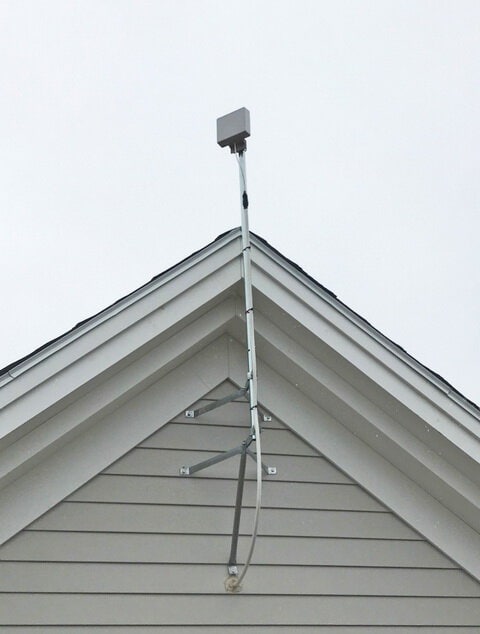
– Outdoor Panel Antennas: Require more robust mounting solutions to ensure they remain stable in outdoor conditions. Installation might involve mounting on poles, rooftops, or exterior walls.
5. Power and Amplification:
– Indoor Panel Antennas: Generally have lower power requirements and may not need additional amplification.
– Outdoor Panel Antennas: Often designed to work with higher power levels and may include or require additional amplifiers to achieve long-range communication.
Usage Scenarios
1. Indoor Panel Antennas:
– Home Networks: Enhancing WiFi coverage in specific rooms or floors.
– Office Buildings: Providing coverage in open office spaces, meeting rooms, and common areas.
– Retail Stores: Ensuring strong WiFi signals throughout the store for both customers and staff.
– Hospitals and Schools: Offering reliable coverage in various rooms, classrooms, or departments.
2. Outdoor Panel Antennas:
cURL Too many subrequests by single Worker invocation. To configure this limit, refer to https://developers.cloudflare.com/workers/wrangler/configuration/#limits.
cURL Too many subrequests by single Worker invocation. To configure this limit, refer to https://developers.cloudflare.com/workers/wrangler/configuration/#limits.
cURL Too many subrequests by single Worker invocation. To configure this limit, refer to https://developers.cloudflare.com/workers/wrangler/configuration/#limits.
cURL Too many subrequests by single Worker invocation. To configure this limit, refer to https://developers.cloudflare.com/workers/wrangler/configuration/#limits.
Conclusion
cURL Too many subrequests by single Worker invocation. To configure this limit, refer to https://developers.cloudflare.com/workers/wrangler/configuration/#limits.
cURL Too many subrequests by single Worker invocation. To configure this limit, refer to https://developers.cloudflare.com/workers/wrangler/configuration/#limits
Frequency Range
cURL Too many subrequests by single Worker invocation. To configure this limit, refer to https://developers.cloudflare.com/workers/wrangler/configuration/#limits
cURL Too many subrequests by single Worker invocation. To configure this limit, refer to https://developers.cloudflare.com/workers/wrangler/configuration/#limits
cURL Too many subrequests by single Worker invocation. To configure this limit, refer to https://developers.cloudflare.com/workers/wrangler/configuration/#limits
cURL Too many subrequests by single Worker invocation. To configure this limit, refer to https://developers.cloudflare.com/workers/wrangler/configuration/#limits
cURL Too many subrequests by single Worker invocation. To configure this limit, refer to https://developers.cloudflare.com/workers/wrangler/configuration/#limits
cURL Too many subrequests by single Worker invocation. To configure this limit, refer to https://developers.cloudflare.com/workers/wrangler/configuration/#limits
cURL Too many subrequests by single Worker invocation. To configure this limit, refer to https://developers.cloudflare.com/workers/wrangler/configuration/#limits
cURL Too many subrequests by single Worker invocation. To configure this limit, refer to https://developers.cloudflare.com/workers/wrangler/configuration/#limits
cURL Too many subrequests by single Worker invocation. To configure this limit, refer to https://developers.cloudflare.com/workers/wrangler/configuration/#limits
cURL Too many subrequests by single Worker invocation. To configure this limit, refer to https://developers.cloudflare.com/workers/wrangler/configuration/#limits
cURL Too many subrequests by single Worker invocation. To configure this limit, refer to https://developers.cloudflare.com/workers/wrangler/configuration/#limits.
Gain
cURL Too many subrequests by single Worker invocation. To configure this limit, refer to https://developers.cloudflare.com/workers/wrangler/configuration/#limits.
cURL Too many subrequests by single Worker invocation. To configure this limit, refer to https://developers.cloudflare.com/workers/wrangler/configuration/#limits
cURL Too many subrequests by single Worker invocation. To configure this limit, refer to https://developers.cloudflare.com/workers/wrangler/configuration/#limits.
cURL Too many subrequests by single Worker invocation. To configure this limit, refer to https://developers.cloudflare.com/workers/wrangler/configuration/#limits
cURL Too many subrequests by single Worker invocation. To configure this limit, refer to https://developers.cloudflare.com/workers/wrangler/configuration/#limits.
– dBd (decibels relative to a dipole antenna): This measurement compares the antenna’s performance to a standard dipole antenna, which has a gain of 2.15 dBi.
3. Typical Gain Values: WiFi panel antennas can have a wide range of gain values, typically from around 8 dBi to 23 dBi or even higher, depending on the design and application.
4. Impact on Performance:
– Higher Gain: A higher gain antenna will have a more focused beam, which can cover longer distances and provide better signal strength in the targeted direction. However, it will have a narrower beamwidth, meaning it covers less area in other directions.
– Lower Gain: A lower gain antenna will have a wider beamwidth, covering a broader area but with less focus and shorter range.
cURL Too many subrequests by single Worker invocation. To configure this limit, refer to https://developers.cloudflare.com/workers/wrangler/configuration/#limits
– Point-to-Point Links: High-gain panel antennas are often used in point-to-point wireless links where a strong, focused signal is needed over a long distance.
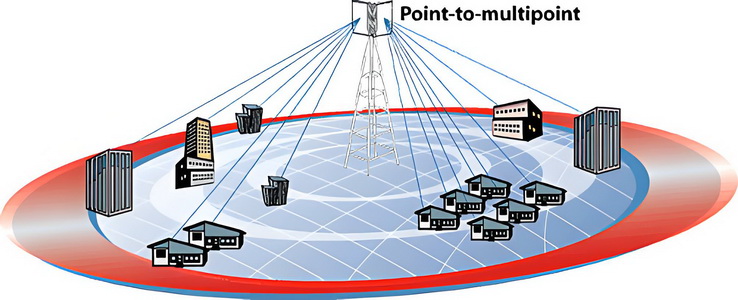
– Point-to-Multipoint: In scenarios where the signal needs to cover multiple locations from a central point, a moderate gain panel antenna might be used to balance range and coverage area.
6. Installation Considerations:
– Alignment: Proper alignment is crucial for directional antennas like panel antennas. Misalignment can lead to poor signal strength and reduced performance.
– Height and Obstructions: The installation height and presence of physical obstructions (like buildings or trees) can significantly affect the antenna’s performance.
Example
A WiFi panel antenna with a gain of 14 dBi will focus the signal more than an antenna with a gain of 8 dBi. This means the 14 dBi antenna can transmit and receive signals over a longer distance in its focused direction, but it will cover a narrower area compared to the 8 dBi antenna.
Conclusion
The gain of a WiFi panel antenna is a crucial factor that determines its performance in terms of range and coverage. Higher gain antennas are suitable for long-distance, focused communication, while lower gain antennas provide broader coverage but over shorter distances. When selecting an antenna, it’s important to consider the specific requirements of the application to choose the appropriate gain.
Polarization
1. Introduction to Polarization:
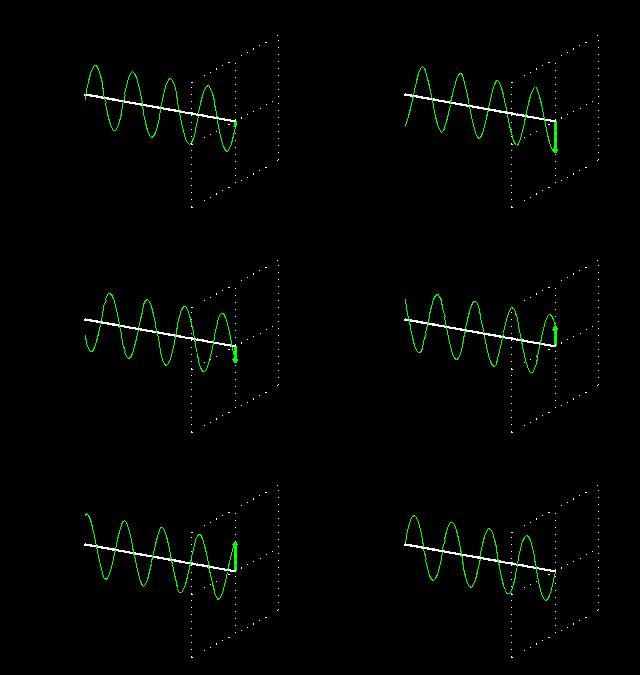
Polarization refers to the orientation of the electric field of an electromagnetic wave. For WiFi antennas, this is crucial as it affects how the signal propagates and interacts with the environment.
2. Types of Polarization:
– Linear Polarization:
cURL Too many subrequests by single Worker invocation. To configure this limit, refer to https://developers.cloudflare.com/workers/wrangler/configuration/#limits.
cURL Too many subrequests by single Worker invocation. To configure this limit, refer to https://developers.cloudflare.com/workers/wrangler/configuration/#limits.
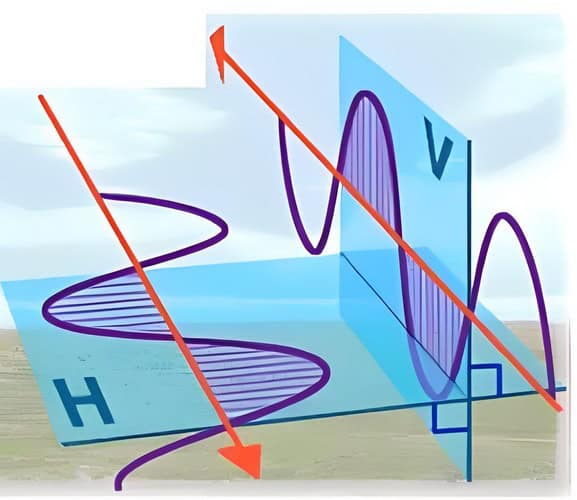
– Usage: Common in many WiFi applications where the orientation of devices is fixed or predictable.
– Slant Polarization:
– +45° Slant Polarization: The electric field oscillates at a 45-degree angle to the horizontal plane.
– -45° Slant Polarization: The electric field oscillates at a -45-degree angle to the horizontal plane.

– Usage: Often used in scenarios where traditional vertical or horizontal polarization might not be optimal, providing better performance in certain environments.
– Dual Polarization:
– Vertical and Horizontal Polarization: Combines both vertical and horizontal polarizations in one antenna.
– +45° and -45° Slant Polarization: Combines both +45° and -45° slant polarizations in one antenna.
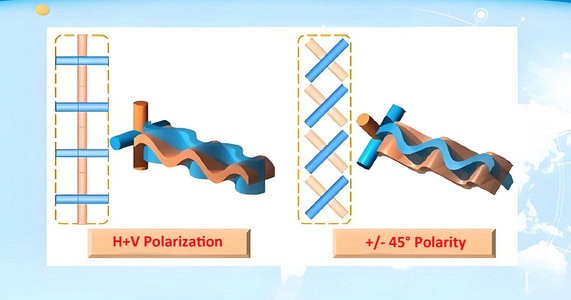
– Usage: Improves signal reliability and performance by providing two distinct polarization paths, often used in MIMO (Multiple Input Multiple Output) systems to enhance data throughput and reduce interference.
3. Importance of Matching Polarization:
– Signal Strength and Quality: Matching the polarization of the transmitter and receiver antennas maximizes signal strength and quality.
– Cross-Polarization Loss: If the polarizations do not match, significant signal loss can occur, known as cross-polarization loss.
– Interference Reduction: Proper polarization can help reduce interference from other signals with different polarizations.
4. Polarization in WiFi Panel Antennas:
– Design Considerations: WiFi panel antennas are designed with specific polarization to optimize performance for the intended application.
– Installation: Proper installation alignment is crucial to ensure the polarization of the panel antenna matches the receiving devices.
– Multi-Polarized Antennas: Some advanced WiFi panel antennas use dual or multi-polarization to improve performance in various environments, providing better signal reliability and coverage.
5. Practical Applications:
– Indoor WiFi Networks: Typically use linear polarization, with vertical polarization being common for access points mounted on ceilings or walls. Slant polarization can also be used to improve performance in complex indoor environments.
– Outdoor WiFi Networks: May use either linear or slant polarization depending on the deployment scenario and environmental factors. Dual polarization is particularly useful in outdoor settings to combat multipath interference.
– Mobile Devices: Often benefit from slant or dual polarization due to the varying orientations of the devices.
cURL Too many subrequests by single Worker invocation. To configure this limit, refer to https://developers.cloudflare.com/workers/wrangler/configuration/#limits
cURL Too many subrequests by single Worker invocation. To configure this limit, refer to https://developers.cloudflare.com/workers/wrangler/configuration/#limits.
cURL Too many subrequests by single Worker invocation. To configure this limit, refer to https://developers.cloudflare.com/workers/wrangler/configuration/#limits
cURL Too many subrequests by single Worker invocation. To configure this limit, refer to https://developers.cloudflare.com/workers/wrangler/configuration/#limits.
cURL Too many subrequests by single Worker invocation. To configure this limit, refer to https://developers.cloudflare.com/workers/wrangler/configuration/#limits
cURL Too many subrequests by single Worker invocation. To configure this limit, refer to https://developers.cloudflare.com/workers/wrangler/configuration/#limits.
cURL Too many subrequests by single Worker invocation. To configure this limit, refer to https://developers.cloudflare.com/workers/wrangler/configuration/#limits.
cURL Too many subrequests by single Worker invocation. To configure this limit, refer to https://developers.cloudflare.com/workers/wrangler/configuration/#limits.
cURL Too many subrequests by single Worker invocation. To configure this limit, refer to https://developers.cloudflare.com/workers/wrangler/configuration/#limits
cURL Too many subrequests by single Worker invocation. To configure this limit, refer to https://developers.cloudflare.com/workers/wrangler/configuration/#limits.
cURL Too many subrequests by single Worker invocation. To configure this limit, refer to https://developers.cloudflare.com/workers/wrangler/configuration/#limits.
cURL Too many subrequests by single Worker invocation. To configure this limit, refer to https://developers.cloudflare.com/workers/wrangler/configuration/#limits.
cURL Too many subrequests by single Worker invocation. To configure this limit, refer to https://developers.cloudflare.com/workers/wrangler/configuration/#limits
cURL Too many subrequests by single Worker invocation. To configure this limit, refer to https://developers.cloudflare.com/workers/wrangler/configuration/#limits.
cURL Too many subrequests by single Worker invocation. To configure this limit, refer to https://developers.cloudflare.com/workers/wrangler/configuration/#limits.
Practical Considerations
cURL Too many subrequests by single Worker invocation. To configure this limit, refer to https://developers.cloudflare.com/workers/wrangler/configuration/#limits.
cURL Too many subrequests by single Worker invocation. To configure this limit, refer to https://developers.cloudflare.com/workers/wrangler/configuration/#limits.
cURL Too many subrequests by single Worker invocation. To configure this limit, refer to https://developers.cloudflare.com/workers/wrangler/configuration/#limits.
Conclusion
cURL Too many subrequests by single Worker invocation. To configure this limit, refer to https://developers.cloudflare.com/workers/wrangler/configuration/#limits.
VSWR (Voltage Standing Wave Ratio)
cURL Too many subrequests by single Worker invocation. To configure this limit, refer to https://developers.cloudflare.com/workers/wrangler/configuration/#limits

cURL Too many subrequests by single Worker invocation. To configure this limit, refer to https://developers.cloudflare.com/workers/wrangler/configuration/#limits
cURL Too many subrequests by single Worker invocation. To configure this limit, refer to https://developers.cloudflare.com/workers/wrangler/configuration/#limits.
cURL Too many subrequests by single Worker invocation. To configure this limit, refer to https://developers.cloudflare.com/workers/wrangler/configuration/#limits
– A VSWR of 1:1 is ideal, meaning all the power is transmitted and none is reflected back.
– Practically, a VSWR below 1.8:1 is generally considered acceptable for most WiFi applications.
3. Impact on Performance:
– Low VSWR: Indicates minimal power reflection and efficient transmission. This leads to better signal strength and coverage.
– High VSWR: Indicates significant power reflection, leading to loss of signal strength, potential damage to the transmitter, and reduced coverage.
Matching Antenna Impedance with the System
1. Impedance Matching:
– WiFi systems typically operate at a characteristic impedance of 50 ohms.
– The antenna should have an impedance close to this value to minimize reflections and ensure efficient power transfer.
2. Impedance Mismatch:
– If the antenna impedance differs significantly from 50 ohms, it can cause a high VSWR, leading to inefficiencies.
– Impedance matching techniques, such as using matching networks or tuning the antenna, can help achieve a better match.
3. Measurement and Adjustment:
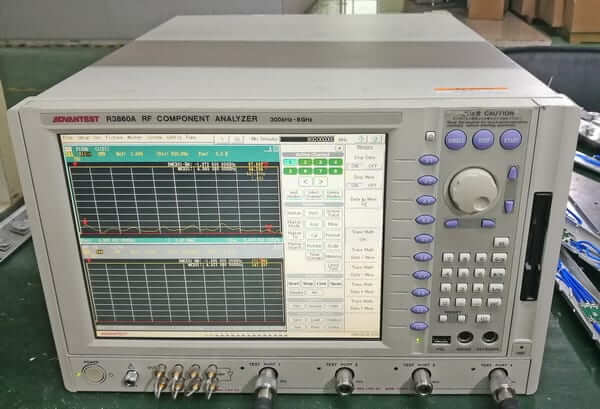
– VSWR can be measured using a VSWR meter or a network analyzer.
– Adjustments can be made to the antenna design or placement to achieve a lower VSWR.
Practical Considerations for WiFi Panel Antennas
1. Design:
– WiFi panel antennas are designed to have a broad frequency range, typically covering 2.4 GHz and 5 GHz bands.
– The design should ensure a low VSWR across these bands to maintain consistent performance.
2. Installation:
– Proper installation and positioning of the antenna can influence VSWR.
– Avoiding obstructions and ensuring a clear line of sight can help maintain a low VSWR.
3. Testing:
– Regular testing of VSWR during installation and maintenance can help identify and rectify issues early.
– Ensuring connectors and cables are in good condition is also crucial for maintaining a low VSWR.
In summary, VSWR is a key parameter in the performance of WiFi panel antennas. Ensuring a low VSWR through proper design, impedance matching, and installation practices can significantly enhance the efficiency and reliability of WiFi communications.
Isolation
Isolating ports in a WiFi panel antenna is crucial to ensure optimal performance and minimize interference. Here are steps and considerations for effectively isolating ports:

1. Understand the Antenna Design:
– Panel Antenna: Typically consists of multiple elements arranged in a flat panel. Each element may have its own port.
– Ports: Each port represents a connection point for the RF signal. Isolation between these ports is essential to prevent signal leakage and interference.
2. Use High-Quality Components:
– Connectors: Use connectors with good shielding and minimal leakage.
– Cables: Use high-quality, low-loss cables to ensure signal integrity.
3. Physical Separation:
– Distance: Maintain adequate physical distance between ports to reduce coupling.
– Shielding: Use metal enclosures or partitions to shield ports from each other.
4. Electrical Isolation:
– Filters: Use band-pass or band-stop filters to isolate frequencies.
– Decoupling Capacitors:** These can help to block DC and low-frequency AC signals between ports.
5. Antenna Design Techniques:
cURL Too many subrequests by single Worker invocation. To configure this limit, refer to https://developers.cloudflare.com/workers/wrangler/configuration/#limits.
cURL Too many subrequests by single Worker invocation. To configure this limit, refer to https://developers.cloudflare.com/workers/wrangler/configuration/#limits.
cURL Too many subrequests by single Worker invocation. To configure this limit, refer to https://developers.cloudflare.com/workers/wrangler/configuration/#limits
cURL Too many subrequests by single Worker invocation. To configure this limit, refer to https://developers.cloudflare.com/workers/wrangler/configuration/#limits.
cURL Too many subrequests by single Worker invocation. To configure this limit, refer to https://developers.cloudflare.com/workers/wrangler/configuration/#limits.
cURL Too many subrequests by single Worker invocation. To configure this limit, refer to https://developers.cloudflare.com/workers/wrangler/configuration/#limits
cURL Too many subrequests by single Worker invocation. To configure this limit, refer to https://developers.cloudflare.com/workers/wrangler/configuration/#limits.
cURL Too many subrequests by single Worker invocation. To configure this limit, refer to https://developers.cloudflare.com/workers/wrangler/configuration/#limits.
cURL Too many subrequests by single Worker invocation. To configure this limit, refer to https://developers.cloudflare.com/workers/wrangler/configuration/#limits
cURL Too many subrequests by single Worker invocation. To configure this limit, refer to https://developers.cloudflare.com/workers/wrangler/configuration/#limits, cURL Too many subrequests by single Worker invocation. To configure this limit, refer to https://developers.cloudflare.com/workers/wrangler/configuration/#limits, cURL Too many subrequests by single Worker invocation. To configure this limit, refer to https://developers.cloudflare.com/workers/wrangler/configuration/#limitscURL Too many subrequests by single Worker invocation. To configure this limit, refer to https://developers.cloudflare.com/workers/wrangler/configuration/#limits.
cURL Too many subrequests by single Worker invocation. To configure this limit, refer to https://developers.cloudflare.com/workers/wrangler/configuration/#limits.
cURL Too many subrequests by single Worker invocation. To configure this limit, refer to https://developers.cloudflare.com/workers/wrangler/configuration/#limits
cURL Too many subrequests by single Worker invocation. To configure this limit, refer to https://developers.cloudflare.com/workers/wrangler/configuration/#limits.
cURL Too many subrequests by single Worker invocation. To configure this limit, refer to https://developers.cloudflare.com/workers/wrangler/configuration/#limits.
cURL Too many subrequests by single Worker invocation. To configure this limit, refer to https://developers.cloudflare.com/workers/wrangler/configuration/#limits
cURL Too many subrequests by single Worker invocation. To configure this limit, refer to https://developers.cloudflare.com/workers/wrangler/configuration/#limits.
cURL Too many subrequests by single Worker invocation. To configure this limit, refer to https://developers.cloudflare.com/workers/wrangler/configuration/#limits.
cURL Too many subrequests by single Worker invocation. To configure this limit, refer to https://developers.cloudflare.com/workers/wrangler/configuration/#limits
cURL Too many subrequests by single Worker invocation. To configure this limit, refer to https://developers.cloudflare.com/workers/wrangler/configuration/#limits.
cURL Too many subrequests by single Worker invocation. To configure this limit, refer to https://developers.cloudflare.com/workers/wrangler/configuration/#limits
Size and Form Factor
cURL Too many subrequests by single Worker invocation. To configure this limit, refer to https://developers.cloudflare.com/workers/wrangler/configuration/#limits panel antenna, the size and form factor are crucial considerations to ensure optimal performance and compatibility with the intended environment. Here are some key points to consider:
Size
1. Dimensions: The physical dimensions of the antenna should fit within the allocated space without obstructing other components or pathways. Typical panel antennas range from a few inches to about a foot in width and height.

2. Thickness: The thickness of the panel should be considered, especially if it needs to be mounted on a wall or within a tight enclosure.
3. Weight: The weight of the antenna can impact the mounting options and the overall stability of the installation.
Form Factor
1. Shape: Panel antennas are generally rectangular or square, which allows for a broad and flat radiation pattern.
2. Mounting Options: The form factor should accommodate various mounting options such as wall mounting, pole mounting, or ceiling mounting. Mounting brackets or kits are often included.
3. Orientation: The antenna should be designed to be mounted in the correct orientation (vertical or horizontal) to achieve the desired coverage pattern.
4. Enclosure: The casing or enclosure of the antenna should be durable and possibly weatherproof if intended for outdoor use. Materials like UV-resistant plastic or metal are common.
cURL Too many subrequests by single Worker invocation. To configure this limit, refer to https://developers.cloudflare.com/workers/wrangler/configuration/#limits
1. Gain: Higher gain antennas are typically larger in size. Ensure the size does not compromise the required gain for your application.
2. Frequency Range: The size of the antenna is also influenced by the frequency range it is designed to cover. WiFi typically operates in the 2.4 GHz and 5 GHz bands.
3. Beamwidth: The panel antenna should have an appropriate beamwidth to cover the desired area. A narrower beamwidth provides more focused coverage, while a wider beamwidth covers a larger area.
Examples
1. Indoor Panel Antennas: These are usually smaller, lighter, and designed to blend with indoor environments. Dimensions might be around 6×6 inches with a thickness of about 1 inch.
2. Outdoor Panel Antennas: These tend to be larger and more robust to withstand environmental conditions. Dimensions might be around 12×12 inches with a thickness of 2-3 inches.
Conclusion
Selecting the right size and form factor for a WiFi panel antenna involves balancing physical constraints with performance requirements. Ensure that the antenna fits the intended space, can be mounted securely, and meets the necessary gain and coverage specifications for your application.
Enclosure (CPE)
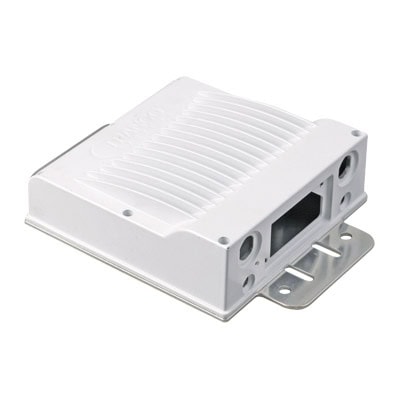
The enclosure for the radio, equipped with a WiFi panel antenna, plays a crucial role in the overall performance of Customer Premises Equipment (CPE). This setup is essential for ensuring reliable and efficient wireless communication.
Material and Design
The enclosure is typically made from die-casting aluminum, known for its durability, lightweight properties, and excellent heat dissipation. The design is both functional and aesthetic, providing robust protection while maintaining a sleek appearance.
Function and Advantages
The primary function of the enclosure is to protect the radio components from environmental factors such as dust, moisture, and physical damage. The WiFi panel antenna, integrated into the enclosure, enhances signal strength and coverage, ensuring a stable and high-quality connection.
Key Advantages
1. Improved Signal Quality: The panel antenna provides better signal reception and transmission, leading to faster and more reliable internet connectivity.
2. Enhanced Durability: Made from die-casting aluminum, the enclosure offers superior protection against external elements, extending the lifespan of the equipment.
3. Excellent Heat Dissipation: The aluminum material helps in dissipating heat efficiently, preventing overheating and ensuring optimal performance.
4. Aesthetic Integration: The compact and sleek design of the enclosure allows for seamless integration into various environments, whether residential or commercial.
5. Ease of Installation: The combined unit simplifies the installation process, reducing the need for multiple components and minimizing setup time.
6. Cost Efficiency: By protecting the radio and improving signal performance, the enclosure with a WiFi panel antenna reduces maintenance costs and enhances overall user satisfaction.
Conclusion
In summary, the die-casting aluminum enclosure with a WiFi panel antenna is an essential component for CPE. It offers numerous benefits, including improved signal quality, enhanced durability, excellent heat dissipation, and ease of installation, all contributing to a robust and efficient wireless communication system.
Connector Type
The connector type of a WiFi panel antenna can vary, but some of the most common types include:
1. SMA (SubMiniature version A): This is a very common connector type used in many WiFi antennas, including panel antennas. It comes in both male and female versions, with the male version having a pin in the center and the female version having a corresponding receptacle.
2. RP-SMA (Reverse Polarity SMA): This is similar to the SMA connector but with the gender of the center pin reversed. RP-SMA connectors are also widely used in WiFi applications.

3. N-Type: This is a larger connector often used for outdoor antennas or higher-power applications. It is known for being very robust and weather-resistant.

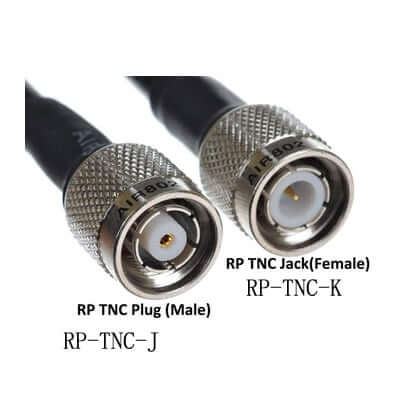
4. TNC (Threaded Neill–Concelman): This is a threaded version of the BNC connector and is sometimes used in WiFi applications for its secure connection.
cURL Too many subrequests by single Worker invocation. To configure this limit, refer to https://developers.cloudflare.com/workers/wrangler/configuration/#limits.

cURL Too many subrequests by single Worker invocation. To configure this limit, refer to https://developers.cloudflare.com/workers/wrangler/configuration/#limits.

cURL Too many subrequests by single Worker invocation. To configure this limit, refer to https://developers.cloudflare.com/workers/wrangler/configuration/#limits.
cURL Too many subrequests by single Worker invocation. To configure this limit, refer to https://developers.cloudflare.com/workers/wrangler/configuration/#limits
cURL Too many subrequests by single Worker invocation. To configure this limit, refer to https://developers.cloudflare.com/workers/wrangler/configuration/#limits
Compatibility
cURL Too many subrequests by single Worker invocation. To configure this limit, refer to https://developers.cloudflare.com/workers/wrangler/configuration/#limits
cURL Too many subrequests by single Worker invocation. To configure this limit, refer to https://developers.cloudflare.com/workers/wrangler/configuration/#limits
cURL Too many subrequests by single Worker invocation. To configure this limit, refer to https://developers.cloudflare.com/workers/wrangler/configuration/#limits
cURL Too many subrequests by single Worker invocation. To configure this limit, refer to https://developers.cloudflare.com/workers/wrangler/configuration/#limits
cURL Too many subrequests by single Worker invocation. To configure this limit, refer to https://developers.cloudflare.com/workers/wrangler/configuration/#limits
cURL Too many subrequests by single Worker invocation. To configure this limit, refer to https://developers.cloudflare.com/workers/wrangler/configuration/#limits.
cURL Too many subrequests by single Worker invocation. To configure this limit, refer to https://developers.cloudflare.com/workers/wrangler/configuration/#limits
1. LMR-195:

cURL Too many subrequests by single Worker invocation. To configure this limit, refer to https://developers.cloudflare.com/workers/wrangler/configuration/#limits.
cURL Too many subrequests by single Worker invocation. To configure this limit, refer to https://developers.cloudflare.com/workers/wrangler/configuration/#limits.
cURL Too many subrequests by single Worker invocation. To configure this limit, refer to https://developers.cloudflare.com/workers/wrangler/configuration/#limits.
2. LMR-400:
cURL Too many subrequests by single Worker invocation. To configure this limit, refer to https://developers.cloudflare.com/workers/wrangler/configuration/#limits.
cURL Too many subrequests by single Worker invocation. To configure this limit, refer to https://developers.cloudflare.com/workers/wrangler/configuration/#limits.
cURL Too many subrequests by single Worker invocation. To configure this limit, refer to https://developers.cloudflare.com/workers/wrangler/configuration/#limits.
3. LMR-240:
cURL Too many subrequests by single Worker invocation. To configure this limit, refer to https://developers.cloudflare.com/workers/wrangler/configuration/#limits.
cURL Too many subrequests by single Worker invocation. To configure this limit, refer to https://developers.cloudflare.com/workers/wrangler/configuration/#limits.
cURL Too many subrequests by single Worker invocation. To configure this limit, refer to https://developers.cloudflare.com/workers/wrangler/configuration/#limits.
cURL Too many subrequests by single Worker invocation. To configure this limit, refer to https://developers.cloudflare.com/workers/wrangler/configuration/#limits
– Very thin and flexible.
– Higher signal loss, suitable for very short runs (up to 6 feet).
– Often used for internal connections within devices.
Lengths
– Short Runs (1-10 feet):
– LMR-195 or RG174 cables may be sufficient.
– Minimal signal loss over short distances.
– Medium Runs (10-50 feet):
– LMR-240 is a good choice for balancing flexibility and signal integrity.
– LMR-195 can be used for shorter medium runs but may experience some loss at the higher end of this range.
– Long Runs (50-100 feet or more):
– LMR-400 is recommended due to its low signal loss characteristics.
– Ensure proper weatherproofing if used outdoors.
Additional Considerations
1. Weatherproofing: If the cable will be used outdoors, ensure it is rated for outdoor use and has proper weatherproofing to protect against the elements.
2. Signal Boosters: For very long runs, consider using a signal booster to maintain signal strength.
3. Cable Quality: Invest in high-quality cables from reputable manufacturers to ensure durability and performance.
Popular Brands and Manufacturers
– Times Microwave Systems (LMR series) or similar
Installation Tips
– Avoid Sharp Bends: Coaxial cables should not be bent sharply as it can damage the internal structure and degrade performance.
– Secure Connections: Ensure connectors are securely fastened to avoid signal loss.
– Minimize Interference: Keep the cable away from potential sources of electromagnetic interference, such as power lines and large metal objects.
By carefully selecting the appropriate type and length of coaxial cable, you can ensure that your WiFi panel antenna performs optimally, providing strong and reliable signal coverage.
Mounting Options and Brackets
Here are the revised mounting options for WiFi panel antennas based on the environment:
Mounting Options
1. Wall Mounting:
– Indoor: Suitable for placing the antenna on walls inside buildings to cover specific rooms or areas.
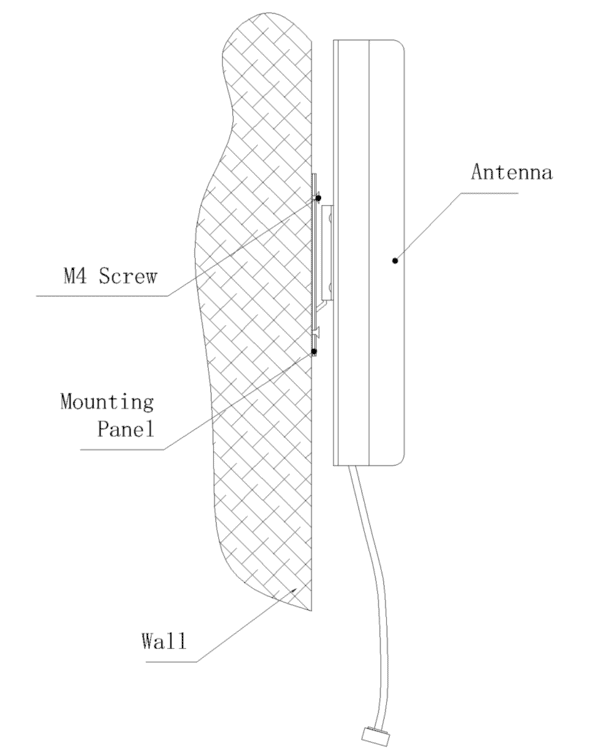
– Outdoor: Ideal for mounting on the exterior walls of buildings to cover outdoor areas or to extend the signal to other buildings.
2. Pole Mounting:
– Commonly used for outdoor installations where the antenna needs to be elevated above obstacles.
– Can be mounted on existing poles, masts, or specially installed poles.

3. Roof Mounting:
– Ideal for maximizing coverage and avoiding obstacles like buildings and trees.
– Provides an elevated position, which can enhance signal range and quality.
– Suitable for both residential and commercial installations.
1. Wall Mount Brackets:

– Fixed Brackets:*Simple brackets that hold the antenna flush against the wall.
– Adjustable Brackets: Allow for tilting and rotating the antenna to achieve the best signal direction.
2. Pole Mount Brackets:

– U-Bolt Brackets: Secure the antenna to the pole using U-bolts, providing a stable and adjustable mount.
cURL Too many subrequests by single Worker invocation. To configure this limit, refer to https://developers.cloudflare.com/workers/wrangler/configuration/#limits.
cURL Too many subrequests by single Worker invocation. To configure this limit, refer to https://developers.cloudflare.com/workers/wrangler/configuration/#limits
cURL Too many subrequests by single Worker invocation. To configure this limit, refer to https://developers.cloudflare.com/workers/wrangler/configuration/#limits.
cURL Too many subrequests by single Worker invocation. To configure this limit, refer to https://developers.cloudflare.com/workers/wrangler/configuration/#limits cURL Too many subrequests by single Worker invocation. To configure this limit, refer to https://developers.cloudflare.com/workers/wrangler/configuration/#limits cURL Too many subrequests by single Worker invocation. To configure this limit, refer to https://developers.cloudflare.com/workers/wrangler/configuration/#limits.

cURL Too many subrequests by single Worker invocation. To configure this limit, refer to https://developers.cloudflare.com/workers/wrangler/configuration/#limits.
cURL Too many subrequests by single Worker invocation. To configure this limit, refer to https://developers.cloudflare.com/workers/wrangler/configuration/#limits.
Installation Tips
cURL Too many subrequests by single Worker invocation. To configure this limit, refer to https://developers.cloudflare.com/workers/wrangler/configuration/#limits.
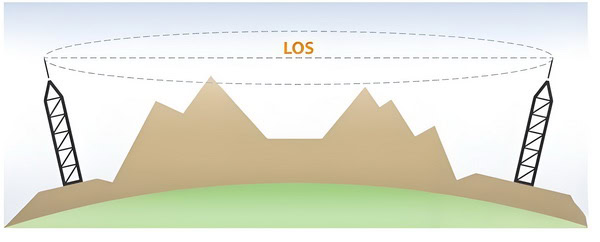
cURL Too many subrequests by single Worker invocation. To configure this limit, refer to https://developers.cloudflare.com/workers/wrangler/configuration/#limits.
cURL Too many subrequests by single Worker invocation. To configure this limit, refer to https://developers.cloudflare.com/workers/wrangler/configuration/#limits.
cURL Too many subrequests by single Worker invocation. To configure this limit, refer to https://developers.cloudflare.com/workers/wrangler/configuration/#limits.
cURL Too many subrequests by single Worker invocation. To configure this limit, refer to https://developers.cloudflare.com/workers/wrangler/configuration/#limits.
cURL Too many subrequests by single Worker invocation. To configure this limit, refer to https://developers.cloudflare.com/workers/wrangler/configuration/#limits.
cURL Too many subrequests by single Worker invocation. To configure this limit, refer to https://developers.cloudflare.com/workers/wrangler/configuration/#limits
cURL Too many subrequests by single Worker invocation. To configure this limit, refer to https://developers.cloudflare.com/workers/wrangler/configuration/#limits
cURL Too many subrequests by single Worker invocation. To configure this limit, refer to https://developers.cloudflare.com/workers/wrangler/configuration/#limits

cURL Too many subrequests by single Worker invocation. To configure this limit, refer to https://developers.cloudflare.com/workers/wrangler/configuration/#limits
cURL Too many subrequests by single Worker invocation. To configure this limit, refer to https://developers.cloudflare.com/workers/wrangler/configuration/#limits.
cURL Too many subrequests by single Worker invocation. To configure this limit, refer to https://developers.cloudflare.com/workers/wrangler/configuration/#limits.
cURL Too many subrequests by single Worker invocation. To configure this limit, refer to https://developers.cloudflare.com/workers/wrangler/configuration/#limits
cURL Too many subrequests by single Worker invocation. To configure this limit, refer to https://developers.cloudflare.com/workers/wrangler/configuration/#limits.
cURL Too many subrequests by single Worker invocation. To configure this limit, refer to https://developers.cloudflare.com/workers/wrangler/configuration/#limits.
– Weatherproof Boots: Install weatherproof boots or heat shrink tubing over the connectors to provide an additional layer of protection.
3. Mounting Hardware:
– Rust-Resistant Materials: Use stainless steel or galvanized mounting hardware to prevent rust and corrosion.
– Secure Mounting: Ensure the antenna is securely mounted to withstand high winds. Use appropriate brackets and mounts.
4. Enclosures:
– Weatherproof Enclosures: If your antenna comes with an enclosure, ensure it is rated for outdoor use (IP65 with gasket or o-ring ).
– Drainage Holes: Some enclosures have drainage holes to prevent water accumulation. Ensure these are clear and not blocked.
Maintenance

1. Regular Inspections:
– Visual Check: Perform regular visual inspections of the antenna, connectors, and cables. Look for signs of wear, corrosion, or damage.
– Tightness Check: Ensure all connectors and mounting hardware are tight and secure.
2. Cleaning:
– Dirt and Debris: Clean the antenna and surrounding area to remove dirt, leaves, and other debris that may accumulate.
– Mild Detergent: Use a mild detergent and water to clean the antenna surface. Avoid using harsh chemicals that could damage the material.
3. Cable Management:
– Inspect Cables: Check for any signs of wear or damage to the cables. Replace any damaged cables immediately.
– Secure Cables: Use cable ties or clips to secure cables and prevent them from flapping in the wind.
4. Firmware and Software Updates:
– Check for Updates: Regularly check for firmware and software updates for your WiFi panel antenna. Manufacturers often release updates to improve performance and security.
5. Environmental Considerations:
– Extreme Weather: In areas prone to extreme weather (e.g., heavy snow, hurricanes), consider additional protective measures such as weather shields or relocating the antenna to a more sheltered location.
6. Professional Maintenance:
– Annual Check-Up: Consider having a professional technician perform an annual check-up to ensure everything is in optimal condition.
By following these weatherproofing and maintenance tips, you can help ensure that your WiFi panel antenna remains operational and efficient for an extended period, even in challenging outdoor environments.
Environmental Considerations
1. Durability and Weather Resistance
– Material Selection: Use materials that are resistant to corrosion, UV radiation, and extreme temperatures. Common materials include UV-resistant plastics, stainless steel, and aluminum.
– Sealing and Enclosures: Ensure that the antenna housing is properly sealed to prevent water ingress. Use IP-rated enclosures to protect against dust and moisture.
2. Temperature Range
– Operating Temperatures: Design the antenna to function efficiently within a wide temperature range, typically from -40°C to +85°C, to accommodate various environmental conditions.
– Thermal Management: Incorporate materials and designs that can dissipate heat effectively to prevent overheating in high-temperature environments.
3. Wind Load and Physical Stability
– Structural Integrity: Ensure the antenna can withstand high wind speeds and mechanical stress. Use robust mounting systems that can secure the antenna firmly in place.
– Aerodynamic Design: Consider designing the antenna with an aerodynamic profile to reduce wind resistance and potential damage.
4. Environmental Impact
– Eco-friendly Materials: Opt for recyclable and non-toxic materials in the antenna’s construction to minimize environmental impact.
– Energy Efficiency: Design the antenna to operate efficiently with minimal power consumption to reduce the overall carbon footprint.
5. Electromagnetic Interference (EMI)
– Shielding: Implement proper shielding techniques to minimize EMI from external sources, ensuring reliable performance in various environments.
– Compliance: Ensure the antenna complies with relevant standards and regulations regarding electromagnetic emissions.
6. Installation Environment
– Urban vs. Rural: Consider the specific environmental challenges of urban (e.g., multipath interference, high density of devices) versus rural (e.g., long-distance transmission, fewer obstructions) settings.
cURL Too many subrequests by single Worker invocation. To configure this limit, refer to https://developers.cloudflare.com/workers/wrangler/configuration/#limits.
cURL Too many subrequests by single Worker invocation. To configure this limit, refer to https://developers.cloudflare.com/workers/wrangler/configuration/#limits
cURL Too many subrequests by single Worker invocation. To configure this limit, refer to https://developers.cloudflare.com/workers/wrangler/configuration/#limits.
cURL Too many subrequests by single Worker invocation. To configure this limit, refer to https://developers.cloudflare.com/workers/wrangler/configuration/#limits.
cURL Too many subrequests by single Worker invocation. To configure this limit, refer to https://developers.cloudflare.com/workers/wrangler/configuration/#limits
cURL Too many subrequests by single Worker invocation. To configure this limit, refer to https://developers.cloudflare.com/workers/wrangler/configuration/#limits.
cURL Too many subrequests by single Worker invocation. To configure this limit, refer to https://developers.cloudflare.com/workers/wrangler/configuration/#limits.
cURL Too many subrequests by single Worker invocation. To configure this limit, refer to https://developers.cloudflare.com/workers/wrangler/configuration/#limits
cURL Too many subrequests by single Worker invocation. To configure this limit, refer to https://developers.cloudflare.com/workers/wrangler/configuration/#limits
cURL Too many subrequests by single Worker invocation. To configure this limit, refer to https://developers.cloudflare.com/workers/wrangler/configuration/#limits

1. Frequency Range
cURL Too many subrequests by single Worker invocation. To configure this limit, refer to https://developers.cloudflare.com/workers/wrangler/configuration/#limits.
cURL Too many subrequests by single Worker invocation. To configure this limit, refer to https://developers.cloudflare.com/workers/wrangler/configuration/#limits.
cURL Too many subrequests by single Worker invocation. To configure this limit, refer to https://developers.cloudflare.com/workers/wrangler/configuration/#limits
cURL Too many subrequests by single Worker invocation. To configure this limit, refer to https://developers.cloudflare.com/workers/wrangler/configuration/#limits.
cURL Too many subrequests by single Worker invocation. To configure this limit, refer to https://developers.cloudflare.com/workers/wrangler/configuration/#limits.
cURL Too many subrequests by single Worker invocation. To configure this limit, refer to https://developers.cloudflare.com/workers/wrangler/configuration/#limits
cURL Too many subrequests by single Worker invocation. To configure this limit, refer to https://developers.cloudflare.com/workers/wrangler/configuration/#limits.
cURL Too many subrequests by single Worker invocation. To configure this limit, refer to https://developers.cloudflare.com/workers/wrangler/configuration/#limits.
cURL Too many subrequests by single Worker invocation. To configure this limit, refer to https://developers.cloudflare.com/workers/wrangler/configuration/#limits
cURL Too many subrequests by single Worker invocation. To configure this limit, refer to https://developers.cloudflare.com/workers/wrangler/configuration/#limits.
cURL Too many subrequests by single Worker invocation. To configure this limit, refer to https://developers.cloudflare.com/workers/wrangler/configuration/#limits
cURL Too many subrequests by single Worker invocation. To configure this limit, refer to https://developers.cloudflare.com/workers/wrangler/configuration/#limits.
6. Mounting and Installation
– Mounting Options: Check if the antenna’s mounting options (e.g., wall mount, pole mount) are compatible with your installation environment.
– Cable Length: Ensure the antenna comes with an appropriate length of cable or that you can source the necessary length without significant signal loss.
7. Environmental Considerations
– Indoor vs. Outdoor: Determine whether the antenna is designed for indoor or outdoor use based on your deployment requirements.
– Weatherproofing: For outdoor installations, ensure the antenna is weatherproof and can withstand the environmental conditions of your location.
8. Regulatory Compliance
– FCC/CE Certification: Ensure the antenna complies with relevant regulatory standards (e.g., FCC in the USA, CE in Europe) to avoid legal issues and ensure safe operation.
9. Compatibility with Router/Access Point Firmware
– Firmware Support: Some advanced routers and access points may have specific firmware requirements for external antennas. Verify compatibility with the device’s firmware.
10. Manufacturer Recommendations
– Vendor Documentation: Check the documentation and recommendations from both the antenna and router/access point manufacturers for compatibility guidance.
Conclusion
By carefully considering these factors, you can ensure that the WiFi panel antenna you choose will be compatible with your existing equipment, providing optimal performance and coverage for your wireless network.
Integration with Network Systems
Integrating a WiFi panel antenna into existing network systems requires careful planning and consideration of various technical aspects to ensure seamless performance and optimal network coverage. Below are detailed steps and best practices to guide the integration process:

1. Site Survey and Planning
1.1. Conduct a Site Survey
– Identify Coverage Areas: Determine the areas that need WiFi coverage.
– Assess Interference Sources: Identify potential sources of interference such as other wireless devices, physical obstructions, and electronic appliances.
– Signal Strength Measurement: Use tools like WiFi analyzers to measure existing signal strength and identify dead zones.
1.2. Planning the Antenna Placement
– Optimal Location: Choose locations that are central to the coverage area and free from obstructions.
– Height and Angle: Ensure the antenna is mounted at an appropriate height and angle to maximize coverage.
2. Hardware Integration
2.1. Selecting the Right Antenna
– Frequency Band: Ensure the antenna supports the required frequency bands (2.4 GHz, 5 GHz, or dual-band).
– Gain and Coverage Pattern: Choose an antenna with the appropriate gain and coverage pattern for your needs.
2.2. Connecting the Antenna
– Antenna Connectors: Use compatible connectors (e.g., SMA, N-type) to connect the antenna to the WiFi access point.
– Cabling: Use high-quality coaxial cables to minimize signal loss.
2.3. Mounting the Antenna
– Mounting Brackets: Use sturdy mounting brackets to secure the antenna.
– Weatherproofing: Ensure the antenna and connections are weatherproof if mounted outdoors.
3. Network Configuration
3.1. Access Point Configuration
– SSID and Security: Configure the SSID and security settings on the access point.
– Channel Selection: Select the appropriate WiFi channel to minimize interference.
– Power Settings: Adjust the transmission power to balance coverage and avoid interference with other access points.
3.2. Network Integration
cURL Too many subrequests by single Worker invocation. To configure this limit, refer to https://developers.cloudflare.com/workers/wrangler/configuration/#limits.
cURL Too many subrequests by single Worker invocation. To configure this limit, refer to https://developers.cloudflare.com/workers/wrangler/configuration/#limits.
cURL Too many subrequests by single Worker invocation. To configure this limit, refer to https://developers.cloudflare.com/workers/wrangler/configuration/#limits.
cURL Too many subrequests by single Worker invocation. To configure this limit, refer to https://developers.cloudflare.com/workers/wrangler/configuration/#limits
cURL Too many subrequests by single Worker invocation. To configure this limit, refer to https://developers.cloudflare.com/workers/wrangler/configuration/#limits
cURL Too many subrequests by single Worker invocation. To configure this limit, refer to https://developers.cloudflare.com/workers/wrangler/configuration/#limits.
cURL Too many subrequests by single Worker invocation. To configure this limit, refer to https://developers.cloudflare.com/workers/wrangler/configuration/#limits.
cURL Too many subrequests by single Worker invocation. To configure this limit, refer to https://developers.cloudflare.com/workers/wrangler/configuration/#limits
cURL Too many subrequests by single Worker invocation. To configure this limit, refer to https://developers.cloudflare.com/workers/wrangler/configuration/#limits.
cURL Too many subrequests by single Worker invocation. To configure this limit, refer to https://developers.cloudflare.com/workers/wrangler/configuration/#limits.
cURL Too many subrequests by single Worker invocation. To configure this limit, refer to https://developers.cloudflare.com/workers/wrangler/configuration/#limits
cURL Too many subrequests by single Worker invocation. To configure this limit, refer to https://developers.cloudflare.com/workers/wrangler/configuration/#limits.
cURL Too many subrequests by single Worker invocation. To configure this limit, refer to https://developers.cloudflare.com/workers/wrangler/configuration/#limits.
cURL Too many subrequests by single Worker invocation. To configure this limit, refer to https://developers.cloudflare.com/workers/wrangler/configuration/#limits
cURL Too many subrequests by single Worker invocation. To configure this limit, refer to https://developers.cloudflare.com/workers/wrangler/configuration/#limits
cURL Too many subrequests by single Worker invocation. To configure this limit, refer to https://developers.cloudflare.com/workers/wrangler/configuration/#limits.
cURL Too many subrequests by single Worker invocation. To configure this limit, refer to https://developers.cloudflare.com/workers/wrangler/configuration/#limits.
cURL Too many subrequests by single Worker invocation. To configure this limit, refer to https://developers.cloudflare.com/workers/wrangler/configuration/#limits
cURL Too many subrequests by single Worker invocation. To configure this limit, refer to https://developers.cloudflare.com/workers/wrangler/configuration/#limits.
cURL Too many subrequests by single Worker invocation. To configure this limit, refer to https://developers.cloudflare.com/workers/wrangler/configuration/#limits.
cURL Too many subrequests by single Worker invocation. To configure this limit, refer to https://developers.cloudflare.com/workers/wrangler/configuration/#limits.
cURL Too many subrequests by single Worker invocation. To configure this limit, refer to https://developers.cloudflare.com/workers/wrangler/configuration/#limits
The performance and functionality of a WiFi panel antenna are not solely dependent on its physical design and hardware components. Software and firmware play a crucial role in optimizing and managing the antenna’s performance, ensuring efficient operation, and providing flexibility for various applications.

Here are some key considerations regarding software and firmware for WiFi panel antennas:
1. Antenna Control and Management Software:
– Configuration and Tuning:
– Beamforming: Software can adjust the antenna’s beam pattern to focus the signal in a specific direction, enhancing signal strength and reducing interference.
– Frequency Selection: Automatic or manual selection of operating frequencies to avoid congestion and interference.
– Monitoring and Diagnostics:
– Real-time monitoring of signal strength, quality, and interference levels.
– Diagnostic tools for identifying and troubleshooting issues.
– Firmware Updates:
– Regular updates to improve performance, add new features, and fix bugs.
– Over-the-air (OTA) updates for remote and convenient firmware upgrades.
2. Network Management:
– Integration with Network Management Systems (NMS):
– Compatibility with NMS for centralized control and monitoring.
– Support for protocols like SNMP (Simple Network Management Protocol) for network management.
– Quality of Service (QoS):
– Prioritization of traffic to ensure optimal performance for critical applications.
– Bandwidth management to allocate resources efficiently.
– Security:
– Implementation of security protocols (WPA3, WPA2) to protect the network.
– Regular updates to address security vulnerabilities.
3. User Interface:
– Web-Based Interface:
– User-friendly web interface for configuration and management.
– Remote access capabilities for managing the antenna from different locations.
– Mobile Applications:
– Mobile apps for convenient access and control via smartphones and tablets.
– API Integration:
– APIs for integration with other software and systems, enabling automation and custom solutions.
cURL Too many subrequests by single Worker invocation. To configure this limit, refer to https://developers.cloudflare.com/workers/wrangler/configuration/#limits
– Adaptive Algorithms:
– Algorithms that dynamically adjust settings based on environmental conditions and usage patterns.
– Load Balancing:
– Distributing traffic evenly across multiple antennas or channels to avoid overload and maintain performance.
– Interference Mitigation:
– Techniques like Dynamic Frequency Selection (DFS) and Transmit Power Control (TPC) to minimize interference.
5. Compatibility and Standards:
– Compliance with WiFi Standards:
cURL Too many subrequests by single Worker invocation. To configure this limit, refer to https://developers.cloudflare.com/workers/wrangler/configuration/#limits.
cURL Too many subrequests by single Worker invocation. To configure this limit, refer to https://developers.cloudflare.com/workers/wrangler/configuration/#limits
cURL Too many subrequests by single Worker invocation. To configure this limit, refer to https://developers.cloudflare.com/workers/wrangler/configuration/#limits.
6. Energy Efficiency:
cURL Too many subrequests by single Worker invocation. To configure this limit, refer to https://developers.cloudflare.com/workers/wrangler/configuration/#limits
cURL Too many subrequests by single Worker invocation. To configure this limit, refer to https://developers.cloudflare.com/workers/wrangler/configuration/#limits.
cURL Too many subrequests by single Worker invocation. To configure this limit, refer to https://developers.cloudflare.com/workers/wrangler/configuration/#limits
cURL Too many subrequests by single Worker invocation. To configure this limit, refer to https://developers.cloudflare.com/workers/wrangler/configuration/#limits.
Conclusion
cURL Too many subrequests by single Worker invocation. To configure this limit, refer to https://developers.cloudflare.com/workers/wrangler/configuration/#limits.
Chapter 6: Case Studies and Applications
cURL Too many subrequests by single Worker invocation. To configure this limit, refer to https://developers.cloudflare.com/workers/wrangler/configuration/#limits
cURL Too many subrequests by single Worker invocation. To configure this limit, refer to https://developers.cloudflare.com/workers/wrangler/configuration/#limits

cURL Too many subrequests by single Worker invocation. To configure this limit, refer to https://developers.cloudflare.com/workers/wrangler/configuration/#limits
cURL Too many subrequests by single Worker invocation. To configure this limit, refer to https://developers.cloudflare.com/workers/wrangler/configuration/#limits.
cURL Too many subrequests by single Worker invocation. To configure this limit, refer to https://developers.cloudflare.com/workers/wrangler/configuration/#limits.
cURL Too many subrequests by single Worker invocation. To configure this limit, refer to https://developers.cloudflare.com/workers/wrangler/configuration/#limits.
cURL Too many subrequests by single Worker invocation. To configure this limit, refer to https://developers.cloudflare.com/workers/wrangler/configuration/#limits
cURL Too many subrequests by single Worker invocation. To configure this limit, refer to https://developers.cloudflare.com/workers/wrangler/configuration/#limits.
cURL Too many subrequests by single Worker invocation. To configure this limit, refer to https://developers.cloudflare.com/workers/wrangler/configuration/#limits.
cURL Too many subrequests by single Worker invocation. To configure this limit, refer to https://developers.cloudflare.com/workers/wrangler/configuration/#limits.
cURL Too many subrequests by single Worker invocation. To configure this limit, refer to https://developers.cloudflare.com/workers/wrangler/configuration/#limits

cURL Too many subrequests by single Worker invocation. To configure this limit, refer to https://developers.cloudflare.com/workers/wrangler/configuration/#limits.
cURL Too many subrequests by single Worker invocation. To configure this limit, refer to https://developers.cloudflare.com/workers/wrangler/configuration/#limits.
cURL Too many subrequests by single Worker invocation. To configure this limit, refer to https://developers.cloudflare.com/workers/wrangler/configuration/#limits.
Applications
1. Home Offices: With the rise of remote work, a strong and reliable WiFi connection is crucial for home offices. A WiFi panel antenna can ensure a stable connection, even if the office is located in a part of the house that traditionally has poor coverage.
2. Smart Home Devices: Smart home devices, such as security cameras, smart thermostats, and smart lighting, often require a strong WiFi signal to function properly. A WiFi panel antenna can help ensure these devices remain connected and operational.
3.Streaming and Gaming: For households with multiple devices streaming video or engaging in online gaming, a WiFi panel antenna can help maintain high-speed connections and reduce buffering or lag.
4. Outdoor Activities: Extending WiFi coverage to outdoor areas can enhance the usability of devices like tablets, laptops, and smart speakers in gardens, patios, and backyards.
Installation Tips
– Placement: Position the panel antenna in a central location, ideally elevated, and directed towards areas with weak signals.
– Orientation: Adjust the antenna’s angle and direction to maximize coverage in the desired areas.
– Interference: Minimize interference by keeping the antenna away from large metal objects, microwaves, and other electronic devices.
Conclusion
WiFi panel antennas offer a practical and effective solution for enhancing residential WiFi networks. By focusing the signal in specific directions, they can overcome common issues like dead zones, weak signals, and limited coverage, providing a more reliable and robust home network experience.
Commercial and Enterprise Solutions
WiFi panel antennas are designed to provide robust and reliable wireless connectivity in various commercial and enterprise environments. These antennas are particularly effective in scenarios where high-density coverage and long-range signal transmission are required. Here are some detailed case studies and applications of WiFi panel antennas in commercial and enterprise solutions:
1. Office Buildings
Case Study: Multi-Floor Office Complex
Scenario: A multi-floor office complex requires seamless WiFi coverage to support hundreds of employees, IoT devices, and guest users. Traditional omnidirectional antennas struggle to provide consistent coverage across all floors and corners of the building.

Solution: WiFi panel antennas are strategically installed on each floor, focusing the signal in specific directions to ensure even coverage. By using directional antennas, the network can avoid interference from other floors and provide stronger signals to areas with higher user density.
Outcome:
– Improved signal strength and coverage throughout the building.
– Reduced interference and better network performance.
– Enhanced user experience with faster and more reliable WiFi connections.
2. Educational Institutions
Case Study: University Campus
Scenario: A large university campus needs to provide WiFi access across multiple buildings, outdoor areas, and student residences. The challenge is to offer consistent and high-speed connectivity to thousands of students and faculty members.

Solution: WiFi panel antennas are deployed in key locations such as lecture halls, libraries, dormitories, and outdoor common areas. These antennas are chosen for their ability to direct the signal towards high-traffic areas and penetrate through walls and other obstacles.
Outcome:
– Comprehensive WiFi coverage across the entire campus.
– High-speed internet access for academic and personal use.
– Increased satisfaction among students and staff due to reliable connectivity.
3. Large Venues
Case Study: Convention Center
Scenario: A convention center hosts various events, including trade shows, conferences, and concerts. Each event requires robust WiFi coverage to support thousands of attendees, exhibitors, and event staff.
Solution: WiFi panel antennas are installed in strategic locations such as exhibition halls, conference rooms, and common areas. The directional nature of these antennas helps focus the signal where it is needed most, ensuring strong and reliable connectivity even in high-density environments.
Outcome:
– Reliable WiFi coverage for large numbers of concurrent users.
– Enhanced experience for event attendees and exhibitors.
– Ability to support high-bandwidth applications such as live streaming and interactive displays.
4. Retail Environments
Case Study: Shopping Mall
Scenario: A shopping mall requires extensive WiFi coverage to support shoppers, store owners, and mall operations. The goal is to provide seamless connectivity throughout the mall, including stores, food courts, and common areas.

Solution: WiFi panel antennas are placed in key locations to direct the signal towards high-traffic areas and minimize interference from adjacent stores. The antennas are configured to provide overlapping coverage, ensuring that users experience a seamless connection as they move throughout the mall.
Outcome:
– Consistent and high-quality WiFi coverage throughout the mall.
– Improved shopper experience with access to online services and apps.
– Enhanced operational efficiency for store owners and mall management.
Conclusion
cURL Too many subrequests by single Worker invocation. To configure this limit, refer to https://developers.cloudflare.com/workers/wrangler/configuration/#limits.
cURL Too many subrequests by single Worker invocation. To configure this limit, refer to https://developers.cloudflare.com/workers/wrangler/configuration/#limits
cURL Too many subrequests by single Worker invocation. To configure this limit, refer to https://developers.cloudflare.com/workers/wrangler/configuration/#limits.
cURL Too many subrequests by single Worker invocation. To configure this limit, refer to https://developers.cloudflare.com/workers/wrangler/configuration/#limits
cURL Too many subrequests by single Worker invocation. To configure this limit, refer to https://developers.cloudflare.com/workers/wrangler/configuration/#limits.
cURL Too many subrequests by single Worker invocation. To configure this limit, refer to https://developers.cloudflare.com/workers/wrangler/configuration/#limits.
Outcome:
cURL Too many subrequests by single Worker invocation. To configure this limit, refer to https://developers.cloudflare.com/workers/wrangler/configuration/#limits.
cURL Too many subrequests by single Worker invocation. To configure this limit, refer to https://developers.cloudflare.com/workers/wrangler/configuration/#limits.
cURL Too many subrequests by single Worker invocation. To configure this limit, refer to https://developers.cloudflare.com/workers/wrangler/configuration/#limits.
cURL Too many subrequests by single Worker invocation. To configure this limit, refer to https://developers.cloudflare.com/workers/wrangler/configuration/#limits
cURL Too many subrequests by single Worker invocation. To configure this limit, refer to https://developers.cloudflare.com/workers/wrangler/configuration/#limits.
cURL Too many subrequests by single Worker invocation. To configure this limit, refer to https://developers.cloudflare.com/workers/wrangler/configuration/#limits.
Outcome:
cURL Too many subrequests by single Worker invocation. To configure this limit, refer to https://developers.cloudflare.com/workers/wrangler/configuration/#limits.
cURL Too many subrequests by single Worker invocation. To configure this limit, refer to https://developers.cloudflare.com/workers/wrangler/configuration/#limits.
cURL Too many subrequests by single Worker invocation. To configure this limit, refer to https://developers.cloudflare.com/workers/wrangler/configuration/#limits.
cURL Too many subrequests by single Worker invocation. To configure this limit, refer to https://developers.cloudflare.com/workers/wrangler/configuration/#limits
cURL Too many subrequests by single Worker invocation. To configure this limit, refer to https://developers.cloudflare.com/workers/wrangler/configuration/#limits.
cURL Too many subrequests by single Worker invocation. To configure this limit, refer to https://developers.cloudflare.com/workers/wrangler/configuration/#limits.
Outcome:
cURL Too many subrequests by single Worker invocation. To configure this limit, refer to https://developers.cloudflare.com/workers/wrangler/configuration/#limits.
cURL Too many subrequests by single Worker invocation. To configure this limit, refer to https://developers.cloudflare.com/workers/wrangler/configuration/#limits.
cURL Too many subrequests by single Worker invocation. To configure this limit, refer to https://developers.cloudflare.com/workers/wrangler/configuration/#limits.
cURL Too many subrequests by single Worker invocation. To configure this limit, refer to https://developers.cloudflare.com/workers/wrangler/configuration/#limits
Problem: A city government aimed to implement a smart city initiative that included public WiFi, smart lighting, and traffic management systems. The challenge was to provide consistent and reliable connectivity across various urban environments.
Solution: WiFi panel antennas were integrated into the city’s infrastructure, including streetlights, traffic signals, and public buildings. These antennas provided the necessary connectivity for various smart city applications.
Outcome:
– Improved public services, such as free WiFi in public areas.
– Enhanced traffic management through real-time data collection and analysis.
– Increased energy efficiency with smart lighting systems.
Application 1: Industrial Automation

WiFi panel antennas play a crucial role in industrial automation by providing reliable wireless communication for automated machinery, sensors, and control systems. These antennas ensure that data is transmitted quickly and accurately, which is essential for maintaining efficient and safe operations.
Application 2: Outdoor Surveillance

In security and surveillance applications, WiFi panel antennas enable the deployment of wireless cameras in outdoor environments. These antennas provide the necessary range and reliability to transmit high-definition video feeds to monitoring stations, ensuring comprehensive coverage of large areas.
Application 3: Transportation and Logistics
WiFi panel antennas are used in transportation and logistics to create wireless networks for tracking and managing vehicles, cargo, and personnel. These networks improve operational efficiency, reduce costs, and enhance safety by providing real-time location and status updates.
Conclusion
WiFi panel antennas are indispensable in industrial and outdoor applications due to their robustness, reliability, and ability to provide long-range wireless connectivity. As demonstrated in the case studies and applications above, these antennas are essential for improving operational efficiency, safety, and overall performance in various challenging environments.
Chapter 7: Future Trends and Innovations
cURL Too many subrequests by single Worker invocation. To configure this limit, refer to https://developers.cloudflare.com/workers/wrangler/configuration/#limits
Emerging technologies in WiFi panel antennas are driving significant improvements in wireless communication, expanding the capabilities and performance of WiFi networks. Here are some key developments:
1. Beamforming Technology:
– Multi-User MIMO (MU-MIMO): Allows multiple devices to receive data simultaneously, increasing the efficiency and speed of the network.
– Adaptive Beamforming: Dynamically adjusts the direction of the signal to improve coverage and reduce interference.

2. Higher Frequency Bands:
– 5 GHz and Beyond: Utilization of higher frequency bands such as 6 GHz (WiFi 6E) and the upcoming WiFi 7 to provide more channels and higher data rates.

– Millimeter Wave (mmWave): Exploring frequencies above 24 GHz for ultra-high-speed data transmission over short distances.
3. Advanced Materials:
– Metamaterials: Engineered materials that can manipulate electromagnetic waves in novel ways, leading to more efficient and compact antennas.
– Graphene-based Antennas: Offering potential for ultra-thin, flexible, and highly conductive antennas.
4. Integration with IoT and Smart Devices:
– Smart Antennas: Incorporating AI and machine learning to optimize signal strength and adapt to changing environments.

– IoT Compatibility: Designing antennas that can efficiently communicate with a wide range of IoT devices, enhancing connectivity and energy efficiency.
5. Enhanced Security Features:
– Secure Boot and Firmware: Ensuring that the antenna and associated hardware are protected from unauthorized access and tampering.
– Encrypted Communication: Implementing advanced encryption standards to safeguard data transmitted over WiFi networks.
6. Energy Efficiency:
– Low-Power Designs: Creating antennas that consume less power, crucial for battery-operated devices and sustainable technology.
– Energy Harvesting: Exploring technologies that can capture ambient energy (e.g., solar, RF energy) to power the antennas.
7. Compact and Aesthetic Designs:
– Integrated Antennas: Embedding antennas into devices in a way that maintains aesthetics without compromising performance.
– Flexible and Wearable Antennas: Developing antennas that can be integrated into clothing or other wearable items for seamless connectivity.
8. Enhanced Range and Coverage:
– Mesh Networking: Utilizing multiple nodes to create a robust network that provides extensive coverage and eliminates dead zones.
– High-Gain Antennas: Designing antennas with higher gain to extend the range and improve signal quality.
9. Software-Defined Radios (SDR):
– Programmable Antennas: Allowing for real-time adjustments and optimizations through software, enabling more versatile and adaptive network configurations.
cURL Too many subrequests by single Worker invocation. To configure this limit, refer to https://developers.cloudflare.com/workers/wrangler/configuration/#limits
cURL Too many subrequests by single Worker invocation. To configure this limit, refer to https://developers.cloudflare.com/workers/wrangler/configuration/#limits.
cURL Too many subrequests by single Worker invocation. To configure this limit, refer to https://developers.cloudflare.com/workers/wrangler/configuration/#limits.
cURL Too many subrequests by single Worker invocation. To configure this limit, refer to https://developers.cloudflare.com/workers/wrangler/configuration/#limits.
cURL Too many subrequests by single Worker invocation. To configure this limit, refer to https://developers.cloudflare.com/workers/wrangler/configuration/#limits
cURL Too many subrequests by single Worker invocation. To configure this limit, refer to https://developers.cloudflare.com/workers/wrangler/configuration/#limits

cURL Too many subrequests by single Worker invocation. To configure this limit, refer to https://developers.cloudflare.com/workers/wrangler/configuration/#limits.
cURL Too many subrequests by single Worker invocation. To configure this limit, refer to https://developers.cloudflare.com/workers/wrangler/configuration/#limits.
cURL Too many subrequests by single Worker invocation. To configure this limit, refer to https://developers.cloudflare.com/workers/wrangler/configuration/#limits.
cURL Too many subrequests by single Worker invocation. To configure this limit, refer to https://developers.cloudflare.com/workers/wrangler/configuration/#limits.
cURL Too many subrequests by single Worker invocation. To configure this limit, refer to https://developers.cloudflare.com/workers/wrangler/configuration/#limits.
cURL Too many subrequests by single Worker invocation. To configure this limit, refer to https://developers.cloudflare.com/workers/wrangler/configuration/#limits.
cURL Too many subrequests by single Worker invocation. To configure this limit, refer to https://developers.cloudflare.com/workers/wrangler/configuration/#limits.
cURL Too many subrequests by single Worker invocation. To configure this limit, refer to https://developers.cloudflare.com/workers/wrangler/configuration/#limits.
cURL Too many subrequests by single Worker invocation. To configure this limit, refer to https://developers.cloudflare.com/workers/wrangler/configuration/#limits.
cURL Too many subrequests by single Worker invocation. To configure this limit, refer to https://developers.cloudflare.com/workers/wrangler/configuration/#limits.
cURL Too many subrequests by single Worker invocation. To configure this limit, refer to https://developers.cloudflare.com/workers/wrangler/configuration/#limits.
Impact of 5G and Beyond
cURL Too many subrequests by single Worker invocation. To configure this limit, refer to https://developers.cloudflare.com/workers/wrangler/configuration/#limits
cURL Too many subrequests by single Worker invocation. To configure this limit, refer to https://developers.cloudflare.com/workers/wrangler/configuration/#limits
cURL Too many subrequests by single Worker invocation. To configure this limit, refer to https://developers.cloudflare.com/workers/wrangler/configuration/#limits.
cURL Too many subrequests by single Worker invocation. To configure this limit, refer to https://developers.cloudflare.com/workers/wrangler/configuration/#limits.
cURL Too many subrequests by single Worker invocation. To configure this limit, refer to https://developers.cloudflare.com/workers/wrangler/configuration/#limits.
2. Beamforming and MIMO Technology

5G heavily relies on beamforming and Multiple Input Multiple Output (MIMO) technology to enhance signal strength and data throughput.
– Beamforming: WiFi panel antennas must incorporate active or passive beamforming capabilities to direct signals towards user devices, improving coverage and reducing interference.
– Massive MIMO: Antennas need to support massive MIMO configurations, involving dozens or even hundreds of antenna elements, to handle the increased data traffic and device connections.
3. Increased Bandwidth and Data Rates
The higher data rates and bandwidths offered by 5G require WiFi panel antennas to support wider frequency bands.
– Broadband Antennas: Antennas must be designed to operate over a broad range of frequencies, ensuring compatibility with both existing WiFi standards (e.g., WiFi 6/6E) and future iterations.
– High Data Throughput: Enhanced antenna designs are needed to handle the high data throughput, minimizing latency and maximizing user experience.
4. Integration with IoT and Smart Devices
The proliferation of Internet of Things (IoT) devices and smart applications in a 5G ecosystem demands robust and versatile WiFi panel antennas.
– Scalability: Antennas must be scalable to support a large number of connected devices simultaneously, without compromising performance.
– Energy Efficiency: With many IoT devices being battery-powered, antennas need to be energy-efficient to prolong device lifespans.
5. Network Densification and Small Cells
5G networks involve the deployment of numerous small cells to enhance coverage and capacity, especially in urban areas.
– Compact and Aesthetic Designs: WiFi panel antennas for small cells must be compact and aesthetically pleasing to facilitate deployment in various environments, including indoors and outdoors.
– High Capacity: These antennas should be capable of handling high user densities and providing reliable connections in crowded areas.
6. Advanced Antenna Technologies
Emerging technologies are shaping the future of WiFi panel antennas in the context of 5G and beyond.
– Reconfigurable Antennas: Antennas that can dynamically adjust their frequency, polarization, and radiation patterns to adapt to changing network conditions.
– Metamaterials: Utilization of metamaterials to create antennas with superior performance characteristics, such as higher gain and better beam steering capabilities.
7. Interference Management
With the dense deployment of 5G infrastructure, managing interference between different wireless systems becomes crucial.
– Directional Antennas: WiFi panel antennas with highly directional beams can minimize interference by focusing energy in specific directions.
– Smart Antenna Systems: Integration of smart antenna systems that can dynamically adjust their parameters to mitigate interference and optimize performance.
Conclusion
The transition to 5G and beyond presents both challenges and opportunities for WiFi panel antennas. To meet the demands of higher frequencies, increased data rates, and a more connected world, antenna designs must incorporate advanced technologies and materials. By doing so, they will play a crucial role in realizing the full potential of next-generation wireless networks, ensuring robust, high-speed, and reliable connectivity for a multitude of applications.
Conclusion
Summary of Key Points

Here are the revised key considerations when choosing WiFi panel antennas:
1. Frequency Band: Ensure the antenna supports the frequency band your WiFi operates on (2.4 GHz, 5 GHz, or dual-band).
2. Gain: Higher gain antennas (measured in dBi) provide more focused signals, which can improve range and signal strength but may reduce coverage area.
3. Beamwidth: The angle of coverage; a narrower beamwidth focuses the signal more, while a wider beamwidth covers a broader area.
4. Polarization: Determines how the antenna emits and receives signals. Matching polarization with your devices can improve performance.
5. Installation Location: Consider where the antenna will be installed (indoor vs. outdoor) and ensure it has appropriate weatherproofing if needed.
6. Connector Type: Ensure the antenna has a compatible connector type for your router or access point.
7. Mounting Options: Look for antennas that come with flexible mounting options to suit your installation needs.
8. Cable Type and Length: Choose the appropriate cable type and length for your setup to minimize signal loss and ensure easy installation.
– Regulatory Compliance: Ensure the antenna complies with local regulations and standards for wireless communication.
10. Price and Brand: Consider reputable brands and balance cost with the features and performance you need.
These factors will help you select the appropriate WiFi panel antenna for your specific requirements.
cURL Too many subrequests by single Worker invocation. To configure this limit, refer to https://developers.cloudflare.com/workers/wrangler/configuration/#limits
Here are expert recommendations for selecting WiFi panel antennas based on various scenarios:
Scenario 1: Residential Use
cURL Too many subrequests by single Worker invocation. To configure this limit, refer to https://developers.cloudflare.com/workers/wrangler/configuration/#limits.
cURL Too many subrequests by single Worker invocation. To configure this limit, refer to https://developers.cloudflare.com/workers/wrangler/configuration/#limits
cURL Too many subrequests by single Worker invocation. To configure this limit, refer to https://developers.cloudflare.com/workers/wrangler/configuration/#limits.
cURL Too many subrequests by single Worker invocation. To configure this limit, refer to https://developers.cloudflare.com/workers/wrangler/configuration/#limits.
cURL Too many subrequests by single Worker invocation. To configure this limit, refer to https://developers.cloudflare.com/workers/wrangler/configuration/#limits.
cURL Too many subrequests by single Worker invocation. To configure this limit, refer to https://developers.cloudflare.com/workers/wrangler/configuration/#limits.
cURL Too many subrequests by single Worker invocation. To configure this limit, refer to https://developers.cloudflare.com/workers/wrangler/configuration/#limits
cURL Too many subrequests by single Worker invocation. To configure this limit, refer to https://developers.cloudflare.com/workers/wrangler/configuration/#limits.
cURL Too many subrequests by single Worker invocation. To configure this limit, refer to https://developers.cloudflare.com/workers/wrangler/configuration/#limits
cURL Too many subrequests by single Worker invocation. To configure this limit, refer to https://developers.cloudflare.com/workers/wrangler/configuration/#limits.
cURL Too many subrequests by single Worker invocation. To configure this limit, refer to https://developers.cloudflare.com/workers/wrangler/configuration/#limits.
cURL Too many subrequests by single Worker invocation. To configure this limit, refer to https://developers.cloudflare.com/workers/wrangler/configuration/#limits.
cURL Too many subrequests by single Worker invocation. To configure this limit, refer to https://developers.cloudflare.com/workers/wrangler/configuration/#limits.
cURL Too many subrequests by single Worker invocation. To configure this limit, refer to https://developers.cloudflare.com/workers/wrangler/configuration/#limits
cURL Too many subrequests by single Worker invocation. To configure this limit, refer to https://developers.cloudflare.com/workers/wrangler/configuration/#limits.
cURL Too many subrequests by single Worker invocation. To configure this limit, refer to https://developers.cloudflare.com/workers/wrangler/configuration/#limits
cURL Too many subrequests by single Worker invocation. To configure this limit, refer to https://developers.cloudflare.com/workers/wrangler/configuration/#limits.
cURL Too many subrequests by single Worker invocation. To configure this limit, refer to https://developers.cloudflare.com/workers/wrangler/configuration/#limits.
cURL Too many subrequests by single Worker invocation. To configure this limit, refer to https://developers.cloudflare.com/workers/wrangler/configuration/#limits.
cURL Too many subrequests by single Worker invocation. To configure this limit, refer to https://developers.cloudflare.com/workers/wrangler/configuration/#limits.
cURL Too many subrequests by single Worker invocation. To configure this limit, refer to https://developers.cloudflare.com/workers/wrangler/configuration/#limits
cURL Too many subrequests by single Worker invocation. To configure this limit, refer to https://developers.cloudflare.com/workers/wrangler/configuration/#limits.
cURL Too many subrequests by single Worker invocation. To configure this limit, refer to https://developers.cloudflare.com/workers/wrangler/configuration/#limits
cURL Too many subrequests by single Worker invocation. To configure this limit, refer to https://developers.cloudflare.com/workers/wrangler/configuration/#limits.
cURL Too many subrequests by single Worker invocation. To configure this limit, refer to https://developers.cloudflare.com/workers/wrangler/configuration/#limits.
cURL Too many subrequests by single Worker invocation. To configure this limit, refer to https://developers.cloudflare.com/workers/wrangler/configuration/#limits.
4. Features: Ensure the antenna has a robust weatherproof rating (e.g., IP65 or higher) and supports PoE (Power over Ethernet) for easy installation.
Scenario 5: Point-to-Point (P2P) or Point-to-Multipoint (P2MP) Links
Objective: Establish a reliable wireless link between two locations or multiple points.
cURL Too many subrequests by single Worker invocation. To configure this limit, refer to https://developers.cloudflare.com/workers/wrangler/configuration/#limits
1. Antenna Type: High-gain directional panel antennas for P2P, sector antennas for P2MP.
2. Gain: 19-25 dBi for long-distance links.
3. Placement: Align antennas with a clear line of sight between the locations, minimizing obstacles.
4. Features: Look for antennas with polarization options (vertical/horizontal) to reduce interference and enhance link stability.
General Tips for All Scenarios
– Compatibility: Ensure the antenna is compatible with your existing router or access point.
– Cable Quality: Use high-quality, low-loss coaxial cables to minimize signal degradation.
– Regulations: Check local regulations regarding antenna gain and installation to ensure compliance with legal standards.
– Professional Installation: For complex setups, consider professional installation to optimize performance and ensure safety.
By considering these recommendations, you can select the most suitable WiFi panel antenna for your specific needs, ensuring improved coverage and performance.
Further Reading and Resources

Here are some suggested readings and resources to help you choose the right WiFi panel antenna:
cURL Too many subrequests by single Worker invocation. To configure this limit, refer to https://developers.cloudflare.com/workers/wrangler/configuration/#limits
cURL Too many subrequests by single Worker invocation. To configure this limit, refer to https://developers.cloudflare.com/workers/wrangler/configuration/#limits“cURL Too many subrequests by single Worker invocation. To configure this limit, refer to https://developers.cloudflare.com/workers/wrangler/configuration/#limits”cURL Too many subrequests by single Worker invocation. To configure this limit, refer to https://developers.cloudflare.com/workers/wrangler/configuration/#limits
– This book provides a comprehensive overview of wireless communication technologies, including antenna theory and design principles.
cURL Too many subrequests by single Worker invocation. To configure this limit, refer to https://developers.cloudflare.com/workers/wrangler/configuration/#limits“Antenna Theory: Analysis and Design” by Constantine A. Balanis
– A detailed textbook that covers various types of antennas, including panel antennas, and provides the theoretical background needed to understand their operation and design.
3. “RF and Microwave Wireless Systems” by Kai Chang
– This book covers the fundamental principles of RF and microwave systems, including antennas, which are essential for understanding WiFi systems.
Articles and Papers
1. “A Review on WiFi Antenna Design and Performance”
– This paper reviews various WiFi antenna designs and their performance metrics, providing insights into the advantages and disadvantages of different types of antennas.
2. “Design and Development of a High Gain WiFi Panel Antenna”
– This article discusses the design process and performance evaluation of a high-gain WiFi panel antenna, offering practical insights.
Online Resources
1. Antenna Theory (www.antenna-theory.com)
– A comprehensive online resource that covers all aspects of antenna theory, including different types of antennas and their applications.
2. RF Wireless World (www.rfwireless-world.com)
– This website offers a range of articles, tutorials, and resources on RF and wireless communication, including antenna design and selection.
3. YouTube Channels
– Channels like “Antenna Man” and “RF Basics” provide practical videos on antenna installation, reviews, and comparisons.
cURL Too many subrequests by single Worker invocation. To configure this limit, refer to https://developers.cloudflare.com/workers/wrangler/configuration/#limits
1. Datasheets and Application Notes
– Manufacturers like TP-Link, cURL Too many subrequests by single Worker invocation. To configure this limit, refer to https://developers.cloudflare.com/workers/wrangler/configuration/#limits, cURL Too many subrequests by single Worker invocation. To configure this limit, refer to https://developers.cloudflare.com/workers/wrangler/configuration/#limits cURL Too many subrequests by single Worker invocation. To configure this limit, refer to https://developers.cloudflare.com/workers/wrangler/configuration/#limits cURL Too many subrequests by single Worker invocation. To configure this limit, refer to https://developers.cloudflare.com/workers/wrangler/configuration/#limits.
cURL Too many subrequests by single Worker invocation. To configure this limit, refer to https://developers.cloudflare.com/workers/wrangler/configuration/#limits
cURL Too many subrequests by single Worker invocation. To configure this limit, refer to https://developers.cloudflare.com/workers/wrangler/configuration/#limits cURL Too many subrequests by single Worker invocation. To configure this limit, refer to https://developers.cloudflare.com/workers/wrangler/configuration/#limits‘cURL Too many subrequests by single Worker invocation. To configure this limit, refer to https://developers.cloudflare.com/workers/wrangler/configuration/#limits cURL Too many subrequests by single Worker invocation. To configure this limit, refer to https://developers.cloudflare.com/workers/wrangler/configuration/#limits cURL Too many subrequests by single Worker invocation. To configure this limit, refer to https://developers.cloudflare.com/workers/wrangler/configuration/#limits.
Software Tools
cURL Too many subrequests by single Worker invocation. To configure this limit, refer to https://developers.cloudflare.com/workers/wrangler/configuration/#limits
cURL Too many subrequests by single Worker invocation. To configure this limit, refer to https://developers.cloudflare.com/workers/wrangler/configuration/#limits.
cURL Too many subrequests by single Worker invocation. To configure this limit, refer to https://developers.cloudflare.com/workers/wrangler/configuration/#limits
cURL Too many subrequests by single Worker invocation. To configure this limit, refer to https://developers.cloudflare.com/workers/wrangler/configuration/#limits.
cURL Too many subrequests by single Worker invocation. To configure this limit, refer to https://developers.cloudflare.com/workers/wrangler/configuration/#limits.
cURL Too many subrequests by single Worker invocation. To configure this limit, refer to https://developers.cloudflare.com/workers/wrangler/configuration/#limits
FAQ

cURL Too many subrequests by single Worker invocation. To configure this limit, refer to https://developers.cloudflare.com/workers/wrangler/configuration/#limits
cURL Too many subrequests by single Worker invocation. To configure this limit, refer to https://developers.cloudflare.com/workers/wrangler/configuration/#limits.
cURL Too many subrequests by single Worker invocation. To configure this limit, refer to https://developers.cloudflare.com/workers/wrangler/configuration/#limits
cURL Too many subrequests by single Worker invocation. To configure this limit, refer to https://developers.cloudflare.com/workers/wrangler/configuration/#limits.
cURL Too many subrequests by single Worker invocation. To configure this limit, refer to https://developers.cloudflare.com/workers/wrangler/configuration/#limits
cURL Too many subrequests by single Worker invocation. To configure this limit, refer to https://developers.cloudflare.com/workers/wrangler/configuration/#limits.
cURL Too many subrequests by single Worker invocation. To configure this limit, refer to https://developers.cloudflare.com/workers/wrangler/configuration/#limits
cURL Too many subrequests by single Worker invocation. To configure this limit, refer to https://developers.cloudflare.com/workers/wrangler/configuration/#limits.
5. Can a WiFi panel antenna be used indoors?
Yes, it can be used indoors, but it’s most effective in open spaces or where there are fewer obstacles.
6. What frequency bands do WiFi panel antennas support?
They commonly support 2.4 GHz, 5 GHz and 6 GHz frequency bands.
7. How do I install a WiFi panel antenna?
Installation typically involves mounting the antenna in the desired location, connecting it to your WiFi device, and ensuring it is aimed in the correct direction.
8. Do I need any special tools to install a WiFi panel antenna?
Basic tools like a screwdriver, drill, and mounting hardware are usually sufficient.
9. Can I use a WiFi panel antenna with any router?
Most WiFi panel antennas are compatible with routers that have detachable antennas or external antenna connectors.
10. How do I aim a WiFi panel antenna?
Aim it towards the area where you need the strongest signal, using a WiFi analyzer app or software to fine-tune the direction.
11. What is the difference between a directional and an omni-directional antenna?
A directional antenna, like a panel antenna, focuses the signal in one direction, while an omni-directional antenna radiates the signal in all directions.
12. Can I use multiple WiFi panel antennas together?
Yes, using multiple panel antennas can help cover different areas or improve overall network performance.
13. What is the gain of a WiFi panel antenna?
Gain is a measure of how much the antenna amplifies the signal, typically expressed in dBi. Higher gain means a stronger, more focused signal.
14. How do I choose the right WiFi panel antenna for my needs?
Consider factors like frequency band, gain, polarization, and the specific environment where it will be used.
15. Are there any safety concerns with using a WiFi panel antenna?
Generally, there are no significant safety concerns, but it’s important to follow installation guidelines and avoid pointing the antenna directly at people.
16. Can a WiFi panel antenna improve my internet speed?
It can improve signal strength and stability, which can lead to better internet speeds, especially in areas with weak signals.
17. Do weather conditions affect the performance of a WiFi panel antenna?
Yes, factors like rain, snow, and extreme temperatures can impact performance, especially for outdoor installations.
18. Can I use a WiFi panel antenna for long-distance connections?
Yes, panel antennas are often used for long-distance point-to-point connections.
19. What is the typical beamwidth of a WiFi panel antenna?
Beamwidth varies, but it is usually between 30 to 90 degrees.
20. How do I connect a WiFi panel antenna to my router?
Connect it to the router’s external antenna port using the appropriate coaxial cable and connectors.
21. Can I use a WiFi panel antenna with a WiFi extender?
Yes, it can be used with a WiFi extender to improve coverage and signal strength.
22. What is the difference between a panel antenna and a Yagi antenna?
A panel antenna has a flat, rectangular design and a wider beamwidth, while a Yagi antenna has a more focused, narrow beam and is typically used for longer distances.
23. Do I need an amplifier with my WiFi panel antenna?
An amplifier can help boost the signal further, but it’s not always necessary.
24. Can a WiFi panel antenna penetrate walls?
It can penetrate walls to some extent, but signal strength will be reduced compared to an open space.
25. How do I maintain my WiFi panel antenna?
cURL Too many subrequests by single Worker invocation. To configure this limit, refer to https://developers.cloudflare.com/workers/wrangler/configuration/#limits.
cURL Too many subrequests by single Worker invocation. To configure this limit, refer to https://developers.cloudflare.com/workers/wrangler/configuration/#limits
cURL Too many subrequests by single Worker invocation. To configure this limit, refer to https://developers.cloudflare.com/workers/wrangler/configuration/#limits.
cURL Too many subrequests by single Worker invocation. To configure this limit, refer to https://developers.cloudflare.com/workers/wrangler/configuration/#limits
cURL Too many subrequests by single Worker invocation. To configure this limit, refer to https://developers.cloudflare.com/workers/wrangler/configuration/#limits.
cURL Too many subrequests by single Worker invocation. To configure this limit, refer to https://developers.cloudflare.com/workers/wrangler/configuration/#limits
cURL Too many subrequests by single Worker invocation. To configure this limit, refer to https://developers.cloudflare.com/workers/wrangler/configuration/#limits.
cURL Too many subrequests by single Worker invocation. To configure this limit, refer to https://developers.cloudflare.com/workers/wrangler/configuration/#limits
cURL Too many subrequests by single Worker invocation. To configure this limit, refer to https://developers.cloudflare.com/workers/wrangler/configuration/#limits.
cURL Too many subrequests by single Worker invocation. To configure this limit, refer to https://developers.cloudflare.com/workers/wrangler/configuration/#limits
cURL Too many subrequests by single Worker invocation. To configure this limit, refer to https://developers.cloudflare.com/workers/wrangler/configuration/#limits.
cURL Too many subrequests by single Worker invocation. To configure this limit, refer to https://developers.cloudflare.com/workers/wrangler/configuration/#limits
cURL Too many subrequests by single Worker invocation. To configure this limit, refer to https://developers.cloudflare.com/workers/wrangler/configuration/#limits
cURL Too many subrequests by single Worker invocation. To configure this limit, refer to https://developers.cloudflare.com/workers/wrangler/configuration/#limits
cURL Too many subrequests by single Worker invocation. To configure this limit, refer to https://developers.cloudflare.com/workers/wrangler/configuration/#limits
cURL Too many subrequests by single Worker invocation. To configure this limit, refer to https://developers.cloudflare.com/workers/wrangler/configuration/#limits
 French (France)
  English
  Spanish
  German
  Korean
  Russian
  Indonesian
  French (Canada)
  Vietnamese
  Armenian
  Albanian
  Assamese
  Acehnese
  Amharic
  Czech
Czech  Bulgarian
  Cebuano
  Malayalam
  German (Switzerland)
  Japanese
  Dutch
Dutch 