 Ga naar de inhoud
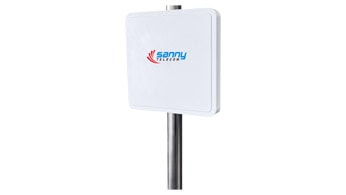
Choosing the right RFID antenna isn’t as simple as it might seem. When you see specs like “9dBi” and “12dBi,” it’s easy to get confused about what those numbers actually mean for your setup. And to make things a bit more complex, you’ll also see antennas described as “linear” or “circular” polarized.
With 15 years of experience in RFID technology, I can tell you: both antenna gain (measured in dBi) and polarization matter—a lot. Let’s break down what these terms mean, the differences between 9dBi and 12dBi antennas, and how to pick the best one for your needs.
What Does “dBi” Mean?
First, let’s clear up the jargon. “dBi” stands for decibels relative to an isotropic radiator. In plain English, it measures how well an antenna focuses energy in a particular direction compared to an ideal, evenly radiating antenna.
- Higher dBi (like 12dBi): Focuses energy into a narrower beam. This means longer read distances, but a smaller area is covered.
- Lower dBi (like 9dBi): Spreads energy over a wider area. This gives you broader coverage, but the read range is shorter.
Think of it like a flashlight: a high-gain antenna is like a focused beam that shines farther, while a lower-gain antenna is like a lantern, lighting up a wider area but not as far.
What Is Polarization? (Linear vs. Circular)
Polarization describes how the radio waves are oriented as they leave the antenna. There are two main types:
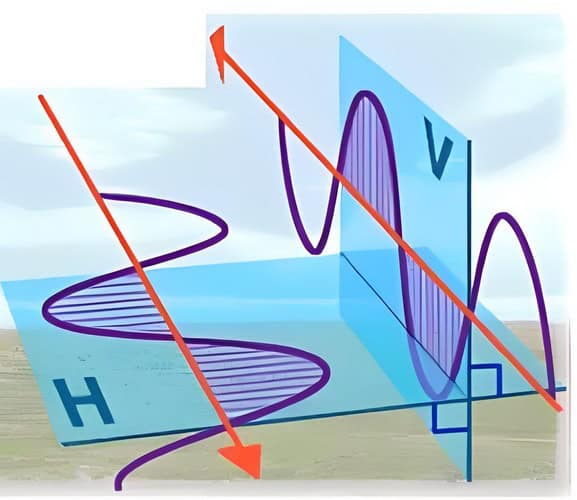
- Linear Polarization: The electromagnetic waves travel in a single plane (either vertical or horizontal). Linear antennas are best when you know the orientation of your RFID tags will always match the antenna’s orientation.
- Pros: Higher read range (about 10-20% more than circular), less energy loss.
- Cons: If the tag is tilted or misaligned, read reliability drops.
- Circular Polarization: The waves rotate in a circle as they travel, covering all possible tag orientations.
- Pros: More forgiving—will read tags no matter how they’re angled or positioned.
- Cons: Slightly shorter read range compared to linear, but much more versatile.
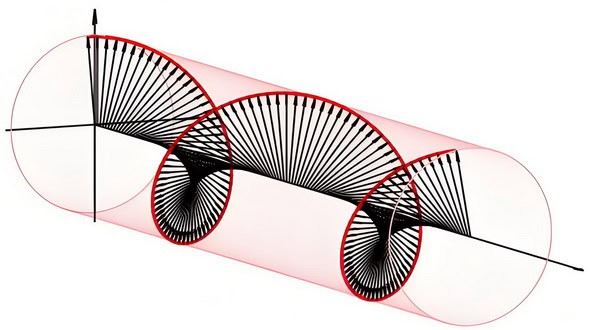
In short:
- Use linear when tag orientation is controlled and consistent.
- Use circular when tag orientation is random or unknown.
Quick Note: Typical Technical Specs to Watch
When choosing your antenna, beyond just polarization and dBi, you’ll run into a few key technical parameters. Here’s what actually matters:
- Frequency: Most UHF RFID antennas work in ranges like 865–868 MHz (Europe/India) or 902–928 MHz (Americas/Asia).
- Protocol: Look for support of ISO/IEC 18000-6C (also called EPC C1G2)—the industry standard for most applications.
- Beam Angles:
- Horizontal Angle: For example, a typical 12dBi antenna might have a horizontal beamwidth of around 40°.
- Vertical Angle: Often about 38°.
These angles indicate how wide the coverage “cone” will be.
- Standing Wave Ratio (SWR): Lower is better; ≤ 1.3 is considered excellent and means less reflected energy, more efficient performance.
- Front-to-Back Ratio: cURL Too many subrequests by single Worker invocation. To configure this limit, refer to https://developers.cloudflare.com/workers/wrangler/configuration/#limits.
- cURL Too many subrequests by single Worker invocation. To configure this limit, refer to https://developers.cloudflare.com/workers/wrangler/configuration/#limits cURL Too many subrequests by single Worker invocation. To configure this limit, refer to https://developers.cloudflare.com/workers/wrangler/configuration/#limits.
- cURL Too many subrequests by single Worker invocation. To configure this limit, refer to https://developers.cloudflare.com/workers/wrangler/configuration/#limits cURL Too many subrequests by single Worker invocation. To configure this limit, refer to https://developers.cloudflare.com/workers/wrangler/configuration/#limits.
cURL Too many subrequests by single Worker invocation. To configure this limit, refer to https://developers.cloudflare.com/workers/wrangler/configuration/#limits.
cURL Too many subrequests by single Worker invocation. To configure this limit, refer to https://developers.cloudflare.com/workers/wrangler/configuration/#limits
cURL Too many subrequests by single Worker invocation. To configure this limit, refer to https://developers.cloudflare.com/workers/wrangler/configuration/#limits cURL Too many subrequests by single Worker invocation. To configure this limit, refer to https://developers.cloudflare.com/workers/wrangler/configuration/#limits.
cURL Too many subrequests by single Worker invocation. To configure this limit, refer to https://developers.cloudflare.com/workers/wrangler/configuration/#limits
- cURL Too many subrequests by single Worker invocation. To configure this limit, refer to https://developers.cloudflare.com/workers/wrangler/configuration/#limits.
- cURL Too many subrequests by single Worker invocation. To configure this limit, refer to https://developers.cloudflare.com/workers/wrangler/configuration/#limits.
- cURL Too many subrequests by single Worker invocation. To configure this limit, refer to https://developers.cloudflare.com/workers/wrangler/configuration/#limits.
cURL Too many subrequests by single Worker invocation. To configure this limit, refer to https://developers.cloudflare.com/workers/wrangler/configuration/#limits
- cURL Too many subrequests by single Worker invocation. To configure this limit, refer to https://developers.cloudflare.com/workers/wrangler/configuration/#limits
- cURL Too many subrequests by single Worker invocation. To configure this limit, refer to https://developers.cloudflare.com/workers/wrangler/configuration/#limits
- cURL Too many subrequests by single Worker invocation. To configure this limit, refer to https://developers.cloudflare.com/workers/wrangler/configuration/#limits
- cURL Too many subrequests by single Worker invocation. To configure this limit, refer to https://developers.cloudflare.com/workers/wrangler/configuration/#limits

cURL Too many subrequests by single Worker invocation. To configure this limit, refer to https://developers.cloudflare.com/workers/wrangler/configuration/#limits
- cURL Too many subrequests by single Worker invocation. To configure this limit, refer to https://developers.cloudflare.com/workers/wrangler/configuration/#limits.
- cURL Too many subrequests by single Worker invocation. To configure this limit, refer to https://developers.cloudflare.com/workers/wrangler/configuration/#limits.
cURL Too many subrequests by single Worker invocation. To configure this limit, refer to https://developers.cloudflare.com/workers/wrangler/configuration/#limits
A 12dBi antenna is built for distance. It focuses the signal into a tight, powerful beam, letting you read tags from much farther away. The trade-off? The coverage area is much narrower.
Why pick a 12dBi antenna?
- Longer Read Range: Ideal for scanning tags at a distance.
- Precise Targeting: Great for monitoring entry points or specific zones.
- Less Interference: Narrow beam means fewer stray reads from unwanted tags.
Best uses for 12dBi antennas:
- Vehicle or fleet tracking outdoors
- Cargo and port gate scanning
- Large industrial plants
- Tracking trucks or containers along specific routes
But there’s more to these high-gain antennas than just a powerful punch.
Key Specs of a 12dBi UHF RFID Antenna
- Frequency Band: UHF 860~960 MHz — fits international standards for most RFID applications.
- International Standard Compliance: ISO/IEC 18000-6C, EPC C1G2, so you’re covered for global deployments.
- IP67 Protection: Fully dust-tight and waterproof, ready for harsh outdoor or industrial environments.
- Wind Resistance: Rated to withstand up to 60 m/s, making it suitable for exposed locations.
- cURL Too many subrequests by single Worker invocation. To configure this limit, refer to https://developers.cloudflare.com/workers/wrangler/configuration/#limits Typically designed for easy pole-mounting—set it up at gates, entry points, or along fences for optimal coverage.
These specs mean you’re not just getting distance—you’re also getting durability and reliability, whether you’re mounting the antenna at a port, along a rail track, or in a large warehouse yard.
cURL Too many subrequests by single Worker invocation. To configure this limit, refer to https://developers.cloudflare.com/workers/wrangler/configuration/#limits
- Linear polarization is often used for long-range, controlled setups (like vehicle gates), where tag orientation is predictable.
- Circular polarization is helpful if tag orientation may vary, even at longer distances, but expect a slightly reduced range.
Reading Range: H-Side vs. E-Side
When it comes to RFID antennas, the actual distance you can achieve often depends on which side of the antenna you’re using—known as the “H-side” and “E-side.”
- H-side (Horizontal side): This is typically the side where you’ll see the strongest performance, with the longest read distances. Expect to reach the higher end of your antenna’s rated range here—so if you’re using a 12dBi antenna, you might get that impressive 12+ meters (or even more in optimal conditions) when reading tags positioned on the H-side.
- E-side (Edge side): On this side, the read distance is generally shorter. The energy spread is less concentrated, which means your effective range drops off. For a 9dBi antenna, while the H-side might get you up to 8 meters, the E-side usually covers a more modest portion of that—sometimes as much as 30-40% less, depending on setup and environment.
- Pro tip: For best results, try to align your RFID tags so that they’re facing the H-side of your antenna whenever possible. This maximizes read reliability and distance, especially important in applications where every extra meter counts.
Now, let’s put this all into perspective with a quick side-by-side of 9dBi versus 12dBi antennas—and how polarization fits into the equation…
Supported Frequency Bands
Both 9dBi and 12dBi UHF antennas are designed to work across the global UHF RFID band, typically covering frequencies from 860 MHz to 960 MHz. This makes them suitable for use in virtually any region, whether you’re operating in North America, Europe, or Asia-Pacific. So, no matter what hardware or reader brand (like Impinj, Zebra, or Alien) you’re pairing with your antenna, you’ll get wide compatibility and flexibility for new deployments or upgrades.
Why This Antenna Stands Out: Quality, Value, and Reliability
When it comes to picking an antenna, you want to know you’re getting solid performance for your investment—no one likes a gear surprise in the field. Luckily, options like this are built to deliver exactly what you need, without any hand-wringing.
cURL Too many subrequests by single Worker invocation. To configure this limit, refer to https://developers.cloudflare.com/workers/wrangler/configuration/#limits
cURL Too many subrequests by single Worker invocation. To configure this limit, refer to https://developers.cloudflare.com/workers/wrangler/configuration/#limits.
cURL Too many subrequests by single Worker invocation. To configure this limit, refer to https://developers.cloudflare.com/workers/wrangler/configuration/#limits
cURL Too many subrequests by single Worker invocation. To configure this limit, refer to https://developers.cloudflare.com/workers/wrangler/configuration/#limits.
cURL Too many subrequests by single Worker invocation. To configure this limit, refer to https://developers.cloudflare.com/workers/wrangler/configuration/#limits
cURL Too many subrequests by single Worker invocation. To configure this limit, refer to https://developers.cloudflare.com/workers/wrangler/configuration/#limits.
cURL Too many subrequests by single Worker invocation. To configure this limit, refer to https://developers.cloudflare.com/workers/wrangler/configuration/#limits
cURL Too many subrequests by single Worker invocation. To configure this limit, refer to https://developers.cloudflare.com/workers/wrangler/configuration/#limits.
cURL Too many subrequests by single Worker invocation. To configure this limit, refer to https://developers.cloudflare.com/workers/wrangler/configuration/#limits.
cURL Too many subrequests by single Worker invocation. To configure this limit, refer to https://developers.cloudflare.com/workers/wrangler/configuration/#limits
| cURL Too many subrequests by single Worker invocation. To configure this limit, refer to https://developers.cloudflare.com/workers/wrangler/configuration/#limits | cURL Too many subrequests by single Worker invocation. To configure this limit, refer to https://developers.cloudflare.com/workers/wrangler/configuration/#limits | cURL Too many subrequests by single Worker invocation. To configure this limit, refer to https://developers.cloudflare.com/workers/wrangler/configuration/#limits |
| cURL Too many subrequests by single Worker invocation. To configure this limit, refer to https://developers.cloudflare.com/workers/wrangler/configuration/#limits | cURL Too many subrequests by single Worker invocation. To configure this limit, refer to https://developers.cloudflare.com/workers/wrangler/configuration/#limits | cURL Too many subrequests by single Worker invocation. To configure this limit, refer to https://developers.cloudflare.com/workers/wrangler/configuration/#limits |
| cURL Too many subrequests by single Worker invocation. To configure this limit, refer to https://developers.cloudflare.com/workers/wrangler/configuration/#limits | cURL Too many subrequests by single Worker invocation. To configure this limit, refer to https://developers.cloudflare.com/workers/wrangler/configuration/#limits | cURL Too many subrequests by single Worker invocation. To configure this limit, refer to https://developers.cloudflare.com/workers/wrangler/configuration/#limits |
| cURL Too many subrequests by single Worker invocation. To configure this limit, refer to https://developers.cloudflare.com/workers/wrangler/configuration/#limits | cURL Too many subrequests by single Worker invocation. To configure this limit, refer to https://developers.cloudflare.com/workers/wrangler/configuration/#limits | cURL Too many subrequests by single Worker invocation. To configure this limit, refer to https://developers.cloudflare.com/workers/wrangler/configuration/#limits |
| Polarization | Circular for random tag orientation; | Linear for controlled orientation; |
| Linear for controlled orientation | Circular for variable orientation | |
| Installation | Easier, less precise alignment needed | Needs careful aiming for best results |
| Cost | Usually more affordable | May cost more, more specialized |
Compatible RFID Readers: What Works with These Antennas?
Wondering which RFID readers will pair seamlessly with your 9dBi or 12dBi antennas? The good news is that both types are designed to work with any UHF RFID reader that supports the global ISO 18000-6C (also known as EPC Gen 2) standard.
Popular choices include:
- Impinj Speedway series (such as the R420 or R700)
- Zebra FX7500 and FX9600
- ThingMagic Mercury6
- Alien ALR-F800
- Chainway C72 and similar enterprise UHF handhelds
These readers cover everything from fixed installations in warehouses to mobile handhelds for inventory sweeps. As long as your reader supports the 18000-6C protocol and has standard antenna ports (SMA, TNC, or N-type connectors), you’re all set.
A quick pro tip: Double-check the connector type and ensure your cable matches. Most professional readers have configurable ports, making upgrades or antenna swaps straightforward.
Now, how do you decide which antenna is right for your setup? Let’s break down the key considerations:
Environmental Durability and Operating Range
When it comes to braving the elements, these antennas aren’t shy. They’re designed to handle tough conditions—from freezing -40°C winters to sizzling 60°C summers, and anything in between.
Worried about outdoor installations or stormy days? Rest easy—these antennas can withstand winds up to 60 meters per second (that’s hurricane-level tough). DC grounding is also included as a practical shield against static and lightning, keeping reliability high in unpredictable weather.
Recommended Cable Lengths for Antenna Connections
When connecting your 9dBi or 12dBi antenna to an RFID reader, choosing the right cable length is important to maintain performance without unnecessary signal loss. For most applications, a coaxial cable length of up to 15 meters (about 50 feet) strikes a good balance between flexibility in installation and preserving signal strength.
A few tips:
- Use high-quality, low-loss coaxial cables such as LMR-400 or RG-8 for lengths up to 15 meters to ensure optimal signal transmission.
- Keep in mind, longer cables can cause more signal drop-off, so try to keep cable runs as short as practical for your setup.
- If your reader and antenna will be far apart, consider planning your installation so the cable length doesn’t exceed the 15-meter mark, or use signal amplifiers designed for RFID systems if greater distances are unavoidable.
- Most retail and warehouse setups find 15 meters to be more than sufficient for flexible positioning.
This setup gives you room to place antennas exactly where you need them—across long warehouse shelving or above doorways—without the headache of signal degradation.
Connectivity: Antenna Interface Type
Most 9dBi and 12dBi antennas, like those from Times Microwave or L-com, use the industry-standard N-type female connector. This threaded interface provides a reliable, weather-resistant connection—perfect for both indoor setups and outdoor installations where durability matters. If you’re planning your cable runs, make sure your coaxial cable or reader end matches up (N male connector on the cable). This popular interface ensures compatibility with a wide range of RFID readers and extension cables, making installation hassle-free.
International Standards Compliance
Wondering if your antenna will work with the systems you already have? Good news—these antennas are designed to play nicely with global standards. They comply with ISO/IEC 18000-6C and EPC Class 1 Gen 2 protocols. That means they’re compatible with most major UHF RFID readers and tags from trusted names like Impinj, NXP, and Alien Technology.
So whether your operation is local or you’re shipping halfway around the globe, you’re working within widely accepted engineering requirements—no surprises, and no headaches when integrating with existing RFID infrastructure.
How to Choose: Key Considerations
Still unsure? Here are some things to think about:
- Environment: Indoors with lots of shelves or metal? Go for 9dBi. Outdoors or in open spaces? 12dBi might be better.
- cURL Too many subrequests by single Worker invocation. To configure this limit, refer to https://developers.cloudflare.com/workers/wrangler/configuration/#limits.
- cURL Too many subrequests by single Worker invocation. To configure this limit, refer to https://developers.cloudflare.com/workers/wrangler/configuration/#limits.
- cURL Too many subrequests by single Worker invocation. To configure this limit, refer to https://developers.cloudflare.com/workers/wrangler/configuration/#limits.
cURL Too many subrequests by single Worker invocation. To configure this limit, refer to https://developers.cloudflare.com/workers/wrangler/configuration/#limits
cURL Too many subrequests by single Worker invocation. To configure this limit, refer to https://developers.cloudflare.com/workers/wrangler/configuration/#limits
- cURL Too many subrequests by single Worker invocation. To configure this limit, refer to https://developers.cloudflare.com/workers/wrangler/configuration/#limits.
- cURL Too many subrequests by single Worker invocation. To configure this limit, refer to https://developers.cloudflare.com/workers/wrangler/configuration/#limits.
cURL Too many subrequests by single Worker invocation. To configure this limit, refer to https://developers.cloudflare.com/workers/wrangler/configuration/#limits
cURL Too many subrequests by single Worker invocation. To configure this limit, refer to https://developers.cloudflare.com/workers/wrangler/configuration/#limits.
cURL Too many subrequests by single Worker invocation. To configure this limit, refer to https://developers.cloudflare.com/workers/wrangler/configuration/#limits.
cURL Too many subrequests by single Worker invocation. To configure this limit, refer to https://developers.cloudflare.com/workers/wrangler/configuration/#limits
 Dutch
Dutch  English
  Spanish
  German
  French (France)
  Korean
  Russian
  Indonesian
  French (Canada)
  Vietnamese
  Armenian
  Albanian
  Assamese
  Acehnese
  Amharic
  Czech
Czech  Bulgarian
  Cebuano
  Malayalam
  German (Switzerland)
  Japanese