 Skip to content
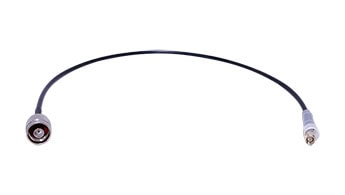
In the rapidly evolving landscape of wireless communication, the focus often falls on high-gain antennas, cutting-edge routers, or the latest surveillance cameras. Yet, tucked quietly between these devices and their antennas is a small but crucial component that can make or break your system’s performance: the coaxial cable assembly, commonly known as the pigtail. This humble assembly acts as the physical bridge, ensuring seamless and efficient transmission of high-frequency signals between antennas and various communication equipment—routers, wireless access points (APs), customer premises equipment (CPE), RFID readers, and even CCTV cURL Too many subrequests.
In this article, we’ll pull back the curtain on coaxial cable assemblies. We’ll explore why their quality and specifications are so important, what types and models are commonly used, and how to select the right connectors for your application. Whether you’re an installer, a system integrator, or a tech enthusiast, understanding the role and selection of coaxial pigtails can help you unlock the full potential of your wireless network.
What is a Coaxial Cable Assembly?
A coaxial cable assembly, or pigtail, is a short length of coaxial cable terminated with connectors at one or both ends. Its primary role is to connect an antenna to a device such as a router, AP, CPE, RFID reader or camera. While it may seem like a simple component, the cable assembly is critical in preserving signal integrity, minimizing loss, and ensuring compatibility between equipment.

Why Not Connect Directly? Most communication devices and antennas have different types of connectors and may be located in awkward or tight spaces. The pigtail provides flexibility, allows for easy installation, and bridges the gap between the fixed connectors on the device and the antenna, often adapting between different connector types or cable sizes.
The Role of Pigtails in Modern Communications
Coaxial pigtails are found everywhere wireless signals are transmitted or received:
Routers & Wireless Access Points (APs):

Many enterprise and industrial-grade routers/APs use external antennas for better range and coverage. Pigtails connect these antennas to the device’s RF ports.
Customer Premises Equipment (CPE):
In fixed wireless broadband, CPE units use pigtails to connect to outdoor directional antennas, ensuring strong signal reception from the base station.

Base Stations:
Wireless base stations, including those for cellular, WiFi, or private radio networks, often use pigtails to link internal RF modules to high-gain external antennas for extended coverage.
Repeaters & Signal Boosters:
Repeaters and signal boosters amplify weak wireless signals. Pigtails are used to connect these devices to both donor (receiving) and service (transmitting) antennas, optimizing signal strength and quality.

Surveillance Cameras (CCTV):
Modern wireless CCTV cameras often employ external antennas for longer-range connectivity, using pigtails to bridge the antenna to the camera’s RF module.
RFID Readers:
Many RFID readers, especially in industrial or warehouse environments, use pigtails to connect to external antennas, improving tag read range and reliability.

IoT Gateways & Sensors:
Many IoT devices require robust wireless links and use pigtails to connect to specialized antennas for WiFi, LoRa, Zigbee, or cellular networks.
In each case, the performance of the entire system can hinge on the quality and suitability of the coaxial cable assembly.
Key Components and Functions of a Coaxial Cable Assembly
A coaxial cable assembly, often referred to as a pigtail, comprises a length of coaxial cable fitted with connectors at both ends. The cable is carefully stripped and prepared to ensure secure and reliable connections. The choice of connector types—such as N-male to N-female or SMA-male to SMA-female—depends on the specific requirements of the devices and antennas being connected, guaranteeing compatibility and optimal signal transmission.

These cable assemblies play a crucial role in linking communication equipment to antennas, helping to reduce signal loss and minimize interference. Thanks to their flexibility, durability, and ease of installation, coaxial pigtails are widely utilized in RF, wireless, and networking applications.
Common Types and Models of Coaxial Cables for Pigtails
Not all coaxial cables are created equal. The right choice depends on frequency, signal loss tolerance, flexibility, and environmental conditions. Here are some of the most commonly used types and models for pigtail assemblies:
Applications: RG58 is common for external pigtails, while RG316 is favored for internal wiring, test leads, or compact assemblies.
1. 3D-FB / 5D-FB
cURL Too many subrequests.
cURL Too many subrequests.
cURL Too many subrequests.
cURL Too many subrequests.
RG58: cURL Too many subrequests.
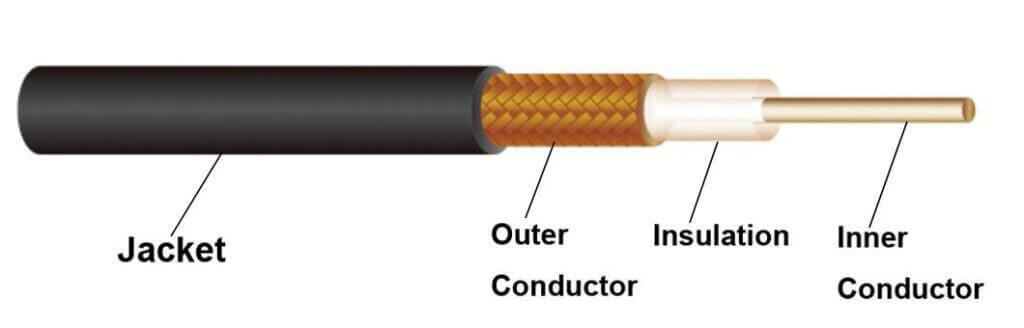
cURL Too many subrequests. cURL Too many subrequests.
cURL Too many subrequests. cURL Too many subrequests.
Applications: cURL Too many subrequests.
cURL Too many subrequests.
LMR195: cURL Too many subrequests.

LMR240: cURL Too many subrequests.
cURL Too many subrequests. cURL Too many subrequests.
Applications: cURL Too many subrequests.
cURL Too many subrequests.
cURL Too many subrequests. cURL Too many subrequests. cURL Too many subrequests. (PIM), making it a reliable choice for demanding cellular and distributed antenna system (DAS) environments. RG401 is commonly specified for high-frequency, low-loss signal transmission in both indoor and outdoor wireless infrastructure.
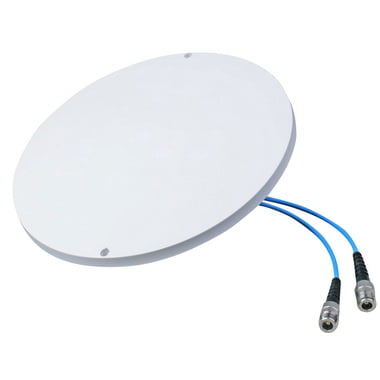
RG402: Slightly smaller in diameter than RG401, RG402 shares the same semi-rigid design and low PIM attributes. With robust shielding and consistent impedance, it ensures minimal signal degradation and intermodulation interference. RG402 is often selected for RF jumpers, interconnects in test and measurement setups, and critical links within 4G/5G base stations and in-building wireless systems.
141 Cable (also known as Semi-Rigid .141″): This 0.141-inch diameter semi-rigid coaxial cable is widely recognized for its low PIM performance, mechanical stability, and precise impedance control. Its solid metal outer sheath and PTFE insulation provide superior shielding and minimal signal leakage, making it ideal for applications where signal purity and intermodulation resistance are vital. 141 Cable is extensively used in RF modules, cellular repeaters, and DAS head-end equipment.
Other Common Low PIM Models: In addition to the above, other semi-rigid and conformable cables—such as 086 Cable (0.086″ diameter)—are frequently employed in low PIM scenarios. These cables are selected for their ability to maintain signal integrity and suppress unwanted intermodulation products, especially in multi-carrier and high-density RF installations.
Applications:
Low PIM coaxial cables are indispensable in modern wireless networks, including 4G/5G macro and micro cells, indoor DAS, small cell deployments, and any environment where minimizing PIM is essential for maintaining network performance and reliability.
5. Super Flexible RF Coaxial Cables (1/4”, 1/2”, 5/8”)
Super flexible RF coaxial cables are heavy-duty cables engineered for optimal performance in demanding environments. Available in popular sizes—1/4 inch, 1/2 inch, and 5/8 inch—these cables are constructed with a corrugated or helically-wound outer conductor, allowing for exceptional flexibility even with their relatively large diameters. Their design ensures low signal attenuation, making them ideal for high-frequency applications where reliable transmission is critical.

1/4″ Superflex: With an outer diameter of approximately 7.2 mm (0.28″), this cable is lightweight and highly flexible, perfect for installations with space constraints or tight bends.
1/2″ Superflex: Featuring an outer diameter of about 13 mm (0.51″), this size strikes a balance between flexibility and even lower signal loss, making it suitable for medium-length runs in complex layouts.
5/8″ Superflex: With an outer diameter nearing 16 mm (0.63″), this heavy-duty cable offers the lowest attenuation among the three, providing outstanding performance for long cable runs while still retaining good flexibility due to its corrugated construction.
Key Features:
- Exceptional Flexibility: Corrugated or helically-wound outer conductors deliver superior bendability, simplifying routing, and installation—even in tight or complex spaces.
- Low Attenuation: Designed for minimal signal loss over long distances, these cables maintain excellent signal integrity, crucial for high-power or high-frequency systems.
- Durability: The robust construction resists crushing and kinking, ensuring long-term reliability even in harsh or outdoor environments.
Applications: Super flexible RF coaxial cables in 1/4″, 1/2″, and 5/8″ sizes are widely used in:
- Cellular Base Stations: Connecting antennas and radio units with minimal signal loss.
- Tower Runs: Facilitating efficient signal transmission over vertical and horizontal tower paths.
- Broadcast Facilities: Supporting high-power transmissions over extended distances with low attenuation.
- Large-scale Wireless Infrastructure: Essential where both low loss and high flexibility are required for complex or large network deployments.
Summary: Whether you’re working on a rooftop, in a crowded equipment room, or along a sprawling broadcast tower, super flexible RF coaxial cables in 1/4″, 1/2″, and 5/8″ diameters offer the perfect balance of strength, low signal loss, and installation ease—making them a go-to solution for modern RF and wireless communication projects.
6. Ultra-Miniature RF Coaxial Cables (RF1.13, RF1.37, etc.)
RF1.13 / RF1.37: Extremely thin, highly flexible coaxial cables (often under 1.5mm in diameter), designed for internal connections in compact consumer electronics, including smartphones, tablets, laptops, and IoT devices.
Applications: Perfect for internal RF signal routing where space and flexibility are critical.
In summary:
Whether you’re designing a distributed antenna system, outfitting a cellular base station, assembling compact consumer electronics, or building robust outdoor wireless links, selecting the right coaxial cable is crucial for optimal performance. Each cable type offers unique advantages in terms of flexibility, attenuation, size, and application suitability.
Understanding Antenna Connector Types
The connectors at each end of a pigtail are just as important as the cable itself. Using the wrong connector can result in poor connections, high loss, or even damage to your equipment. Here are the most common connector types you’ll encounter in wireless communication systems:
SMA (SubMiniature version A)
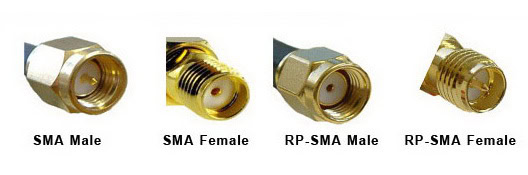
SMA Male/Female: Widely used in WiFi, LTE, and GPS equipment. The male has a center pin, while the female has a center socket. SMA connectors are compact, reliable, and support frequencies up to 18 GHz.
cURL Too many subrequests.
Common in consumer WiFi equipment. The gender of the center pin is reversed to prevent accidental connection to non-compliant devices.
N-Type
cURL Too many subrequests.
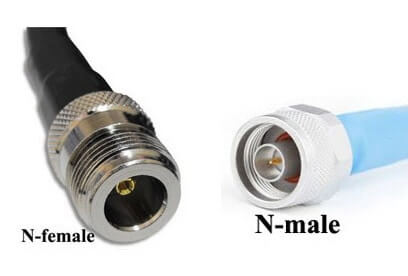
cURL Too many subrequests.
cURL Too many subrequests.
cURL Too many subrequests.
cURL Too many subrequests.

cURL Too many subrequests.
cURL Too many subrequests.

cURL Too many subrequests.
cURL Too many subrequests.
cURL Too many subrequests.
cURL Too many subrequests.

cURL Too many subrequests.
cURL Too many subrequests.

7/16 DIN
cURL Too many subrequests. cURL Too many subrequests.
4.3-10
cURL Too many subrequests. cURL Too many subrequests.

2.2-5
cURL Too many subrequests.
cURL Too many subrequests.
Key Considerations When Selecting a Coaxial Cable Assembly
1. Frequency and Signal Loss
Higher frequencies (like 5 GHz and 6GHz WiFi ) are more susceptible to cable loss. Choose a low-loss cable (such as LMR195 or LMR240) for these applications, especially if the cable run exceeds a few feet.
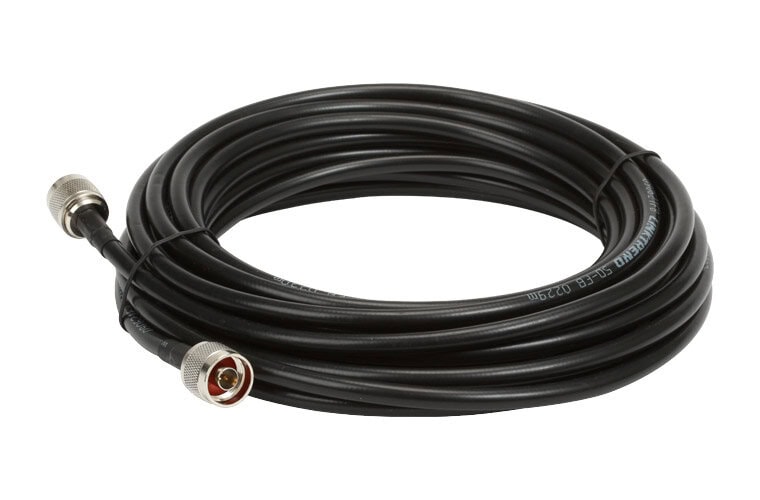
2. Cable Length
Keep your pigtail as short as possible. Every extra inch of cable adds attenuation. For internal device connections, RG316 or RG174 might be fine, but for longer runs, step up to LMR195, LMR240, or even LMR400.
3. Indoor vs. Outdoor
Use If your installation is outdoors, you definitely want to pick cables and connectors rated for UV exposure, moisture, and temperature extremes. Indoor-only cables might degrade quickly if used outside.
4. Flexibility and Durability
For installations where the cable needs to bend or twist, a more flexible cable like RG316 or LMR195 is preferable. For outdoor or harsh environments, look for UV-resistant, waterproof jackets, or direct-burial rated cables.
5. Connector Quality
Inferior connectors can cause high resistance, intermittent connections, or even damage to the device’s RF port. Always use assemblies with high-quality, precisely machined connectors, and ensure they are securely attached.
6. Impedance Matching
Most wireless communication equipment and antennas use 50 Ohm systems. Make sure your cable and connectors match this impedance to avoid signal reflection and loss.
7. Input Power Capacity
If you’re transmitting higher power, not all cables are created equal. Thicker, lower-loss cables like LMR400 can handle higher input power without overheating or degrading signal quality, while thinner cables may not be up to the task.
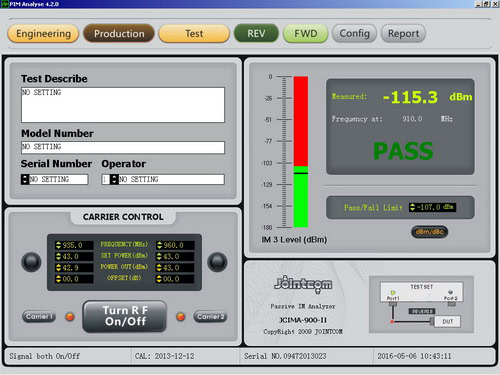
8. Low PIM (Passive Intermodulation)
For cellular, DAS, or other high-performance systems, low PIM is crucial to avoid signal distortion and interference. Select cables and connectors specifically rated for low PIM if your application is sensitive to intermodulation.
9. Fire and Safety Ratings
In some venues, you may need cables with specific fire ratings, like plenum or riser-rated jackets, to comply with building codes. Always check local regulations before installation.
10. Cost and Availability
While it’s tempting to go for the highest-spec cable, consider your budget and how easily you can source replacements or additional lengths. Sometimes a slightly less expensive cable that’s readily available is the practical choice.
Practical Examples
Selecting the right coaxial cable and connectors is crucial for maintaining high signal quality in wireless communication setups. The choices you make depend on the devices involved, the distances covered, and the installation environment. Here are some practical scenarios illustrating how to match cables and connectors to your specific wireless needs.
Example 1: Connecting an Indoor Access Point (AP) to an External Antenna
- Cable: LMR240 or LMR400 (choose LMR400 for longer runs to reduce signal loss)
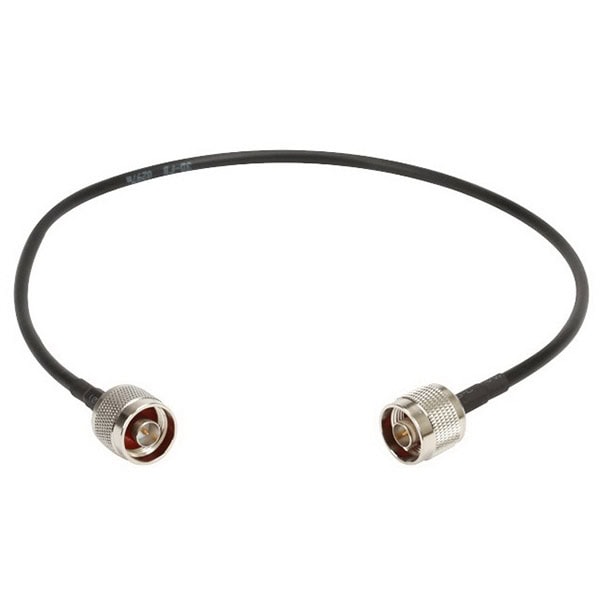
- Connectors: RP-SMA male (for the AP) to N male (for the antenna)
- Length: Keep the cable as short as possible for best performance, ideally under 10 meters unless absolutely necessary
- Tip: Make sure to weatherproof any outdoor connection points to prevent moisture damage.

Example 2: Upgrading a CCTV Wireless Antenna
- Cable: 3D-FB or LMR195(suitable for short connections up to a few meters)
- Connectors: Usually SMA male to SMA female, or RP-SMA versions depending on your camera model
- Length: Short cables (under 5 meters) work best to minimize signal loss
- Tip: Always double-check connector type as some CCTV models use unique or proprietary connectors.

Example 3: Linking an RFID Reader to a Remote Antenna
- Cable: LMR195 for very short runs (up to 5 meters), LMR240 or LMR400 for longer distances
- Connectors: Typically SMA male (RFID reader) to N male (cURL Too many subrequests.)
- Length: As short as possible; RFID signals are easily weakened by excess cable length
- Tip: Use shielded cables and connectors for industrial or outdoor environments to prevent interference.

Example 4: Installing a Signal Booster with an External Antenna
- Cable: LMR195 recommended for most installations due to its low loss over longer distances
- cURL Too many subrequests.
- cURL Too many subrequests.
- cURL Too many subrequests.
cURL Too many subrequests.
cURL Too many subrequests.
cURL Too many subrequests.
cURL Too many subrequests.
cURL Too many subrequests.
cURL Too many subrequests.
cURL Too many subrequests.
cURL Too many subrequests.
- cURL Too many subrequests.
- cURL Too many subrequests.
- cURL Too many subrequests.
- cURL Too many subrequests.
cURL Too many subrequests.
cURL Too many subrequests.
cURL Too many subrequests.
cURL Too many subrequests.
- GNSS Heading Antenna Setup: Comprehensive walk-throughs on aligning and mounting GNSS antennas, including tips to optimize satellite reception and avoid interference.
- GPS Antenna Quick Start: Short and sweet instructions for GPS antenna placement, grounding, and ensuring maximum visibility of the sky.
- Spotbeam Antenna Installation for Various Regions: Step-by-step advice tailored to regions like Asia Pacific, Europe/Africa/Middle East, and the Gulf of Mexico, addressing unique environmental and regulatory considerations.
- UHF/VHF and Wi-Fi Antenna Mounting: Thorough overviews for setting up UHF, VHF, and Wi-Fi antennas on vehicles, rooftops, or challenging environments.
Whether you’re working with marine, vehicular, or industrial systems, these guides share proven installation practices to help avoid common pitfalls and squeeze the most performance out of your equipment.
Conclusion
The coaxial cable assembly—or pigtail—is the unsung hero of wireless communication systems. It’s the vital bridge that ensures your high-performance cURL Too many subrequests. and communication device truly deliver on their potential. By understanding the different cable types (3D-FB, RG58, RG316, LMR195), matching the correct connector types (SMA, N, MMCX, U.FL), and selecting the optimal assembly for your application, you can dramatically improve signal integrity, reduce loss, and boost overall system reliability.
So next time you’re designing or troubleshooting a wireless setup, don’t overlook the pigtail. This small, often inexpensive component could be the key to unlocking the full performance of your antennas and communication equipment—making it, truly, the vital link in your connectivity chain.
 German (Switzerland)
  English
  Spanish
  German
  French (France)
  Korean
  Russian
  Indonesian
  French (Canada)
  Vietnamese
  Armenian
  Albanian
  Assamese
  Acehnese
  Amharic
  Czech
Czech  Bulgarian
  Cebuano
  Malayalam
  Japanese
  Dutch
Dutch