 Skip to content

In today’s world, having a strong and reliable WiFi connection is crucial. Whether you’re setting up a network at home, improving the wireless infrastructure of a business, or extending coverage in large outdoor areas, choosing the right WiFi omni-directional antenna can make all the difference. This guide will cover everything you need to know about selecting the perfect cURL Too many subrequests., helping you navigate through the many options available and ensuring that your network performs at its best, no matter where you are.
Introduction
Overview of WiFi Omni-directional Antennas
Definition and Purpose
WiFi Omni-directional Antennas are types of antennas designed to radiate or receive signals in a 360-degree horizontal plane. Unlike directional antennas, which focus the signal in a specific direction, omni-directional antennas distribute the signal evenly in all directions around the antenna. This makes them ideal for environments where the signal needs to cover a broad area.

Purpose:
1. Uniform Coverage: To provide consistent wireless coverage over a wide area.
2. Ease of Installation: Simplifies the setup process as there is no need to aim the antenna in a specific direction.
3. Versatility: Suitable for various applications, including home networks, public WiFi hotspots, and office environments.
Importance in Modern Networking
1. Broad Coverage:
– Home Networks: Ensures that devices throughout a home can connect to the WiFi network without significant signal loss.
– Public Hotspots: Facilitates connectivity in public spaces like cafes, parks, and shopping malls.
– Enterprise Environments: Supports numerous devices across large office spaces, enhancing productivity and connectivity.
2. Scalability:
– Network Expansion: Easily integrates into existing networks to extend coverage without extensive reconfiguration.
– IoT Devices: Supports the growing number of Internet of Things (IoT) devices that require reliable and consistent WiFi connectivity.
3. Mobility and Flexibility:
– Mobile Devices: Accommodates the movement of smartphones, tablets, and laptops within the coverage area without requiring reconfiguration.
– Flexible Deployment: Can be used in various scenarios, from indoor environments to outdoor installations, ensuring reliable connectivity across different settings.
4. Cost-Effectiveness:
– Reduced Infrastructure Costs: By providing wide coverage, fewer access points may be needed, reducing the overall cost of network infrastructure.
– Lower Maintenance: Simplifies network management and maintenance due to its non-directional nature.
5. Enhanced User Experience:
– Consistent Connectivity: Users experience fewer dead zones and more stable connections, leading to higher satisfaction.
– Support for High-Density Environments: Can handle multiple users and devices simultaneously, making it ideal for high-traffic areas.
6. Technological Advancements:
– Integration with Modern Standards: Supports the latest WiFi standards (e.g., WiFi 7) for improved speed, efficiency, and performance.
– Smart Antenna Technology: Some omni-directional antennas incorporate smart technology to optimize signal distribution and reduce interference.
Conclusion
WiFi omni-directional antennas play a crucial role in modern networking by providing broad, uniform coverage and supporting a wide range of applications. Their versatility, ease of installation, and ability to handle high-density environments make them indispensable in both residential and commercial settings. As technology continues to evolve, these antennas will remain a cornerstone of efficient and effective wireless communication.
Chapter 1: Understanding WiFi Omni-directional Antennas
What is a WiFi Omni-directional Antenna?
An WiFi cURL Too many subrequests. is a type of antenna designed to radiate or receive signals uniformly in all directions in a single plane, typically the horizontal plane. This means it can send and receive wireless signals 360 degrees around its axis, making it ideal for providing broad coverage in environments where the signal needs to reach multiple directions, such as in homes, offices, or public spaces. Unlike directional antennas, which focus the signal in a specific direction, omni-directional antennas are used when widespread coverage is more important than range or signal strength in a particular direction.
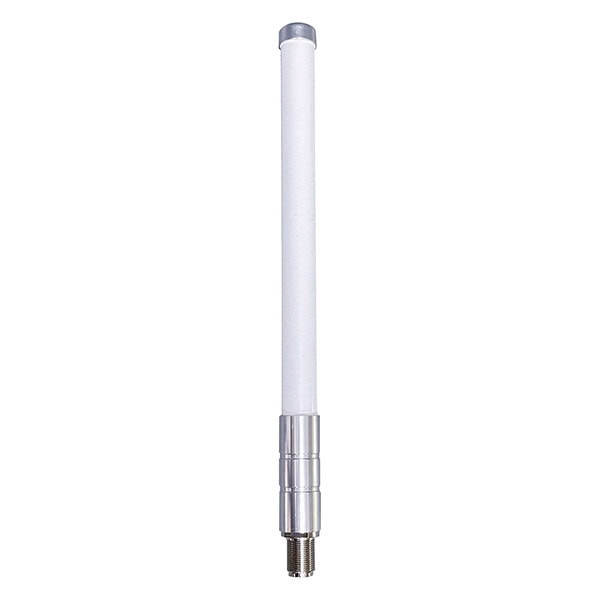
How Does the WiFi Omni-directional Antennas Work?
WiFi omni-directional antennas are designed to radiate signals in all directions horizontally, providing broad coverage in a 360-degree pattern. Here’s an explanation of how they work:
Basic Principles
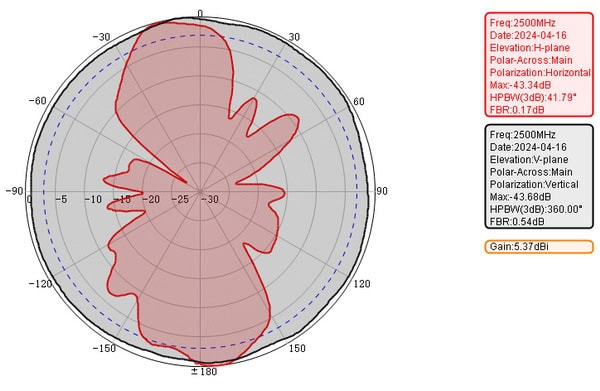
1. Radiation Pattern: Unlike directional antennas that focus the signal in a specific direction, omni-directional antennas emit signals in a doughnut-shaped pattern. This means they have a wide horizontal coverage area but limited vertical reach.
2. Design: Common designs include dipoles and collinear arrays. The most basic form, the dipole antenna, consists of two conductive elements that radiate the signal. Collinear arrays stack multiple dipole elements vertically to increase gain.
3. Gain: Omni-directional antennas typically have lower gain compared to directional antennas. Gain is a measure of how well the antenna focuses energy in a particular direction. While omni-directional antennas spread the signal more evenly, they don’t concentrate it, resulting in lower gain.
cURL Too many subrequests.
cURL Too many subrequests.
cURL Too many subrequests.
cURL Too many subrequests.
cURL Too many subrequests.
Applications
cURL Too many subrequests.
cURL Too many subrequests.
cURL Too many subrequests.
Advantages
cURL Too many subrequests.
cURL Too many subrequests.
Disadvantages
cURL Too many subrequests.
cURL Too many subrequests.
Conclusion
cURL Too many subrequests.
cURL Too many subrequests.
cURL Too many subrequests. cURL Too many subrequests.
cURL Too many subrequests.
cURL Too many subrequests.
cURL Too many subrequests.
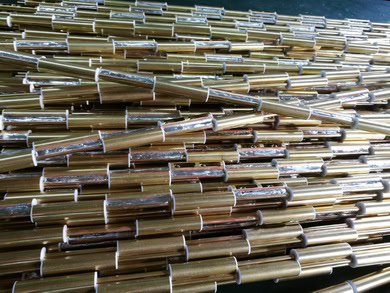
– Material: Commonly made from conductive materials like copper or aluminum, which are chosen for their excellent electrical conductivity.
2. Ground Plane:
– Function: Provides a reference point for the radiating element and helps in shaping the radiation pattern.
– Material: Often made from metal, such as aluminum or copper, to provide a stable and conductive surface.
3. Feed Line:
– Function: Connects the antenna to the WiFi transmitter or receiver, carrying the signal to and from the radiating element.
– Material: Typically coaxial cable, with an inner conductor made of copper, an insulating layer, a metallic shield, and an outer insulating layer.

4. Connector:
– Function: Provides a detachable interface between the antenna feed line and the WiFi transmitter/receiver, allowing for easy connection and disconnection.
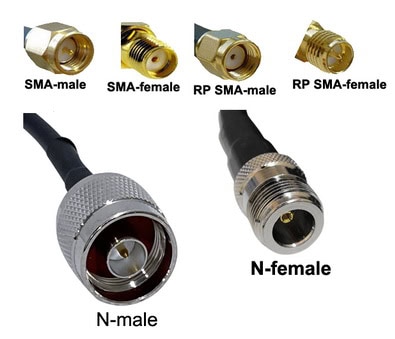
– Material: Typically made from metal, such as brass or stainless steel, with gold or silver plating to ensure good electrical contact and minimize signal loss. Common types include SMA, N-type, and RP-SMA connectors.
5. Antenna Housing:
– Function: Protects the internal components from environmental factors like moisture, dust, and physical damage.
– Material: Usually made from durable plastic or fiberglass, which are chosen for their weather-resistant properties and minimal impact on signal transmission.

6. Mounting Hardware:
– Function: Provides a means to securely attach the antenna to a structure, such as a pole, wall, or ceiling.
– Material: Often made from steel, aluminum alloy or even 304 stainless steel, depending on the application and environmental conditions.

Materials
1. Copper:
– Usage: Radiating elements, feed lines, connectors, and internal wiring
– Properties: High electrical conductivity, corrosion resistance, and durability.

2. Aluminum:
– Usage: Ground planes and some radiating elements.
– Properties: Lightweight, good conductivity, and corrosion resistance.
3. Plastic:
– Usage: Antenna housing, cap and some mounting bracket accessories.
– Properties: Lightweight, weather-resistant, and non-conductive.
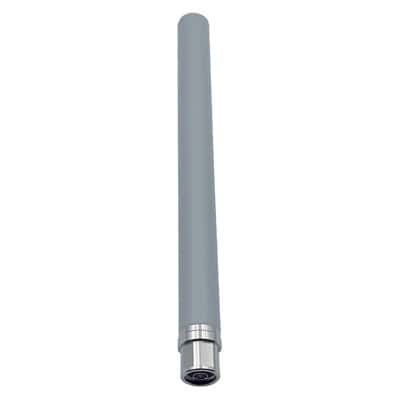
4. Fiberglass:
– Usage: Antenna housing, especially for outdoor applications.
– Properties: High strength, weather resistance, and minimal impact on signal transmission.

5. Stainless Steel:
– Usage: Mounting hardware.
– Properties: High strength, corrosion resistance, and durability.
By understanding these components and materials, one can appreciate the design considerations that go into making WiFi omni antennas effective and reliable for various applications.
Applications and Use Cases of WiFi Omni Antennas
Home Networks
1. Whole-Home Coverage:
– Application: Ensuring consistent WiFi coverage throughout the entire home.
– Use Case: Placing an omni antenna in a central location to minimize dead spots and maintain strong signals in all rooms.

2. Smart Home Devices:
– Application: Connecting multiple smart home devices like security cameras, smart lights, and thermostats.
– Use Case: Using an omni antenna to provide reliable connectivity to devices spread throughout the house and even in the yard.
cURL Too many subrequests.
cURL Too many subrequests.
cURL Too many subrequests.
cURL Too many subrequests.
cURL Too many subrequests.
cURL Too many subrequests.
cURL Too many subrequests.
cURL Too many subrequests.
cURL Too many subrequests.
cURL Too many subrequests.
cURL Too many subrequests.
cURL Too many subrequests.
cURL Too many subrequests.
cURL Too many subrequests.
cURL Too many subrequests.
cURL Too many subrequests.
cURL Too many subrequests.
cURL Too many subrequests.
cURL Too many subrequests.
– Use Case: Deploying multiple omni antennas strategically to handle high-density usage and provide consistent coverage throughout the venue.
3. Transportation Hubs:
– Application: Offering WiFi to travelers in airports, train stations, and bus terminals.
– Use Case: Placing omni antennas in waiting areas, lounges, and platforms to ensure that all travelers have access to WiFi while they wait.
4. Campus and Educational Institutions:
– Application: Providing WiFi coverage across school or university campuses.
– Use Case: Using omni antennas to cover outdoor areas like courtyards, sports fields, and walkways, ensuring that students and staff remain connected even when moving between buildings.
General Benefits of WiFi Omni Antennas
– Ease of Installation: Typically easier to install than directional antennas because they don’t require precise aiming.
– Broad Coverage: Effective in environments where users are spread out in multiple directions.
– Cost-Effectiveness: Often more economical for providing general coverage compared to deploying multiple directional antennas.
By leveraging the 360-degree coverage of omni antennas, various environments can ensure robust and consistent WiFi connectivity, enhancing user experience and supporting a wide range of applications.
Chapter 2: Types of WiFi Omni-directional Antennas
Indoor vs. Outdoor Omni Antennas
When choosing between indoor and outdoor cURL Too many subrequests., several key differences and considerations can impact performance, installation, and overall effectiveness. Below are the primary factors to consider:

1. Environmental Resistance
– Indoor Antennas:
– Designed for controlled environments.
– Typically lack weatherproofing.
– More susceptible to damage from moisture, dust, and temperature fluctuations.
– Outdoor Antennas:
– Built to withstand harsh weather conditions (rain, snow, wind, UV radiation).
– Often feature rugged, waterproof, and UV-resistant enclosures.
– Can operate in a wider range of temperatures and environmental conditions.
2. Range and Coverage
– Indoor Antennas:
– Optimized for shorter ranges and confined spaces.
– Coverage is designed to penetrate walls and floors within buildings.
– Typically have lower gain compared to outdoor antennas.
– Outdoor Antennas:
– Designed for long-range coverage.
– Can cover larger areas, such as open fields, parks, or large outdoor venues.
– Generally have higher gain, improving signal strength over longer distances.
3. Antenna Gain
– Indoor Antennas:
– Lower gain (usually between 2dBi and 5dBi).
– Suitable for providing uniform coverage in smaller, enclosed spaces.
– Outdoor Antennas:
– Higher gain (ranging from 6dBi to 15dBi or more).
– Focuses the signal to cover larger areas and reduce interference.
4. Installation and Mounting
– Indoor Antennas:
– Easier to install, often requiring minimal tools.
– Can be mounted on walls, ceilings, or placed on desks.
– Typically lightweight and compact.
– Outdoor Antennas:
cURL Too many subrequests.
cURL Too many subrequests.
cURL Too many subrequests.
cURL Too many subrequests.
– Indoor Antennas:
cURL Too many subrequests.
– Outdoor Antennas:
cURL Too many subrequests.
cURL Too many subrequests.
– Indoor Antennas:
cURL Too many subrequests.
– Outdoor Antennas:
cURL Too many subrequests.
cURL Too many subrequests.
– Indoor Antennas:
cURL Too many subrequests.
– Outdoor Antennas:
cURL Too many subrequests.
cURL Too many subrequests.
– Indoor Antennas:
cURL Too many subrequests.
cURL Too many subrequests.
– Outdoor Antennas:
cURL Too many subrequests.
cURL Too many subrequests.
Conclusion
cURL Too many subrequests. cURL Too many subrequests. cURL Too many subrequests.
SISO vs. MIMO Omni Antennas
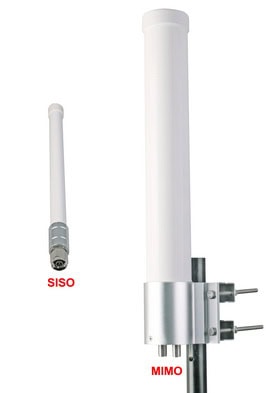
SISO (Single Input Single Output) WiFi Omni Antennas
Pros
1. Simplicity: SISO systems are simpler to design, implement, and maintain. They have fewer components, which generally leads to lower costs.
2. Cost-Effective: Because they require only one antenna and one RF chain, they are less expensive in terms of both initial investment and ongoing maintenance.
3. Power Efficiency: With only one transmitter and receiver, power consumption is generally lower compared to more complex systems.
4. Compatibility: SISO systems are widely compatible with older devices and networks that do not support MIMO.
cURL Too many subrequests.
1. Limited Data Rates: SISO systems have lower data rates compared to MIMO systems because they can only send and receive one data stream at a time.
2. Reduced Range and Reliability: They are more susceptible to signal degradation and interference, which can affect performance in environments with many obstacles or other sources of interference.
3. Lower Spectral Efficiency: SISO systems make less efficient use of available spectrum, which can be a limitation in crowded frequency bands.
Applications
1. Home WiFi Networks: Suitable for basic internet browsing, email, and streaming in smaller homes or apartments.
2. IoT Devices: Ideal for Internet of Things (IoT) applications where data rates are low and power efficiency is crucial.
3. Legacy Systems: Useful in environments where older WiFi standards are still in use.
MIMO (Multiple Input Multiple Output) WiFi Omni Antennas
Pros
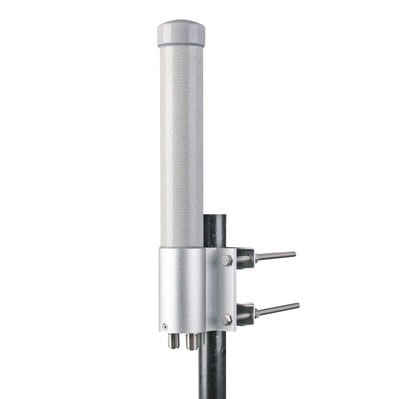
1. Higher Data Rates: MIMO systems can transmit multiple data streams simultaneously, leading to significantly higher data rates.
2. Improved Range and Reliability: MIMO technology uses multiple antennas to improve signal quality and reduce the impact of interference and obstacles.
3. Better Spectral Efficiency: MIMO systems make more efficient use of available spectrum, which is beneficial in crowded environments.
4. Enhanced Performance: Higher throughput and more stable connections make MIMO ideal for demanding applications like HD video streaming and online gaming.
cURL Too many subrequests.
1. Complexity: MIMO systems are more complex to design, implement, and maintain. They require multiple antennas and RF chains, which can complicate installation and troubleshooting.
2. Higher Cost: The additional hardware and complexity generally result in higher costs for both initial setup and ongoing maintenance.
3. Power Consumption: More antennas and RF chains mean higher power consumption, which can be a drawback for battery-operated devices.
Applications
1. Enterprise WiFi Networks: Ideal for large office environments where high data rates and reliable connections are essential.
2. Public WiFi Hotspots: Suitable for places like airports, cafes, and stadiums where many users need to connect simultaneously.
3. Smart Homes: Useful in smart home setups with multiple devices streaming high-definition content or requiring low-latency connections.
4. Industrial IoT: Beneficial in industrial settings where reliable, high-speed data transmission is crucial for automation and monitoring systems.
cURL Too many subrequests.
– SISO is simpler, more cost-effective, and power-efficient but offers lower data rates and is more susceptible to interference.
– MIMO provides higher data rates, better range, and improved reliability but is more complex and costly.
Choosing between SISO and MIMO depends on the specific requirements of the application, including budget, data rate needs, and environmental conditions.
Single-band vs. Dual-band Omni Antennas

Single-band WiFi Omni Antennas
Pros
1. Cost-Effective: Typically less expensive due to simpler design.
2. Simplicity: Easier to set up and configure, as they operate on a single frequency band.
3. Performance: Can offer better performance on the specific frequency band they are designed for, as they are optimized for that band.
cURL Too many subrequests.
1. Limited Flexibility: Only operates on one frequency band, typically either 2.4 GHz or 5 GHz, limiting the adaptability to different environments.
2. Interference: More susceptible to interference, especially in the crowded 2.4 GHz band.
3. Future-Proofing: As WiFi technology evolves, single-band antennas may become obsolete faster than dual-band options.
Applications
– Home Networks: Suitable for homes with basic internet usage, where high-speed performance and advanced features are not critical.
– Small Offices: Can be used in small office environments where the network demand is not very high.
– IoT Devices: Often used in Internet of Things (IoT) devices that require minimal data transfer and operate on a single band.
Pros
1. Flexibility: Can operate on both 2.4 GHz and 5 GHz bands, providing more options for connectivity.
2. Reduced Interference: Allows devices to switch to the less crowded 5 GHz band, reducing interference and improving performance.
cURL Too many subrequests.
cURL Too many subrequests.
cURL Too many subrequests.
cURL Too many subrequests.
cURL Too many subrequests.
cURL Too many subrequests.
Applications
cURL Too many subrequests.
cURL Too many subrequests.
cURL Too many subrequests.
cURL Too many subrequests.
cURL Too many subrequests.
cURL Too many subrequests.
cURL Too many subrequests.
cURL Too many subrequests.

cURL Too many subrequests. cURL Too many subrequests., cURL Too many subrequests.
cURL Too many subrequests.
Pros
cURL Too many subrequests.
cURL Too many subrequests.
cURL Too many subrequests.
4. Compatibility: Widely compatible with most modern WiFi devices, which commonly operate on 2.4 GHz and 5 GHz bands.
5. Lower Interference: With fewer bands to manage, there is potentially less interference and signal degradation.
cURL Too many subrequests.
1. Limited Frequency Range: Dual-band antennas cannot support the newer 6 GHz band, which may be necessary for future-proofing and accessing less congested frequencies.
2. Bandwidth Limitations: May not offer the same level of performance and bandwidth as triple-band antennas, especially in high-density environments.
3. Potential for Congestion: The 2.4 GHz and 5 GHz bands are already crowded, which can lead to interference and reduced performance.
Applications:
1. Home Networks: Ideal for typical home WiFi setups, providing sufficient coverage and speed for most household needs.
2. Small to Medium Businesses: Suitable for small to medium-sized business environments where high-density traffic is not a major concern.
3. Consumer Devices: Commonly used in consumer-grade routers, access points, and WiFi extenders.
Triple-band WiFi Omni Antennas
Pros
1. Extended Frequency Range: Supports 2.4 GHz, 5 GHz, and the newer 6 GHz bands, providing more options for connectivity.
2. Future-Proofing: Better suited for upcoming WiFi 6E standards and beyond, ensuring compatibility with future devices and technologies.
3. Higher Performance: Can handle more devices and higher data rates, making them ideal for high-density environments.
4. Reduced Congestion: The 6 GHz band is less congested, offering cleaner and potentially faster connections.
cURL Too many subrequests.
1. Higher Cost: Generally more expensive due to the complexity and additional components required.
2. Complexity: More complex design can lead to potential reliability issues and increased difficulty in installation and maintenance.
3. Device Compatibility: Not all devices currently support the 6 GHz band, which may limit the immediate benefits.
Applications
1. High-Density Environments: Ideal for places like stadiums, conference centers, and large office buildings where multiple devices need to connect simultaneously.
2. Future-Proof Networks: Businesses and tech enthusiasts looking to future-proof their networks for upcoming standards and devices.
3. Advanced Home Networks: Suitable for smart homes with a high number of connected devices and advanced networking needs.
4. Enterprise Solutions: Used in enterprise-grade routers, access points, and mesh networks to provide robust and scalable connectivity solutions.
Conclusion
Choosing between dual-band and triple-band WiFi omni antennas depends on your specific needs and future-proofing considerations. Dual-band antennas are cost-effective and sufficient for most current applications, while triple-band antennas offer higher performance and future compatibility at a higher cost.
Omni Fiberglass Antennas
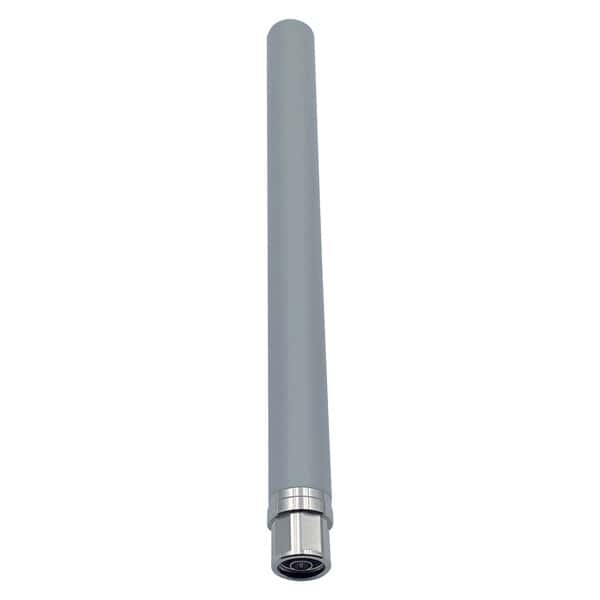
WiFi Omni Fiberglass Antennas are antennas designed to enhance the signal strength and coverage of WiFi networks. These antennas are constructed using durable fiberglass material, making them weatherproof and suitable for outdoor use. They come in various gain levels, including low gain, middle gain, and high gain, allowing users to choose the antenna that best fits their needs.
WiFi Omni Fiberglass Antennas are omni-directional, meaning they can transmit and receive signals in all directions, making them suitable for providing WiFi coverage in large areas or outdoor environments. They are easy to install and can be mounted on poles or other structures. These antennas are compatible with most WiFi routers and access points, providing an affordable solution for extending the range of a WiFi network.
Pros
1. Durability: Fiberglass antennas are known for their robustness and can withstand harsh environmental conditions, including extreme temperatures, UV exposure, and moisture.
2. Omnidirectional Coverage: These antennas provide 360-degree coverage, making them suitable for environments where the signal needs to be broadcasted in all directions.
3. Ease of Installation: Typically, these antennas are straightforward to install and can be mounted on various surfaces, including rooftops, poles, and walls.
4. Low Maintenance: Due to their sturdy construction, fiberglass antennas require minimal maintenance compared to other types of antennas.
5. Improved Signal Strength: They can significantly enhance signal strength and range, especially in outdoor settings.
6. Aesthetic Appeal: Fiberglass antennas often have a sleek and professional appearance, making them less obtrusive in various settings.
cURL Too many subrequests.
1. Cost: Fiberglass antennas can be more expensive than other types of antennas, such as plastic ones.
2. Size and Weight: These antennas can be bulkier and heavier, which might pose challenges for installation in certain settings.
3. Limited Range: While they provide omnidirectional coverage, the range might be limited compared to directional antennas.
4. Potential Interference: Omnidirectional antennas can pick up interference from all directions, which might affect signal quality in congested areas.
5. Installation Complexity: In some cases, the installation might require professional assistance, especially for high or hard-to-reach locations.
6. Vulnerability to Physical Damage: Despite their durability, they can still be damaged by severe physical impacts or vandalism.
Applications
1. Outdoor WiFi Networks: Ideal for providing WiFi coverage in outdoor areas such as parks, campuses, and public spaces.
2. Marine Environments: Used on boats and ships to maintain reliable WiFi connectivity in marine settings.
3. Industrial Sites: Suitable for industrial environments where robust and reliable WiFi coverage is necessary.
4. Rural and Remote Areas: Can be used to extend WiFi coverage in rural or remote locations where traditional infrastructure might be lacking.
5. Event Venues: Useful in large event spaces, stadiums, and convention centers to provide comprehensive WiFi coverage to attendees.
6. Residential Use: Can be used in larger residential properties to ensure uniform WiFi coverage across the entire property.
cURL Too many subrequests.
cURL Too many subrequests.
cURL Too many subrequests.
cURL Too many subrequests.
cURL Too many subrequests.
cURL Too many subrequests.
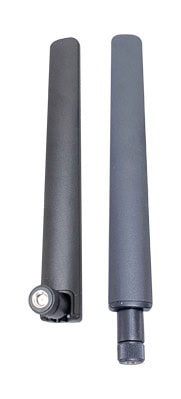
Pros
cURL Too many subrequests.
cURL Too many subrequests.
cURL Too many subrequests.
cURL Too many subrequests.
cURL Too many subrequests.
cURL Too many subrequests.
cURL Too many subrequests.
cURL Too many subrequests.
5. Ease of Installation:
cURL Too many subrequests.
cURL Too many subrequests.
cURL Too many subrequests.
cURL Too many subrequests.
cURL Too many subrequests.
cURL Too many subrequests.
cURL Too many subrequests.
cURL Too many subrequests.
cURL Too many subrequests.
– For applications requiring long-distance communication or point-to-point links, rubber duck antennas are not the best choice. Directional antennas with higher gain are more suitable for such scenarios.
5. Aesthetic and Space Considerations:
– While compact, the rubber duck design may not be aesthetically pleasing in all settings, and in some cases, the protruding antenna can be a nuisance or take up valuable space.
Applications
1. Home WiFi Routers:
– Rubber duck antennas are commonly used in home WiFi routers to provide coverage throughout the house. Their omnidirectional nature ensures that multiple rooms receive a signal.
2. IoT Devices:
– Many Internet of Things (IoT) devices, such as smart home gadgets, use rubber duck antennas for wireless connectivity due to their compact size and ease of installation.
3. Office Environments:
– In small to medium-sized office environments, rubber duck antennas can be used in WiFi access points to provide coverage for employees’ devices.
4. Mobile and Portable WiFi Devices:
– Portable WiFi devices, such as mobile hotspots and WiFi adapters, often use rubber duck antennas for their flexibility and durability.
5. Industrial Applications:
– In industrial settings, rubber duck antennas can be used in wireless sensors and monitoring equipment where ruggedness and reliability are important.
6. Educational Institutions:
– Schools and universities may use rubber duck antennas in classroom and campus WiFi access points to ensure widespread coverage for students and staff.
7. Public WiFi Hotspots:
– Public WiFi hotspots in cafes, libraries, and other public spaces can use rubber duck antennas to provide reliable connectivity to visitors.
In summary, WiFi rubber duck antennas are a versatile and cost-effective option for many general-purpose WiFi applications. However, their limited range and susceptibility to interference may make them less suitable for specific uses requiring long-distance communication or high performance in crowded environments.
Magnetic Antennas
WiFi magnetic antennas are small, portable antennas that can be easily attached to a metallic surface, such as a car roof or a window, to enhance the WiFi signal reception. These antennas are designed to work with WiFi routers or access points and can improve the range and coverage of the WiFi network. They are typically used in situations where the WiFi signal is weak or there are obstacles, such as walls or trees, that block the signal. The magnetic base allows for easy installation and repositioning of the antenna for optimal signal strength.
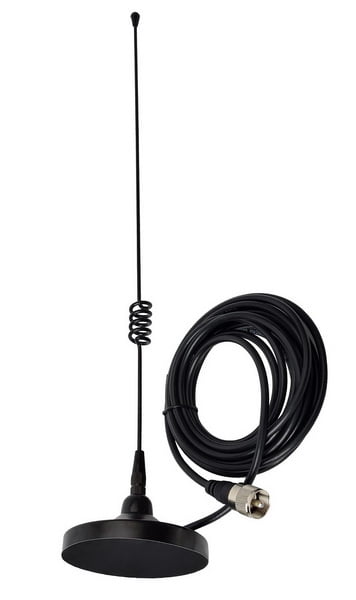
Pros
1. Ease of Installation: Magnetic antennas can be easily attached to metal surfaces without the need for drilling or permanent fixtures.
2. Portability: They can be moved and repositioned effortlessly, making them ideal for temporary setups or situations where the optimal position needs to be found.
3. Improved Signal Quality: By positioning the antenna in an optimal location (e.g., higher up or away from obstructions), users can often achieve better signal strength and quality.
4. Versatility: Suitable for both indoor and outdoor use, provided the magnetic base is strong enough to withstand environmental conditions.
5. Cost-Effective: Generally, they are affordable and can be an economical solution for improving WiFi coverage.
cURL Too many subrequests.
1. Limited to Metal Surfaces: Magnetic antennas require a metal surface to attach to, which might limit their placement options.
2. Potential for Damage: If not secured properly, the antenna might fall and get damaged, especially in high-wind conditions outdoors.
3. Interference: The presence of other electronic devices or metal objects nearby can sometimes interfere with the signal.
4. Durability: The magnet might weaken over time, especially if frequently moved, reducing its effectiveness.
5. Aesthetic Concerns: The antenna and its cable might not blend well with the surroundings, which could be a concern in residential or aesthetically sensitive environments.
Applications
1. Home WiFi Networks: To improve signal strength in specific areas of a house or apartment, especially in multi-story buildings.
2. Office Environments: To enhance WiFi coverage in specific areas of an office, such as meeting rooms or remote corners.
3. Vehicles: For providing WiFi connectivity in cars, trucks, RVs, or boats where a stable and strong signal is required.
4. Temporary Setups: Ideal for events, trade shows, or temporary workspaces where a quick and efficient WiFi setup is needed.
5. Remote Locations: Useful in remote or rural areas where WiFi signal strength might be weak and an external antenna can help.
6. Industrial Applications: In warehouses, factories, or other industrial settings where robust and flexible WiFi connectivity is needed.
7. Outdoor Events: For outdoor gatherings, concerts, or sports events where a temporary but strong WiFi network is required.
8. Research and Development: In labs or research facilities where WiFi coverage needs to be adjusted frequently based on experimental setups.
Overall, magnetic WiFi antennas offer a flexible and efficient solution for enhancing wireless connectivity in a variety of settings, though they come with certain limitations that need to be considered.
Chapter 3: Key Factors to Consider
Frequency Bands
WiFi omni-directional antennas are designed to radiate signals uniformly in all directions, which makes them ideal for broad coverage areas. These antennas can operate across different frequency bands, commonly including the 2.4 GHz, 5 GHz, and the newer 6 GHz bands. Here’s a brief overview of these frequency bands:
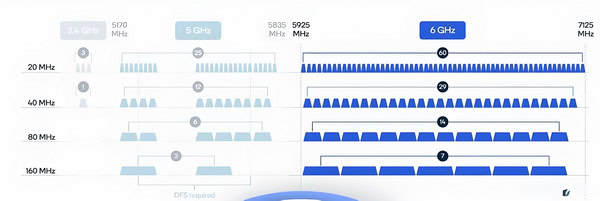
2.4 GHz Band
cURL Too many subrequests.
cURL Too many subrequests.
cURL Too many subrequests.
cURL Too many subrequests.
cURL Too many subrequests.
cURL Too many subrequests.
cURL Too many subrequests.
cURL Too many subrequests.
5 GHz Band
cURL Too many subrequests.
cURL Too many subrequests.
cURL Too many subrequests.
cURL Too many subrequests.
cURL Too many subrequests.
cURL Too many subrequests.
cURL Too many subrequests.
cURL Too many subrequests.
6 GHz Band
cURL Too many subrequests.
cURL Too many subrequests.
cURL Too many subrequests.
cURL Too many subrequests.
cURL Too many subrequests.
cURL Too many subrequests.
cURL Too many subrequests.
– Limited range and penetration capabilities similar to the 5 GHz band.
– Requires devices that support WiFi 6E.
Applications
– 2.4 GHz: Suitable for general use, including web browsing, email, and IoT devices.
– 5 GHz: Better for high-bandwidth applications like HD video streaming, online gaming, and video conferencing.
– 6 GHz: Ideal for ultra-high-bandwidth applications, future-proofing networks, and environments with many connected devices.
When choosing an omni-directional antenna, it’s essential to consider the specific frequency bands it supports, the environment in which it will be used, and the types of devices that will connect to the network.
Gain (dBi)
Definition
The gain of a WiFi omni antenna, often measured in decibels relative to an isotropic radiator (dBi), indicates how effectively the antenna can direct radio frequency energy in a particular direction compared to an ideal isotropic antenna, which radiates equally in all directions. For an omni-directional antenna, this gain is typically achieved by compressing the radiation pattern vertically, which extends the horizontal coverage area.
Impact on Coverage
– Higher Gain (e.g., 12 dBi): A higher gain omni antenna will have a flatter, more compressed radiation pattern. This means it can cover a larger horizontal distance but with reduced vertical coverage. This is ideal for large, flat areas like warehouses, open office spaces, or outdoor environments where you need to cover a broad area horizontally.
– Lower Gain (e.g., 2 dBi): A lower gain antenna has a more spherical radiation pattern, providing more vertical coverage but less horizontal reach. This is suitable for multi-story buildings or environments where coverage in all directions (including vertically) is necessary.
How to Choose the Appropriate Gain Level
Selecting the right gain level for your WiFi omni antenna depends on several factors:
1. Environment:
– Indoor Multi-Story Building: Opt for a lower gain antenna (3-5 dBi) to ensure coverage across different floors.
– Large Open Spaces: Choose a higher gain antenna (9-12 dBi) to maximize horizontal reach.
2. Coverage Area:
– Small Area: A lower gain antenna is sufficient and will provide more uniform coverage.
– Large Area: A higher gain antenna will extend the coverage area, but ensure it’s installed at an optimal height to avoid dead zones.
3. Antenna Placement:
– Central Location: If the antenna is centrally located, a lower gain antenna might be more appropriate to provide even coverage.
– Perimeter Location: A higher gain antenna can be beneficial to project the signal across the area more effectively.
4. Interference and Obstacles:
– High Interference: In environments with significant interference, a lower gain antenna might provide a more stable connection as it avoids focusing too much energy in one direction.
– Few Obstacles: Higher gain antennas work well in open areas with minimal obstacles.
5. Application:
– General Use: For most home or small office environments, a medium gain antenna (4-6 dBi) is typically sufficient.
– Specialized Use: For specific applications like long-range point-to-multipoint setups, higher gain antennas are more suitable.
Practical Examples
– Home Use: A 2-4 dBi antenna is usually adequate, providing good coverage across multiple rooms and floors.
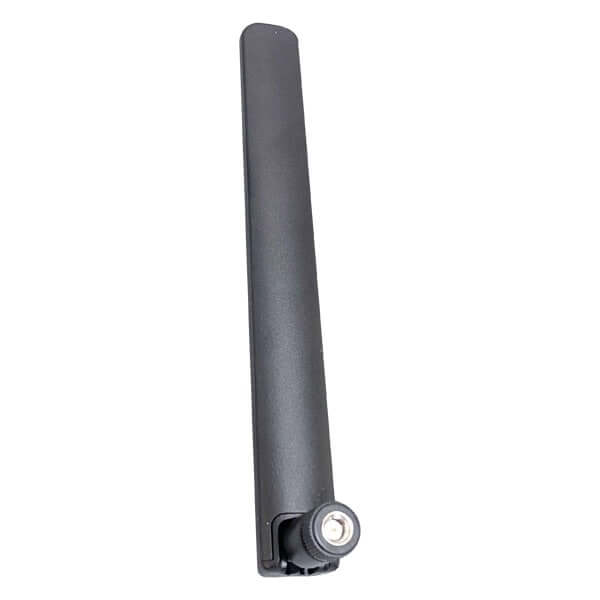
– Office Use: A 5-8 dBi antenna can offer better coverage in an office environment, balancing between horizontal and vertical reach.
– Outdoor Use: A 9-15 dBi antenna is ideal for outdoor areas, such as parks or large campuses, where horizontal coverage is more critical.

Conclusion
Choosing the appropriate gain level for a WiFi omni antenna requires a careful assessment of the environment, coverage needs, and specific application. By understanding the trade-offs between horizontal and vertical coverage, you can select an antenna that provides optimal performance for your particular scenario.
Polarization
WiFi omni-directional antennas can have various types of polarization, each with its own characteristics and applications. Here’s a brief overview of the common polarization types:
1. Vertical Polarization:

– Description: The electric field of the radio wave is oriented vertically.
– Applications: Common in many WiFi applications, especially for general-purpose use in environments where devices are typically oriented vertically (e.g., smartphones, laptops).
– Advantages: Good for urban and suburban areas due to the typical orientation of devices.
cURL Too many subrequests.

– Description: The electric field of the radio wave is oriented horizontally.
– Applications: Used in specific scenarios where horizontal orientation is beneficial, such as certain point-to-point links.
– Advantages: Can reduce interference in environments where most signals are vertically polarized.
3. Slant -45°/+45° Polarization:

cURL Too many subrequests.
cURL Too many subrequests.
cURL Too many subrequests.
cURL Too many subrequests.

cURL Too many subrequests.
cURL Too many subrequests.
cURL Too many subrequests.
cURL Too many subrequests.
cURL Too many subrequests.
cURL Too many subrequests.
cURL Too many subrequests.
Conclusion
cURL Too many subrequests.
cURL Too many subrequests.
cURL Too many subrequests. cURL Too many subrequests. cURL Too many subrequests.
cURL Too many subrequests.
cURL Too many subrequests.
cURL Too many subrequests.
cURL Too many subrequests.
cURL Too many subrequests.
cURL Too many subrequests.
– Ideal VSWR: 1:1 (This indicates perfect impedance matching with no reflected power. However, achieving a perfect 1:1 VSWR in practical scenarios is challenging.)
– Good VSWR: ≤ 1.5:1 (This is typically considered very good and indicates minimal power reflection.)
– Acceptable VSWR: ≤ 2:1 (This is generally acceptable for most WiFi applications, indicating that the antenna is performing adequately with some minor reflection.)
– Marginal VSWR: ≤ 3:1 (This may be acceptable in some less critical applications, but performance could be noticeably degraded.)
– Poor VSWR: > 3:1 (This indicates significant power reflection and poor impedance matching, which could lead to inefficient performance and potential damage to the transmitter.)
cURL Too many subrequests.
– Antenna Design: Omni-directional WiFi antennas are designed to have a low VSWR over their operating frequency range (typically 2.4 GHz and/or 5 GHz bands).
– Installation: Proper installation and positioning of the antenna can help maintain a low VSWR. Factors such as the length and quality of the coaxial cable, connectors, and environmental conditions can affect VSWR.
– Testing and Tuning: Regular testing using VSWR meters or network analyzers can help in maintaining optimal performance. In some cases, tuning the antenna or the matching network can help achieve a better VSWR.
In summary, maintaining a low VSWR is essential for the efficient performance of WiFi omni-directional antennas. An acceptable VSWR range for most WiFi applications is typically ≤ 2:1, with values closer to 1:1 being ideal. Regular testing and proper installation practices can help achieve and maintain good VSWR levels.
Unroundness

Impact on Performance
1. Radiation Pattern Distortion:
– Ideal Case: An ideal omni-directional antenna radiates uniformly in all horizontal directions, creating a perfect 360-degree horizontal radiation pattern.
– Unroundness Impact: Any deviation from this ideal shape can cause the radiation pattern to become uneven, leading to areas with weaker signal strength and others with stronger signals. This can result in inconsistent coverage and potential dead zones.
2. Signal Strength Variability:
– Ideal Case: Consistent signal strength in all directions at a given distance from the antenna.
– Unroundness Impact: Variations in signal strength can occur, causing fluctuations in data rates and potential connectivity issues for devices located in areas affected by the weaker signal.
3. Interference and Noise:
– Ideal Case: Uniform radiation minimizes interference and noise issues.
– Unroundness Impact: Uneven radiation can lead to increased interference and noise in certain directions, potentially degrading overall network performance.
4. Network Planning Challenges:
– Ideal Case: Easier to design and implement a network with predictable coverage areas.
– Unroundness Impact: More complex network planning and potential need for additional antennas or adjustments to ensure adequate coverage.
How to Measure Unroundness
1. Antenna Pattern Measurement:
– Anechoic Chamber: Use an anechoic chamber to measure the antenna’s radiation pattern. This controlled environment helps to eliminate external interference and provides accurate measurements.
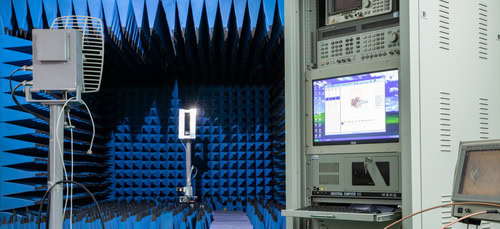
– Network Analyzer: Connect the antenna to a network analyzer to measure its radiation pattern. Rotate the antenna 360 degrees and record the signal strength at various angles to create a polar plot of the radiation pattern.
– Software Tools: Utilize specialized software to analyze the data and identify deviations from the ideal omni-directional pattern.
2. Field Strength Measurements:
– Field Test: Perform field strength measurements in an open area. Place the antenna at a fixed position and measure the signal strength at various points around the antenna at a consistent distance.
– Mapping: Use a spectrum analyzer or a WiFi signal strength meter to map the signal strength in different directions and create a coverage map.
3. Geometric Measurement:
– Physical Inspection: Inspect the physical structure of the antenna for any visible deformities or irregularities.
– Precision Tools: Use calipers or other precision measurement tools to measure the dimensions of the antenna and check for any deviations from the specified design.
4. Simulation and Modeling:
– Simulation Software: Use electromagnetic simulation software to model the antenna’s design and predict its radiation pattern. Compare the simulated results with the actual measurements to identify any discrepancies.
– Finite Element Analysis (FEA): Utilize FEA to analyze the antenna’s structure and predict its performance based on its geometric properties.
By combining these measurement techniques, you can accurately assess the unroundness of a WiFi omni antenna and its impact on performance, allowing for necessary adjustments or redesigns to optimize network coverage and reliability.
Bandwidth and Efficiency
Bandwidth
1. Data Throughput:
– Wider Bandwidth: Allows for higher data rates as more information can be transmitted over a broader range of frequencies.
cURL Too many subrequests.
cURL Too many subrequests.
cURL Too many subrequests.
cURL Too many subrequests.
cURL Too many subrequests.
cURL Too many subrequests.
cURL Too many subrequests.
Efficiency
cURL Too many subrequests.
cURL Too many subrequests.
cURL Too many subrequests.
cURL Too many subrequests.
cURL Too many subrequests.
cURL Too many subrequests.
cURL Too many subrequests.
cURL Too many subrequests.
cURL Too many subrequests.
cURL Too many subrequests.
Bandwidth
cURL Too many subrequests.
cURL Too many subrequests.
2. Spectrum Analyzer:
– A spectrum analyzer can help observe the bandwidth by displaying the frequencies over which the antenna radiates or receives signals.
3. Data Throughput Tests:
– Perform data throughput tests using tools like iPerf or speed test applications to measure the actual data rates achievable over the network.
Efficiency
1. Antenna Analyzer:
– Use an antenna analyzer to measure parameters such as Voltage Standing Wave Ratio (VSWR) and Return Loss, which can indicate the efficiency of the antenna.
2. Radiation Pattern Measurement:
– Measure the radiation pattern of the antenna in an anechoic chamber to determine how efficiently it radiates energy in different directions.
3. Link Budget Analysis:
– Perform a link budget analysis to calculate the expected performance of the antenna in terms of signal strength and coverage area.
4. Field Tests:
– Conduct field tests to measure signal strength (RSSI) and quality (SNR) at various distances and locations to assess real-world efficiency.
By understanding and measuring these parameters, you can optimize the performance of WiFi networks using omni-directional antennas.
Isolation
1. Impact on Performance

Isolation between antennas in a Multiple Input Multiple Output (MIMO) system is crucial for optimal performance. Here’s how isolation impacts various performance metrics:
– Signal Interference: Poor isolation leads to mutual coupling between antennas, causing interference. This degrades signal quality and can lead to higher error rates.
– Channel Capacity: MIMO systems rely on multiple independent signal paths. Poor isolation reduces the independence of these paths, thereby reducing the system’s capacity to handle multiple data streams.
– Signal-to-Noise Ratio (SNR): Good isolation helps maintain a high SNR by minimizing the noise and interference from adjacent antennas.
– Throughput: Reduced interference and higher channel capacity directly translate to higher data throughput.
– Radiation Pattern: Poor isolation can distort the radiation pattern of the antennas, affecting coverage and performance.
– Bit Error Rate (BER): Better isolation typically results in a lower BER, contributing to more reliable data transmission.
2. How to Measure Isolation
Isolation is typically measured in terms of S-parameters, specifically S_21 or S_12, which represent the transmission coefficient between two antennas. Here’s a step-by-step guide to measure isolation:
a. Equipment Needed:
– Vector Network Analyzer (VNA)
– Coaxial cables
– Calibration kit for VNA
b. Measurement Steps:
1. Calibration:
– Calibrate the VNA using the calibration kit to ensure accurate measurements. This usually involves performing an open, short, and load calibration.
2. Setup:
– Connect the first antenna to port 1 of the VNA.
– Connect the second antenna to port 2 of the VNA.
3. Measurement:
– Measure the S_21 parameter, which indicates how much power is transmitted from antenna 1 to antenna 2.
– Alternatively, measure S_12 to see the power transmitted from antenna 2 to antenna 1. For reciprocal systems, S_21 = S_12.
4. Interpretation:
– The isolation is typically expressed in dB. Higher negative values indicate better isolation. For instance, -30 dB of isolation is better than -20 dB.
c. Practical Tips:
– Antenna Placement: Ensure that the antennas are placed in their intended positions during the measurement to simulate real-world conditions.
cURL Too many subrequests.
cURL Too many subrequests.
cURL Too many subrequests.
cURL Too many subrequests.
cURL Too many subrequests.
cURL Too many subrequests.
cURL Too many subrequests.
cURL Too many subrequests.
cURL Too many subrequests.
Impedance Matching
cURL Too many subrequests. cURL Too many subrequests.

cURL Too many subrequests.
cURL Too many subrequests.
cURL Too many subrequests.
cURL Too many subrequests.
cURL Too many subrequests.
cURL Too many subrequests.
cURL Too many subrequests. cURL Too many subrequests., LMR195, cURL Too many subrequests. LMR-400 are common types that have a 50-ohm impedance. Choose cables with low loss for better performance.
– Connectors: Use high-quality connectors to minimize signal loss and reflections. Poor quality connectors can introduce impedance mismatches.
3. Minimize Cable Lengths
– Shorter Cables: Use the shortest possible cable length to reduce signal loss and potential impedance mismatches.
– Cable Management: Properly manage and secure cables to avoid kinks and bends that can affect impedance.
4. Check for Impedance Matching Components
– Impedance Matching Transformers: If there is a need to connect components with different impedances (e.g., 75-ohm to 50-ohm), use impedance matching transformers or baluns.
– Matching Networks: Design or use matching networks (combinations of inductors and capacitors) to match impedances at specific frequencies.
5. Measure and Verify Impedance Matching
– Network Analyzer: Use a network analyzer to measure the impedance of your antenna system. This device can help you identify mismatches and losses.
– SWR Meter: Measure the Standing Wave Ratio (SWR). A SWR close to 1:1 indicates good impedance matching. An SWR higher than 2:1 suggests significant impedance mismatch.
6. Adjust and Fine-Tune
– Antenna Tuning: If your antenna has adjustable elements, fine-tune them to achieve the best impedance match.
– Component Replacement: Replace any mismatched or poor-quality components identified during measurement.
7. Testing and Validation
– Signal Strength Testing: Use WiFi signal strength analysis tools to ensure that the antenna is performing well and that there are no significant losses.
– Network Performance: Monitor the overall network performance to ensure that data rates and connectivity are optimal.
8. Documentation and Maintenance
– Keep Records: Document the specifications of all components used, including their impedance ratings.
– Regular Maintenance: Periodically check and maintain the antenna system to ensure continued impedance matching and optimal performance.
By following these steps, you can ensure that your WiFi omni antenna is properly impedance-matched with other network components, leading to better performance and reliability of your wireless network.
Power Handling Capacity
The maximum power input of a cURL Too many subrequests. refers to the highest amount of power the antenna can handle without damage or performance degradation. This specification is crucial for several reasons:
1. Performance Optimization: Ensuring the transmitter operates within the antenna’s power handling capacity helps maintain optimal performance. Exceeding this limit can cause signal distortion or loss, reducing the effectiveness of the WiFi network.
2. Safety: Operating an antenna above its maximum power input can lead to overheating and potential damage, posing safety risks such as fire hazards.
3. Regulatory Compliance: Different regions have regulations governing the maximum allowable transmission power for WiFi devices. Adhering to these limits helps avoid legal issues and interference with other wireless services.
4. Equipment Longevity: Staying within the recommended power input range helps extend the life of the antenna and associated equipment, reducing the need for frequent replacements or repairs.
Typical Power Handling Capacities
– Consumer-Grade Antennas: Often designed for lower power levels, typically around 1 to 2 watts.
– Commercial/Industrial Antennas: These can handle higher power levels, sometimes up to 80 watts or more, depending on the specific model and application.
cURL Too many subrequests.
– Matching Components: Ensure that the transmitter and antenna are compatible in terms of power handling capacity to avoid mismatches that could lead to inefficiencies or damage.
– Environmental Factors: Consider environmental conditions such as temperature and humidity, which can affect the antenna’s performance and power handling capacity.
– Antenna Gain: Higher gain antennas focus energy more effectively, but they do not necessarily handle more power. The gain and power handling capacity are separate specifications that both need attention.
In summary, the maximum power input of a WiFi omni antenna is a critical specification that impacts performance, safety, regulatory compliance, and equipment longevity. Always refer to the manufacturer’s guidelines to ensure proper usage.
Coverage Area
To determine the coverage area of a WiFi omni antenna and ensure it meets your needs, you can follow these steps:
Determining Your Needs
1. Purpose: Identify the primary purpose of the WiFi network (e.g., home use, office, outdoor event).
2. Area Size: Measure the physical dimensions of the area you want to cover (square footage or square meters).
3. Obstacles: Consider obstacles such as walls, floors, and furniture that can affect signal strength.
4. Devices: Estimate the number and type of devices that will connect to the network.
cURL Too many subrequests.
cURL Too many subrequests.
cURL Too many subrequests.
cURL Too many subrequests.
cURL Too many subrequests.
cURL Too many subrequests.
cURL Too many subrequests.
cURL Too many subrequests.

Where:
d cURL Too many subrequests.
f cURL Too many subrequests.
c cURL Too many subrequests.
cURL Too many subrequests.

cURL Too many subrequests.
cURL Too many subrequests. d cURL Too many subrequests. f cURL Too many subrequests.
cURL Too many subrequests.
cURL Too many subrequests.
cURL Too many subrequests.
Transmit Power (Pt): _dBm
Antenna Gain (Gt): _ dBi
Receiver Sensitivity (Sr):_ dBm
Frequency (f): _Hz
5. Practical Considerations:
– Indoor Range: Typically, an omni antenna in the 2.4 GHz band might cover 50-100 meters indoors, while the 5 GHz band might cover 20-50 meters.
– Outdoor Range: Outdoors, the 2.4 GHz band might cover up to 200-300 meters, and the 5 GHz band might cover up to 100-200 meters, depending on environmental factors.
6. Coverage Map: Create a coverage map using the calculated ranges and consider areas of weak signal. Tools like heat mapping software can help visualize coverage.
Example Calculation
Let’s say you have a WiFi omni antenna with the following specs:
– Gain (Gt) : 10 dBi
– Frequency (f) : 2.4 GHz
– Transmit Power (Pt) : 30 dBm
– Receiver Sensitivity (Sr) : -90 dBm
Step-by-Step Solution
1. Calculate Link Budget
Link Budget (dB)=30+10−(−90)=130 dB
2. Calculate FSPL (dB) in terms of d:
FSPL (dB)=130 dB
3. Rearrange FSPL formula to solve for d :
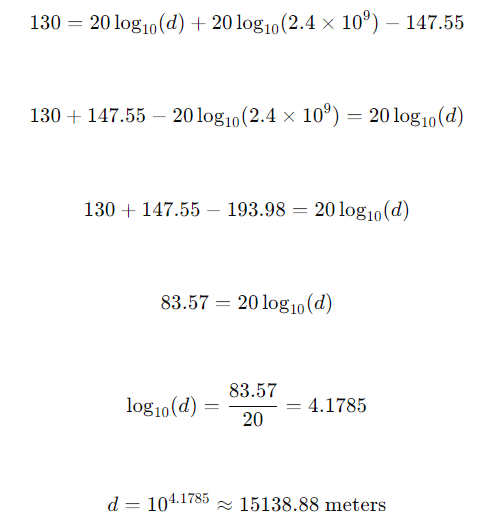
Conclusion
Maximum Distance (d): ≈ (approx)15138.88 meters
This format provides a structured way to calculate the link budget and determine the maximum distance for signal transmission.
Final Steps
– Deploy and Test: Place the antenna and test the actual coverage area with devices to adjust for real-world conditions.
– Adjustments: If coverage is insufficient, consider additional antennas, range extenders, or higher-gain antennas.
By following these steps, you can estimate and optimize the coverage area of your WiFi omni antenna to meet your specific needs.
cURL Too many subrequests.
When considering WiFi omni antennas, it’s important to understand both router and device compatibility as well as compliance with WiFi standards (IEEE 802.11). Here’s a breakdown of these aspects:
cURL Too many subrequests.
1. Connector Type:
cURL Too many subrequests.
2. Frequency Band:
cURL Too many subrequests.
cURL Too many subrequests.
cURL Too many subrequests.
cURL Too many subrequests.
cURL Too many subrequests.
cURL Too many subrequests.
cURL Too many subrequests.
cURL Too many subrequests.
cURL Too many subrequests.
cURL Too many subrequests.
cURL Too many subrequests.
cURL Too many subrequests.
cURL Too many subrequests.
cURL Too many subrequests.
– 802.11ax cURL Too many subrequests.
– cURL Too many subrequests. cURL Too many subrequests.
cURL Too many subrequests.
– Newer WiFi standards are generally backward compatible with older ones. For instance, a WiFi 6 (802.11ax) router will work with 802.11n/ac devices, but the performance will be limited to the capabilities of the older standard.
3. Antenna Design and Standards Compliance:
– Ensure the antenna is designed to support the specific WiFi standards your devices use. For example, an antenna designed for 802.11ac should support the 5 GHz band and MIMO technology.
cURL Too many subrequests.
To ensure compatibility and optimal performance:
– Match the connector type between the antenna and your router/device.
– Verify frequency band support (2.4 GHz, 5 GHz, 6 GHz) of the antenna.
– Check the antenna gain to ensure it meets your range and coverage needs.
– Ensure the antenna supports the WiFi standards (IEEE 802.11a/b/g/n/ac/ax) your devices use.
– Confirm the number of antenna ports on your router and whether you need multiple antennas for MIMO.
By considering these aspects, you can select a WiFi omni antenna that is compatible with your router and devices and adheres to the necessary WiFi standards.
Chapter 4: Mechanical Specifications
Physical Design and Size
When selecting a WiFi omni antenna, the physical design and size play crucial roles in performance, aesthetics, and practical application. Here’s a detailed breakdown:
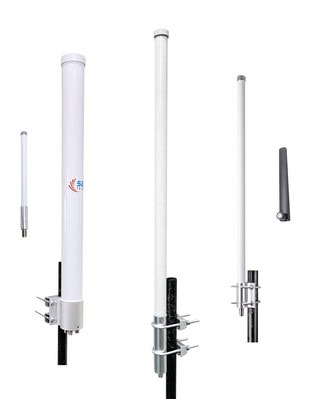
1. Gain and Length
– Gain: The gain of a WiFi omni-directional antenna is typically measured in dBi (decibels relative to an isotropic radiator). Common gain values for WiFi omni antennas are 2 dBi, 5 dBi, 8 dBi, 10dBi and 12 dBi. Higher gain antennas focus the signal more horizontally, providing longer range but less vertical coverage.
– Size (Length) based on 2.4 GHz SISO:
– 5 dBi: These antennas are generally quite short, often around 30-35 cm (11.8-13.8 inches) for omni fiberglass antennas.
– 8 dBi: These are medium-sized, typically around 60 cm (24 inches) for both rubber duck antennas and omni fiberglass antennas .
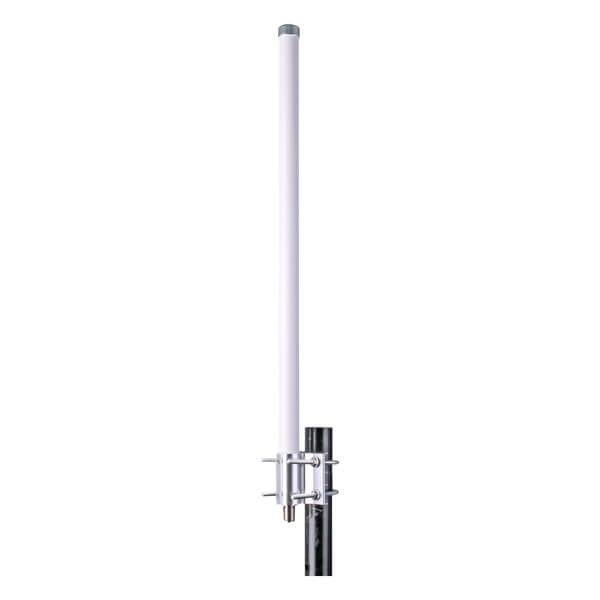
– 12 dBi: High-gain antennas can be quite long, often exceeding 100 cm (39 inches) in length for the omni fiberglass antennas.
– 15 dBi: High-gain antennas can be extremely long, often exceeding 140 cm (55 inches) in length for the omni fiberglass antennas with center-fed arrays.
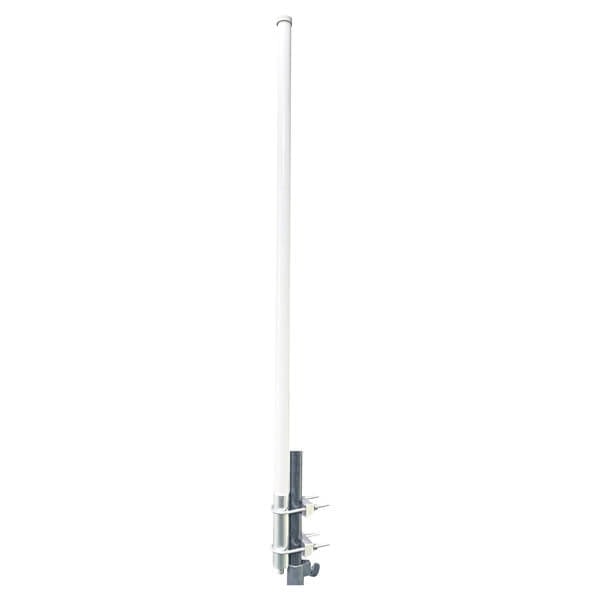
– Size (Length) based on 5 GHz SISO :
– 2 dBi: These antennas are generally quite short, often around 5-10 cm (2-4 inches) for rubber duck antennas.
– 5 dBi: These are medium-sized, typically around 15-20 cm (6-8 inches) for both rubber duck antennas and omni fiberglass antennas .
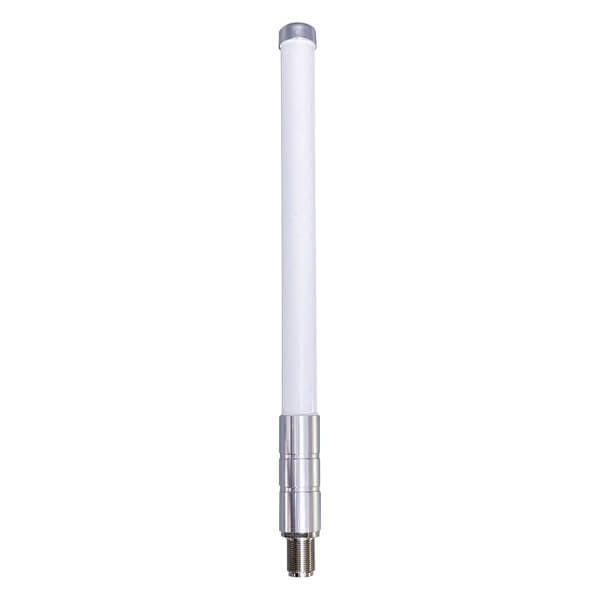
– 8 dBi: These antennas are longer, usually around 40-50 cm (16-20 inches) for omni fiberglass antennas.
– 12 dBi: High-gain antennas can be quite long, often exceeding 70 cm (28 inches) in length for the omni fiberglass antennas.

The length of the omni antenna can vary significantly depending on whether it is designed for 2.4 GHz, 5 GHz or 6 GHz frequencies. Generally, 5 GHz antennas are much shorter than their 2.4 GHz counterparts for the same gain value because higher frequencies have shorter wavelengths.
2. Coverage Area
– Coverage Pattern: Omni-directional antennas radiate signals in a 360-degree horizontal pattern, providing coverage in all directions around the antenna. However, the vertical coverage can be limited depending on the gain.
– Coverage Range:
– 2 dBi: Suitable for short-range applications, typically covering up to 100 meters (328 feet) in open environments at 2.4 GHz. The range might be slightly less at 5 GHz due to higher frequency attenuation.
– 5 dBi: Offers moderate range, covering approximately 200-300 meters (656-984 feet) in open environments at 2.4 GHz. The range might be around 150-250 meters (492-820 feet) at 5 GHz.
– 8 dBi: Provides a longer range, covering up to 500 meters (1640 feet) or more in open environments at 2.4 GHz. The range might be around 400 meters (1312 feet) at 5 GHz.
– 12 dBi: Designed for maximum range, these can cover distances of 1 km (0.62 miles) or more in open environments at 2.4 GHz. The range might be around 800 meters (2625 feet) at 5 GHz.
Note: The actual coverage area can be significantly affected by environmental factors such as physical obstructions (walls, trees, buildings), interference from other electronic devices, and the specific characteristics of the environment in which the antenna is deployed.
cURL Too many subrequests.
– Gain: Typically ranges from 2 dBi to 12 dBi.
– Size (Length): Can range from 5 cm (2 inches) for low-gain antennas to over 70 cm (28 inches) for high-gain antennas for 5GHz version. The size may vary significantly depending on whether the antenna is for 2.4 GHz or 5 GHz or higher frequencies.
– Coverage Area: Varies from around 100 meters (328 feet) for low-gain antennas to over 1 km (0.62 miles) for high-gain antennas in open environments at 2.4 GHz. Coverage is generally slightly less at 5 GHz.
When selecting an omni-directional WiFi antenna, it’s essential to consider the specific requirements of the deployment environment to ensure optimal performance and coverage.
cURL Too many subrequests.
cURL Too many subrequests.
cURL Too many subrequests.
cURL Too many subrequests.
cURL Too many subrequests.
cURL Too many subrequests.
cURL Too many subrequests.
cURL Too many subrequests.
cURL Too many subrequests.
cURL Too many subrequests.
cURL Too many subrequests.
cURL Too many subrequests.
cURL Too many subrequests.
cURL Too many subrequests.
cURL Too many subrequests.
cURL Too many subrequests.
cURL Too many subrequests. cURL Too many subrequests.
Frequency
cURL Too many subrequests.
cURL Too many subrequests.
cURL Too many subrequests.
Some modern WiFi systems also operate in the 6 GHz band, known as WiFi 6E and WiFi 7:
– 6 GHz Band: Covers 5.925 GHz to 7.125 GHz.
cURL Too many subrequests.
The design of the radiating elements in an omni antenna can vary, but common types include:
1. Dipole Antennas:
– Structure: Consists of two conductive elements (rods) extending in opposite directions.
– Pros: Simple design, easy to manufacture, and cost-effective.
– Cons: Limited gain, generally around 2.15 dBi.
– Structure: Multiple dipole elements stacked vertically to increase gain, typically using Center-fed or Series-fed symmetrical brass elements for a higher gain. It’s widely used for base stations with high input power.
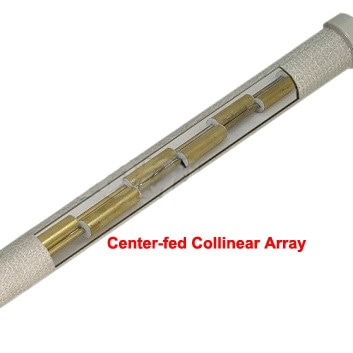
– Pros: Higher gain compared to a single dipole, typically between 5 dBi to 15 dBi. Higher input power, typically between 10 watts to 50 watts, sometimes even up to 100 watts or more, depending on the specific model and application.
– Cons: More complex design and construction, larger physical size (the length can reach 1.5m) with high cost and more expensive to manufacture.
– Structure: A single rod or wire mounted perpendicularly on a conductive surface.
– Pros: Simple and compact design, easy to integrate.
– Cons: Requires a ground plane, which can limit placement options.
4. PCB Antennas:
– Structure: Antennas etched onto a printed circuit board (PCB).
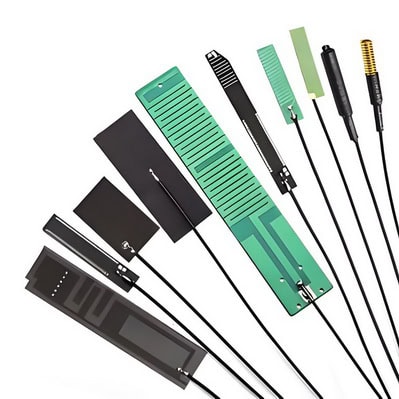
– Pros: Compact, can be integrated into devices, and is cost-effective for mass production.
– Cons: Limited gain, typically around 2 dBi to 5 dBi.
5. Slotted Waveguide Array Antennas:
– Structure: Comprises a waveguide with slots cut at specific intervals to allow radiation.

– Pros: High gain, dual polarization(horizontal and vertical) , improved signal quality and reliability, better performance in multipath environments, and increased data throughput.
– Cons: More complex design, larger in size , higher cost and expensive to manufacture compared to single polarization antennas.
– Widely Used For: WiFi MIMO 2×2 omni antennas, including WiFi 2.4GHz, 5 GHz, and dual band 2.4/5GHz dual polarization omni antennas. This makes them suitable for improving signal quality and throughput in modern wireless communication systems.

Materials
The choice of materials impacts the performance, cost, and durability of the antenna. Common materials include:
1. Copper:
– Pros: Excellent conductivity, widely available, and relatively inexpensive.
– Cons: Can tarnish over time, requiring protective coatings.
2. Aluminum:
– Pros: Good conductivity, lightweight, and corrosion-resistant.
– Cons: Slightly less conductive than copper, can be more difficult to work with.
3. Brass:
– Pros: Good conductivity, corrosion-resistant, and easy to machine.
– Cons: More expensive than copper and aluminum.
4. PCB Materials (FR4):
– Pros: Cost-effective for mass production, allows for compact designs.
– Cons: Lower conductivity compared to metals, which can affect performance.
Pros and Cons
Pros
– 360-Degree Coverage: Ideal for environments requiring uniform signal distribution.
– Versatility: Suitable for various applications, including indoor and outdoor use.
– Ease of Installation: Generally straightforward to mount and deploy.
cURL Too many subrequests.
– Limited Range: Typically lower gain compared to directional antennas, which can limit range.
– Interference: Omni-directional patterns can pick up more interference from surrounding signals.
– Size and Aesthetics: Higher-gain designs can be bulky and less visually appealing.
Conclusion
cURL Too many subrequests.
cURL Too many subrequests.
cURL Too many subrequests. WiFi omni antenna cURL Too many subrequests.
cURL Too many subrequests.
cURL Too many subrequests.
cURL Too many subrequests.
cURL Too many subrequests.
cURL Too many subrequests.
cURL Too many subrequests.
cURL Too many subrequests.
cURL Too many subrequests.
cURL Too many subrequests.
cURL Too many subrequests.
cURL Too many subrequests.
cURL Too many subrequests.
cURL Too many subrequests.
cURL Too many subrequests.
cURL Too many subrequests.
cURL Too many subrequests.
cURL Too many subrequests.
cURL Too many subrequests.
cURL Too many subrequests.
cURL Too many subrequests.
– Moldability: Can be easily molded into various shapes, offering design flexibility.
cURL Too many subrequests.
– Durability: Less durable compared to fiberglass and polycarbonate, especially in harsh environmental conditions.
– UV Resistance: Prone to degradation when exposed to prolonged UV radiation.
4. PTFE (Teflon)
cURL Too many subrequests.
– Low Signal Loss: Excellent electrical properties, resulting in minimal signal attenuation.
– Chemical Resistance: Highly resistant to chemicals, making it suitable for industrial environments.
– Temperature Range: Can withstand extreme temperatures without degrading.
cURL Too many subrequests.
– Cost: Significantly more expensive than other materials.
– Flexibility: Less flexible, making it harder to mold into complex shapes.
5. PVC (Polyvinyl Chloride)
cURL Too many subrequests.
– Cost-effective: One of the cheapest options available.
– Ease of Manufacturing: Easy to mold and manufacture in various shapes and sizes.
– Chemical Resistance: Good resistance to many chemicals.
cURL Too many subrequests.
– Durability: Less durable compared to fiberglass and polycarbonate.
– Signal Loss: Higher signal attenuation compared to other materials like PTFE.
Conclusion
The choice of radome material for a WiFi omni antenna depends on various factors including cost, environmental conditions, and performance requirements. Fiberglass and polycarbonate offer excellent durability and signal transparency but come at a higher cost. ABS plastic and PVC are more cost-effective but may not provide the same level of durability and performance. PTFE offers the best electrical properties but is the most expensive option.
Connector Type
There are several different types of connectors that can be used with a WiFi omni antenna. Some of the most common connector types include:
Certainly! Here is the updated list with the right-angle version for the N-type connector and without the asterisks:
1. SMA (SubMiniature version A): A common type of coaxial RF connector used for antennas.
2. RP-SMA (Reverse Polarity SMA): Similar to SMA but with reversed gender of the connector’s contact pin.

3. N-Type: A larger connector often used for outdoor antennas due to its durability and weather resistance.
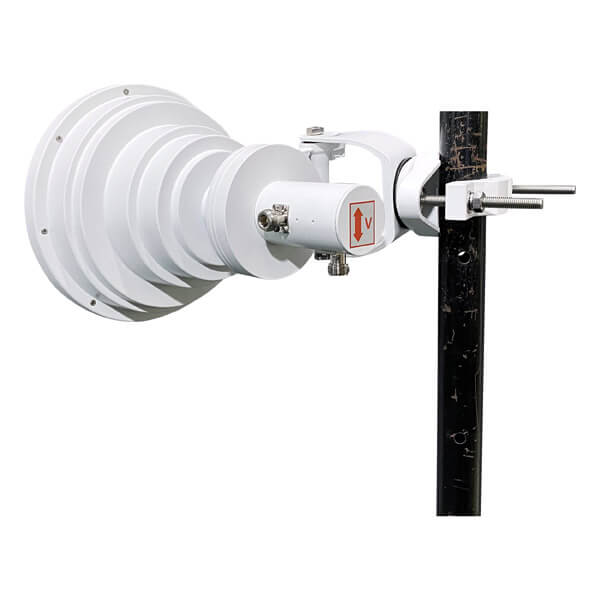
– N-Type Right Angle: A version of the N-Type connector that allows for connections in tighter spaces by angling the connector.

4. TNC (Threaded Neill–Concelman): Similar to BNC connectors but with threading for a more secure connection.
5. BNC (Bayonet Neill–Concelman): Less common for WiFi antennas, but still used in some applications.
When selecting an antenna, ensure that the connector type matches the connector on your WiFi device or access point. If they don’t match, adapters are available to convert between different types of connectors.
Mounting Options and Brackets
There are several mounting options and mounting brackets available for cURL Too many subrequests..
Mounting Options
1. Wall Mount: This is a simple and common mounting option where the antenna is attached to a wall using screws or bolts. The antenna is usually mounted vertically to ensure optimal signal coverage.
2. Pole Mount: A pole mount is used when you want to mount the omni antenna on a pole or mast. The antenna is attached to the pole using a mounting bracket specifically designed for pole mounting. This option is often used for outdoor installations.
3. Ceiling Mount: If you want to mount the omni antenna on the ceiling, you can use a ceiling mount. The antenna is attached to the mount and then secured to the ceiling using screws or bolts. This option is commonly used in indoor installations such as offices or warehouses.
4. Magnetic Mount: A magnetic mount is used when you want to temporarily mount the omni antenna on a metal surface such as a vehicle roof or a metal pole. The antenna has a magnetic base that sticks to the metal surface, providing a secure and temporary mounting option.
5. Direct Mount: In this option, the omni antenna is directly connected to the radio or wireless device without the need for additional mounting hardware. This is often done using a connector that attaches the antenna directly to the device’s antenna port. This option is ideal for portable or compact setups where space is limited and a direct connection is feasible.
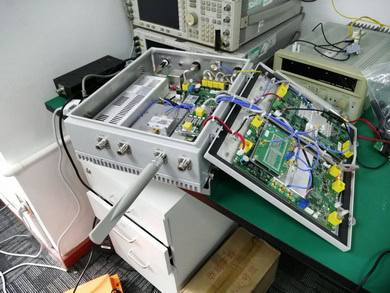
Mounting Brackets
1. L-Bracket
– A simple L-shaped bracket that allows for wall or pole mounting.

– Provides a stable and secure hold for the antenna.
2. Adjustable Tilt Bracket
– Allows for angle adjustments to optimize the antenna’s position.
– Useful for fine-tuning signal direction and coverage.
cURL Too many subrequests.
cURL Too many subrequests.
cURL Too many subrequests.
cURL Too many subrequests.
cURL Too many subrequests.
cURL Too many subrequests.
cURL Too many subrequests.
cURL Too many subrequests.
cURL Too many subrequests.
cURL Too many subrequests.
cURL Too many subrequests.
cURL Too many subrequests.
cURL Too many subrequests.
cURL Too many subrequests.
cURL Too many subrequests.
cURL Too many subrequests.
cURL Too many subrequests. cURL Too many subrequests.. cURL Too many subrequests.

cURL Too many subrequests.
– Indoor: Consider walls, floors, furniture, and other obstructions that can affect signal propagation.
– Outdoor: Take into account trees, buildings, weather conditions, and other physical barriers.
2. Identify Coverage Areas:
– Define the specific areas where WiFi coverage is required.
– Map out high-density areas where more bandwidth might be needed.
3. Measure Signal Strength:
– Use tools like WiFi analyzers to measure the existing signal strength in different areas.
– Identify dead zones and areas with weak signals.
4. Evaluate Interference:
– Identify sources of interference such as other wireless devices, microwave ovens, and Bluetooth devices.
– Use spectrum analyzers to detect and measure interference levels.
5. Document Findings:
– Create detailed maps and notes of the site, indicating signal strengths, interference sources, and physical obstacles.
– Use software tools to create a visual representation of the site survey data.
Identifying Optimal Antenna Locations
Choosing the right locations for cURL Too many subrequests. is crucial for maximizing coverage and performance. Consider the following factors when identifying optimal locations:
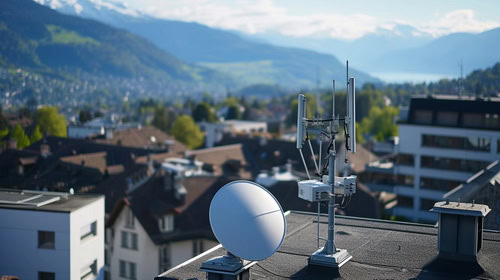
1. Centralized Placement:
– Position antennas centrally within the coverage area to ensure even distribution of the signal.
– Avoid placing antennas at the edges or corners of the coverage area.
2. Height and Elevation:
– Place antennas at a height that allows for unobstructed signal propagation.
– For indoor environments, ceiling-mounted antennas can provide better coverage.
– In outdoor environments, consider mounting antennas on rooftops or poles.
3. Minimize Obstructions:
– Avoid placing antennas near large metal objects, thick walls, or other materials that can block or reflect signals.
– Ensure a clear line of sight between the antenna and the coverage area.
4. Consider Antenna Gain:
– Higher-gain antennas provide longer range but narrower coverage areas, while lower-gain antennas offer wider coverage but shorter range.
– Choose the appropriate antenna gain based on the size and shape of the coverage area.
5. Power and Cabling:
– Ensure that power sources and network cabling are accessible at the chosen antenna locations.
– Plan for any necessary power over Ethernet (PoE) requirements.
6. Redundancy and Overlap:
– Plan for overlapping coverage areas to ensure seamless connectivity and redundancy.
– Avoid excessive overlap, which can lead to interference and reduced performance.
7. Future Expansion:
– Consider potential future expansion and scalability when selecting antenna locations.
– Ensure that the network can be easily expanded or reconfigured if needed.
8. Compliance and Regulations:
– Ensure that the installation complies with local regulations and guidelines.
cURL Too many subrequests.
Final Steps
cURL Too many subrequests.
cURL Too many subrequests.
cURL Too many subrequests.
cURL Too many subrequests.
cURL Too many subrequests.
cURL Too many subrequests.
cURL Too many subrequests.
cURL Too many subrequests.
cURL Too many subrequests.
cURL Too many subrequests.
cURL Too many subrequests.
cURL Too many subrequests.
cURL Too many subrequests.
cURL Too many subrequests.
cURL Too many subrequests.
cURL Too many subrequests.
cURL Too many subrequests.
cURL Too many subrequests.
– Ladder (if required)
– Materials
– WiFi Omni Antenna
– Mounting brackets (usually provided with the antenna)

– Screws and anchors (for wall mounting)
– Weatherproofing materials (if installing outdoors)
2. Location Selection
– Choose a central location to maximize coverage.
– Ensure the area is free from large metal objects and other obstructions.
– If installing outdoors, select a high and clear spot, like the roof or a tall pole.
3. Mount the Antenna
– Wall Mounting:
1. Mark the mounting holes on the wall using the bracket as a template.
2. Drill holes at the marked spots and insert anchors.
3. Attach the bracket to the wall using screws.
4. Secure the antenna to the bracket.
– Pole Mounting:
1. Attach the mounting bracket to the pole using U-bolts or hose clamps.
2. Secure the antenna to the bracket.
– Ceiling Mounting (Indoor):
1. Mark the mounting points on the ceiling.
2. Drill holes and insert anchors.
3. Attach the bracket to the ceiling and secure the antenna.
4. Connect the Coaxial Cable
– Connect one end of the coaxial cable to the antenna.
– Route the cable to the WiFi router or access point.
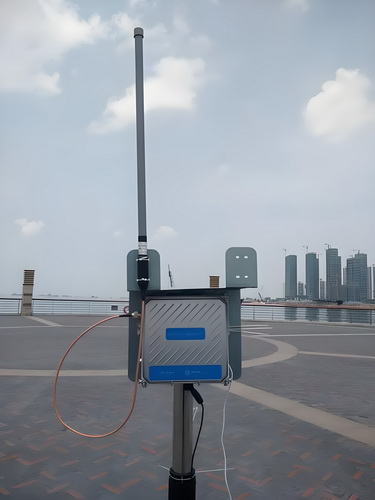
– Secure the cable along the route using cable ties to prevent it from hanging loosely.
5. Weatherproofing (Outdoor Installation)
– Apply weatherproofing tape or sealant to the coaxial cable connections to prevent water ingress.
– Ensure the antenna is mounted securely to withstand wind and other weather conditions.
6. Testing and Adjustment
– Power on your WiFi router or access point.
– Use a WiFi analyzer tool to check the signal strength and coverage.
– Adjust the antenna orientation if necessary to optimize the signal.
Common Pitfalls and How to Avoid Them
1. Poor Location Choice
– Pitfall: Installing the antenna in a location with many obstructions or interference.
– Solution: Choose a central, high, and clear location. Avoid areas with thick walls, metal objects, and electronic devices that can cause interference.
2. Improper Mounting
– Pitfall: Using the wrong mounting hardware or not securing the antenna properly.
– Solution: Use the provided mounting brackets and follow the manufacturer’s instructions. Ensure all screws and bolts are tightened securely.
cURL Too many subrequests.
cURL Too many subrequests.
cURL Too many subrequests.
cURL Too many subrequests.
cURL Too many subrequests.
cURL Too many subrequests.
cURL Too many subrequests.
cURL Too many subrequests.
cURL Too many subrequests.
cURL Too many subrequests.
cURL Too many subrequests.
cURL Too many subrequests.
cURL Too many subrequests.
cURL Too many subrequests.
cURL Too many subrequests.
cURL Too many subrequests.
cURL Too many subrequests.
cURL Too many subrequests.
cURL Too many subrequests.
– Use Signal Testing Tools: Employ tools such as WiFi analyzers (e.g., NetSpot, Ekahau, or inSSIDer) to measure signal strength (RSSI), noise levels, and interference.
– Test at Different Locations: Take readings at various points within the coverage area, including corners, edges, and areas with known obstacles.
– Identify Dead Zones: Mark areas with weak or no signal to address them later.
3. Adjusting Antenna Placement
– Optimal Height: Place antennas at an optimal height, usually above head level, to minimize obstructions and maximize coverage.
– Central Positioning: Position antennas centrally within the coverage area to ensure even distribution of the signal.
– Avoid Obstructions: Ensure antennas are not blocked by large objects or walls.
4. Fine-Tuning Antenna Orientation
– Vertical Alignment: Ensure omni antennas are vertically aligned for consistent 360-degree horizontal coverage.
– Angle Adjustments: If antennas are adjustable, experiment with slight angle changes to improve coverage in specific areas.
5. Channel Selection
– Avoid Overlapping Channels: Use a WiFi analyzer to identify the least congested channels. Avoid channels used by neighboring networks to reduce interference.
– Channel Width: Set appropriate channel width (20 MHz for 2.4 GHz, 40 MHz or 80 MHz for 5 GHz) based on the environment and interference levels.
6. Power Settings
– Adjust Transmit Power: Modify the transmit power settings on your WiFi router or access point. Higher power levels increase range but may cause interference, while lower power levels can reduce interference but may create dead zones.
– Balance Coverage and Interference: Aim for a balance between adequate coverage and minimal interference.
7. Band Steering
– Enable Band Steering: If supported, enable band steering to encourage dual-band devices to use the 5 GHz band, which is less crowded and offers higher speeds.
8. Additional Access Points
– Add More Access Points: In larger or more complex environments, additional access points may be necessary to ensure even coverage.
– Mesh Network: Consider a mesh WiFi system for seamless coverage over a larger area.
9. Post-Adjustment Testing
– Re-test Signal Strength: After making adjustments, re-test the signal strength and coverage to ensure improvements.
– User Feedback: Gather feedback from users within the coverage area to identify any lingering issues.
10. Documentation
– Document Changes: Keep a record of all adjustments made, including antenna positions, power settings, and channel selections.
– Create a Coverage Map: Use the data collected to create a coverage map, highlighting strong and weak signal areas.
11. Ongoing Monitoring
– Regular Monitoring: Periodically re-test the network to ensure consistent performance, especially after any changes to the environment (e.g., new walls, furniture).
– Firmware Updates: Keep your WiFi equipment firmware up to date to benefit from performance improvements and security patches.
By following these steps, you can optimize the performance of your WiFi omni antennas, ensuring even coverage and reliable connectivity throughout the desired area.
Chapter 6: Troubleshooting Common Issues
Weak Signal

1. Interference:
– Cause: Other electronic devices, such as microwaves, cordless phones, and Bluetooth devices, can interfere with WiFi signals.
– Solution: Change the WiFi channel on your router to one that is less congested. Use dual-band routers to switch between 2.4 GHz and 5 GHz frequencies.
2. Physical Obstructions:
– Cause: Walls, floors, and furniture can block or weaken WiFi signals.
– Solution: Place the router in a central, elevated location with minimal obstructions. Use WiFi extenders or mesh networks to cover larger areas.
3. Distance:
– Cause: The farther you are from the router, the weaker the signal will be.
– Solution: Move closer to the router or use a WiFi extender to boost the signal in distant areas.
cURL Too many subrequests.
cURL Too many subrequests.
cURL Too many subrequests.
cURL Too many subrequests.
cURL Too many subrequests.
cURL Too many subrequests.
cURL Too many subrequests.
cURL Too many subrequests.
cURL Too many subrequests.
cURL Too many subrequests.
cURL Too many subrequests.
cURL Too many subrequests.
cURL Too many subrequests.
cURL Too many subrequests.
cURL Too many subrequests.
cURL Too many subrequests.
cURL Too many subrequests.
cURL Too many subrequests.
cURL Too many subrequests.
– Cause: Problems with your Internet Service Provider (ISP) can also result in weak WiFi signals.
– Solution: Contact your ISP to check for any issues on their end and consider upgrading your internet plan if necessary.
cURL Too many subrequests.
By identifying the root cause of weak WiFi signals and applying the appropriate solutions, you can significantly improve your WiFi performance. Whether it involves repositioning your router, updating firmware, or reducing interference, these steps can help ensure a stronger and more reliable WiFi connection.
cURL Too many subrequests.
Identifying Sources of Interference

1. Other WiFi Networks: Nearby WiFi networks operating on the same or overlapping channels can cause interference.
2. Bluetooth Devices: Bluetooth operates in the same 2.4 GHz band as WiFi, leading to potential interference.
3. Microwave Ovens: These also operate around the 2.4 GHz frequency and can cause significant interference when in use.
4. Cordless Phones: Some older models operate in the 2.4 GHz or 5 GHz bands, causing interference.
5. Baby Monitors: Similar to cordless phones, they can operate in the same frequency bands as WiFi.
6. Wireless Video Cameras: These can also operate in the 2.4 GHz or 5 GHz bands.
7. Physical Obstructions: Walls, floors, and other physical barriers can attenuate WiFi signals, leading to weaker and more interference-prone connections.
8. Electronic Devices: Devices like wireless speakers, some gaming controllers, and even certain lighting systems can cause interference.
9. Neighboring Non-WiFi Devices: Devices like Zigbee-based smart home devices can also operate in the 2.4 GHz band.
10. Environmental Factors: Weather conditions and large bodies of water can sometimes impact WiFi signal strength and stability.
cURL Too many subrequests.
1. Channel Selection: Use a WiFi analyzer tool to identify the least congested channel and manually set your WiFi to use that channel.
2. Dual-Band Routers: Use dual-band routers to switch between 2.4 GHz and 5 GHz bands, depending on which is less congested.
3. Channel Width Adjustment: Narrowing the channel width (e.g., from 40 MHz to 20 MHz) can reduce interference and improve performance.
4. Positioning of Router: Place your router in a central location, elevated, and away from potential sources of interference.
5. Firmware Updates: Ensure that your router’s firmware is up to date to benefit from the latest performance improvements and bug fixes.
6. Use of Wired Connections: Where possible, use wired Ethernet connections to reduce wireless congestion.
7. Quality of Service (QoS): Configure QoS settings to prioritize important traffic, such as video streaming or VoIP.
8. Power Settings: Adjust the transmit power of your WiFi router to optimize coverage without causing unnecessary interference.
9. Interference Mitigation Features: Some modern routers come with built-in interference mitigation features; ensure these are enabled.
10. Shielding: Use shielding materials or enclosures for devices known to cause interference.
11. Frequency Planning: For environments with multiple access points, plan frequencies to minimize overlap and interference.
12. Upgrade Equipment: Consider upgrading to WiFi 6 (802.11ax) routers and devices, which are designed to handle interference better and provide more efficient spectrum usage.
13. Use Mesh Networks: Deploy a mesh network to ensure better coverage and reduce dead zones, which can help mitigate interference-related issues.
By understanding and addressing these sources of interference, you can significantly improve the performance and reliability of your WiFi network.
Hardware Issues
Diagnosing and replacing faulty components in cURL Too many subrequests. involves a systematic approach to identify and rectify issues. Here’s a step-by-step guide to help you through the process:

Diagnosing Faulty Components
cURL Too many subrequests.
– Visual Inspection: Check for obvious signs of physical damage, corrosion, or wear on the antenna and its connectors.
– Connection Check: Ensure that all cables and connectors are securely attached and in good condition.
cURL Too many subrequests.
– Signal Strength: Use a WiFi analyzer tool or app to measure the signal strength and identify any weak spots.
– Interference Check: Determine if there is any interference from other electronic devices or networks.
– Range Testing: Test the range of the antenna to see if it matches the expected performance.
3. Hardware Testing
– Multimeter Test: Use a multimeter to check for continuity and proper voltage levels in the antenna circuitry.
– SWR Meter: Use a Standing Wave Ratio (SWR) meter to test the efficiency of the antenna. A high SWR indicates a problem with the antenna or its connections.
4. Component Isolation
– Swap Components: If possible, swap out components like cables, connectors, and even the antenna itself with known good ones to isolate the faulty part.
cURL Too many subrequests.
cURL Too many subrequests.
cURL Too many subrequests.
cURL Too many subrequests.
cURL Too many subrequests.
cURL Too many subrequests.
cURL Too many subrequests.
cURL Too many subrequests.
cURL Too many subrequests.
cURL Too many subrequests.
cURL Too many subrequests.
cURL Too many subrequests.
cURL Too many subrequests.
cURL Too many subrequests.
Common Issues and Solutions
cURL Too many subrequests.
cURL Too many subrequests.
cURL Too many subrequests.
cURL Too many subrequests.
– Issue: Loose, corroded, or damaged connectors.
– Solution: Clean or replace connectors, ensuring a secure and corrosion-free connection.
cURL Too many subrequests.
– Issue: Damaged or degraded cables.
– Solution: Replace with high-quality, low-loss coaxial cables suitable for WiFi frequencies.
4. Interference
– Issue: Signal interference from other devices.
– Solution: Change the WiFi channel, relocate the antenna, or use shielding techniques to minimize interference.
5. Improper Installation
– Issue: Incorrect placement or orientation of the antenna.
– Solution: Follow manufacturer guidelines for optimal placement and orientation.
By following these steps, you can systematically diagnose and replace faulty components in WiFi omni antennas, ensuring reliable and efficient network performance.
Chapter 7: Case Studies and Real-world Examples

Home Network Improvement
cURL Too many subrequests.
Client: Jane Doe
Location: Suburban two-story house with a basement
Initial Setup: ISP-provided modem/router combo located in the living room on the first floor.
Primary Issues:
1. Weak WiFi signal in the basement and second-floor bedrooms.
2. Frequent disconnections and slow internet speed in areas far from the router.
3. Need for stable connection for work-from-home setup and multiple streaming devices.
Objectives
1. Achieve strong and consistent WiFi coverage throughout the house, including the basement.
2. Improve overall internet speed and reduce disconnections.
3. Ensure a stable connection for multiple devices simultaneously.
Solution: WiFi Omni Antennas
Why WiFi Omni Antennas?
Omni-directional antennas are designed to provide 360-degree signal coverage, making them ideal for environments where the WiFi signal needs to be distributed evenly in all directions. This makes them a perfect fit for a multi-story home like Jane’s.
Implementation Plan
Step 1: Site Survey and Analysis
1. Signal Strength Mapping: Use a WiFi analyzer tool to map the current signal strength throughout the house.
2. Identify Dead Zones: Pinpoint areas with weak or no signal.
3. Determine Interference Sources: Identify any potential sources of interference (e.g., thick walls, electronic devices).
Step 2: Equipment Selection
1. Router Upgrade: Replace the ISP-provided modem/router combo with a high-performance router that supports external antennas.
2. Omni Antennas: Select high-gain omni-directional antennas compatible with the new router. For this case, 9dBi antennas were chosen for their balance between range and signal strength.
3. Additional Access Points: Consider adding WiFi extenders or mesh nodes if necessary.
Step 3: Installation
1. Router Placement: Relocate the new router to a more central location on the first floor to maximize coverage.
2. Antenna Installation Attach the omni-directional antennas to the new router, ensuring they are positioned vertically for optimal coverage.
3. Access Points: Install additional access points or mesh nodes in the basement and second-floor bedrooms if required.
Step 4: Configuration
cURL Too many subrequests.
cURL Too many subrequests.
cURL Too many subrequests.
Results
cURL Too many subrequests.
cURL Too many subrequests.
cURL Too many subrequests.
cURL Too many subrequests.
cURL Too many subrequests.
cURL Too many subrequests.
cURL Too many subrequests.
cURL Too many subrequests.
cURL Too many subrequests.
cURL Too many subrequests.
Benefits
cURL Too many subrequests.
cURL Too many subrequests.
cURL Too many subrequests.
Conclusion
cURL Too many subrequests. omni-directional antennas cURL Too many subrequests.
Recommendations
cURL Too many subrequests.
2. Periodic Assessments: Conduct periodic network assessments to identify any new dead zones or interference sources.
3. Future-Proofing: Consider future-proofing the network by investing in WiFi 6 technology for even better performance and capacity.
Final Thoughts
Investing in the right WiFi equipment and optimizing its placement can transform a struggling home network into a robust and reliable system. Omni-directional antennas, in particular, offer a simple yet effective solution for achieving widespread coverage in multi-story homes.
Enterprise Network Deployment

cURL Too many subrequests.
A multinational corporation, XYZ Corp, with headquarters spanning multiple floors in a high-rise building, faced challenges with its existing WiFi network. The existing setup used directional antennas, which resulted in inconsistent coverage, dead zones, and frequent connectivity issues. The IT department decided to revamp the wireless network by deploying WiFi omni antennas to achieve better coverage and reliability.
Objectives
1. Improve WiFi Coverage: Ensure consistent WiFi signal strength across all floors and corners of the building.
2. Enhance Connectivity: Reduce dead zones and improve connectivity for mobile and stationary devices.
3. Scalability: Implement a solution that can easily scale with the company’s growth.
4. Cost-Effectiveness: Optimize the cost of deployment and maintenance.
cURL Too many subrequests. WiFi Omni Antennas
Omni antennas radiate signals in all directions, making them ideal for environments where coverage in multiple directions is necessary. The IT team chose high-gain WiFi omni antennas to replace the existing directional antennas.
Deployment Plan
1. Site Survey and Analysis:
– Conducted a comprehensive site survey to map out the existing network’s coverage and identify dead zones.
– Used WiFi analysis tools to measure signal strength, interference, and channel utilization.
– Analyzed the building’s layout, including walls, floors, and other potential obstacles that could affect signal propagation.
2. Antenna Selection:
– Selected high-gain omni antennas with a 360-degree horizontal radiation pattern.
– Choose antennas with dual-band (2.4 GHz and 5 GHz) capabilities to support a wide range of devices.
– Ensured the antennas were compatible with the existing WiFi access points (APs).
3. Strategic Placement:
– Placed omni antennas in central locations on each floor to maximize coverage.
– Installed antennas at optimal heights to reduce signal obstructions from furniture and partitions.
– Ensured overlapping coverage areas to provide seamless connectivity and reduce dead zones.
4. Network Configuration:
– Configure the WiFi network to optimize channel selection and minimize interference.
– Implemented load balancing to ensure even distribution of devices across access points.
– Enabled advanced security protocols (WPA3) to protect the network from unauthorized access.
5. Testing and Optimization:
– Conducted post-deployment testing to measure signal strength, coverage, and connectivity.
– Collected feedback from employees regarding their WiFi experience.
– Made adjustments to antenna placement and network settings based on test results and feedback.
Results
1. Improved Coverage:
– Achieved consistent WiFi coverage across all floors, eliminating previous dead zones.
– Employees reported a significant improvement in signal strength and reliability.
2. Enhanced Connectivity:
– Reduced connectivity issues, leading to fewer complaints and support tickets.
– Mobile devices experienced seamless transitions between access points without drops in connection.
3. Scalability:
– The new setup allowed for easy addition of more access points and antennas as the company grew.
– The modular nature of the solution ensured future scalability without significant overhauls.
4. Cost-Effectiveness:
– Reduced the need for additional hardware by optimizing the placement and configuration of omni antennas.
cURL Too many subrequests.
Conclusion
cURL Too many subrequests.
cURL Too many subrequests.
cURL Too many subrequests. cURL Too many subrequests. cURL Too many subrequests.
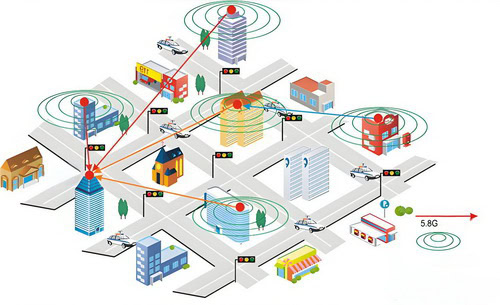
cURL Too many subrequests.
cURL Too many subrequests.
Objectives
cURL Too many subrequests.
cURL Too many subrequests.
cURL Too many subrequests.
cURL Too many subrequests.
Challenges
cURL Too many subrequests.
cURL Too many subrequests.
cURL Too many subrequests.
cURL Too many subrequests.
Solution: WiFi Omni Antennas
cURL Too many subrequests.
cURL Too many subrequests.
cURL Too many subrequests.
cURL Too many subrequests.
cURL Too many subrequests.
4. Durability: Built to withstand outdoor elements, ensuring long-term reliability.
5. Low Visual Impact: Sleek design that blends into the environment without being obtrusive.
Deployment Strategy
1. Site Survey and Planning: Conducted a comprehensive site survey to identify optimal locations for antenna placement, considering factors such as user density, terrain, and existing structures.
2. Antenna Placement:
– Central Locations: Placed high-gain omni antennas at central locations to maximize coverage.
– Strategic Points: Additional antennas were installed at strategic points like entrances, picnic areas, and event spaces to ensure consistent coverage.
3. Network Infrastructure: High-capacity access points were connected to the omni antennas, and a robust backhaul network was established to handle high data traffic.
4. Power Supply: Solar-powered units were used in remote areas to ensure uninterrupted power supply without extensive cabling.
5. Aesthetic Integration: Antennas were mounted on existing structures like light poles and disguised as part of the park’s infrastructure to maintain visual appeal.
Results
1. Enhanced Coverage: The omni antennas provided seamless WiFi coverage across the entire park, with strong signal strength even in previously hard-to-reach areas.
2. High-Speed Access: The network supported high-speed internet access, even during peak times, with minimal latency and downtime.
3. User Satisfaction: Visitor feedback was overwhelmingly positive, with many praising the reliability and speed of the WiFi network.
4. Event Support: The park successfully hosted several large events with thousands of attendees, all of whom had access to stable internet connectivity.
5. Durability: The weatherproof and durable design of the antennas ensured continuous operation without maintenance issues, even during adverse weather conditions.
Conclusion
The deployment of WiFi omni antennas in the city park proved to be a successful solution for providing comprehensive and reliable outdoor WiFi coverage. The project met all its objectives, enhancing visitor experience and supporting the city’s digital inclusion goals. This case study highlights the effectiveness of omni-directional antennas in addressing the unique challenges of outdoor and public WiFi deployments.
Conclusion
Summary of Key Points

1. Understanding Omni-directional Antennas
– Definition: Omni-directional antennas radiate signals uniformly in all directions, making them ideal for broad coverage areas.
– Common Uses: Suitable for environments requiring 360-degree coverage, such as homes, offices, and public spaces.
cURL Too many subrequests.
– 2.4 GHz vs. 5 GHz:
– 2.4 GHz: Longer range, better penetration through walls, but more susceptible to interference.
– 5 GHz: Higher speeds, less interference, but shorter range and poorer penetration through obstacles.
– Dual-band Antennas: Support both 2.4 GHz and 5 GHz, offering flexibility and better performance.
3. Gain and Coverage Area
– Antenna Gain (dBi): Higher gain antennas (e.g., 8-12 dBi) provide longer range but narrower vertical coverage. Lower gain antennas (e.g., 2-5 dBi) offer wider vertical coverage but shorter range.
– Application: Choose higher gain for outdoor or large open spaces and lower gain for indoor environments with multiple floors.
4. Antenna Type and Size
– Form Factor: Includes compact, wall-mounted, ceiling-mounted, and mast-mounted antennas.
– Installation Environment: Consider physical space, aesthetic preferences, and mounting options.
5. Connector Types
– Common Connectors: SMA, RP-SMA, N-type, and others.
– Compatibility: Ensure the antenna connector matches your router or access point.
6. Build Quality and Durability
– Indoor vs. Outdoor Use: Outdoor antennas need to be weatherproof and durable to withstand elements.
– Material: UV-resistant materials and robust construction for longevity.
7. Regulatory Compliance
– Certifications: Check for compliance with local regulations and standards (e.g., FCC, CE).
– Legal Restrictions: Be aware of any legal restrictions on antenna gain and installation height.
8. Price and Brand Reputation
– Budget Considerations: Balance between cost and performance.
– Brand Reliability: Opt for reputable brands known for quality and customer support.
Recap of Important Considerations
cURL Too many subrequests.
cURL Too many subrequests.
cURL Too many subrequests.
cURL Too many subrequests.
cURL Too many subrequests.
cURL Too many subrequests.
cURL Too many subrequests.
cURL Too many subrequests.
Final Recommendations
Choosing the right WiFi omni antenna cURL Too many subrequests.
cURL Too many subrequests.
cURL Too many subrequests.
cURL Too many subrequests.
cURL Too many subrequests.
cURL Too many subrequests.
cURL Too many subrequests.
2. Gain
cURL Too many subrequests.
cURL Too many subrequests.
cURL Too many subrequests.
3. Environment
cURL Too many subrequests.
– Outdoor: Ensure the antenna is weatherproof and durable, with a mounting bracket.
4. Connector Type
– SMA, RP-SMA, N-Type: Match the connector type with your router or access point. Adapters can be used if necessary.
5. Mounting Options
– Ceiling/Wall Mount: For indoor use, providing better coverage and aesthetic appeal.
– Pole/Surface Mount: For outdoor use, ensuring stability and optimal positioning.
6. Brand and Quality
– Reputable Brands: Consider brands like TP-Link, Netgear, Cisco, and Ubiquiti for reliable performance.
– Reviews and Ratings: Check user reviews and expert ratings for real-world performance insights.
7. Budget
– Cost vs. Performance: Higher-priced antennas often offer better performance and durability, but there are budget-friendly options that provide good value.
Recommendations
For Small Homes or Offices:
– TP-Link TL-ANT2408CL: 2.4 GHz, 8 dBi, indoor use, RP-SMA connector.
– Netgear ANT24501B: Dual-band, 5 dBi, indoor use, SMA connector
– Sanny Telecom cURL Too many subrequests.: 2.4 GHz, 5 dBi, indoor use, Copper element, N-type connector.
For Medium to Large Homes or Offices:
– Ubiquiti Networks AMO-2G10: 2.4 GHz, 10 dBi, outdoor use, N-Type connector.
cURL Too many subrequests. cURL Too many subrequests.: 2.4 GHz, 5 dBi, indoor use, Copper element, N-type connector.
For Large Open Spaces or Outdoor Areas:
– TP-Link TL-ANT2415D: 2.4 GHz, 15 dBi, outdoor use, N-Type connector.
– Ubiquiti Networks AMO-5G10: 5 GHz, 10 dBi, outdoor use, N-Type connector.
– Sanny Telecom, STO24G15-PRO: 2.4 GHz, 15 dBi, SISO, outdoor use, N-Type connector.
– Sanny Telecom, STO24G15M2: 2.4 GHz, 15 dBi, MIMO, outdoor use, N-Type connector.
-Sanny Telecom, STO24G15M2: 2.4 GHz, 15 dBi, MIMO, outdoor use, N-Type connector.
– Sanny Telecom, STO5G13M2-PRO: 5 GHz, 13 dBi, MIMO, outdoor use, N-Type connector.
– Sanny Telecom, cURL Too many subrequests.: 5 GHz, 13 dBi, MIMO, outdoor use, N-Type connector.
Conclusion
Selecting the right WiFi omni antenna involves balancing your specific needs with the antenna’s features and performance. By considering factors like frequency band, gain, environment, connector type, mounting options, brand, and budget, you can make an informed decision that enhances your wireless network’s coverage and reliability.
Future Trends
Emerging technologies and trends in WiFi antennas, particularly cURL Too many subrequests., are driven by the increasing demand for faster, more reliable, and more extensive wireless connectivity. Here are some of the key trends and emerging technologies in this field:

cURL Too many subrequests.
cURL Too many subrequests.
2. Beamforming
cURL Too many subrequests.
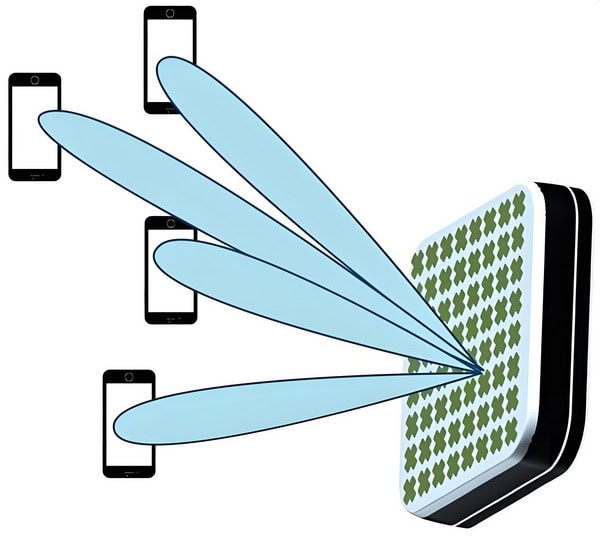
cURL Too many subrequests.
cURL Too many subrequests.
cURL Too many subrequests.
cURL Too many subrequests.
cURL Too many subrequests.
cURL Too many subrequests.

cURL Too many subrequests.
cURL Too many subrequests.
cURL Too many subrequests.
cURL Too many subrequests.

cURL Too many subrequests.
cURL Too many subrequests.
cURL Too many subrequests.
cURL Too many subrequests.
cURL Too many subrequests.
cURL Too many subrequests.
11. Security Enhancements
As WiFi networks become more critical to daily life and business operations, security is a paramount concern. Antenna technology is evolving to support advanced security features, such as WPA3 encryption and secure boot processes.
12. Integration with Augmented Reality (AR) and Virtual Reality (VR)
AR and VR applications require high-bandwidth, low-latency connections. Omni antennas are being optimized to handle the demanding requirements of these applications, ensuring smooth and immersive experiences.
Conclusion
The future of cURL Too many subrequests. is bright, with numerous technological advancements and trends shaping their evolution. As the demand for better wireless connectivity continues to grow, these innovations will play a crucial role in meeting the needs of consumers and businesses alike.
Appendices
Glossary of Terms
1. Antenna Gain: A measure of how much power is transmitted in the direction of peak radiation to that of an isotropic source. It is usually measured in dBi (decibels relative to an isotropic antenna).
2. dBi (Decibels relative to isotropic): A unit of measurement that describes the gain of an antenna relative to an isotropic antenna, which radiates power uniformly in all directions.
3. Frequency Band: The range of frequencies over which an antenna can effectively operate. Common WiFi frequency bands are 2.4 GHz and 5 GHz.
4. Omni-directional Antenna: An antenna that radiates signal uniformly in all directions in one plane, typically horizontal.
5. Polarization: The orientation of the electric field of the radio wave with respect to the Earth’s surface. Common types include vertical, horizontal, and circular polarization.
6. VSWR (Voltage Standing Wave Ratio): A measure of how efficiently radio-frequency power is transmitted from a power source, through a transmission line, into a load (e.g., an antenna). A lower VSWR indicates better efficiency.
7. Beamwidth: The angular width of the main lobe of the antenna radiation pattern, usually measured between the half-power (-3 dB) points. It indicates the coverage area of the antenna.
8. Impedance: The resistance of the antenna to the flow of electrical current, typically measured in Ohms (Ω). Standard impedance for WiFi antennas is 50 Ohms.
9. Radiation Pattern: A graphical representation of the radiation properties of an antenna as a function of space coordinates. It shows how the antenna radiates power in different directions.
10. Connector Type: The type of connector used to attach the antenna to the device. Common types include SMA, RP-SMA, N-Type, and BNC.
11. Bandwidth: The range of frequencies over which the antenna can operate effectively. It is often measured in MHz or GHz.
12. SWR (Standing Wave Ratio): Similar to VSWR, it is a measure of impedance matching of the antenna to the transmission line. A lower SWR means better matching and less signal reflection.
13. Front-to-Back Ratio: The ratio of the power radiated in the desired direction to the power radiated in the opposite direction. Higher ratios indicate better directionality and less interference from behind.
14. Effective Isotropic Radiated Power (EIRP): The total power radiated by the antenna, taking into account the gain and the input power. It is often regulated to avoid interference with other devices.
15. MIMO (Multiple Input Multiple Output): A technology that uses multiple antennas at both the transmitter and receiver to improve communication performance.
16. Elevation Plane: The vertical plane that is perpendicular to the ground, often used to describe the vertical radiation pattern of an antenna.
17. Azimuth Plane: The horizontal plane parallel to the ground, used to describe the horizontal radiation pattern of an antenna.
18. Line of Sight (LoS): A clear path between the transmitting and receiving antennas without any obstructions that could cause signal degradation.
19. Propagation: The behavior of radio waves as they travel through the atmosphere. Different factors such as reflection, refraction, and diffraction can affect propagation.
20. Fresnel Zone: An elliptical area around the line of sight between the transmitter and receiver that must be clear of obstacles to avoid signal degradation.
21. Decibel (dB): A logarithmic unit used to express the ratio of two values, often power or intensity. It is commonly used to describe gains and losses in signal strength.
22. Link Budget: The calculation of all gains and losses from the transmitter, through the medium (free space, cables, etc.), to the receiver in a communication system.
23. Noise Figure: A measure of the degradation of the signal-to-noise ratio caused by components in the signal chain, such as amplifiers or antennas.
24. SNR (Signal-to-Noise Ratio): The ratio of the power of the signal to the power of background noise, usually measured in decibels (dB).
25. Path Loss: The reduction in power density of a signal as it propagates through space. It is influenced by distance, obstacles, and frequency.
This glossary should help you understand the technical terms used in the guide to choosing the right WiFi omni-directional antennas.
FAQ

1. What is a WiFi Omni Antenna?
– A WiFi Omni Antenna is a type of antenna that radiates signal equally in all directions, providing 360-degree coverage.
2. How does an Omni Antenna differ from a Directional Antenna?
– Unlike directional antennas, which focus signal in a specific direction, omni antennas distribute the signal uniformly in all directions.
3. What are the typical applications for WiFi Omni Antennas?
– They are commonly used in environments where wide-area coverage is needed, such as homes, offices, outdoor public spaces, and warehouses.
4. What frequency bands do WiFi Omni Antennas support?
cURL Too many subrequests.
cURL Too many subrequests.
cURL Too many subrequests.
cURL Too many subrequests.
cURL Too many subrequests.
cURL Too many subrequests.
cURL Too many subrequests.
cURL Too many subrequests.
cURL Too many subrequests.
cURL Too many subrequests.
cURL Too many subrequests.
cURL Too many subrequests.
cURL Too many subrequests.
cURL Too many subrequests.
cURL Too many subrequests.
cURL Too many subrequests.
cURL Too many subrequests.
cURL Too many subrequests.
cURL Too many subrequests.
14. How do environmental factors affect WiFi Omni Antenna performance?
– Factors such as walls, metal objects, and other obstructions can reduce signal strength and coverage area.
15. Can I use a WiFi Omni Antenna for both sending and receiving signals?
– Yes, omni antennas are designed to both transmit and receive WiFi signals.
16. What is the difference between indoor and outdoor WiFi Omni Antennas?
– Outdoor antennas are built to withstand weather conditions, while indoor antennas are typically smaller and less rugged.
17. Are there any health risks associated with WiFi Omni Antennas?
– WiFi signals are generally considered safe and are regulated by health and safety standards.
18. How do I choose the right WiFi Omni Antenna for my needs?
– Consider factors like coverage area, frequency band, gain, and whether you need indoor or outdoor installation.
19. Can WiFi Omni Antennas be used with other wireless devices?
– Yes, they can be used with any device that operates on the same frequency bands, such as access points and wireless cameras.
20. What maintenance is required for WiFi Omni Antennas?
– Minimal maintenance is needed, but it’s good practice to periodically check for physical damage and ensure connections are secure.
Additional Resources
Choosing the right WiFi omni-directional antenna can be a complex task, but there are numerous resources available to help you make an informed decision. Here are some links to further reading and tools that can assist you:
Articles and Guides

1. Understanding Antenna Basics
– [Antenna Theory: A Beginner’s Guide](https://www.antenna-theory.com/basics/main.php)
2. WiFi Antenna Types and Uses
– [Choosing the Right WiFi Antenna for your Application](https://www.l-com.com/images/downloadables/white-papers/Selecting-the-Right-Wifi-Antenna-for-your-application.pdf)
3. Technical Specifications and Performance
– [Antenna Gain](https://www.antenna-theory.com/basics/gain.php)
– [Antenna Polarization Explained](https://www.antenna-theory.com/basics/polarization.php)
Online Tools
1. Antenna Calculators
– [Antenna Gain Calculator](https://www.ahsystems.com/EMC-formulas-equations/Antenna-Factor-Gain-calculation.php)
– [WiFi Coverage Calculator](https://www.l-com.com/resources/wireless-calculators)
2. Signal Strength and Coverage Mapping
– [Ekahau HeatMapper](https://www.ekahau.com/products/heatmapper/overview/)
– [NetSpot WiFi Site Survey](https://www.netspotapp.com/)
Forums and Communities
1. Reddit: Home Networking
– [r/HomeNetworking](https://www.reddit.com/r/HomeNetworking/)
2. Wireless Forums
– [Wireless Joint](https://wirelessjoint.com/)
– [Broadband Reports: Wireless Networking](https://www.dslreports.com/forum/wlan)
3. Professional Networking Communities
– [Cisco Community](https://community.cisco.com/)
– [Aruba Networks Community](https://community.arubanetworks.com/)
cURL Too many subrequests.
Ubiquiti Networks
– [Ubiquiti Community](https://community.ui.com/)
Books
cURL Too many subrequests.
cURL Too many subrequests.https://www.amazon.com/Antenna-Theory-Analysis-Design-Balanis/dp/1118642066/)
cURL Too many subrequests.
cURL Too many subrequests.https://www.amazon.com/Wireless-Communications-Principles-Practice-Rappaport/dp/0133755363/)
cURL Too many subrequests.
cURL Too many subrequests.https://www.amazon.com/ARRL-Antenna-Book-Radio-Communications/dp/1625950829/)
cURL Too many subrequests.
Contact Information
If you need further assistance, you can contact Andrew Chen, an antenna expert with 15 years’ experience and know-how from Sanny Telecom. His contact information is as follows:
– Website: www.sannytelecom.com
– Email: andrew@sannytelecom.com
– WhatsApp: +86 189 3430 8461
 German (Switzerland)
  English
  Spanish
  German
  French (France)
  Korean
  Russian
  Indonesian
  French (Canada)
  Vietnamese
  Armenian
  Albanian
  Assamese
  Acehnese
  Amharic
  Czech
Czech  Bulgarian
  Cebuano
  Malayalam
  Japanese
  Dutch
Dutch