 Skip to content

Are you constantly battling with slow internet speeds, signal dropouts, or interference in your WiFi network? Discover how a dual band WiFi antenna can revolutionize your online experience, ensuring faster, more reliable connections across all your devices.
A dual band WiFi antenna is a cutting-edge device designed to operate on two distinct frequency bands: 2.4GHz and 5GHz. Unlike single band antennas that work on one frequency, dual band antennas enhance your internet experience by offering improved speed, reduced interference, and better range. They can switch between frequencies based on signal strength and congestion, ensuring optimal performance.
But what makes dual band antennas a must-have in today’s digital age? Let’s dive deeper.
What is Dual WiFi Band?
The 2.4GHz band is a widely used frequency band for Wi-Fi devices, but it can be crowded and prone to interference from other devices such as microwaves, cordless phones, and Bluetooth devices.
The 5GHz band, on the other hand, is less crowded and offers faster speeds and less interference.
Frequency Range and Channel Structure of the 2.4GHz Band
Frequency Range: 2400 MHz to 2485 MHz
WiFi Channels: Up to 14 overlapping channels, each 20 MHz wide—though only channels 1 to 11 are used in the US, and channels 1 to 14 are available in Europe, Africa, and Asia.
As the original frequency band for WiFi, 2.4GHz is also shared by other wireless technologies like ZigBee and a range of household gadgets. This overlap, while making the band universally compatible, often results in increased signal congestion and interference.
The 2.4GHz band operates within the 2400 MHz to 2485 MHz frequency range, making it the foundation of most early WiFi technology. Within this range, you’ll find up to 14 channels, each spaced 5 MHz apart and typically 20 MHz wide, though not all channels are available everywhere—channels 1 through 11 are standard in the US, while other regions like Europe and Asia may use channels up to 14.Because the channels overlap, only a few (usually channels 1, 6, and 11) can be used simultaneously in the same area without causing interference. Beyond WiFi, this band is busy—it’s also home to technologies like Bluetooth, ZigBee, and a variety of household devices like baby monitors and cordless phones. This heavy use is one of the reasons why congestion and interference are common on the 2.4GHz band.
Understanding the 5GHz Frequency Range and Channel Structure
The 5GHz band offers a refreshing change of pace from the crowded 2.4GHz spectrum, giving WiFi users a welcome boost in both speed and reliability. But what exactly is the frequency range and channel breakdown of this band?
Frequency Range of the 5GHz Band
The 5GHz WiFi band actually covers several separate frequency ranges, generally from 5.15 GHz up to 5.825 GHz. These ranges are divided into specific segments, often referred to as sub-bands, each with its own intended use (such as indoor or outdoor applications).
- Indoor sub-bands: 5.150 GHz to 5.250 GHz and 5.250 GHz to 5.350 GHz are typically reserved for indoor use.
- Mixed-use and outdoor sub-bands: 5.470 GHz to 5.725 GHz and 5.735 GHz to 5.850 GHz can support both indoor and outdoor applications, with the last segment often designed for rugged, weather-resistant deployments.
Channel Structure in the 5GHz Band
Unlike the 2.4GHz band, which offers just a handful of channels (many of which overlap), the 5GHz WiFi band features a greater number of channels—up to 26, with 19 of these being non-overlapping. This cleaner channel structure means devices can operate with less interference from neighboring networks, translating to faster speeds and lower latency.
This abundance of non-overlapping channels is a big reason why the 5GHz band has become the go-to choice for high-speed internet, streaming, gaming, and any application requiring rock-solid stability.
By having dual WiFi bands, a device can connect to either the 2.4GHz or 5GHz band depending on the network and the device’s capabilities. This allows for better performance and less congestion, as devices that support the 5GHz band can connect to it, leaving the 2.4GHz band available for devices that do not support 5GHz.
Dual WiFi bands are commonly found in modern routers and network devices, providing users with the flexibility to choose the best frequency band for their devices and network conditions.
Which Wi-Fi Standards Are Supported by 2.4 GHz to 5.8 GHz Dual-Band Antennas?
When it comes to compatibility, dual band WiFi antennas covering 2.4 GHz to 5.8 GHz frequencies support a broad spectrum of Wi-Fi standards. This includes all major iterations of the 802.11 family, such as Wi-Fi 1 (802.11b), Wi-Fi 2 (802.11a), Wi-Fi 3 (802.11g), Wi-Fi 4 (802.11n), Wi-Fi 5 (802.11ac), and Wi-Fi 6 (802.11ax). These antennas are also suitable for use with Wi-Fi 6E devices, as long as they’re operating on the 2.4 or 5 GHz bands—though it’s important to note that 6 GHz-only channels are not supported by these particular antennas.
In short:
- Support all major Wi-Fi protocols up to Wi-Fi 6, provided the device stays within 2.4 GHz or 5 GHz.
- Ideal for modern routers, laptops, smartphones, smart TVs, and other compatible devices.
- Not equipped for the newer 6 GHz band used exclusively by some Wi-Fi 6E devices, but fully capable on the traditional bands.
If you’re using any device that connects to 2.4 GHz or 5 GHz WiFi—including nearly all current and past consumer gadgets—these antennas will have you covered.
What Are the Differences Between the 5 GHz WiFi Sub-bands?
The 5 GHz frequency band is divided into several smaller sub-bands, each with its own characteristics and intended uses. Understanding these sub-bands can help you make the most of your dual band WiFi antenna’s capabilities.
Here’s how the 5 GHz sub-bands differ:
- Indoor vs. Outdoor Use: Some sub-bands are specifically allocated for indoor use (such as those in the lower and upper 5.15–5.35 GHz range), which helps minimize interference with sensitive equipment or licensed devices outside homes and offices. Others, like the higher frequency segments, are intended for outdoor use and require weatherproof equipment.
- Channel Availability: The 5 GHz band offers more WiFi channels than the 2.4 GHz range—26 in total—but not all are available everywhere. Non-overlapping channels are distributed across four primary sub-bands, meaning devices can connect with less interference, making them ideal for densely populated apartments or offices.
- Regulatory Considerations: Different sub-bands may fall under various regional regulations. For instance, some outdoor sub-bands might require special features like Dynamic Frequency Selection (DFS) to avoid interference with radar systems, commonly found around airports.
- Performance and Flexibility: Sub-bands support high-speed data transmission due to wider channel widths, enhancing overall WiFi speed and reliability. The wide range of channels in the 5 GHz band helps reduce congestion, ensuring smoother streaming and gaming experiences.
By strategically leveraging these sub-bands, dual band antennas smartly navigate between less crowded frequencies, giving you the performance edge whether you’re binge-watching Netflix or conquering your next Zoom call.
What Does a Dual Band WiFi Antenna Do?
A dual-band WiFi antenna allows a device to connect to both the 2.4 GHz and 5 GHz frequency bands of a WiFi network. This enables the device to have access to a wider range of available WiFi channels, reducing interference and congestion, and potentially providing faster and more stable internet connections.
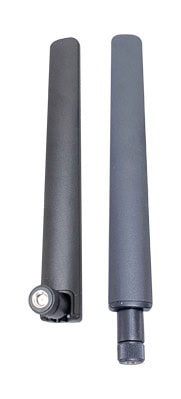
In addition, a dual band WiFi antenna can also improve the overall stability and reliability of your internet connection. By having the option to connect to both bands, you can switch between them if one band is experiencing interference or a weak signal. This can help to reduce buffering and lag when streaming videos or playing online games.
How Does Antenna Gain Affect WiFi Signal Range and Quality?
Antenna gain plays a crucial role in determining both the range and quality of your WiFi signal. In essence, the “gain” refers to an antenna’s ability to focus energy in a particular direction, which boosts the signal’s strength and reach.
Most stock antennas that come with dual band routers offer a modest gain, typically less than 5 dBi. While these are sufficient for standard home usage, they may struggle to provide solid coverage in larger spaces or through multiple walls.
Upgrading to a higher-gain dual band antenna—such as those with 7 dBi or even 9 dBi, like the TP-Link TL-ANT2409A or Alfa AOA-2409TF—can make a significant difference. Here’s how higher antenna gain impacts your WiFi performance:
- Extended Range: A higher-gain antenna can transmit signals further, extending coverage to hard-to-reach areas like attics, garages, or larger offices.
- Improved Signal Quality: Enhanced gain helps maintain a stronger, more reliable signal over longer distances, reducing dead spots and dropouts.
- Focused Coverage: With increased gain, the antenna directs the signal more efficiently, which is especially useful in environments with a lot of obstructions or electronic interference.
However, it’s important to note that antennas with very high gain tend to narrow the coverage angle. This means that while the signal travels farther, it may become more directional—ideal for large, open spaces or passing signal down a hallway, but potentially less effective for covering multiple floors in a house.
By understanding and choosing the right antenna gain for your needs, you can optimize your WiFi setup for speed, reliability, and coverage.
Main Types of Dual Band WiFi Antennas
When it comes to upgrading your wireless setup, you’ll notice that dual band WiFi antennas come in several different designs, each crafted for specific needs and environments. Here’s a quick overview of the most common types you’ll encounter:
- Dipole Antennas: These are the classic “rubber duck” antennas often seen on home routers. They radiate signal in all directions (omnidirectional), making them great for general coverage throughout a room or small office.
- Articulating Antennas: Offering adjustable angles, these antennas let you tweak their position to aim your signal precisely where coverage is needed most. Perfect for overcoming tricky placements or unique room layouts.
- i-Bar Antennas: Recognizable by their slim, bar-like profile, i-Bar antennas provide an unobtrusive option for modern aesthetics while still delivering solid omnidirectional performance.
- Puck Antennas: Compact and low-profile, puck antennas are typically mounted on ceilings or flat surfaces. They’re popular for creating even coverage in open spaces, making them a good choice for cafes, offices, or classrooms.
- Collinear Antennas: Built with multiple elements in series, collinear antennas boost range and signal strength, making them a strong contender for larger homes or small businesses needing broader coverage.
- Panel Antennas: Designed for directional use, panel antennas focus the WiFi signal in a specific direction. If you need a strong, targeted connection—perhaps to reach a distant corner of your property—panel antennas are the way to go.
Each type offers distinct advantages depending on your network’s layout and coverage goals.
What is the Benefit of Dual Band WiFi Antennas?
The benefit of dual band WiFi antennas is that they can operate on both the 2.4 GHz and 5 GHz frequency bands. This allows for more flexibility and better performance in terms of speed, range, and signal quality.
One of the main advantages of a dual band antenna is its ability to minimize interference. The 2.4GHz band is crowded with devices like microwaves, cordless phones, and baby monitors, which can cause signal interference and slow down your connection. By switching to the 5GHz band, you can avoid this congestion and enjoy faster, more reliable internet speeds.
In addition to reducing interference, dual band antennas also offer faster connection speeds. The 5GHz band has a higher capacity for data transfer, allowing you to download and upload files more quickly. This is especially important for activities like streaming high-definition videos, online gaming, and video conferencing, where a stable and fast connection is essential.
Moreover, dual band antennas provide better coverage, especially in larger homes or offices. The 2.4GHz band has a longer range and can penetrate walls and obstacles more effectively, ensuring that you have a strong signal throughout your space. On the other hand, the 5GHz band has a shorter range but offers higher speeds, making it ideal for close-range connections.
How Do Dual Band Antennas Save Cost, Space, and Connectors?
Opting for a dual band antenna isn’t just about speed and reliability—it’s also a smart, cost-effective choice. Instead of installing two separate antennas for each frequency band, a dual band antenna efficiently manages both 2.4GHz and 5GHz connections with a single piece of hardware.
This setup comes with plenty of practical benefits:
- Reduced Hardware Costs: With only one antenna doing the job of two, you save money up front and avoid the hassle of buying extra equipment.
- Less Space Required: Consolidating antennas saves valuable space, especially in compact devices or crowded networking setups where room is at a premium.
- Fewer Connectors Needed: Using just one antenna frees up connectors on your device, making installation cleaner and reducing potential points of failure.
In essence, a dual band antenna streamlines your wireless setup—minimizing clutter, costs, and complexity, while still delivering versatile, high-performance connectivity.
What is the Difference Between Single Band and Dual Band Antennas?
Dual band antennas allow for better performance and less interference compared to single band antennas.
Single band antennas operate on only one frequency band, typically 2.4GHz, which is prone to congestion and interference. Dual band antennas, however, offer the flexibility to operate on both the 2.4GHz and 5GHz bands, significantly improving network performance and user experience.
What Types and Formats of Dual Band WiFi Antennas Are Available?
Dual band WiFi antennas come in a wide variety of shapes and designs to fit different network setups and requirements. Whether you need all-around coverage for your living room or a focused signal for a point-to-point wireless bridge, there’s likely a dual band antenna tailored to your needs.
Some of the most common types include:
- Dipole antennas: Often the familiar “rubber duck” style you see on routers, these provide reliable omnidirectional coverage and are a solid default choice for many users.
- Articulating antennas: With adjustable joints, these antennas can be angled or oriented to help optimize signal strength in tricky environments or awkward placements.
- Panel antennas: Featuring a flat design, panel antennas are great for delivering a focused, directional signal—ideal for targeting specific areas or devices.
- Collinear antennas: These omnidirectional antennas are designed for extended range and are well-suited to larger environments where coverage area is a priority.
- Puck antennas: Compact and robust, puck-style antennas are typically used for discreet installations or in vehicles, thanks to their low profile.
- i-Bar antennas: Sleek and narrow, i-Bar antennas are perfect when space is limited or aesthetics are important, without sacrificing reliable connectivity.
When choosing an antenna, you’ll also need to match the connector type to your device—common options include RP-SMA, SMA, Type N, and U.FL connectors, which are widely found on networking gear from brands like TP-Link, Asus, and Netgear.
Understanding the available formats and connector options makes it easier to choose the right dual band antenna for your particular setup, ensuring you get the best possible signal and performance.
What are the Differences Between Omnidirectional and Directional Dual Band Antennas?
When choosing a dual band antenna, it’s important to understand the difference between omnidirectional and directional designs. Each type has distinct advantages depending on your needs and environment.
Omnidirectional antennas broadcast and receive signals in all directions (a full 360 degrees), making them ideal for providing wide, general coverage in homes, offices, or outdoor areas. Think of these as the “lamps” of the antenna world—they illuminate everything around them equally, ensuring devices in multiple locations can connect without the need to aim the antenna.
Directional antennas, by contrast, focus their signal in a specific direction—more like a flashlight than a lamp. This targeted approach is perfect for creating point-to-point wireless links, such as connecting two buildings or extending your network to a detached garage. Because the signal is concentrated, directional antennas can achieve greater range and performance in a straight line, but have less coverage to the sides or behind them.
In summary:
Omnidirectional:
- Covers a broad area
- Suitable for multiple devices scattered throughout a location
- Good for general-purpose use
Directional:
- Focuses signal toward a specific location
- Ideal for connecting two fixed points with a stronger, more direct signal
- Reduces interference from unwanted directions
Understanding your layout and coverage needs will help you decide which antenna type best fits your setup.
What Technical Refinements Improve the Performance of Dual-Band Antennas?
Several sophisticated design choices contribute to the enhanced performance of dual-band antennas. For starters, the physical construction of the antenna elements themselves plays a crucial role—using varying thicknesses of copper helps fine-tune the bandwidth, allowing each element to resonate efficiently at its intended frequency. Rather than placing the elements directly between the two frequency ranges, engineers carefully position them for each specific band, which results in clearer, more reliable signals.
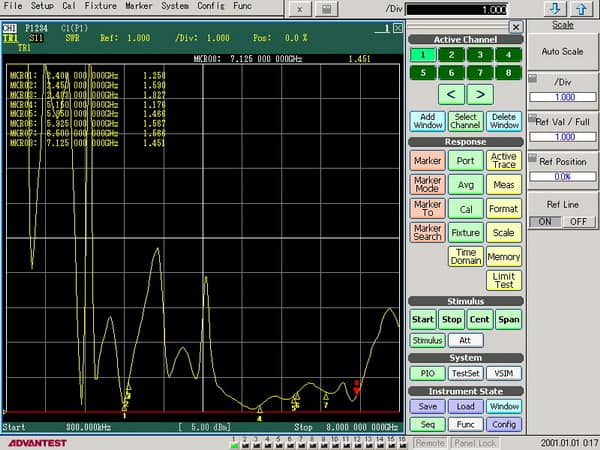
Another key refinement involves precise impedance matching, typically to 50 Ohms, optimizing both power transfer and minimizing signal reflections. Achieving a favorable Voltage Standing Wave Ratio (VSWR) is also essential; this calibration helps the antenna deliver maximum signal strength and stability.
Finally, manufacturers may design dual-band antennas so that both frequency bands share a single feedline, or they may house separate antenna elements and feedlines—all cleverly integrated into one enclosure. These technical details work together to ensure your dual-band antenna provides the best possible connection, no matter which frequency you’re using.
How Are Antenna Elements Designed and Optimized for Specific Frequencies?
The design of antenna elements is carefully tailored to ensure optimal performance for both the 2.4GHz and 5GHz frequency bands. Each antenna element is crafted to match the wavelength of its designated frequency—meaning elements intended for 2.4GHz are longer than those meant for 5GHz. Because both frequencies are above 1GHz, these elements can be kept relatively compact, fitting easily inside most modern antennas.
To further boost performance, manufacturers select the thickness of the antenna’s copper material to fine-tune the bandwidth—thicker elements allow for a wider bandwidth, which can help with signal stability and strength. Instead of attempting to compromise with a single element for both bands (which would weaken signal quality), designers ensure each element resonates specifically at either 2.4GHz or 5GHz. This targeted resonance ensures better signal clarity and reduced interference.
Additionally, dual band antenna elements are engineered for optimal impedance matching, typically to 50 Ohms, and minimized VSWR (Voltage Standing Wave Ratio), which means more efficient transfer of signal power. Depending on the design, multiple elements may be connected to a single feedline, or separately stacked inside the antenna’s casing, ensuring reliable connectivity across both frequency bands.
How Do Manufacturers Impedance Match and Optimize VSWR in Dual-Band Antennas?
Manufacturers use several engineering techniques to ensure dual-band antennas perform well across both the 2.4GHz and 5GHz frequencies. One key aspect is impedance matching—designers typically match the antenna elements to a standard 50 Ohms, helping to ensure efficient power transfer from the router or access point to the antenna itself. This is crucial for minimizing signal reflections and maximizing throughput.
To further enhance performance, antennas are optimized for low Voltage Standing Wave Ratio (VSWR). A low VSWR value means that most of the signal sent to the antenna is radiated out into the air, rather than being reflected back and lost as heat. Achieving this involves careful selection and placement of components, tuning the length and shape of the antenna elements, and sometimes using additional circuitry or matching networks.
In some cases, manufacturers design the internal structure so that both frequency bands share a single feedline. In other designs, each band has its own separate antenna within the same housing (radome), with dedicated feedlines for each frequency. Both approaches aim to deliver the best possible signal quality, flexibility, and compatibility with various devices and environments.
Why Do I Need Dual Band WiFi?
Dual band WiFi operates on two different frequencies: 2.4 GHz and 5 GHz. Here are some reasons why you might need dual band WiFi:
1. Faster Speeds: The 5 GHz frequency band offers faster speeds compared to the 2.4 GHz band. If you have a high-speed internet connection, dual band WiFi can take full advantage of it and provide faster download and upload speeds.
2. Reduced Interference: The 2.4 GHz band is crowded with various devices such as microwaves, cordless phones, and Bluetooth devices. This can cause interference and slower speeds. The 5 GHz band is less crowded, resulting in reduced interference and better performance.
3. Better Performance in Crowded Areas: In densely populated areas or apartments with multiple WiFi networks, the 2.4 GHz band can become congested, leading to slower speeds and poor performance. Dual band WiFi allows you to switch to the less crowded 5 GHz band, providing better performance and less interference.
4. Streaming and Gaming: Dual band WiFi is ideal for streaming high-definition videos and online gaming. The faster speeds and reduced interference on the 5 GHz band ensure a smooth and uninterrupted streaming or gaming experience.
5. Multiple Devices: If you have multiple devices connected to your WiFi network, dual band WiFi can handle the increased traffic more efficiently. You can assign bandwidth-intensive tasks to the 5 GHz band and use the 2.4 GHz band for less demanding tasks, ensuring a stable connection for all devices.
6. Future-Proofing: As technology advances, more devices will support the 5 GHz band. Having a dual band WiFi router ensures compatibility with future devices and ensures you can take advantage of the latest WiFi standards.
In summary, dual band WiFi provides faster speeds, reduced interference, better performance in crowded areas, and is ideal for streaming and gaming. It also accommodates multiple devices and future-proofs your network.
Can Some WiFi Antennas Carry Both 2.4 GHz and 5GHz Signals?
Yes, dual band WiFi antennas are specifically designed to support both 2.4GHz and 5GHz signals. This capability allows them to seamlessly cater to a wide range of devices and applications, ensuring optimal network efficiency and performance.
Dual band WiFi antennas have two separate antennas within a single housing – one for 2.4GHz and one for 5GHz. These antennas are designed to operate on different frequencies and provide optimal performance for each frequency range. This enables them to support both 2.4GHz and 5GHz signals simultaneously.
How Dual Band Antennas Work
Inside the housing, dual band antennas contain multiple elements—typically mono or dipole antenna elements. Each element is specifically tuned, or “resonant,” at the fundamental frequency of one of the two bands: 2.4GHz or 5GHz. Because the 2.4 GHz and 5 GHz frequency bands have different wavelengths, the antenna elements vary in length to match their respective frequencies. Both of these bands are above 1 GHz, so the antenna elements themselves are relatively short compared to those used for lower frequencies. This careful design keeps the elements distinct and ensures efficient transmission and reception on both bands, maximizing overall network performance.
Are Dual Band Antennas Compatible with All WiFi Protocols?
Absolutely! Dual band WiFi antennas are designed to support all major versions of WiFi standards, thanks to their ability to operate across both the 2.4 GHz and 5 GHz frequency bands. Whether your devices use older protocols like 802.11b/g/a, more recent ones like 802.11n (Wi-Fi 4), 802.11ac (Wi-Fi 5), or the latest 802.11ax (Wi-Fi 6), a dual band antenna has you covered.
To break it down, here’s a quick look at how these antennas work with key WiFi generations:
- Wi-Fi 1 (802.11b) and Wi-Fi 3 (802.11g) utilize the 2.4 GHz band.
- Wi-Fi 2 (802.11a) prefers the 5 GHz band.
- Wi-Fi 4 (802.11n), Wi-Fi 5 (802.11ac), and Wi-Fi 6 (802.11ax) take full advantage of both 2.4 GHz and 5 GHz, optimizing speed and minimizing interference.
Even newer standards, such as Wi-Fi 6E, incorporate the 2.4 GHz and 5 GHz frequencies in addition to the emerging 6 GHz band. While dual band antennas support devices on both the 2.4 GHz and 5 GHz bands, you’ll need a tri-band or a dedicated 6 GHz antenna to tap into the new 6 GHz channels offered by Wi-Fi 6E.
So, whether you’re connecting a classic laptop, a smart fridge, or the latest gaming console, a dual band antenna ensures compatibility and reliable performance across virtually all mainstream WiFi versions.
What Types of Connectors Are Commonly Used with Dual Band Antennas?
When choosing a dual band WiFi antenna, it’s important to consider the type of connector it uses to ensure compatibility with your devices.
Some of the most common antenna connectors you’ll encounter include:
- RP-SMA (Reverse Polarity SMA): Widely used for WiFi devices like routers and access points.
- SMA: Frequently found in both consumer and industrial wireless equipment.
- Type N: Known for its durability and typically used in outdoor or commercial networks.
- U.FL: A miniature connector often used inside laptops or other compact devices.
Each connector type serves different use cases, so matching your antenna’s connector to your hardware is key for seamless installation and optimal performance.
Are Dual Band Antennas Compatible with Wi-Fi 6E?
Dual band antennas can support devices and routers using Wi-Fi 6 and Wi-Fi 6E standards, but with an important distinction: while they work seamlessly with the familiar 2.4 GHz and 5 GHz frequency bands used by Wi-Fi 6E, they are not able to operate on the newer 6 GHz band introduced with Wi-Fi 6E.
In practical terms, this means a dual band antenna is fully compatible with any device or router using Wi-Fi 6E on 2.4 GHz and 5 GHz, but you’ll need a true tri-band antenna if you plan to utilize the 6 GHz spectrum for even greater speeds and capacity.
In summary, a dual band WiFi antenna is a worthwhile investment for anyone who wants to make the most of their internet experience in a world where the internet is an integral part of our lives. By reducing interference and providing faster and more reliable connections, dual band antennas are the foundation of modern and efficient networking.
How are Feedlines Managed Within Dual-Band Antennas?
Dual band antennas are carefully engineered to ensure efficient signal transmission for both 2.4GHz and 5GHz frequencies. To achieve this, manufacturers use one of two approaches when it comes to managing the feedlines inside the antenna:
- Shared Feedline: In some designs, both antenna elements—each tuned to their respective frequency—share a single feedline. This setup reduces bulk and simplifies installation, yet still maintains reliable performance across both bands.
- Separate Feedlines: Alternatively, manufacturers may include two distinct antenna elements, each with its own dedicated feedline. Both are housed together within the same enclosure or radome. This arrangement can enhance isolation between the bands, which may improve signal quality, especially in environments with a lot of interference.
Regardless of which method is used, dual band antennas are impedance-matched (typically to 50 Ohms) and optimized for a low Voltage Standing Wave Ratio (VSWR) to ensure that you receive the best signal transmission and minimal loss. This careful design is what allows dual band antennas to operate so effectively, catering to the demands of today’s crowded wireless environments.
In summary, a dual band WiFi antenna is a worthwhile investment for anyone who wants to make the most of their internet experience in a world where the internet is an integral part of our lives. By reducing interference and providing faster and more reliable connections, dual band antennas are the foundation of modern and efficient networking.
 English
  Spanish
  German
  French (France)
  Korean
  Russian
  Indonesian
  French (Canada)
  Vietnamese
  Armenian
  Albanian
  Assamese
  Acehnese
  Amharic
  Czech
Czech  Bulgarian
  Cebuano
  Malayalam
  German (Switzerland)
  Japanese
  Dutch
Dutch